Webinar Marketing Playbook
Webinar Marketing Playbook
A webinar is a scheduled broadcast with a job to do: teach something useful, collect questions, and turn a share of the room into buyers, booked calls, or subscribers. Registration pages, reminders, the live room, and the replay each carry their own numbers; a weak link anywhere cuts the result in half.
The numbers come from vendor pages and one large platform benchmark, all read 12 November 2026. Worked figures are derived arithmetic on stated assumptions. For the price comparison alone, see the Zoom Webinar vs GoTo Webinar vs Demio pricing playbook.
Step 1: Pick the format — live, automated, or on-demand
Three formats cover nearly every marketing webinar, and the choice shapes platform, price, and follow-up.
A live webinar happens once, at a stated time, with a real presenter in the room. It earns the highest live attendance and the most questions, and it is the only format where a live answer can change what a prospect does next.
An automated webinar — evergreen or Simulive — plays a pre-recorded session at scheduled times while the host answers chat live. Zoom calls it Simulive; GoTo Webinar offers it from Elevate; Demio on Growth and Premium; WebinarJam through EverWebinar from Basic. The talk is recorded, the chat is live. Do not claim otherwise.
An on-demand webinar is a recording watched whenever the registrant chooses, with no scheduled start. It catches the people who registered and never attended — a large group, as Step 6 shows. It earns no live interaction, so it works best as a second step for people who already know the topic.
| Format | Audience gets | Cost | When it wins | Authority |
|---|---|---|---|---|
| Live | Real presenter, live Q&A, polls | Presenter + platform fee | Launches, first runs, high-trust offers | Zoom product page |
| Automated (Simulive) | A recorded talk at a set time, live chat | Record once, then monthly fee | A proven talk, run weekly | GoTo FAQ; Demio pricing |
| On-demand | A recording, any time | Recording and a replay page | No-shows, late registrants | Zoomtopia 2026 recap |
Start with live. Run a talk three times, fix what drags, then record the best version for automated or on-demand use. Automating an untested talk locks in its flaws.
Step 2: Size the room from the funnel math
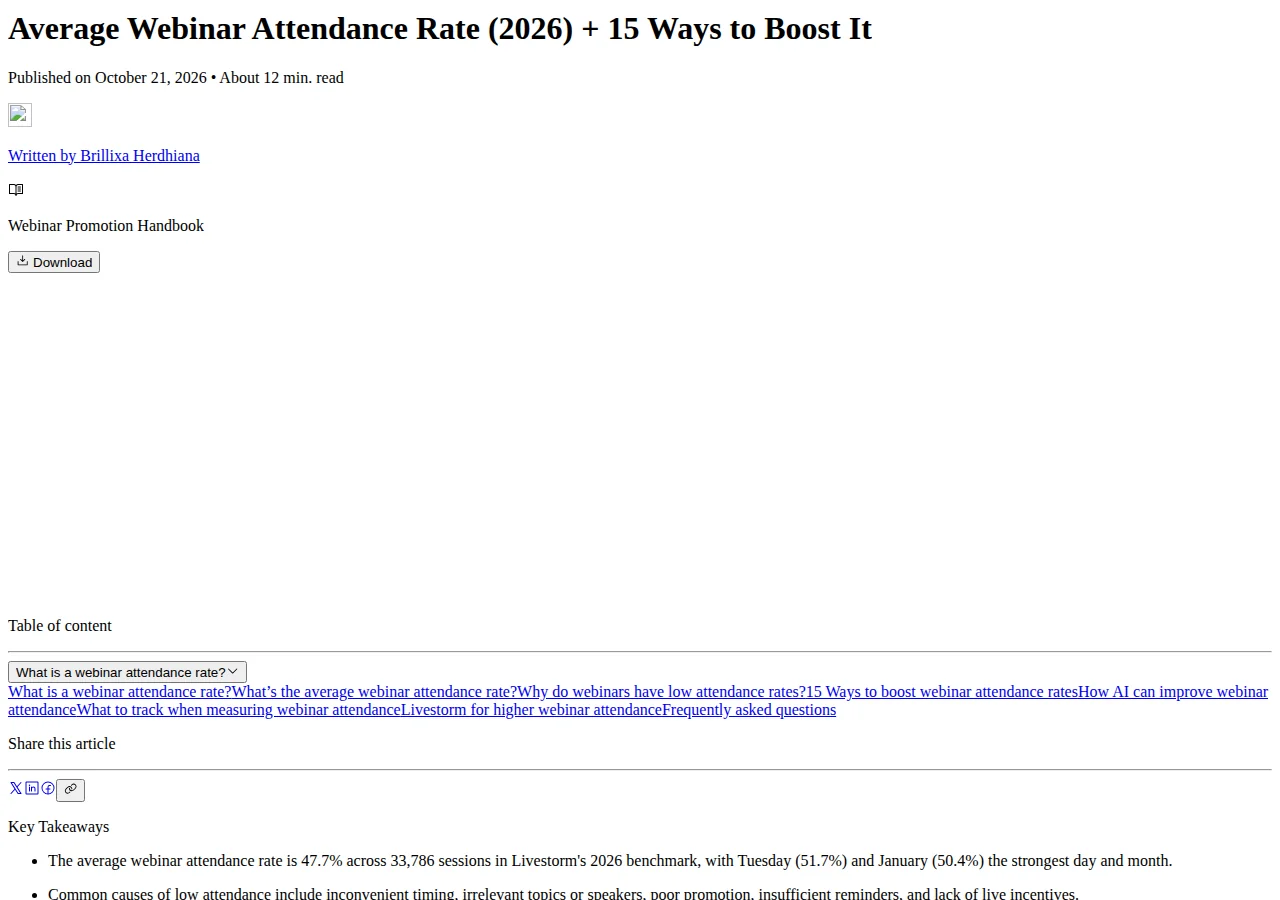
Registrations are not attendance. Livestorm's 2026 benchmark, 33,786 sessions and more than 7 million registrations in 2025, puts the average show-up rate at 47.7\%. Plan on roughly half arriving live and size the room for that number.
A 500-registrant webinar should expect:
That line decides the platform tier: a 50-attendee room cannot hold 239 people, while a 500-attendee tier can. Buying the small room first and upgrading mid-campaign costs more than buying the right tier at the start.
Livestorm found 49.7\% of registrations land in the final seven days, and 15\% arrive on the day itself. On 500 registrants:
Half the audience decides in the last week, so promotion should peak then. Day-of registrants are the warmest in the funnel; the confirmation email and join link must reach them at once.
Step 3: Pick the platform on cost per live attendee
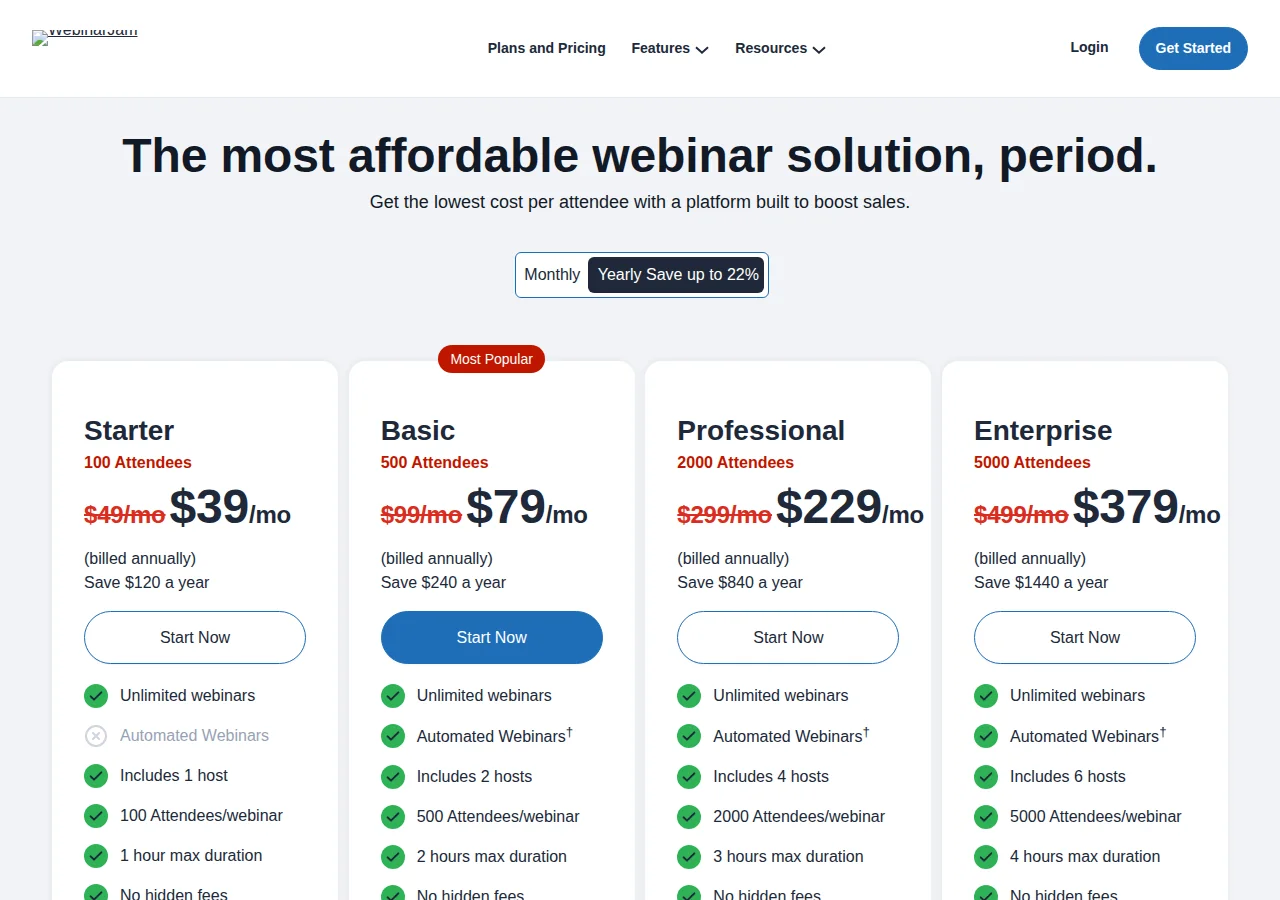
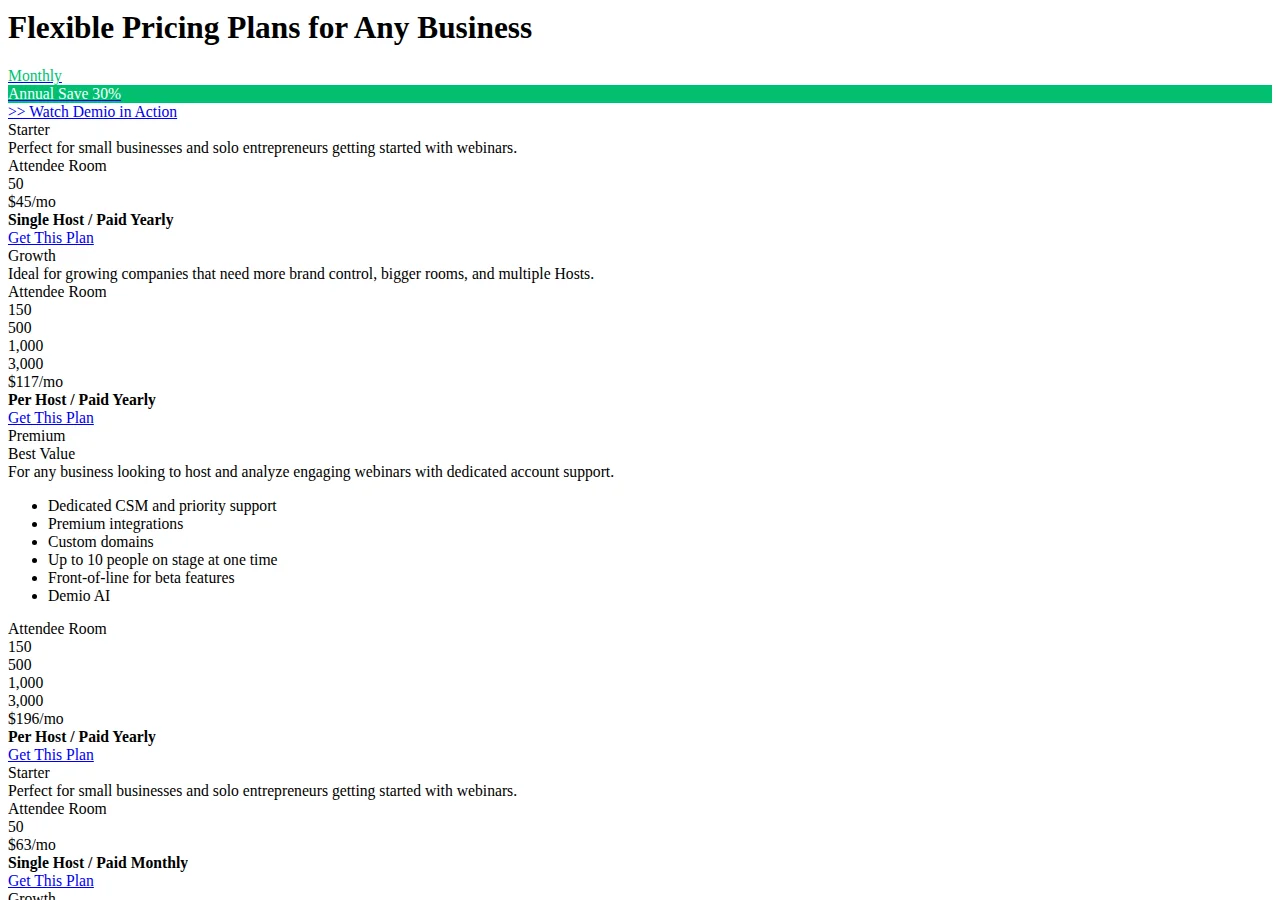
Four vendors cover most small-business webinar programs. Prices are published annual-billing rates read 12 November 2026; monthly billing costs more on every plan. Zoom's dollar figures are from Zoom's pricing page; larger tiers are from independent 2026 breakdowns of that page, as the Authority column records.
| Platform | Entry plan (annual) | Attendee cap | Session limit | Automation | Authority |
|---|---|---|---|---|---|
| Zoom Webinars | \$83.33/user/month, 500 | 500 (to 5,000; \$283.33–\$2,075) | Not capped | Plus only (\$290.83) | Zoom pricing; Zylo 2026 |
| GoTo Webinar | Reach \$59/month, 500 | 500 (Elevate \$103, 1,000; top 3,000 quote-only) | Not capped | Simulive from Elevate | GoTo pricing, Aug 2026 |
| Demio | Starter \$45/month, 50 | 50 (Growth rooms 150–3,000) | 3h (Growth 8h, Premium 10h) | Growth+ | Demio pricing |
| WebinarJam | Starter \$39/month, 100 | 100 (Basic 500; Pro 2,000; Enterprise 5,000) | 1h (Basic 2h, Pro 3h, Enterprise 4h) | EverWebinar from Basic | WebinarJam pricing, Sep 2026 |
Work the cost per live attendee before comparing stickers. Four webinars a month at 500 registrants each is 2,000 registrants; at the 47.7\% benchmark:
At this volume GoTo Reach is cheapest per live attendee, but Reach has no cloud recordings, so the Step 6 replay needs local recording or an Elevate upgrade. Demio Growth is the dearest here per host, so a second host doubles it. Webinars Plus costs 3.5 times the standard plan:
Pay it only when Simulive, on-demand video, or the production tools do real work.
At small volume the order flips. One webinar a month with 100 registrants expects about 48 live attendees:
Demio Starter's 50-attendee room holds 48; at 105 registrants it overflows. Zoom at this volume is the expensive choice; its value is scale, rooms to 100,000.
Step 4: Build registration and reminders that convert
Email does the heavy lifting. In Livestorm's benchmark, 86.3\% of teams name email a top-three registration channel, double the next channel, organic social at 43.3\%; paid social drives registrations for 20.4\% of teams. Budget in that order: email list first, social second, paid traffic only to fill a gap the list cannot close. Paid registration traffic is priced in the LinkedIn Ads vs Google Ads B2B lead cost playbook.
Ask for the fewest fields that still let sales follow up: name, work email, and one qualifying question, company size, role, or the problem they want solved. Every extra field cuts registrations; the question earns its place only if its answer changes what happens next.
Run three reminders: at registration, 24 hours before, and one hour before the start. The one-hour reminder matters most; half the audience registers in the final week and some will have forgotten by the day itself.
Livestorm puts Tuesday first at 51.7\%, Monday to Wednesday at 11 a.m. or 2 p.m. Eastern the recommended window, and January the strongest month at 50.4\%.
Step 5: Run the live room like a broadcast
A live webinar has a run-of-show, not an agenda slide. Write it down before the day: who opens, when the first poll launches, when the offer appears, who watches chat, who answers Q&A, and what happens if the connection drops. WebinarJam Professional includes a Panic Button for a troubled session; elsewhere the fallback is a second host ready to take over.
Engagement is scheduled, not hoped for. Open with a poll in the first three minutes, one question about the audience's situation, so attendees act before they settle into watching. Zoom allows up to 100 polls per webinar with up to 100 questions each, and only the host can create them — build them before the session. Run a second poll at the midpoint, tied to the offer: the answer splits the room into buyers and replay-watchers. Keep Q&A open; unanswered questions become the follow-up email and the next webinar topic.
Watch time is the honest engagement number. Livestorm's benchmark gives 26 minutes on average, about 38\% of a typical 68-minute session, and attendees who stay 28 to 35 minutes engage at 2.75 times the rate of those who drop off at 18 to 20 minutes. That argues for a 45- to 60-minute session with the offer inside the first 35 minutes. Keep at least 75\% teaching and at most 25\% pitch.
Founder & CEO Insight — Enow A. Jovial
Step 6: Work the replay window while it is warm
Most of the value arrives after the live session ends. Zoom's audience-behavior data found 72\% of on-demand views happen in the first week, and 84\% of no-shows said they planned to watch the recording, stated intent, not confirmed viewing, but a strong reason to publish the replay the same day, with slides, poll results, and a clear next step.
On a 500-registrant webinar, 239 attend live and 261 do not. If 84\% of no-shows intend to watch:
Treat 219 as intent, not views; the confirmed number comes from replay analytics. The replay audience can nearly double the live room, which is why replay terms matter at purchase: on-demand video needs Webinars Plus on Zoom and Growth or Premium on Demio; WebinarJam includes replay rooms through EverWebinar from Basic; GoTo cloud recordings start at Elevate.
Send the replay in three waves: attendees the same day with slides and the offer, no-shows the next morning with the recording and a shorter deadline, and the full list at week's end with the three best questions answered in writing. A replay with no deadline is a recording nobody watches.
Step 7: Score the webinar and decide the next one
Five numbers decide whether a webinar worked: registrants, live attendees, watch time, offer clicks, and buyers. Divide each by the one before it to find the leak. With 500 registrants, 239 live attendees, and 12 buyers, conversion is:
If the leak sits between registration and attendance, fix reminders and timing. Between attendance and offer clicks, fix the offer placement and the midpoint poll. Between clicks and buyers, fix the offer page.
Run the money through the ROI calculator, platform fee, ad spend, and presenter time included. A worked illustration, assumptions stated: 1,000 registrants at the 47.7\% benchmark give 477 live attendees; if 5\% buy a \$297 offer, that is about 24 buyers:
Against WebinarJam Basic at \$79 a month, the platform fee is 1.1\% of that gross figure:
That is gross revenue, not profit: ad spend, payment fees, refunds, taxes, and delivery still come out. The point is proportion: at any real volume the platform fee is the smallest line in the profit and loss, and saving \$20 a month while losing a fifth of the room to a bad join experience is a false economy.
Paying presenters. Collect a W-9 (US) or W-8BEN (foreign) before payout, record the EIN or SSN/ITIN, and pay by Wire or ACH with FX at the day rate. A CPA files the 1099-NEC; the LLC, S-Corp, or C-Corp structure decides who bears it. GDPR covers EU registrant data.
Who this is for, and who should avoid it
This playbook fits a business with an offer worth at least \$100, a list that can produce 100 registrants, and someone willing to rehearse. It fits product demos, training-led sales, and expertise businesses where the talk proves the value, run monthly, improved from the numbers. Avoid webinars if the offer is a low-price impulse buy, if there is no list and no budget for registration traffic, or if nobody owns the follow-up. A webinar with no replay plan and no follow-up sequence is a free class, not a funnel; a short sales page and the paid-media math in the Google Ads vs Meta Ads small business ROAS playbook will return more.
- [x] Pick one format; run it live three times first.
- [x] Forecast live attendees at 47.7\% of registrants; buy the tier that holds them.
- [x] Price the platform per live attendee; check the annual rate.
- [x] Build polls before the session; launch the first in three minutes.
- [x] Send confirmation, 24-hour, and one-hour reminders with a calendar file.
- [x] Publish the replay the same day, in three waves with deadlines.
- [x] Score registrants, live attendees, watch time, clicks, and buyers, then fix the leak.
A webinar program is a loop: one talk, one room, one replay, one scorecard, then the same talk run better. The platform is the cheapest part of it. The expensive parts are the audience that never registers and the room that never comes back, fixed by the operation around the broadcast.