A survey tool looks cheap until the meter starts running. Typeform charges by the response, Jotform charges by the account and caps submissions, payments and storage separately, and Google Forms charges nothing at all — because Forms has no paid tier. The response cap, the payment rules and the billing frequency decide what a year of surveys actually costs. Every figure below carries its source, and the cost math is worked at three stated volumes.
The three tools at a glance
| | Typeform | Jotform | Google Forms |
|---|---|---|---|
| Meter that matters | Responses per month | Submissions, payments and storage per month | None — no paid tier |
| Free tier | $0, 10 responses a month | $0, 100 submissions a month | $0, unlimited forms and responses |
| Entry paid plan | Basic, $28 a month billed annually | Bronze, $34 a month billed annually | Workspace Starter, $7 per user a month |
| Payment collection | Stripe, on paid plans | 40+ gateways, no Jotform fee | None built in |
| Authority | typeform.com/pricing | jotform.com/pricing | workspace.google.com/pricing |
> [!KEY TAKEAWAY]
> Pick the meter first, then the plan. Under 100 responses a month with payments, Jotform's free Starter covers 100 submissions and 10 payments; Typeform's free plan stops at 10 responses. Over 1,000 responses, Google Forms is the only tool with no ceiling — but it cannot take a payment.
Typeform: the response meter
Typeform's pricing page, read on November 6, 2026, lists four core plans. Free costs $0 and collects 10 responses a month across the whole account, with one user and unlimited forms, according to Typeform's help centre as reported in three independent 2026 reads. Ten responses will not carry a real survey.
Basic costs $39 a month on monthly billing, or $28 a month billed annually — $336 a year against $468 month to month, a $132 saving — for 100 responses a month, one user, conditional logic, webhooks, file upload, and a Stripe payment question, with Typeform branding. Plus costs $79 monthly, or $56 billed annually ($672 a year, $276 saved), for 1,000 responses a month, three users, no Typeform branding, and a custom subdomain. Business costs $129 monthly, or $91 billed annually ($1,092 a year, $456 saved), for 10,000 responses a month, five users, drop-off rates, conversion tracking, and priority support with live chat.
Enterprise is custom-priced, with SSO and HIPAA compliance. Monthly-billing figures are corroborated across independent 2026 reads; the annual figures are the page's own pricing data, read November 6, 2026.

Response ceilings can be raised with add-ons — independent 2026 reads put Basic at up to 750 responses, Plus at up to 2,500, and Business at up to 50,000 — but Typeform does not publish the add-on prices, so this playbook does not price them. The Contacts and Automations add-on is priced: 2,400 actions a month for $25, or 12,000 for $75. Typeform runs pricing experiments: an August 2026 read found lower figures in its comparison table than on its pricing cards. The figures here are the pricing-card figures read on November 6, 2026; your account price is the one that binds.
> [!WARNING]
> Typeform's cap is a hard stop, not a soft overage: when the monthly count is full, the form closes until the next cycle or an upgrade. A launch-day survey that passes 100 responses on Basic stops collecting — and the answers you lose are gone.
Jotform: the capacity bundle
Jotform bills per account, not per seat. Its pricing page is a JavaScript application, so the dollar figures below are corroborated across five independent 2026 reads — Athanor, Growform, Jetadmin, Hack'celeration and Zite all agree — while the limits come from the plan data embedded in the page, read directly on November 6, 2026. Starter is free: 5 active forms, 100 submissions a month, 10 payment submissions, 100 MB of upload space, and 10,000 form views a month, with Jotform branding.
Bronze costs $39 a month monthly, or $34 billed annually ($408 a year, $60 less than twelve monthly payments) for 25 forms, 1,000 submissions a month, 100 payment submissions, 1 GB of upload space, 10,000 stored submissions, and three sub-users. Silver costs $49 monthly, or $39 billed annually ($468 a year, $120 saved), for 50 forms, 2,500 submissions, 250 payments, 10 GB, 25,000 stored submissions, and ten sub-users. Gold costs $129 monthly, or $99 billed annually ($1,188 a year, $360 saved), for 100 forms, 10,000 submissions, 1,000 payments, 100 GB, 100,000 stored submissions, and one hundred sub-users. Enterprise is custom-priced.
Gold is the only self-serve plan with HIPAA features — the page marks HIPAA as unavailable below Gold — so a clinic collecting protected health information cannot use the cheaper tiers.
The form connects to more than 40 payment gateways, including Stripe, PayPal and Square, and Jotform states it never charges additional transaction fees — you pay only the processor's own rate. What is capped is the number of payments a month: 10 on Starter, 100 on Bronze, 250 on Silver, 1,000 on Gold. Figures here are full list prices, not first-year promotional rates.
> [!TIP]
> Before you pay for Gold, count payment submissions separately from total submissions. A free workshop with 900 sign-ups and 40 paid tickets fits Bronze (1,000 submissions, 100 payments). A paid course with 300 students does not fit Bronze, because 300 payments exceed its 100-payment cap — Silver is the floor.
Google Forms: free, with the suite as the wrapper
Google Forms has no standalone price. It is a feature bundled into any Google account and into Google Workspace, and there is no premium tier of Forms itself. A personal Google account gets unlimited forms, questions and responses at $0, with file uploads drawing on the account's 15 GB of shared Google Drive storage. Forms is the only tool here with no response ceiling to price around — and the only one with no upgrade path inside the product when you outgrow it.
!Google Workspace pricing cards
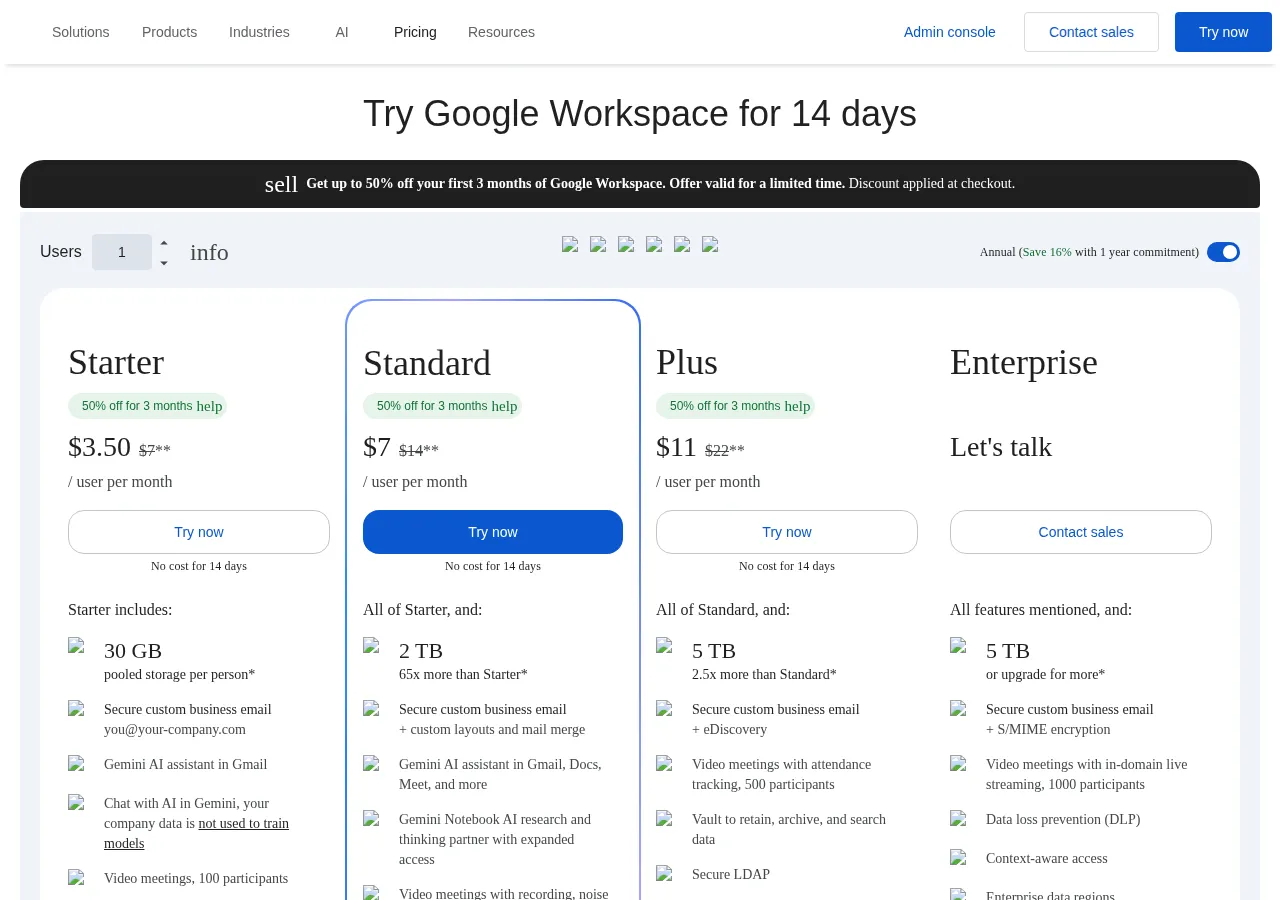
The money, when there is any, is the Workspace seat. Google's pricing page, read on November 6, 2026, lists Business Starter at $7 per user a month on an annual commitment, or $8.40 flexible; Standard at $14, or $16.80 flexible; and Plus at $22, or $26.40 flexible. Starter includes 30 GB of pooled storage per user, Standard 2 TB, Plus 5 TB, and Business plans cap at 300 users. The page currently shows a 50%-off first-three-months promotion; the struck-through prices are the standard rates quoted here. A five-person team on Starter pays $7 × 5 × 12 = $420 a year, but that $420 buys business email, Drive storage, Meet and the rest of the suite — not a better version of Forms, because no better version exists. What it does not buy, at any price, is native payment collection or e-signatures: Forms has neither, so collecting money means bolting on a separate payment link or a different tool. The same per-seat logic drives the suite comparison in Zoom vs Google Meet vs Microsoft Teams — the seat is the unit, not the app.
Forms does have ceilings, but they are performance thresholds, not paid tiers: response views go unavailable above 10,000 responses, summaries above 50,000, and Sheets synchronisation may stop above 100,000. At those volumes the question is no longer price — it is whether a free tool's reporting still works for you.
> [!FOUNDER]
> "The cheapest form is the one that never stops collecting. A free tool that closes at the worst moment costs more than the most expensive plan on this page — it costs you the answers you will never get back."
> — Enow A. Jovial, Founder & Chief Executive Officer
Worked example: the real monthly cost at three volumes
One formula sits behind every number here, because every vendor hides it behind a different meter:
$
\text{Cost per response} = \frac{\text{Monthly price}}{\text{Responses used that month}}
$
At 100 responses a month, Typeform Basic on annual billing costs $28 ÷ 100 = $0.28 per response, Jotform Bronze costs $34 ÷ 100 = $0.34 against a 1,000-submission cap, and Google Forms costs $0. At 1,000, Typeform Plus costs $56 ÷ 1,000 = $0.056 per response, Jotform Bronze $34 ÷ 1,000 = $0.034, Jotform Silver $39 ÷ 1,000 = $0.039, and Google Forms still costs $0. At 10,000, Typeform Business costs $91 ÷ 10,000 = $0.0091 per response, Jotform Gold $99 ÷ 10,000 = $0.0099, and the gap is $8 a month, or $96 a year, in Typeform's favour.
Annual billing is the cheapest honest saving here, and its size varies by vendor. Typeform saves $132 a year on Basic, $276 on Plus and $456 on Business — roughly 28 to 30 percent in each case. Jotform saves $60 on Bronze, $120 on Silver and $360 on Gold — 13, 20 and 23 percent. The second formula is the break-even volume below.
$
\text{Break-even volume} = \frac{\text{Higher plan monthly price}}{\text{Lower plan cost per response at its cap}}
$
Worked example one: Typeform Plus at $56 a month against Basic at its cap, where Basic costs $0.28 per response. The break-even volume is $56 ÷ $0.28 = 200 responses a month. Past 200, Plus costs less per response than Basic did at full use — though Basic cannot carry you past 100 anyway, so this is a unit-cost argument, not permission to exceed the cap. Worked example two: Jotform Silver at $39 a month against Bronze at its cap, where Bronze costs $0.034 per response. The break-even volume is $39 ÷ $0.034 = 1,147.06, or about 1,148 responses a month. Past roughly 1,150, Silver is cheaper per response than Bronze at full use, and Bronze cannot carry you past 1,000 anyway. Buy the plan whose cap sits just above your real volume.
Paying respondents, collecting payments, and the entity behind the form
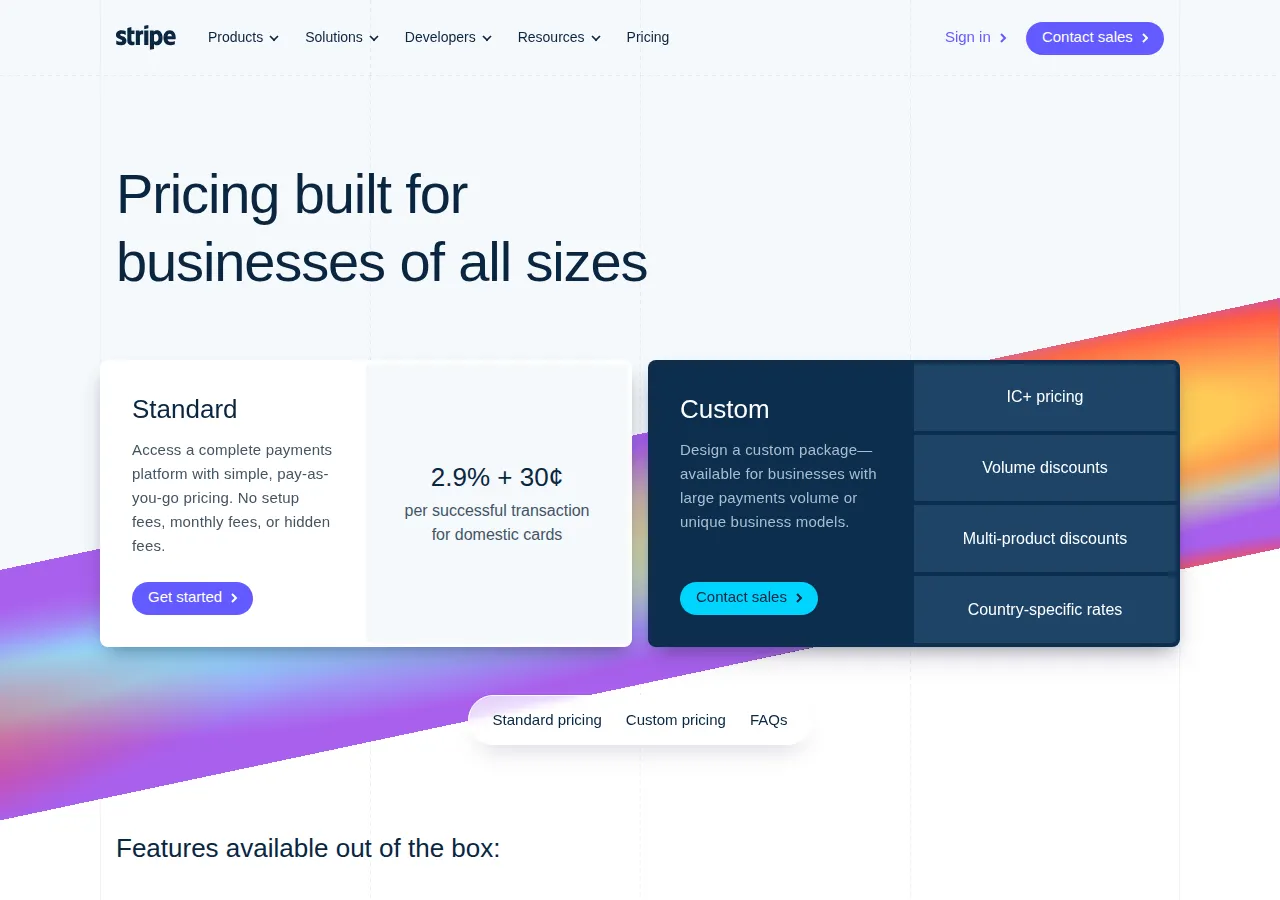
Forms touch money in two directions, and both have paperwork. Collecting payments means a processor takes a cut: Stripe's published US rate, read on November 6, 2026, is 2.9% plus $0.30 per successful domestic card transaction. Worked example: 200 paid registrations at $50 each is $10,000 gross;
!Stripe standard card rate the processor fee is 0.029 × $10,000 = $290, plus 200 × $0.30 = $60, for $350 in total fees and $9,650 net. Neither Jotform nor Typeform adds a platform fee, but the payment-submission cap still applies: a Jotform Bronze account collecting 200 payments in a month hits its 100-payment ceiling.
Paying people is the other direction, and it is where entity paperwork enters. A business paying survey respondents, panellists or contractors needs a W-9 from US payees and a W-8BEN from foreign payees before the first payment, and reports them under its own EIN — or the owner's SSN or ITIN for a sole proprietor. An LLC, an S-Corp and a C-Corp all file differently, and the form collecting payment details should carry the same legal name and EIN as the tax return, because a mismatch triggers backup withholding at 24%. ACH costs cents per transfer and clears in one to three business days; a wire clears the same day and costs $15 to $30 per transfer; paying a foreign respondent adds an FX spread of roughly 1 to 3 percent on top of the processor's rate. A form is a cheap place to collect a W-9; it is an expensive place to discover, at year end, that you never collected one.
Logic jumps and conditional flows
Conditional logic is the feature that separates a survey from a questionnaire: the answer to one question decides which question comes next. Typeform includes conditional logic on every plan, including Basic and the free plan, and it is the core of the one-question-at-a-time flow. Jotform's version is broader: it can show or hide fields, skip pages, require answers conditionally, and trigger different thank-you pages or emails from the same submission. Google Forms supports branching too — a multiple-choice answer can send the respondent to a different section — but the branching is section-based, and it cannot run calculations, score answers, or change a payment amount mid-form.
The five-step switch
Moving a live survey between tools is a migration, not a copy-paste, and the steps below are the order that avoids losing responses mid-flight.
1. Export everything first. Download the full response history as a CSV and export the form structure — questions, logic rules and payment settings — before touching anything.
2. Rebuild the logic, not the layout. Recreate the branching rules question by question, and test every branch with a dummy submission — logic that looks identical can behave differently across vendors.
3. Run both forms in parallel for one cycle. Keep the old form live while the new one collects, and compare response counts daily: a silent logic error shows up as a missing segment, not an error message.
4. Move the payment link last. Switch the Stripe or PayPal connection only after the new form has taken at least one real test payment end to end — a payment question that fails silently loses money, not just data.
5. Redirect and archive. Point the old form's link, QR code and embed at the new form, download a final CSV, and keep the old account for one billing cycle so nothing is lost to a cancellation.
The verdict
Google Forms wins on price at every volume, and for a straightforward survey, RSVP or quiz with no payments it is the correct answer — the only cost is the Workspace seat you may already pay for. Jotform wins on capacity per dollar: Bronze at $34 a month billed annually is the cheapest paid plan that takes payments, collects 1,000 submissions and removes branding, and Silver at $39 is the value step of the comparison. Typeform wins on the respondent's experience — $56 a month billed annually for 1,000 responses, with the hard cap as the trade-off.
Choose by the constraint that bites first. If payments matter, Google Forms is out. If volume passes 1,000 responses, Typeform Basic is out. If protected health information is involved, everything below Jotform Gold is out. And if the survey is the business — a lead form, a paid registration, a research panel — run the worked example above with your own volume: the right plan is the one whose cap sits just above the number you actually collect. The same cap-first thinking applies to the scheduling tools in Calendly vs Acuity and the email platforms in Mailchimp vs Klaviyo vs ActiveCampaign: the meter, not the sticker, is the price. For a final check, run the monthly cost through the Business Profit Margin Calculator before you commit to a year of annual billing.