Zoom vs Google Meet vs Microsoft Teams: Video Conferencing Pricing Playbook
Three vendors sell the same meeting, and the invoice never looks the same. Zoom charges per host. Google charges per user for the whole Workspace bundle, with Meet riding along. Microsoft charges per user too, but splits the price across a standalone Teams license, a Microsoft 365 bundle, and a ten-dollar AI add-on.
Google Workspace prices below are primary, read from workspace.google.com/pricing on November 6, 2026. Zoom and Microsoft prices are corroborated secondary reads from independent October 2026 reads of zoom.us/pricing and microsoft.com — both vendors' pages returned JavaScript-only shells to this network. Prices are US list, exclude tax.
> [!KEY TAKEAWAY]
> At 25 seats on annual billing: Teams Essentials $100 a month, Google Starter $175, Zoom Pro $354, Google Standard $350, Zoom Business $458.25. The spread is $358.25 a month, or $4,299 a year, before any add-on.
How each vendor charges
Zoom Workplace sells licenses per host, not per attendee. Only hosts need a paid license; guests join free without a Zoom account. Zoom prints monthly and annual rates.
Google Meet is not sold on its own. Meet arrives inside Google Workspace, so the meeting price is the Workspace price, and every user who needs a business Gmail address, Drive storage, and recording needs a license. Google lists one rate per tier, billed monthly, and Starter, Standard, and Plus cap at 300 users. On November 6, 2026, Google showed a half-price introductory rate, with standard pricing from February 19, 2027. Budget the list price.
Microsoft Teams is sold three ways: free, standalone, and bundled. Teams Essentials is the standalone license at $4.00 per user per month on annual billing. The Microsoft 365 bundles — Business Basic at $7.00 and Business Standard at $14.00 — include Teams plus the Office apps and OneDrive storage. On July 1, 2026, Microsoft raised Basic from $6.00 to $7.00 and Standard from $12.50 to $14.00; standalone Teams SKUs were excluded, so Essentials is still $4.00. Teams Premium is a $10.00 add-on on top of a paid license.
The price cards, tier by tier
| Vendor | Tier | List price per user / month | Billing |
| :--- | :--- | :--- | :--- |
| Zoom | Basic | $0 | Free |
| Zoom | Workplace Pro | $16.99 monthly / $14.16 annual | Per host |
| Zoom | Workplace Business | $21.99 monthly / $18.33 annual | Per host |
| Google | Business Starter | $7.00 | Per user, billed monthly |
| Google | Business Standard | $14.00 | Per user, billed monthly |
| Google | Business Plus | $22.00 | Per user, billed monthly |
| Microsoft | Teams Free | $0 | Free |
| Microsoft | Teams Essentials | $4.00 | Per user, paid yearly |
| Microsoft | M365 Business Basic | $7.00 | Per user, paid yearly |
| Microsoft | M365 Business Standard | $14.00 | Per user, paid yearly |
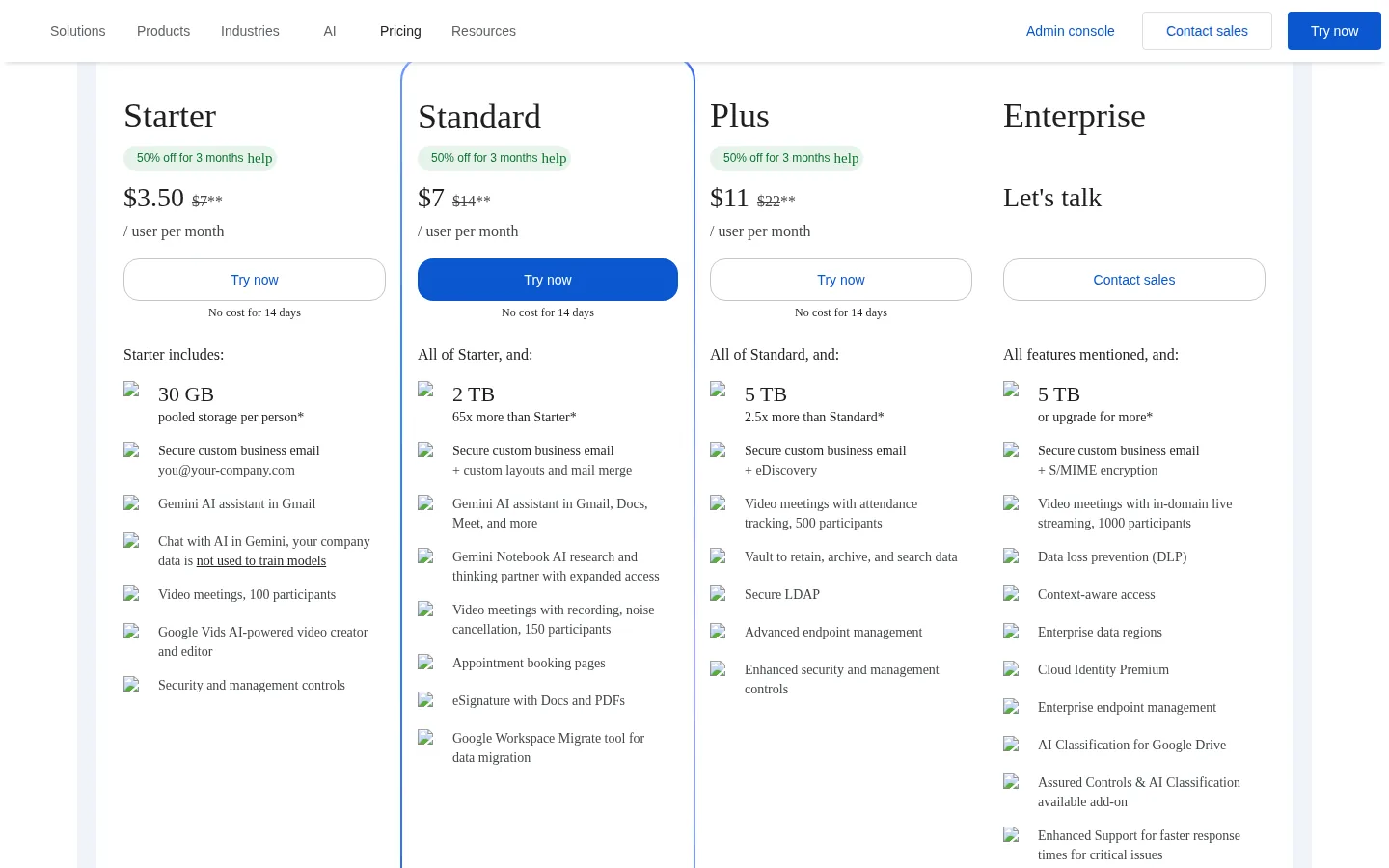
The screenshot above is the live Google Workspace pricing page as rendered on November 6, 2026 — the only price card here captured from the vendor page itself. Zoom and Microsoft returned bot-blocked shells, so their figures are corroborated reads.
Two facts sit behind the table. Zoom caps paid seats per tier: Pro covers 1 to 99 licenses and Business 1 to 250, per Zoom's pricing page, October 27, 2026. A 100-host team cannot buy Pro at any price. Google caps Starter, Standard, and Plus at 300 users each.
> [!WARNING]
> Never budget on the monthly rate and then pay annually, or the reverse. Zoom's annual rate is charged as one upfront payment: Pro at $14.16 a month means $169.92 per host charged at once, Business at $18.33 means $219.96.
The free tiers and where they stop
Zoom Basic is free with a 40-minute cap on group meetings and 100 participants. One-to-one meetings run longer, but any meeting with three or more people ends at forty minutes unless the host holds a paid license.
Google Meet free, for personal Google accounts, caps group meetings of three or more participants at 60 minutes. Google's own Meet help page states the limit plainly and warns the room at fifty minutes that the meeting is about to end. The free tier carries no recording and no admin controls, and it runs on a personal account rather than a business domain.
Microsoft Teams free caps group meetings at 60 minutes with 100 participants and 5 GB of cloud storage per user, with no advanced admin controls and no service-level agreement. Free buys the meeting; paid buys the hour.
Participant and duration ceilings
Ceilings decide the tier more often than features do. A team of 120 that meets all-hands needs a 150-participant tier on Google or a 300-participant tier on Zoom and Teams, and the price follows the ceiling, not the headcount.
| Ceiling | Zoom | Google Meet | Teams |
| :--- | :--- | :--- | :--- |
| Participants, free tier | 100 | 100 (personal account) | 100 |
| Participants, entry paid | 100 (Pro) | 100 (Starter) | 300 (Essentials) |
| Participants, mid paid | 300 (Business) | 150 (Standard) / 500 (Plus) | 300 (Business plans) |
| Max meeting length, free | 40 minutes (group) | 60 minutes (group of 3+) | 60 minutes (group) |
| Paid seat cap | Pro 1–99, Business 1–250 | 300 users (Starter, Standard, Plus) | No published seat cap on Essentials |
Teams Essentials is the only entry paid tier opening 300 participants for $4.00 — Zoom and Google hold 300 behind their second paid rung. A 120-person all-hands fits Google Standard at $14.00, Zoom Business at $18.33, and Teams Essentials at $4.00. Duration stops mattering once you pay: 30 hours on Zoom and Teams, 24 hours on Google.
Recording, transcription, and the AI note-taker
On Zoom, cloud recording and AI Companion meeting summaries come with Workplace Pro. Business adds company branding, vanity URLs, SSO and managed domains, and device management. The AI Companion is in the plan, not an add-on. Caution: third-party reads disagree on the per-license cloud storage allowance, so no storage number for Zoom is printed here.
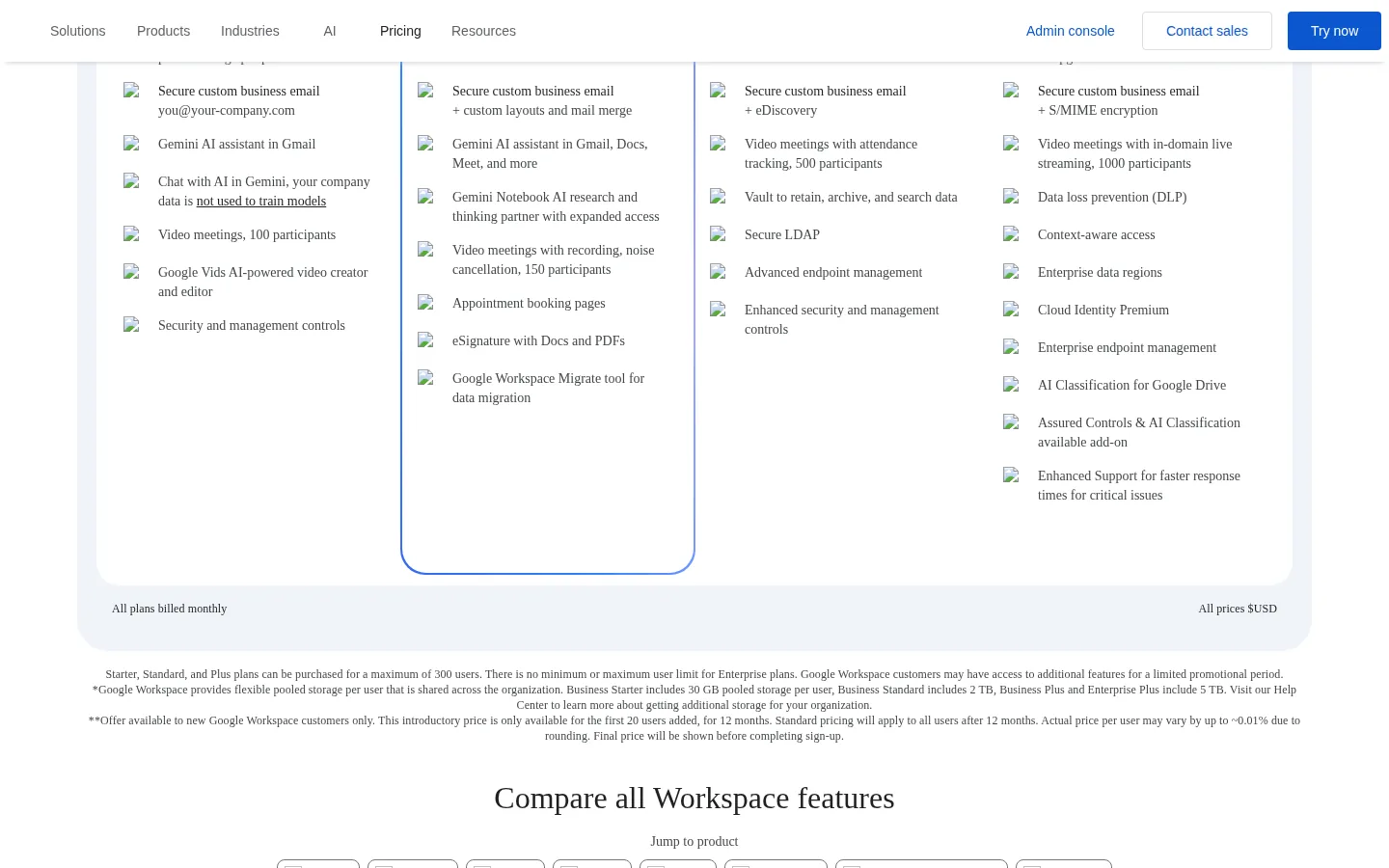
On Google, recording is a Standard feature, not a Starter one. Starter at $7.00 buys video meetings with 100 participants and no recording. Standard at $14.00 adds recording, noise cancellation, and 150 participants, with recordings saved to Google Drive. Plus at $22.00 adds attendance tracking, 500 participants, and Vault retention. Recording is one feature worth exactly $7.00 per user per month.
On Microsoft, recording and transcripts come with the paid Teams licenses, including Essentials, with live captions in English. Intelligent recap — AI meeting notes, suggested tasks, a speaker timeline, and chapters — sits in Teams Premium at $10.00 per user per month, on top of the base license.
If the team records client calls, Zoom Pro at $14.16 annual and Google Standard at $14.00 are the same money for the same job. If the team wants AI-written meeting notes, Teams Premium at $10.00 on top of a $4.00 Essentials base is $14.00 all-in. The vendors have converged on fourteen dollars.
The monthly math at 5, 25, and 100 seats
The formula is one line, and every number in the table below comes out of it. List prices only, so any reader can reproduce the totals with a calculator.
$
ext{Monthly cost} = ext{Seats} imes ext{Per-user monthly rate}
$
$
ext{Annual cost} = ext{Monthly cost} imes 12
$
The table uses annual billing for Zoom and list rates for Google and Microsoft. The Zoom 100-seat column uses Business, because Pro caps at 99 licenses.
| Monthly cost | 5 seats | 25 seats | 100 seats |
| :--- | :--- | :--- | :--- |
| Zoom Pro, annual ($14.16) | $70.80 | $354.00 | Not sold — Pro caps at 99 licenses |
| Zoom Business, annual ($18.33) | $91.65 | $458.25 | $1,833.00 |
| Google Starter ($7.00) | $35.00 | $175.00 | $700.00 |
| Google Standard ($14.00) | $70.00 | $350.00 | $1,400.00 |
| Google Plus ($22.00) | $110.00 | $550.00 | $2,200.00 |
| Teams Essentials ($4.00) | $20.00 | $100.00 | $400.00 |
| Teams Essentials + Premium ($14.00) | $70.00 | $350.00 | $1,400.00 |
Read the table by column, not by row. At 5 seats the cheapest paid meeting is Teams Essentials at $20.00 a month, and the dearest is Zoom Business at $91.65. At 25 seats the spread is $100.00 against $458.25. At 100 seats it is $400.00 against $2,200.00. The Business-versus-Essentials gap alone is $14.33 a seat — $1,433 a month at 100 seats.
The Zoom per-host model changes the reading for teams where few people host. A 25-person team with five hosts pays for five Zoom Pro licenses — $70.80 a month on annual billing — while Google and Microsoft charge for all 25 users. Count hosts, not headcount, before choosing Zoom.
> [!TIP]
> Run the seat count twice: once for hosts, once for users.
Annual billing, and the break-even that decides it
Zoom's annual toggle is worth real money, and the saving is one subtraction.
$
ext{Annual saving per seat} = 12 imes ( ext{Monthly rate} - ext{Annual rate})
$
$
ext{Zoom Pro saving} = 12 imes (16.99 - 14.16) = 12 imes 2.83 = $33.96 ext{ per seat per year}
$
At 25 seats on Pro, annual billing saves $849.00 a year; on Business it saves $1,098.00. The trade is cash timing: the annual rate is charged as one upfront payment, so a 25-seat Pro team pays $4,248.00 on day one instead of $424.75 a month. Thin cash takes monthly billing; cash in hand takes annual.
The second break-even is the tier jump. Google Plus costs $8.00 more per user per month than Standard — $200.00 a month, or $2,400.00 a year, at 25 seats, for 500 participants instead of 150, attendance tracking, and Vault. It pays only if the team holds meetings above 150 people or must retain records under Vault. The same test applies to Zoom Business over Pro: $4.17 more per seat per month, or $1,251.00 a year at 25 seats, for 300 participants, SSO, and managed domains. Without an SSO requirement or a meeting above 100 people, Business is $1,251.00 of tooling the team does not use.
The decision table
| Situation | Buy | Authority |
| :--- | :--- | :--- |
| 5 hosts, 25 people, few hosts | Zoom Pro, annual — $70.80/mo for 5 hosts | Zoom pricing |
| Cheapest paid meetings, any size | Teams Essentials — $4.00/user/mo | Microsoft Teams pricing |
| Gmail + Drive + Meet in one bundle | Google Starter — $7.00/user/mo | Google Workspace pricing |
| Recording required, Google shop | Google Standard — $14.00/user/mo | Google Workspace pricing |
| 120-person all-hands | Teams Essentials — $4.00 (300 participants) | Microsoft Teams pricing |
| 100 hosts on Zoom | Business — Pro caps at 99 licenses | Zoom pricing, Oct 27 2026 |
> [!FOUNDER]
> "I have watched teams pay for 100 Zoom licenses when five people host the meetings. Count the hosts before you count the invoice. The vendors price the seat; the operator prices the job, and the job is whoever actually presses start." — Enow A. Jovial, Founder & Chief Executive Officer
Who should not buy each one
Do not buy Zoom Pro if more than half your team hosts: at full-host teams its invoice is the highest here, and a 300-participant room costs Business money on Zoom, Essentials money on Teams. Do not buy Google Starter if the team records client calls — recording starts at Standard — and do not buy Plus under 150 headcount unless Vault retention is required. Do not buy Teams Premium as a standalone decision: a $10.00 add-on on a $4.00 base is a $14.00 product. And do not buy a Microsoft 365 bundle for Teams alone if the team lives in Google Docs.
Related reading: Slack vs Microsoft Teams vs Discord team communication pricing for the chat side, and Notion vs Airtable vs Coda team workspace pricing and automation for the workspace around the meetings. Test your numbers in the Break-Even Analysis Calculator.
Execution checklist: buy it once, buy it right
1. Count hosts and users separately. Zoom is priced on hosts; Google and Microsoft on users.
2. Measure the longest meeting and the largest room. Over 40 minutes kills Zoom Basic; over 60 kills Meet free and Teams free; over 100 people kills Zoom Pro and Google Starter.
3. Decide recording before choosing a tier. If client calls are recorded, strike Google Starter.
4. Price the 5, 25, and 100 seat columns above. Annual billing for Zoom, list rates for Google and Microsoft.
5. Check the seat caps and confirm the live price. Zoom Pro stops at 99 licenses; Google tiers stop at 300 users.
6. Trial the paid tier with real meetings. One recorded client call, one all-hands at full size, one AI recap.