Calendly vs Acuity Scheduling: Per-Seat Pricing, Calendar Limits, and the Real Monthly Cost at 1, 5, and 25 Users
A scheduling tool looks cheap until you count the seats: Calendly charges per host, Acuity one flat monthly fee per account, scaling by calendars instead. That single difference decides the winner for most buyers before any feature comparison begins.
Every figure below comes from the vendors' own pricing pages as captured on 6 November 2026, with every calculation reproduced for checking.
The two pricing models in one paragraph
Calendly sells seats: everyone who connects a calendar and hosts meetings needs a paid seat; invitees need nothing. Its tiers are Free at $0, Standard at $10 per seat per month on annual billing, Teams at $16, and Enterprise from $15,000 per year (50-seat minimum). Acuity sells an account: one flat monthly fee covers the whole business, scaling by calendars — Starter at $16 per month on annual billing with 1 calendar, Standard at $27 with up to 6, Premium at $55 with up to 36. There is no per-seat charge at Acuity, and no free plan — only a 7-day trial that needs no credit card.
Calendly's bill grows with headcount; Acuity's grows with locations, staff calendars, and service complexity. A one-person consultancy pays less on Calendly Standard ($10 a month) than on Acuity Starter ($16 a month), while a five-person team already pays $50 a month on Calendly Standard against Acuity's flat $27 on Standard.
> [!KEY TAKEAWAY]
> Calendly is priced per host, Acuity per account. Below about six hosts, Calendly Standard is usually cheaper; above that, Acuity Premium at a flat $55 a month undercuts it.
Calendly pricing, tier by tier
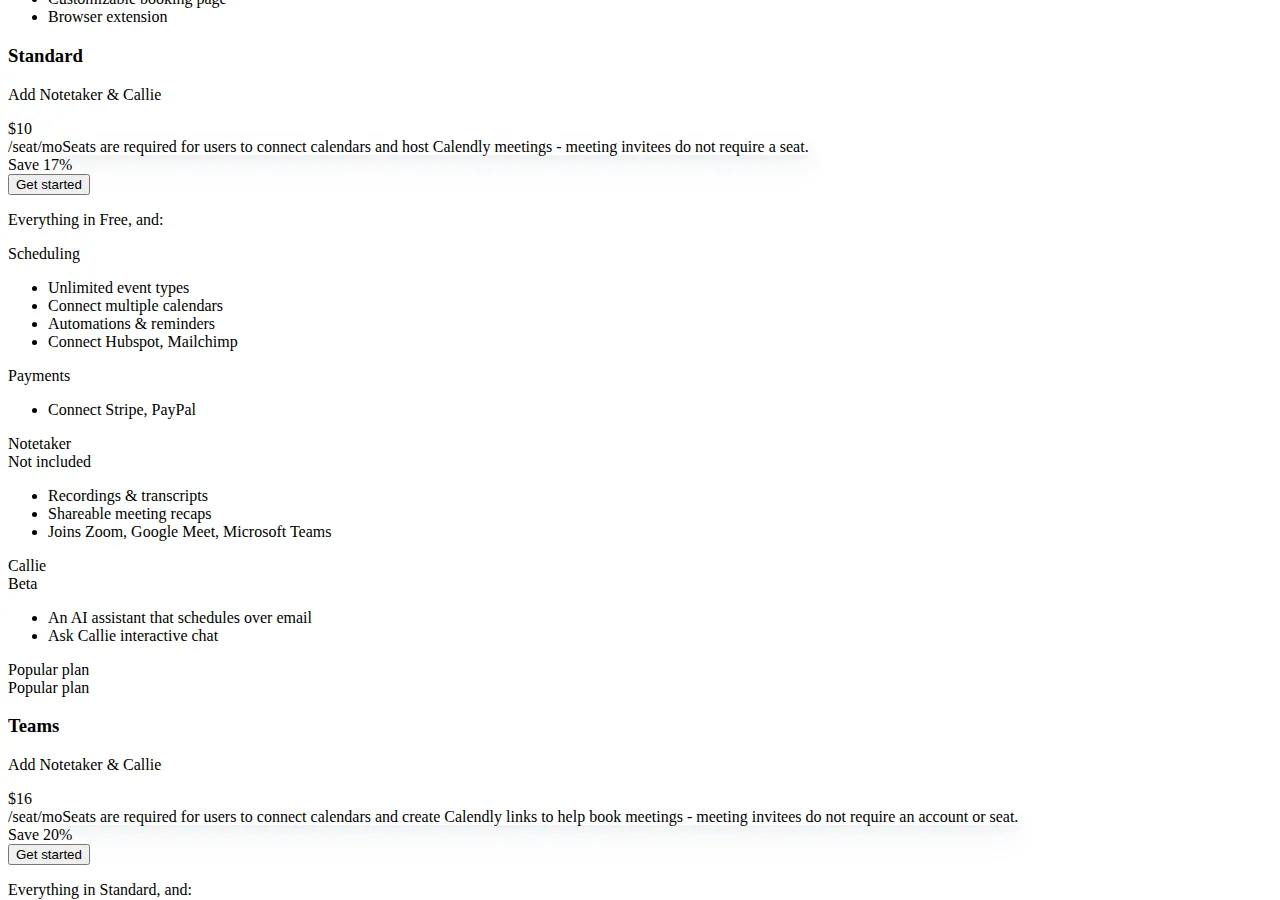
Free costs $0 forever: one event type, one calendar connection, unlimited one-on-one meetings, a customizable booking page, and the browser extension. One event type means one kind of meeting; one calendar connection means Calendly checks conflicts against a single calendar only. A solo operator with one offer and one calendar can run on Free indefinitely; anyone with two services hits the wall on day one.
Standard, at $10 per seat per month billed annually, removes both walls: unlimited event types, up to 6 calendar connections, automated reminders, HubSpot, Mailchimp, Zapier, webhooks, and payment collection through Stripe and PayPal. Monthly billing is $12 per seat per month — implied by the page's "Save 17%" label and confirmed by two independent 2026 reads ($10 is $12 discounted by 16.7%, rounded to 17%).
Teams, at $16 per seat per month billed annually ($20 monthly, corroborated the same way — $16 is exactly 20% below $20), adds round-robin distribution, routing forms that qualify and send leads to the right rep, Salesforce sync, Marketo and Pardot, centrally managed event types, and advanced admin controls. Single sign-on is a paid add-on.
Enterprise starts at $15,000 per year, requires at least 50 seats, and is priced in USD only, adding SSO/SAML, SCIM, domain control, an audit log, a data deletion API, and dedicated support. Floor: $15,000 ÷ 50 = $300 per seat per year ($25/seat/mo) — Enterprise is never cheaper per seat than Teams; you buy it for governance.
Notetaker and Callie are paid Plus add-ons, not included in Standard or Teams — do not budget for them inside the $10 or $16 figure. The calendar cap is 6 even on Teams and Enterprise: paying more buys routing, CRM sync, and admin control, not a seventh connection.
Acuity Scheduling pricing, tier by tier
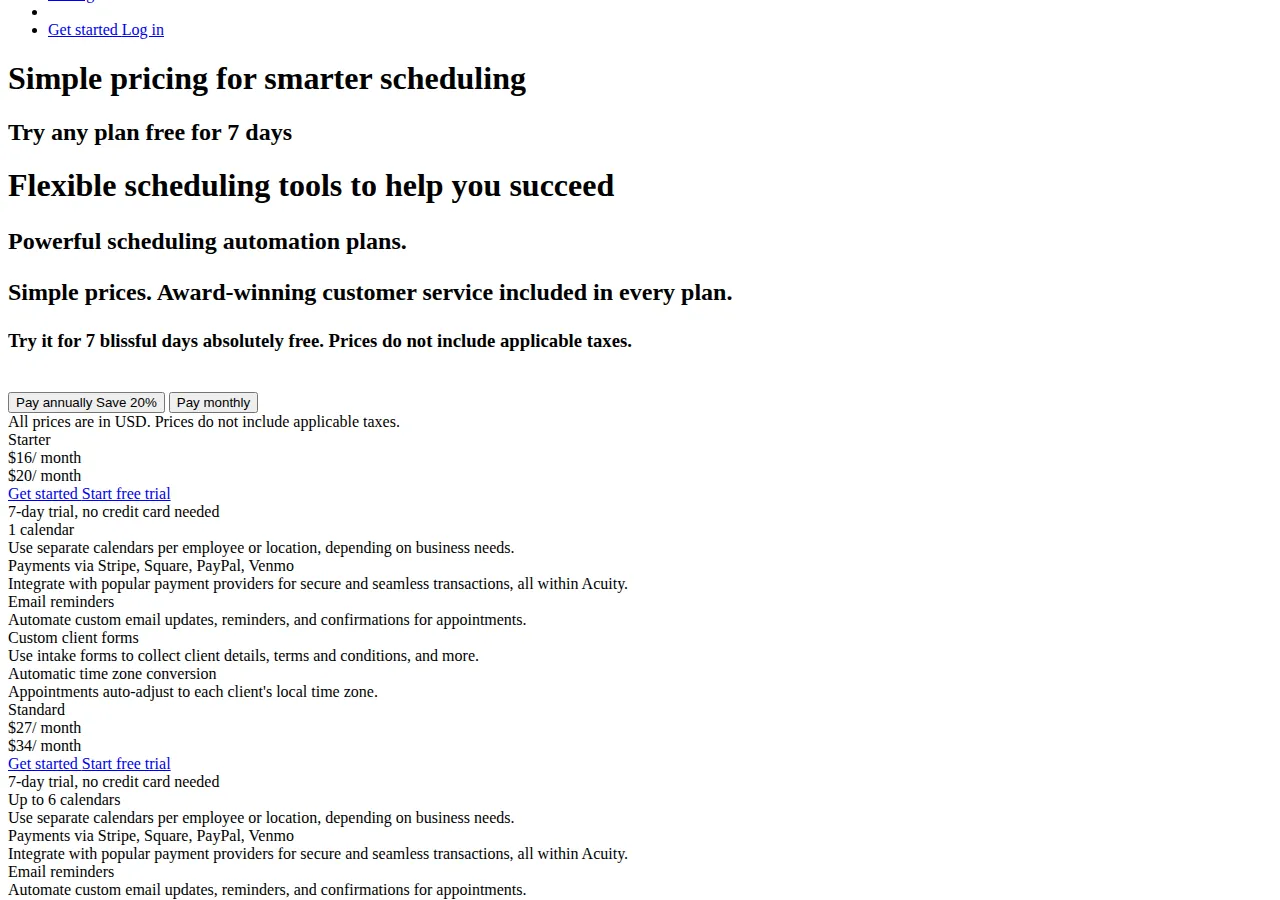
Starter costs $16 per month on annual billing, or $20 monthly, and includes exactly 1 calendar. Every tier includes payment collection through Stripe, Square, PayPal, and Venmo, email reminders, intake forms, and automatic time-zone conversion — Acuity puts payments on the entry tier, where Calendly reserves them for Standard and above. There is no free plan; the vendor's FAQ states Acuity offers no free scheduling, and the 7-day trial is the only way in without paying — with no setup, cancellation, or support fees.
Standard costs $27 per month on annual billing, or $34 monthly, and raises the calendar cap to 6, adding SMS reminders, an appointment waitlist, and memberships, packages, and gift certificates for sale. Premium costs $55 per month on annual billing, or $69 monthly, and raises the cap to 36 calendars, adding an AI Booking Assistant, a signed HIPAA BAA, hiding the Acuity logo, per-staff time zones, and custom API and CSS access.
An Enterprise offering exists for unlimited calendars, priced on request. The scaling unit is the calendar count: 1, 6, then 36. A salon with seven stylists cannot stay on Standard; a clinic with forty rooms cannot stay on Premium without talking to Enterprise sales.
The structural difference: seats versus calendars
The vendors do not sell the same unit, so a price table without a formula misleads: Calendly's cost is seat price times hosts, Acuity's a flat fee that moves only with calendars.
$
\text{Monthly cost (Calendly)} = n_{\text{hosts}} \times p_{\text{seat}}
$
$
\text{Monthly cost (Acuity)} = F_{\text{tier}} \quad \text{where } F \in \{16, 27, 55\} \text{ on annual billing}
$
A sixth host on Standard costs another $10 a month; a sixth staff member on Premium costs $0 while calendars stay under 36. Conversely, one host with 40 calendars pays $10 a month on Calendly Standard and needs Acuity Enterprise. The question is never "which tool is cheaper" — it is "how many hosts, and how many calendars."
> [!FOUNDER]
> "Every scheduling vendor will show you a monthly price. Count the seats first, then count the calendars, and only then look at the price — because the unit they charge for is the decision, and the price is just the arithmetic."
> — Enow A. Jovial, Founder & Chief Executive Officer
Worked cost math at 1, 5, and 25 users
All figures use annual billing, in USD, excluding taxes. Calendly's monthly figures ($12 Standard, $20 Teams) are corroborated by two independent 2026 reads; Acuity's ($20, $34, $69) appear on its pricing page.
| Team size | Calendly Standard (annual) | Calendly Teams (annual) | Acuity Standard | Acuity Premium |
| :--- | :--- | :--- | :--- | :--- |
| 1 host | $10/mo — $120/yr | $16/mo — $192/yr | $27/mo — $324/yr | $55/mo — $660/yr |
| 5 hosts | $50/mo — $600/yr | $80/mo — $960/yr | $27/mo — $324/yr | $55/mo — $660/yr |
| 25 hosts | $250/mo — $3,000/yr | $400/mo — $4,800/yr | $27/mo — $324/yr | $55/mo — $660/yr |
Five hosts on Standard: 5 × $10 = $50/mo ($600/yr). Twenty-five on Teams: 25 × $16 = $400/mo ($4,800/yr). Acuity Standard is $324/yr for one person or twenty-five.
Standard equals Premium when 10n = 55 (n = 5.5): at 6 hosts, Standard at $60/mo costs more than Premium at $55. Teams equals Premium when 16n = 55 (n = 3.44): at 4 hosts, Teams at $64/mo already costs more. Against Acuity Standard at $27, Standard matches at 2.7 hosts and Teams at 1.7 — a three-person team on Teams pays more than the whole Acuity Standard account, which also includes SMS reminders and gift certificates Teams lacks.
$
\text{Crossover hosts (Standard vs Premium)} = \frac{55}{10} = 5.5 \Rightarrow 6 \text{ hosts}
$
$
\text{Annual saving, 25 hosts, Teams vs Premium} = (400 - 55) \times 12 = \$4{,}140
$
Monthly billing costs $2 extra per seat per month on Standard and $4 on Teams — (20 − 16) × 25 × 12 = $1,200 a year for a 25-host Teams plan — and $4 extra on Acuity Starter, $7 on Standard, $14 on Premium. Unless cash flow forces it, annual billing is a 17–20% discount for doing nothing.
> [!WARNING]
> Do not budget Enterprise at the Teams per-seat rate: it starts at $15,000 a year with a 50-seat minimum, so the floor is $300 per seat per year ($25/seat/mo), and a 50-seat team assuming $16 a seat has under-budgeted by $5,400 a year before any add-on is quoted.
Calendar-connection limits: the wall that forces the upgrade
Price tables hide the limit that forces upgrades: calendars. Calendly Free allows 1 connection; Standard, Teams, and Enterprise all allow 6, and no paid tier raises it. A consultant with a Google work calendar, a Google personal calendar, an Outlook calendar, and three client calendars sits at 5, one connection from the wall, and no spending removes it — consolidate calendars before buying.
Acuity's caps are 1 calendar on Starter, 6 on Standard, and 36 on Premium, and here the tier genuinely buys headroom — a business outgrowing Standard's 6 calendars can upgrade to 36 on Premium at $55 a month. The trap: Starter's single calendar. A two-location salon, a tutor with a teaching and a personal calendar, or a clinic with separate calendars per practitioner cannot use Starter at all, whatever the $16 price suggests.
Payments at booking: who takes money, and how
Both vendors collect payment at booking, but the breadth differs. Calendly connects Stripe and PayPal from Standard upward, and adds payment links, prepaid meeting packages, invoicing, and custom payment terms, discounts, and coupon codes; Free-tier users cannot collect payment at all. Acuity connects Stripe, Square, PayPal, and Venmo on every tier including Starter, and adds gift certificates and memberships and packages with recurring billing from Standard upward. Square and Venmo matter most: a US salon or studio whose clients pay by Square or Venmo needs no second checkout flow.
Neither vendor publishes a transaction fee of its own — the processing fee is the processor's standard rate, charged on top of the subscription, so budget the two separately.
The decision table
| Decision factor | Calendly | Acuity Scheduling | Authority |
| :--- | :--- | :--- | :--- |
| Pricing unit | Per seat (per host) | Flat per account | Vendor pages |
| Cheapest paid entry (1 user) | $10/mo (Standard) | $16/mo (Starter) | Vendor pages |
| Cost at 5 hosts | $50/mo Standard; $80/mo Teams | $27/mo Standard; $55/mo Premium | Arithmetic |
| Cost at 25 hosts | $250/mo Standard; $400/mo Teams | $27/mo Standard; $55/mo Premium | Arithmetic |
| Calendar connections | 1 Free; 6 paid | 1 Starter; 6 Standard; 36 Premium | Vendor pages |
| Payment processors | Stripe, PayPal (Standard+) | Stripe, Square, PayPal, Venmo (all tiers) | Vendor pages |
| Round-robin routing | Teams ($16/seat/mo) | Not offered | calendly.com/pricing |
| Memberships / packages / gift certs | Meeting packages only | Standard ($27/mo) | acuityscheduling.com/pricing |
| HIPAA Business Associate Agreement | Not listed on pricing page | Premium ($55/mo) | acuityscheduling.com/pricing |
| Free tier | Yes, $0 | No; 7-day trial only | Vendor pages |
Who should choose which — and who must not
Choose Calendly when the work is meetings, not appointments: a B2B sales team routing inbound leads, a recruiter running round-robin interviews, a consultancy whose calendar is the product. The per-seat price is fair when every seat hosts revenue meetings, and Teams' Salesforce sync and routing forms have no Acuity equivalent. Start on Free and upgrade to Standard the day a second event type or calendar is needed.
Choose Acuity when the work is paid appointments: salons, clinics, fitness studios, tutors, coaches, and any service business selling sessions, packages, memberships, or gift certificates. The flat fee is the advantage — a ten-person studio pays $55 a month on Premium, not $160 — and payment collection on every tier means the cheapest plan already takes money. A business needing a signed HIPAA BAA has one option here: Acuity Premium.
Do not choose Calendly if prepaid packages, memberships, or gift certificates are a core product — that is Acuity Standard's territory, and Calendly's meeting packages do not cover it. Do not choose Calendly if you need more than 6 calendar connections; no tier raises the cap. Do not choose Acuity if your team lives in Salesforce and needs round-robin routing with lead qualification; Acuity has no equivalent, and its Premium API is a build project, not a feature. Do not choose Acuity Starter if you operate from two calendars — the honest entry price is Standard at $27.
> [!TIP]
> Before you pay either vendor, list every calendar that must feed availability and every person who must host. If calendars exceed 6, Calendly is out regardless of price; if hosts exceed 6, compare Calendly Standard against Acuity Premium on the crossover math above, not the headline figures.
Execution checklist: pick, prove, and switch without losing bookings
Follow these steps in order.
1. Count hosts: everyone who connects a calendar and hosts meetings. Invitees do not count on Calendly.
2. Count calendars: every calendar that must feed availability.
3. Price both vendors at your counts on annual billing, and note the crossovers (6 hosts Standard versus Premium, 4 Teams versus Premium).
4. Check the payment list: confirm your clients' preferred processor is supported on the tier you would buy.
5. Run the free option first — Calendly Free, or Acuity's 7-day trial — and book a real test appointment end to end: payment, reminder, cancellation.
6. Confirm the calendar cap in the live account before migrating any booking link; if the published cap and the account's cap differ, stop and ask support.
7. Migrate in one direction only: publish the new page, update your website and email-signature links, and keep the old page live for 14 days so in-flight bookings are not orphaned.
8. After 30 days, audit the bill against the formula. Any difference is an add-on — Notetaker, Callie, or SSO — that was not in the headline price.
Our editorial analysis found the same pattern on both pricing pages: the headline monthly figure is the least informative number on the page. The billing unit, the calendar cap, and the payment gate decide the real cost. Run the crossover numbers through our break-even calculator before you commit — the formula is the same.
The same discipline applies to the rest of a team's software stack — the same mistake repeats with sales tools, as our HubSpot vs Pipedrive comparison for agencies shows, and with workspace tools, as the Notion vs Airtable vs Coda pricing comparison demonstrates. Engineering teams face the identical unit problem, which is why the Linear vs Jira vs ClickUp comparison prices all three the same way.