The meter is the decision
Three vendors sell the same promise — push code from Git, get a running app with TLS, logs, and a database — and charge for it three ways. Heroku sells dynos by the month and bills the database separately. Render sells compute by CPU and RAM size plus a workspace fee. DigitalOcean sells container instances by size with a pooled bandwidth allowance. Pick the wrong meter and the same application costs three times as much. Rates below are from the vendors' pricing pages on November 21, 2026; every total is reproducible from the formulas shown.
The three rate cards
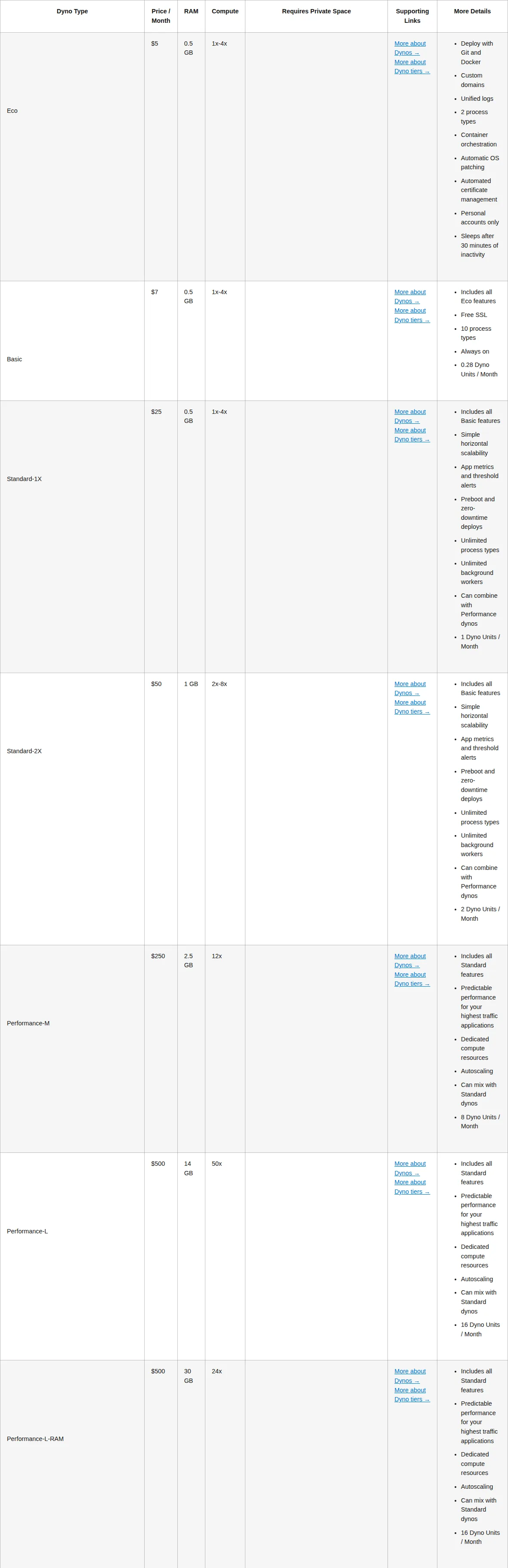
Heroku prices compute as dynos. Eco is the floor at 5 dollars and sleeps after 30 minutes of inactivity; Basic at 7 is the cheapest always-on dyno and adds free SSL. Private dynos run 125 to 1,500 dollars, Shield 150 to 1,800, all requiring a Private Space. No separate outbound bandwidth charge is listed for dynos.
| Dyno | Price / month | RAM | What it adds |
|---|---|---|---|
| Eco | 5 dollars | 0.5 GB | Sleeps after 30 minutes of inactivity |
| Basic | 7 dollars | 0.5 GB | Always on, free SSL |
| Standard-1X | 25 dollars | 0.5 GB | Preboot, zero-downtime deploys, threshold alerts |
| Standard-2X | 50 dollars | 1 GB | Unlimited process types and workers |
| Performance-M | 250 dollars | 2.5 GB | Dedicated compute, autoscaling |
| Performance-L | 500 dollars | 14 GB | Dedicated compute, autoscaling |
Heroku Postgres: Essential-0 5 dollars (1 GB disk, 20 connections), Essential-1 9 (10 GB), Essential-2 20 (32 GB); Standard-0 50 (4 GB RAM, dedicated), Standard-2 200 (8 GB). Fir-generation families — General Purpose 2CPU-4GB 80 dollars, Compute 2CPU-4GB 150, Memory 1CPU-8GB 100 — all require a Private Space, whose price the page does not state.
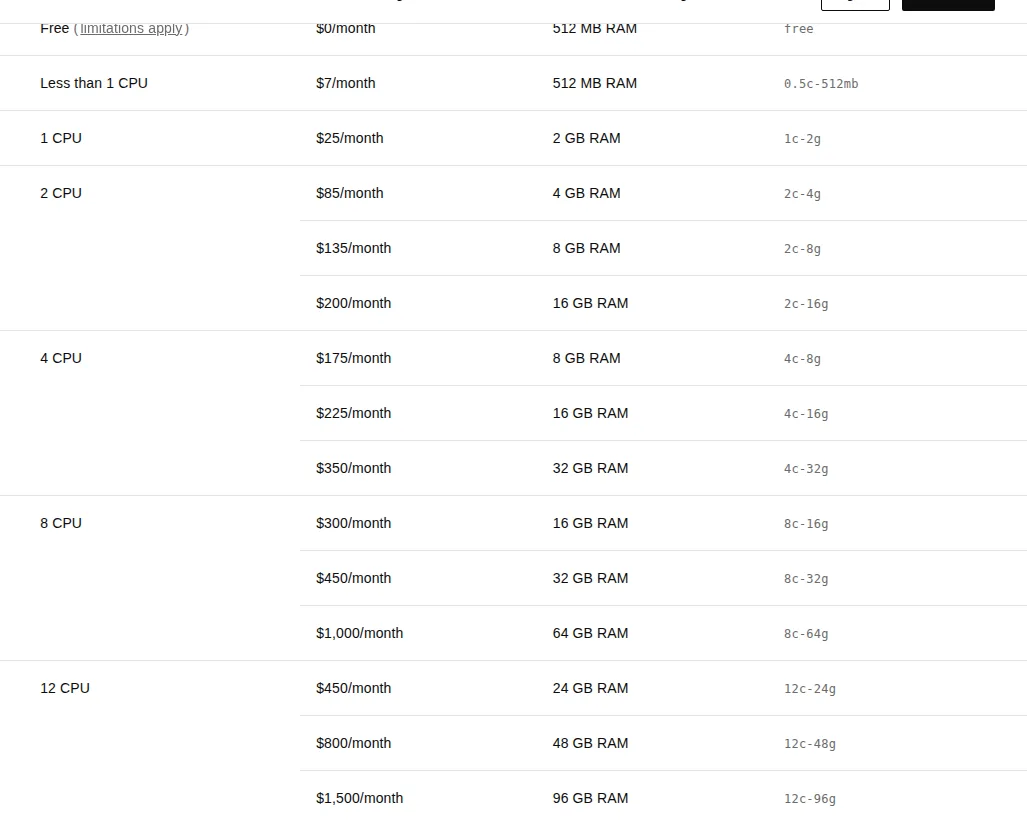
Render splits the bill in two: workspace plus compute — Hobby 0 dollars, Pro 25, Scale 499, Enterprise quoted. Web services are priced by size, as are background workers, private services, and cron jobs. Bandwidth: 5 GB included on Hobby, 25 GB on Pro, 1 TB on Scale, then 0.15 dollars per GB. Build minutes: 500 a month on Hobby, 1,000 on Pro, 5,000 on Scale, then 5 dollars per 1,000 minutes.
| Instance | Price / month | RAM | CPUs |
|---|---|---|---|
| Free | 0 dollars | 512 MB | Less than 1, limitations apply |
| 0.5c-512mb | 7 dollars | 512 MB | Less than 1 |
| 1c-2g | 25 dollars | 2 GB | 1 |
| 2c-4g | 85 dollars | 4 GB | 2 |
| 4c-8g | 175 dollars | 8 GB | 4 |
| 12c-96g | 1,500 dollars | 96 GB | 12 |
Render Postgres: 6 dollars for 256 MB, 19 for 1 GB, 55 for 4 GB, 100 for 8 GB, up to 11,000 for 1,024 GB. Autoscaling is a Pro feature, AWS Private Links arrive on Pro, and contractual uptime SLAs are reserved for Enterprise.
DigitalOcean removed the tier names: Basic and Professional are gone, surviving only under a legacy-plans section for existing apps. App Platform now prices modular container instances by API slug; only dedicated sizes autoscale, and the two cheapest shared sizes cannot scale at all. The free tier covers static sites only (three apps, 1 GiB outbound each); each extra static-site app costs 3 dollars a month. Extra outbound transfer is 0.02 dollars per GiB, inbound is free, and allowances pool across all apps. A development database costs 7 dollars a month per 512 MB. Billing is per second with a one-minute minimum; renaming restarts the 28-day billing count. For raw virtual servers, see DigitalOcean vs Linode vs Vultr.
| Container | Price / month | RAM | Transfer / month |
|---|---|---|---|
| apps-s-1vcpu-0.5gb | 5 dollars | 512 MiB | 50 GiB, shared, no scaling |
| apps-s-1vcpu-1gb | 12 dollars | 1 GiB | 150 GiB, shared, manual scaling |
| apps-s-1vcpu-2gb | 25 dollars | 2 GiB | 200 GiB, shared, manual scaling |
| apps-d-2vcpu-4gb | 78 dollars | 4 GiB | 500 GiB, dedicated, autoscaling |
| apps-d-8vcpu-32gb | 392 dollars | 32 GiB | 900 GiB, dedicated, autoscaling |
The modeling rules
All prices are US dollars before tax, as published November 21, 2026. One web instance means one dyno, one Render service, or one DigitalOcean container; a worker is priced like a web instance. Every workload assumes the app serves HTTP traffic against a SQL database over a TCP connection. Each workload's database is the smallest paid tier meeting the RAM class. Render meters bandwidth in GB, DigitalOcean in GiB; the 7.4 percent gap changes no verdict, so totals treat them as equal. Heroku totals carry no bandwidth line: the pricing page lists no separate outbound bandwidth charge for dynos. DigitalOcean totals carry the 7 dollar development database instead of a production-grade managed Postgres, unverified from a primary source this cycle.
W1: the side project
One always-on web instance around 512 MB of RAM, the smallest paid Postgres, and 5 GB of outbound traffic. Heroku: Basic 7 + Essential-0 5. Render: 0.5c-512mb 7 + Postgres 19, on free Hobby. DigitalOcean: apps-s-1vcpu-0.5gb 5 + dev database 7. Heroku Eco at 5 dollars would cut the total to 10, but Eco sleeps after 30 minutes.
Heroku and DigitalOcean tie at 12 dollars; Render costs 2.17 times as much, and the entire gap is the database — 19 dollars against 5 and 7. At hobby size the compute is a commodity and the database is the decision.
W2: the growing SaaS
Two web instances at 2 GB and one CPU each, one worker at 1 GB, a 4 GB Postgres, and 100 GB of outbound traffic. Heroku: two Standard-2X (100) + one Standard-1X worker (25) + Postgres Standard-0 (50). Render: two 1c-2g (50) + one 0.5c-512mb worker (7) + Postgres 55 + 95 GB over the Hobby allowance at 0.15 dollars per GB (14.25). DigitalOcean: two apps-s-1vcpu-2gb (50) + one apps-s-1vcpu-1gb worker (12) + dev database 7, with 100 GiB inside the 550 GiB pooled allowance.
Flag: the 7 dollars buys a 512 MB development database, not the 4 GB Postgres the others include. On compute alone: Heroku 125 dollars, DigitalOcean 62, Render 57 — Render is the cheapest compute here, and its 55 dollar Postgres is the cheapest production-grade database. See also Railway vs Render vs Fly.io.
W3: production scale
Four web instances at 2 CPUs and 4 GB each, two workers at the same size, an 8 GB Postgres, and 500 GB of outbound traffic, with autoscaling mandatory. Heroku: six Performance-M (1,500) + Postgres Standard-2 (200). Render: six 2c-4g (510) + Postgres 100 + Pro workspace 25 + 475 GB over the Pro allowance at 0.15 dollars per GB (71.25). DigitalOcean: six apps-d-2vcpu-4gb (468) + dev database 7, with 500 GiB inside the 3,000 GiB pooled allowance. The dedicated size is required here because shared containers do not autoscale.
Annualised: Heroku 20,400 dollars, Render 8,475, DigitalOcean 5,700 — a 14,700 dollar Heroku premium over DigitalOcean. Flag again: a production Postgres is excluded from the 475 dollars — add it before comparing with Render's 706.25.
The breakeven lines
First, price per gigabyte of RAM: Heroku Standard-2X is 50 dollars per GB, Render 1c-2g and DigitalOcean apps-s-1vcpu-2gb are 12.50 — a four-times gap that holds across the card, with Performance-M at 100 dollars per GB against 21.25 for Render 2c-4g and 19.50 for DigitalOcean apps-d-2vcpu-4gb.
Second, one Performance-M at 250 dollars buys 3.21 DigitalOcean dedicated 2 vCPU and 4 GB instances at 78 dollars each, each carrying more RAM — 4 GB against 2.5 GB.
Third, bandwidth: Render charges 0.15 dollars per GB over its allowance, DigitalOcean 0.02 per GiB — a 7.5 times difference, or 75 dollars against 10 at 500 GB over allowance.
Fourth, the Render Pro fee: 25 dollars a month adds 20 GB of included bandwidth, worth 3 dollars at the overage rate. It never repays itself in bandwidth; it buys autoscaling, full-stack previews, unlimited services, and AWS Private Links. Run your own numbers with the break-even calculator first. Smallest breakeven of all: Heroku Basic costs 2 dollars a month more than Eco, or 24 dollars a year, for always-on plus free SSL.
The decision table
| Decision dimension | Heroku | Render | DigitalOcean App Platform | Authority |
|---|---|---|---|---|
| Cheapest hobby app, W1 | 12.00 dollars, tied | 26.00 dollars | 12.00 dollars, tied | Vendor pages, Nov 21 2026 |
| Cheapest growing compute, W2 | 125.00 dollars | 57.00 dollars | 62.00 dollars | Vendor pages, Nov 21 2026 |
| Cheapest at production scale, W3 | 1,700.00 dollars | 706.25 dollars | 475.00 dollars, database excluded | Vendor pages, Nov 21 2026 |
| Autoscaling entry point | Performance-M, 250 dollars | Pro workspace, 25 dollars | Dedicated container, 29 dollars | Vendor pages, Nov 21 2026 |
| Database entry | Postgres Essential-0, 5 dollars | Postgres 256 MB, 6 dollars | Development database, 7 dollars | Vendor pages, Nov 21 2026 |
Founder & CEO Insight — Enow A. Jovial
Who should not use which
Do not put an app that must answer its first request on Heroku Eco: it sleeps after 30 minutes. Do not scale on DigitalOcean shared containers and expect autoscaling: only dedicated sizes autoscale, and the two cheapest shared sizes cannot even be scaled manually. Do not run production on Render Hobby: no autoscaling, 5 GB of bandwidth, single-service previews only. Do not treat the DigitalOcean development database as production Postgres: 512 MB, hourly billing, limited capabilities, usable only from its own app. Do not choose Heroku Performance dynos on price alone: at 250 dollars per instance they are the dearest compute here, and they earn their keep only when preboot deploys, threshold alerts, and the add-on ecosystem are worth the 14,700 dollar annual gap.
The costs the rate card hides
Render build minutes run 500 a month on Hobby, 1,000 on Pro, and 5,000 on Scale, then 5 dollars per 1,000 minutes — a team deploying ten times a day on a slow build will feel this before it feels compute. Persistent disks cost 0.25 dollars per GB a month, Postgres storage expands at 0.30 dollars per GB, and Key-Value Store starts at 3 dollars on Heroku against 10 dollars on Render. Migration is the largest hidden cost: all three accept Docker containers and deploy from Git, so the application moves, but the data does not move itself — Render offers logical exports on paid Postgres, Heroku offers fork-and-follow on Standard tiers and above, and DNS cutover, TLS reissue, and connection-string rotation need a maintenance window, not an afternoon. See also Vercel vs Railway vs Render.
Execution checklist
- Measure RAM, CPU, and egress over a week of traffic.
- Price that profile on all three vendors with the formulas above.
- Deploy staging on the cheapest tier and prove the build.
- Cut traffic over with DNS, then delete the old service.
- [x] Measure first: record steady-state RAM and CPU over a week of traffic, then pick the smallest size with 30 percent headroom.
- [x] Price the database separately: it decides W1 and W2 more than compute does.
- [x] Add the bandwidth line: outbound traffic over the allowance costs 0.15 dollars per GB on Render, 0.02 dollars per GiB on DigitalOcean.
- [x] Check the autoscaling tier: Performance on Heroku, Pro workspace on Render, dedicated containers on DigitalOcean.
- [x] Deploy staging on the cheapest tier: prove the build, the TCP database connection, the JSON app spec, and DNS cutover on Eco, Free, or a 5 dollar container.
- [x] Set billing alerts on day one: at 50 and 100 percent of the expected total.
- [x] Re-price every quarter: DigitalOcean removed its tiers and Render repriced by size in 2026.
The verdict is a map, not a winner. Hobby: 12 dollars on Heroku or DigitalOcean, 26 on Render. Growing: 175, 126.25, 69 with a database flag. Production: 1,700, 706.25, 475 with the same flag. Choose by the meter that matches your workload.