DigitalOcean vs Linode vs Vultr: VPS Pricing Playbook
A virtual private server bill is a meter reading, not a price tag. DigitalOcean Droplets, Linode shared and dedicated CPU plans, and Vultr Cloud Compute all sell the same raw shape — a slice of CPU, a fixed amount of RAM, local SSD, and a monthly transfer allowance — yet the same 1 vCPU, 2 GB server costs $10.00 a month on one vendor and $12.00 on the other two, and the ranking flips again when traffic passes about 7 TB a month.
This playbook prices all three from the vendors' own pricing pages and public APIs, opened and read on 8 November 2026, and rebuilds the monthly bill at three stated profiles. Two Linode figures are corroborated secondary, not vendor-page reads — the $0.005 per GB overage rate and the $0.10 per GB block storage rate — because Linode's pricing page returns a 403 to automated requests from this network.
Shared CPU, dedicated CPU, and the three catalogues
The first choice is not a vendor but a CPU type. A shared vCPU is a thread on a host CPU that other tenants also use, and a busy neighbour can take cycles you wanted. A dedicated vCPU is reserved for your instance alone. DigitalOcean's Basic Droplets are shared CPU; its CPU-Optimized and General Purpose Droplets are dedicated. Linode splits the same way, with Shared CPU plans from the $5 Nanode up to 32 GB and Dedicated CPU plans costing about 50% more for the same RAM. Vultr's Regular Performance plans are shared CPU on previous-generation Intel hardware with regular SSD; its High Performance plans move to AMD EPYC or Intel Xeon CPUs with NVMe SSD.
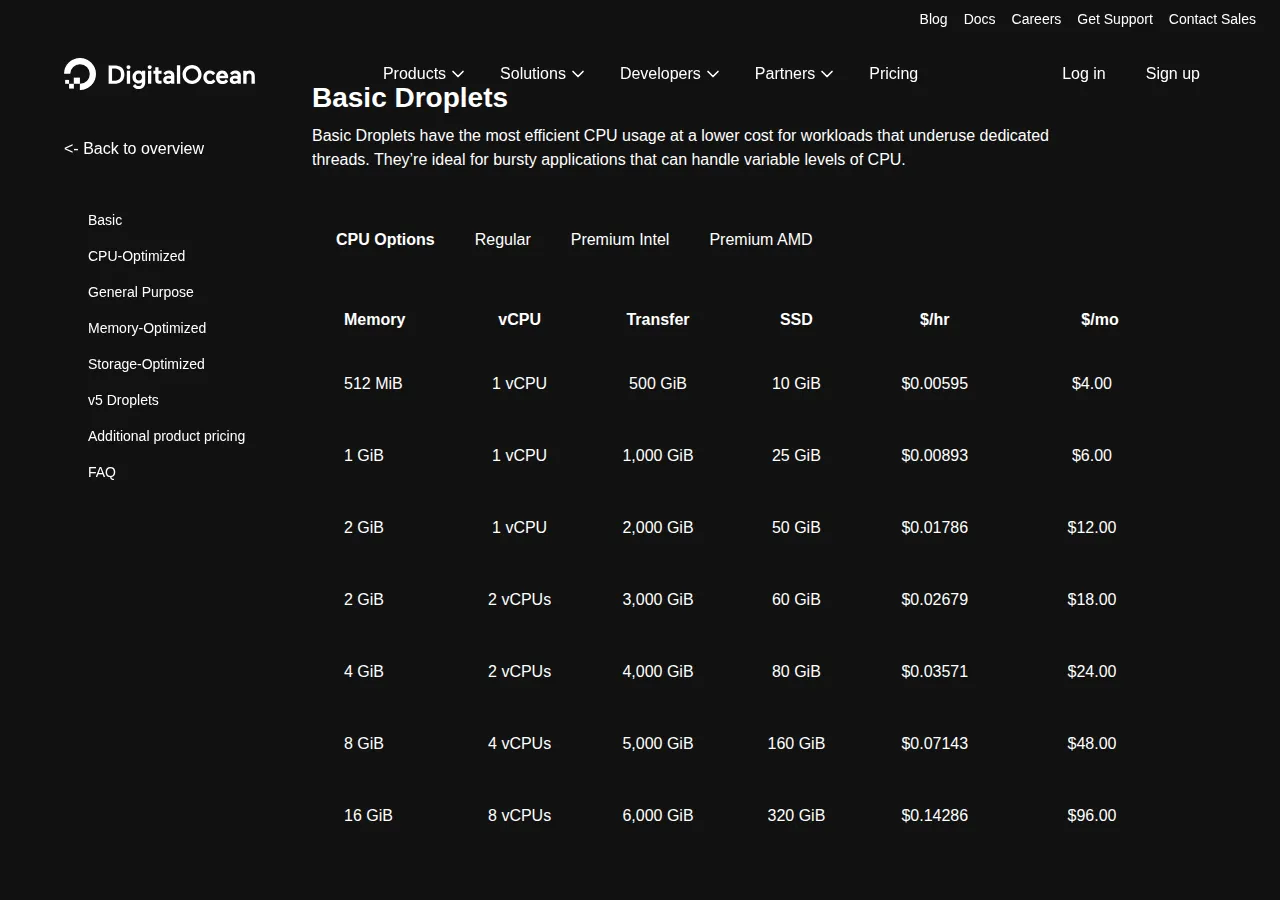
DigitalOcean's Basic Droplets run from 1 vCPU and 512 MiB of RAM for $4.00 a month to 8 vCPUs and 16 GiB for $96.00; CPU-Optimized, General Purpose, Memory-Optimized, and Storage-Optimized Droplets cover the dedicated shapes. Linode, sold as Akamai Cloud, runs from the Nanode at $5.00 a month (1 vCPU, 1 GB RAM, 25 GB disk, 1,000 GB transfer) through Shared CPU plans at $12.00, $24.00, and $48.00 for 2, 4, and 8 GB, with Dedicated CPU at $36.00, $72.00, and $144.00 for the same RAM. Vultr's Regular Performance Cloud Compute is the cheapest shelf here: $5.00, $10.00, $20.00, $40.00, and $160.00 for 1 GB, 2 GB, 4 GB, 8 GB, and 32 GB. Its High Performance tiers cost more per size — 8 vCPUs and 16 GB for $96.00 — and buy newer CPUs with NVMe storage.
The per-unit price table
Block storage costs the same everywhere; the differences sit in compute per gigabyte of RAM and in the overage rate.
| Meter | DigitalOcean | Linode | Vultr | Authority |
|---|---|---|---|---|
| 1 vCPU / 2 GB, per month | $12.00 | $12.00 | $10.00 | Vendor pricing pages, vendor APIs |
| 1 GB RAM, per month, at the 2 GB plan | $6.00 | $6.00 | $5.00 | Derived arithmetic |
| 1 GB block storage, per month | $0.10 | $0.10 | $0.10 | Vendor docs, pricing page |
| 1 GB snapshot, per month | $0.06 | $0.10 | $0.05 | Vendor docs, pricing page |
| Backups | 20% weekly, 30% daily | Per-plan, $2.50 at 2 GB | 20% of base fee | Vendor docs, vendor API |
| 1 GB outbound overage | $0.01 per GiB | $0.005 per GB | $0.01 per GB | Vendor docs, pricing page |
| Transfer included, 2 vCPU / 4 GB plan | 4,000 GiB | 4,000 GB | 5,120 GB (3,072 + 2 TB pool) | Vendor pricing pages, vendor API |
The per-gigabyte RAM price is flat at $6.00 on DigitalOcean and Linode up to 16 GB, while Vultr holds $5.00 per GB on its Regular plans — the whole of Vultr's small-plan lead. And watch the units: DigitalOcean bills transfer in GiB, so its 4,000 GiB allowance is about 4,295 GB, the most generous of the three at the 2 vCPU tier.
Free credits and the billing rules that change the bill
Linode's pricing page offers a $100 promotional credit for 60 days; DigitalOcean's pricing FAQ describes a $5 free credit valid for 90 days. Vultr's pricing page lists no trial credit.
DigitalOcean bundled Droplets bill per second with a minimum charge of 60 seconds or $0.01, and usage is capped at 672 hours — 28 days — per month. Linode bills hourly, rounded up to the nearest hour, with a monthly cap. All three pool transfer at the account or team level.
One rule catches new operators every year: stopping a server does not stop its bill. DigitalOcean's documentation states that bundled-plan Droplets are still billed when powered off, because the compute resources stay reserved; billing ends only when the Droplet is destroyed. Linode's FAQ gives the same answer. Budget for the destroy step, not the power-off step.
The monthly bill formula
Four lines make the whole bill: compute, block storage at $0.10 per gigabyte on all three vendors, overage past the allowance, and backups.
Overage is zero until the allowance is exhausted, then it grows linearly with every gigabyte past it:
Part-month work uses the hourly rate. Ten days of a 2 vCPU, 4 GB server — 240 hours — costs $8.57 on DigitalOcean at $0.03571 per hour, $8.64 on Linode at $0.036 per hour, and $6.48 on Vultr at the API's $0.027 per hour; Vultr's pricing page displays that rate rounded to $0.03. The formula for a partial month is:
Worked example: three profiles, priced to the cent
Profile A — small always-on site: 1 vCPU, 2 GB RAM, 100 GB of egress a month, disk included in the plan.
| Profile A: 1 vCPU / 2 GB, always-on | DigitalOcean | Linode | Vultr |
|---|---|---|---|
| Compute | $12.00 | $12.00 | $10.00 |
| Extra block storage | $0.00 | $0.00 | $0.00 |
| Egress (100 GB) | $0.00 | $0.00 | $0.00 |
| Monthly total | $12.00 | $12.00 | $10.00 |
Vultr wins by $2.00 a month, $24.00 a year: $5.00 per GB of RAM against $6.00 on the other two.
Profile B — production app: 2 vCPU, 4 GB RAM, 500 GB of egress, 50 GB of extra block storage.
| Profile B: 2 vCPU / 4 GB, always-on | DigitalOcean | Linode | Vultr |
|---|---|---|---|
| Compute | $24.00 | $24.00 | $20.00 |
| Block storage (50 GB) | $5.00 | $5.00 | $5.00 |
| Egress (500 GB) | $0.00 | $0.00 | $0.00 |
| Monthly total | $29.00 | $29.00 | $25.00 |
Vultr wins again by $4.00 a month, $48.00 a year; egress is free on all three here.
Profile C — large box: 8 vCPU, 16 GB RAM, 5,000 GB of egress, 200 GB of extra block storage, weekly backups on.
| Profile C: 8 vCPU / 16 GB, backups on | DigitalOcean | Linode | Vultr |
|---|---|---|---|
| Compute | $96.00 | $144.00 | $96.00 |
| Block storage (200 GB) | $20.00 | $20.00 | $20.00 |
| Backups | $19.20 | $20.00 | $19.20 |
| Egress (5,000 GB) | $0.00 | $0.00 | $0.00 |
| Monthly total | $135.20 | $184.00 | $135.20 |
DigitalOcean and Vultr tie at $135.20, and Linode costs $48.80 more — 36% above the leaders. The plans are the closest match at this shape: DigitalOcean Basic 8 vCPU, 16 GiB at $96.00, Linode Dedicated 8 vCPU, 16 GB at $144.00, Vultr High Performance AMD 8 vCPU, 16 GB at $96.00.
Bandwidth: where the lead changes hands
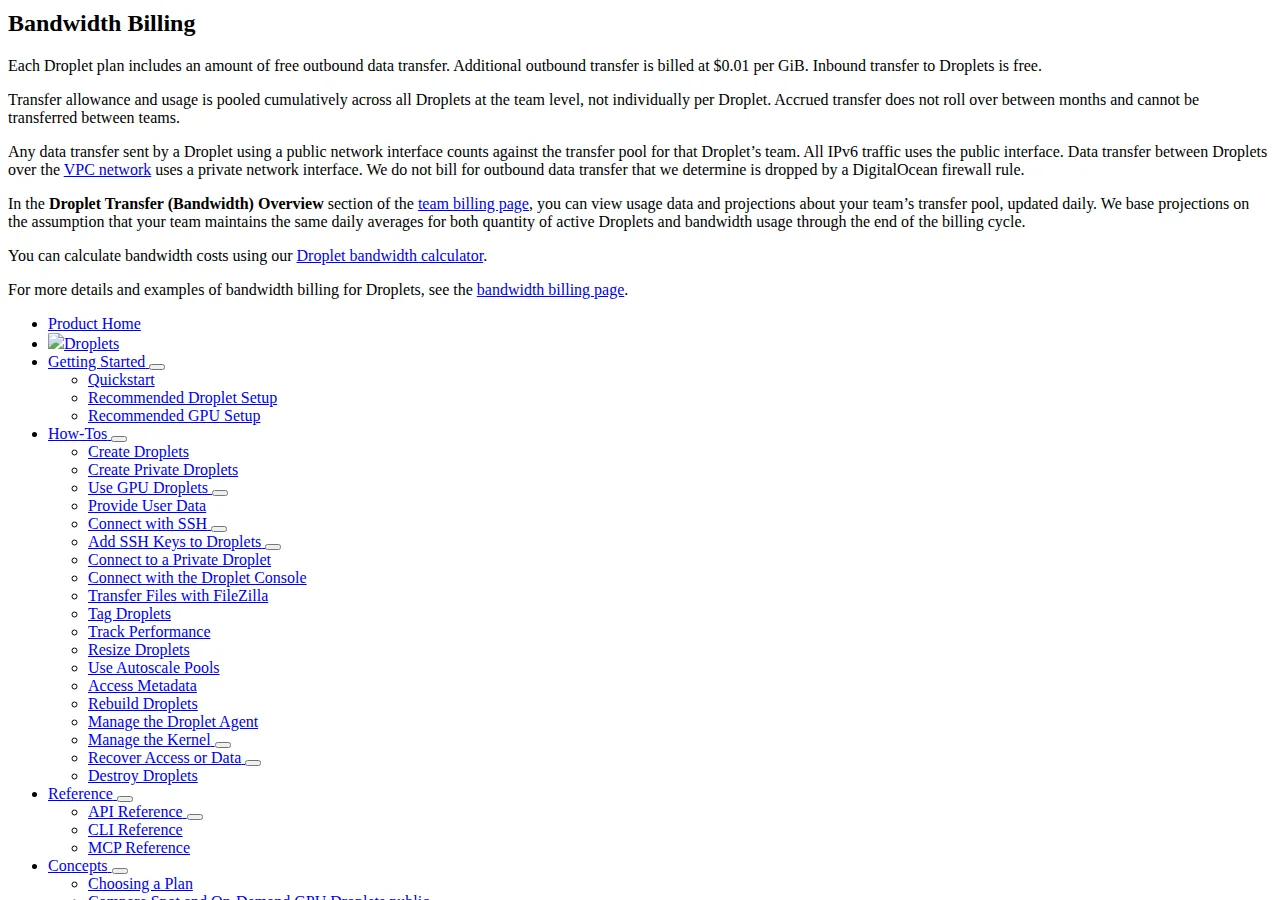
No profile above pays overage, because the allowances are generous — 2,000 GiB or more at every profile priced here. One thousand gigabytes past the allowance costs $10.00 on DigitalOcean at $0.01 per GiB, $10.00 on Vultr at $0.01 per GB, and $5.00 on Linode at the corroborated $0.005 per GB rate.
At Profile B, Vultr's bill stays at $25.00 until its effective allowance runs out — the 3,072 GB plan allowance plus Vultr's 2 TB monthly free pool, 5,120 GB in total. DigitalOcean's 4,000 GiB allowance is about 4,295 GB and Linode's is 4,000 GB, so both start paying overage first. Vultr and Linode cross where their bills are equal:
Below about 7,040 GB of monthly egress, Vultr is cheapest at Profile B. At 5,000 GB, Vultr still totals $25.00 against Linode's $34.00 and DigitalOcean's $36.05. Past 7,040 GB, Linode's halved overage rate takes the lead: at 8,000 GB, Linode totals $49.00 against Vultr's $53.80 and DigitalOcean's $66.05.
Inbound transfer is free everywhere.
Block storage, snapshots, and backups
All three vendors charge $0.10 per GB per month for block storage — DigitalOcean Volumes at $0.10 per GiB, Linode Block Storage at $0.10 per GB, Vultr Block Storage at $1.00 per 10 GB. A 200 GB volume costs $20.00 a month on any of them. The differentiator is behaviour: DigitalOcean charges for a volume whether or not it is attached, so a detached volume keeps billing until destroyed.
A 100 GB snapshot held for a month costs $6.00 on DigitalOcean at $0.06 per GB, $5.00 on Vultr at $0.05 per GB, and $10.00 on Linode at the corroborated $0.10 per GB image rate. Snapshots are on-demand disk images, not backups: they capture a point in time. Automated backups are the product that restores itself — DigitalOcean charges 20% of the Droplet price for weekly backups or 30% for daily, Vultr adds 20% to the base fee, and Linode charges a flat per-plan fee from its API, $2.00 on the Nanode and $20.00 on the dedicated 8 vCPU plan.
The decision, by shape
| Your shape | Pick | Why |
|---|---|---|
| Small always-on site, light traffic | Vultr Regular | $10.00 beats $12.00 at the same shape |
| Production app, traffic under ~7 TB | Vultr Regular | Cheapest until the 7,040 GB crossover |
| Production app, traffic over ~7 TB | Linode Shared | $0.005 per GB overage halves the excess bill |
| Large box, fixed shape, backups on | DigitalOcean or Vultr | Tied at $135.20 on 8 vCPU, 16 GB |
| Steady load needing reserved CPU | Linode Dedicated | Dedicated vCPU, no neighbour contention |
| Static site or object-heavy workload | None of the three | Price object storage instead |
Who should not buy here
A plain VPS is the wrong product in four cases. If the workload needs a managed database with point-in-time recovery and automated failover, buy the vendor's managed database. If the workload needs a GPU, none of these CPU plans apply; DigitalOcean sells GPU Droplets separately, starting at $2.59 per hour for an AMD MI300X. If the app must run Windows, Vultr charges extra for the Windows licence on top of the plan price. If the workload must stay inside one region, check the region price first: Linode's API lists the Nanode at $5.00 in most regions, $6.00 in Jakarta, and $7.00 in São Paulo.
A numbered workflow to pick and prove it
- Write down the profile first: vCPU, RAM, disk gigabytes, monthly egress, and running hours.
- Price the profile on all three vendors with the formula above, and keep the arithmetic in a spreadsheet.
- Check the region price: Linode and Vultr both vary prices by data centre.
- Deploy the same workload to the two cheapest vendors for a week, then compare the invoices to the forecast line by line.
- Test the destroy path: confirm that destroying the instance ends billing, and that powering it off does not.
- Add storage, snapshots, and backups to the forecast: a 20% backup surcharge and a $20.00 volume change the ranking.
- Set a billing alert on day one, at 50% and 80% of the forecast, and re-price every quarter.
The invoice is a deductible business expense for an LLC, S-Corp, or C-Corp. Keep the EIN on the billing profile, pay by card or ACH, and export the usage CSV each month so a disputed charge can be traced to a specific instance and day.
For the neighbouring options, compare the Railway vs Render vs Fly.io PaaS hosting pricing playbook if the workload fits a platform instead of a raw server, and the AWS EC2 vs Google Compute Engine vs Azure VM pricing guide if the workload needs a hyperscaler. For object storage pricing, see the Cloudflare R2 vs AWS S3 vs Backblaze B2 object storage pricing guide. Run the totals through the website cost calculator.
Founder & CEO Insight — Enow A. Jovial
Vultr is cheapest under about 7 TB a month; Linode is cheapest once overage dominates. Write the profile, run the formula, read one real invoice — and the server that fits is the one to pay.