GitHub vs GitLab vs Bitbucket: Code Hosting Pricing Playbook
A code host is the one subscription a software team cannot cancel without a migration project. The repository holds the source, the history, the pull requests, and the secrets. Switching hosts later means moving all of it. The per-seat price is the least important number until you have done the arithmetic. The real cost is seat price times headcount, plus storage, plus the security tier compliance requires, plus included CI minutes.
This guide prices GitHub, GitLab, and Bitbucket, the three leading hosted code platforms. Every price below was read from the vendor's own pricing page on 2026-11-12. Two figures in older comparisons are wrong now: GitLab Ultimate publishes no per-seat price, and Bitbucket Standard is $3.65, not $3.
Who This Guide Is For, and Who Should Skip It
This guide is for the person who signs the software budget: a founder, an engineering manager, or a CTO choosing the host for a team of 5 to 100 developers. It assumes the team writes code in Git and needs private repositories on a hosted cloud plan.
Skip it if you are a solo developer on a public open source project: all three vendors charge $0 for that. Skip it too if your team has standardized on a vendor's wider platform.
Founder & CEO Insight — Enow A. Jovial
The Three Tiers at a Glance
Every figure was verified on the vendor pricing page on 2026-11-12.
| Vendor | Free tier | Mid tier | Top tier | Authority |
|---|---|---|---|---|
| GitHub | $0 | Team, $4 per user per month | Enterprise, $21 per user per month | github.com/pricing |
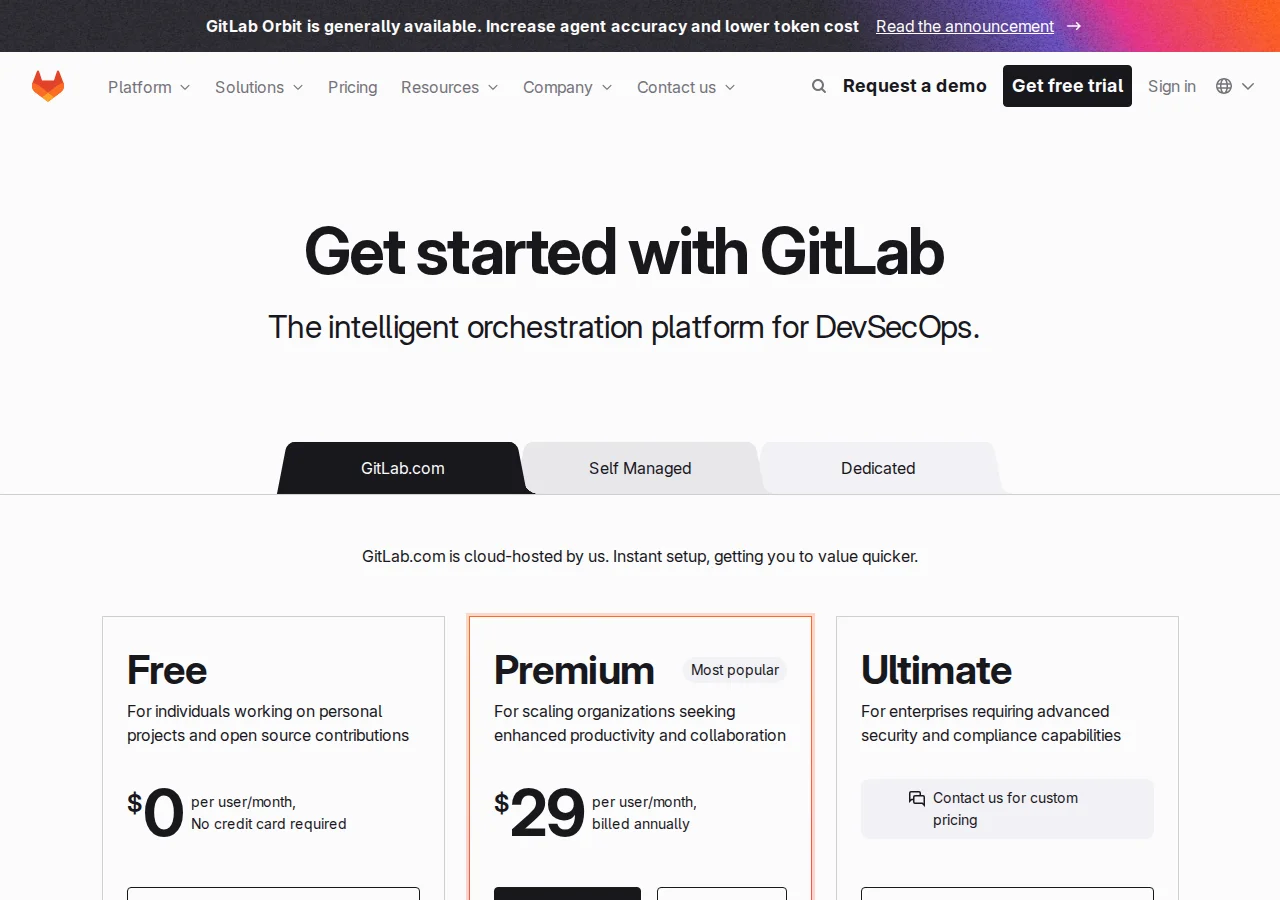
| GitLab | $0, 5 users per top-level group | Premium, $29 per user per month, billed annually | Ultimate, custom pricing on request | about.gitlab.com/pricing |
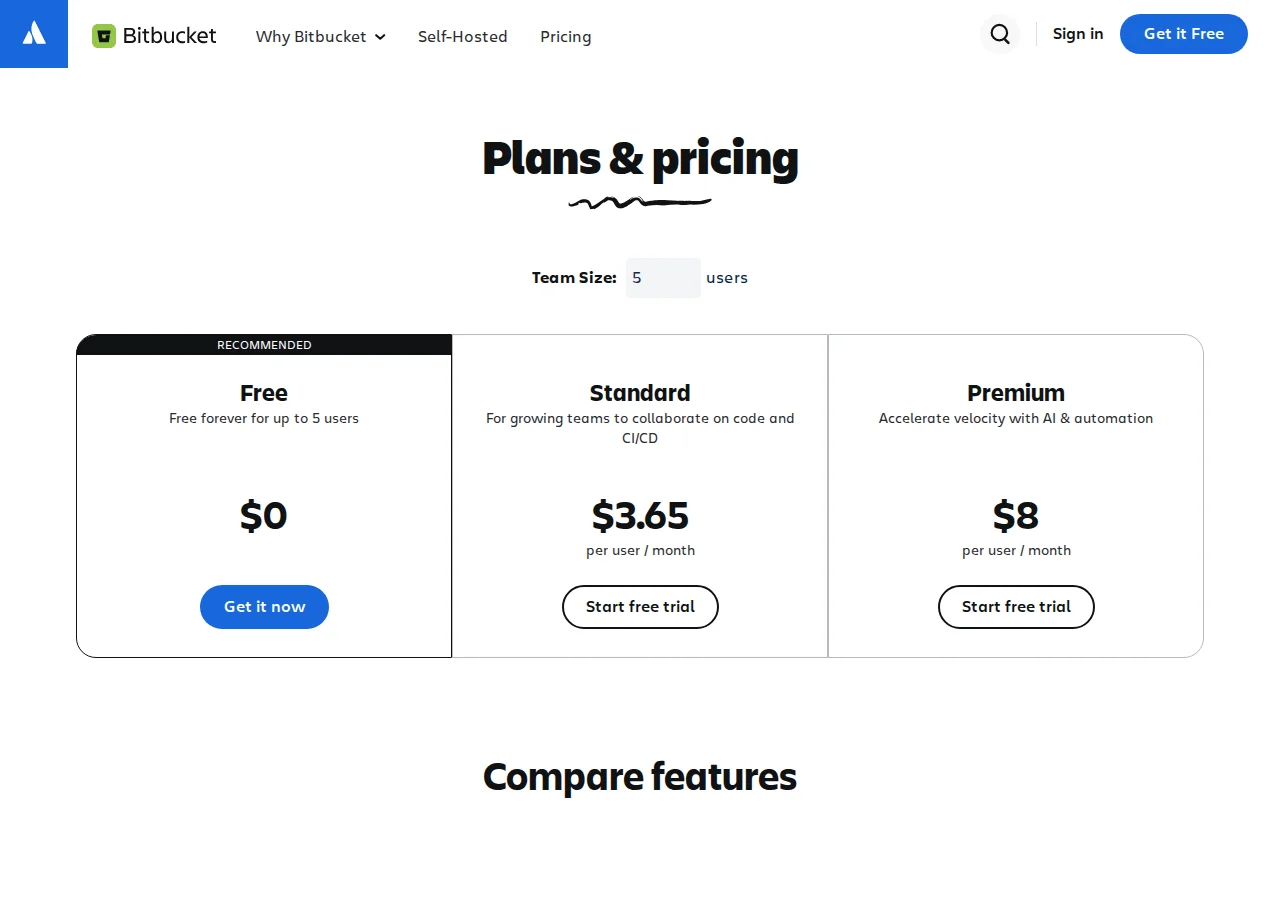
| Bitbucket | $0, up to 5 users | Standard, $3.65 per user per month | Premium, $8 per user per month | bitbucket.org/product/pricing |
Three facts: the spread between the cheapest and most expensive published paid seat is nearly eightfold ($3.65 against $29); GitLab Premium costs more per seat than GitHub Enterprise; and Bitbucket Premium at $8 undercuts GitHub Enterprise.
GitHub: The Default, Priced by the Seat
GitHub Free costs $0: unlimited public and private repositories, Dependabot updates, 2,000 Actions minutes a month, and 500 MB of Packages storage.
Team costs $4 per user per month, adding code owners, required reviewers, draft pull requests, Pages and Wikis, environment secrets, and Secret Protection. It raises included Actions minutes to 3,000 per month and Packages storage to 2 GB, and at $48 per user per year it is the cheapest paid tier here after Bitbucket Standard.
Enterprise costs $21 per user per month, adding SAML single sign-on, advanced auditing, the audit log API, GitHub Connect, SOC reports, and a FedRAMP Tailored ATO, plus 50,000 Actions minutes and 50 GB of Packages storage a month. It is the compliance tier.
The gap to watch is Advanced Security: a paid add-on, metered per active committer, with no per-committer rate on the pricing page or in the billing documentation opened for this guide, so no dollar figure for it appears below. Price Team plus the add-on, not Team alone, if you need code scanning. Large files go through Git LFS, metered with a free allowance; the docs state no quota in gigabytes.
GitLab: One Platform, Enterprise Money at the Mid Tier
GitLab Free costs $0, capped at 5 users per top-level group, with 400 compute minutes a month, 10 GiB of storage, and static application security testing included. A sixth developer forces a decision: pay, split the group, or move.
Premium costs $29 per user per month, billed annually. It removes the user cap, raises compute minutes to 10,000 a month and storage to 500 GiB per project, and adds advanced CI/CD, project management, SLA management, and priority support, plus $12 of GitLab Credits per user per month at $1 per credit.
Ultimate has no published per-seat price; the tier card says "Contact us for custom pricing." It adds application security testing, supply chain security, vulnerability management, and compliance and governance, with 50,000 compute minutes a month and $24 of included credits. Request a written quote and compare it against GitHub Enterprise at $21.
Free projects get 10 GiB total of combined Git repository and LFS usage per project. Premium and Ultimate projects get a fixed 500 GiB per project, and buying storage does not raise a single project's ceiling. Extra storage costs $5 a month per 10 GiB, billed annually. A team with one very large monorepo cannot buy its way past 500 GiB on GitLab.com.
Bitbucket: The Cheapest Paid Seats, With a Jira-Shaped Catch
Bitbucket Free costs $0 for up to 5 users, with unlimited public and private repositories, 1 GB of LFS storage, and 50 build minutes for Pipelines. Standard costs $3.65 per user per month and Premium costs $8. Both paid tiers keep unlimited repositories, with 1 GB of LFS storage plus 1 GB per repository.
Premium adds enforced merge checks, IP allowlisting, deployment permissions, and required two-step verification. Deployment permissions decide who can push to production, and that control costs $8 per seat instead of $21 on GitHub Enterprise or an unpublished quote on GitLab Ultimate.
The catch is the ecosystem: Bitbucket is an Atlassian product, and its best integrations point at Jira and Confluence. A team on another tracker gets a capable Git host with a thinner integration catalog than GitHub's marketplace. Metered extras are the cheapest here: $10 a month buys 1,000 more build minutes or 100 GB of storage.
The Math: What 5, 25, and 100 Developers Actually Pay
Seat prices are monthly, but budgets are annual.
Annual cost per seat: GitHub Team $48, GitHub Enterprise $252, GitLab Premium $348, Bitbucket Standard $43.80, Bitbucket Premium $96.
| Team size | GitHub Team | GitHub Enterprise | GitLab Premium | Bitbucket Standard | Bitbucket Premium | Authority |
|---|---|---|---|---|---|---|
| 5 developers, monthly | $20 | $105 | $145 | $18.25 | $40 | Vendor pages |
| 5 developers, annual | $240 | $1,260 | $1,740 | $219 | $480 | Vendor pages |
| 25 developers, monthly | $100 | $525 | $725 | $91.25 | $200 | Vendor pages |
| 25 developers, annual | $1,200 | $6,300 | $8,700 | $1,095 | $2,400 | Vendor pages |
| 100 developers, monthly | $400 | $2,100 | $2,900 | $365 | $800 | Vendor pages |
| 100 developers, annual | $4,800 | $25,200 | $34,800 | $4,380 | $9,600 | Vendor pages |
GitLab Premium costs $30,000 more per year than GitHub Team at 100 developers, and $9,600 more than GitHub Enterprise. Bitbucket Standard saves $420 a year against GitHub Team at 100 developers. Bitbucket Premium costs exactly twice GitHub Team per seat, while adding deployment permissions GitHub only sells at Enterprise prices. Run the same period through the Break-Even Analysis Calculator before deciding.
The Math: Storage Costs Five Times More on GitLab's Meter
GitLab sells extra storage at $5 a month per 10 GiB; Bitbucket sells 100 GB for $10 a month.
GitLab's rate is $5 divided by 10 GiB: $0.50 per GiB per month ($6.00 per GiB per year). Bitbucket's is $10 divided by 100 GB: $0.10 per GB per month ($1.20 per GB per year). GitLab's metered storage costs five times Bitbucket's per gigabyte. A year of 100 GB extra costs $600 on GitLab against $120 on Bitbucket.
The Math: The Break-Even That Does Not Exist
At what team size does GitLab Premium become cheaper than GitHub Team? It never does: both prices are linear per seat, so GitLab Premium costs $25 more per user per month than GitHub Team and $8 more than GitHub Enterprise at every headcount. There is no crossover point.
At 104 developers the gap is $9,984 a year; at 105 it is $10,080. In reverse, at 100 developers Bitbucket Premium saves $15,600 a year against GitHub Enterprise and $25,200 against GitLab Premium.
Security and Governance per Tier
This guide makes no claim about GitLab SAML SSO or SCIM placement, because the pricing page text opened for this guide does not state it.
| Capability | GitHub | GitLab | Bitbucket | Authority |
|---|---|---|---|---|
| Secret scanning | Team | Free | Not stated | github.com/pricing |
| SAML single sign-on | Enterprise only | Not stated | Not stated | github.com/pricing |
| Code scanning | Paid add-on | Free (SAST included) | Not stated | Vendor pages |
| Deployment permissions | Team | Premium | Premium only | Vendor pages |
| IP allowlisting | Enterprise only | Not stated | Premium only | Vendor pages |
| Enforced merge checks | Team | Premium | Premium only | Vendor pages |
If your checklist requires SAML SSO, GitHub's answer costs $21 a seat; get a written quote for GitLab Ultimate and Atlassian Access to price the other two. If it requires only deployment permissions and IP allowlisting, Bitbucket Premium at $8 is the cheapest compliant seat here. If it requires code scanning, get both quotes in writing: neither price is public.
Included CI Minutes: A Line Item, Not a Price
GitHub includes 2,000 Actions minutes a month on Free, 3,000 on Team, and 50,000 on Enterprise; GitLab includes 400 compute minutes a month on Free, 10,000 on Premium, and 50,000 on Ultimate; Bitbucket Free includes 50 build minutes. No overage rate is printed here: neither pricing page excerpt states one. The companion guide, CI/CD pricing comparison, prices overage and runners in full.
Migration Checklist: Switching Hosts Without Losing History
Moving a code host is a migration project. Do not cancel the old host until the last item is checked.
- [x] Inventory every repository: list all repositories, and record size and LFS usage.
- [x] Audit the seat list: count billable users and remove dormant accounts.
- [x] Map branch protection and code owners: export branch protection rules, CODEOWNERS files, and merge queues, then recreate them.
- [x] Move secrets and variables: rotate every secret rather than copying it.
- [x] Re-point runners and deployments: move self-hosted runners and run one full pipeline.
- [x] Migrate history with verification: mirror each repository with full history, and compare commit counts and tags.
- [x] Update every integration: re-point the issue tracker, status checks, and artifact registry, then run a test release.
- [x] Freeze and cut over: announce a freeze window, take a final mirror, and keep the old host read-only for 30 days.
Which Host for Which Team
A team of 5 should start with Bitbucket Standard at $3.65 or GitHub Team at $4; the annual difference is $21. A team of 25 that needs deployment permissions and merge checks should price GitHub Team at $4 first — $1,200 a year — with Bitbucket Premium at $8 ($2,400 a year) as the alternative if the Atlassian stack matters; both undercut GitHub Enterprise ($6,300 a year) and GitLab Premium ($8,700 a year) at this size. A team of 100 that needs SAML SSO and advanced auditing should price GitHub Enterprise at $21 against a written GitLab Ultimate quote. A team that wants one platform for code, CI/CD, and security scanning should price GitLab Premium at $29 and justify its $30,000 annual premium over GitHub Team at 100 developers. For code review, see AI code review with GitHub Actions, and for monitoring, see Datadog vs Grafana Cloud vs New Relic pricing.
The repository is the deployment in GitOps — our Argo CD vs Flux vs JayeX playbook compares the three tools that turn pushes into production. Your CI pipeline runs the E2E suite — price the runners in Playwright vs Cypress vs Puppeteer before picking a host.