GitHub Actions vs GitLab CI vs CircleCI: CI/CD Pricing — The Operator's Playbook
Three vendors sell the same minute three different ways. GitHub Actions sells dollars of included compute and deducts per-minute rates. GitLab CI sells compute minutes, a unit that multiplies wall-clock time by a cost factor set by machine size. CircleCI sells credits, and every resource class, seat, and feature draws from the same bucket. This playbook converts each vendor's published pricing to a common unit and prices three stated minute profiles.
At the standard 2-vCPU Linux machine, GitHub and CircleCI charge the same marginal rate once the free allowance is gone: six tenths of a cent per minute. GitLab's add-on minute is a cent — $0.01 per compute minute — so its marginal rate is two-thirds higher before the cost factor even applies. The bill is decided by the included allowance, the seat floor, and the multipliers on bigger machines. All prices are list prices as published on 6 November 2026.
Who this is for — and who should stop here
This guide is for the person who approves or pays the CI bill: a founder running a small team on hosted runners, an engineering manager forecasting platform spend, or an operator choosing a vendor before the first pipeline exists. You need your own numbers: monthly pipeline minutes, how many people commit, and whether any job needs macOS, Windows, or a GPU — without them, every price here is a guess wearing a dollar sign.
Stop here if you run everything on self-hosted runners. GitHub charges nothing for self-hosted compute beyond the plan, GitLab's compute minutes do not apply to your own runners, and CircleCI charges no per-minute fee on self-hosted runners. Stop here too if your pipelines run only on public repositories: GitHub Actions is free there, and GitLab's open-source program gives qualifying public projects free Ultimate licences with 50,000 compute minutes a month. Negotiated enterprise contracts, GitLab Ultimate, and CircleCI Scale are not priced here.
How GitHub Actions meters: dollars, not minutes
GitHub expresses the allowance as money: $12 a month on Free, $18 on Pro and Team, $300 on Enterprise Cloud, resetting each cycle. Every job deducts its cost at the runner's per-minute rate. The standard Linux 2-core runner costs $0.006 a minute, so Team's allowance buys 3,000 Linux minutes, Free's buys 2,000, and Enterprise's buys 50,000 — a figure GitHub states as a guide. The 1-core Linux runner costs $0.002 a minute, Arm64 Linux $0.005, Windows $0.010, and macOS $0.062, more than ten times the Linux rate. Standard runners are free in public repositories, for GitHub Pages, and for Dependabot.
Storage bills separately in GB-hours: 500 MB of shared artifact storage on Free, 1 GB on Pro, 2 GB on Team, and 50 GB on Enterprise, with overage at $0.25 per GB per month for shared storage and $0.07 for cache, plus a separate 10 GB cache allowance per repository. Concurrency is a hard ceiling: 20 concurrent jobs on Free, 40 on Pro, 60 on Team, and 500 on Enterprise, with macOS capped at 5 on the lower plans and 50 on Enterprise. A hosted job can run up to 6 hours, and a workflow run up to 35 days. Larger runners bill at higher per-minute rates set by machine size, and their cost can draw from the included compute usage on Team and Enterprise Cloud — while standard runners are free in public repositories, larger runners are billed there too. GitHub's own worked example: 5,000 minutes split as 3,000 Linux and 2,000 Windows costs $38, because 3,000 at $0.006 is $18 and 2,000 at $0.010 is $20.
How GitLab CI meters: compute minutes and cost factors
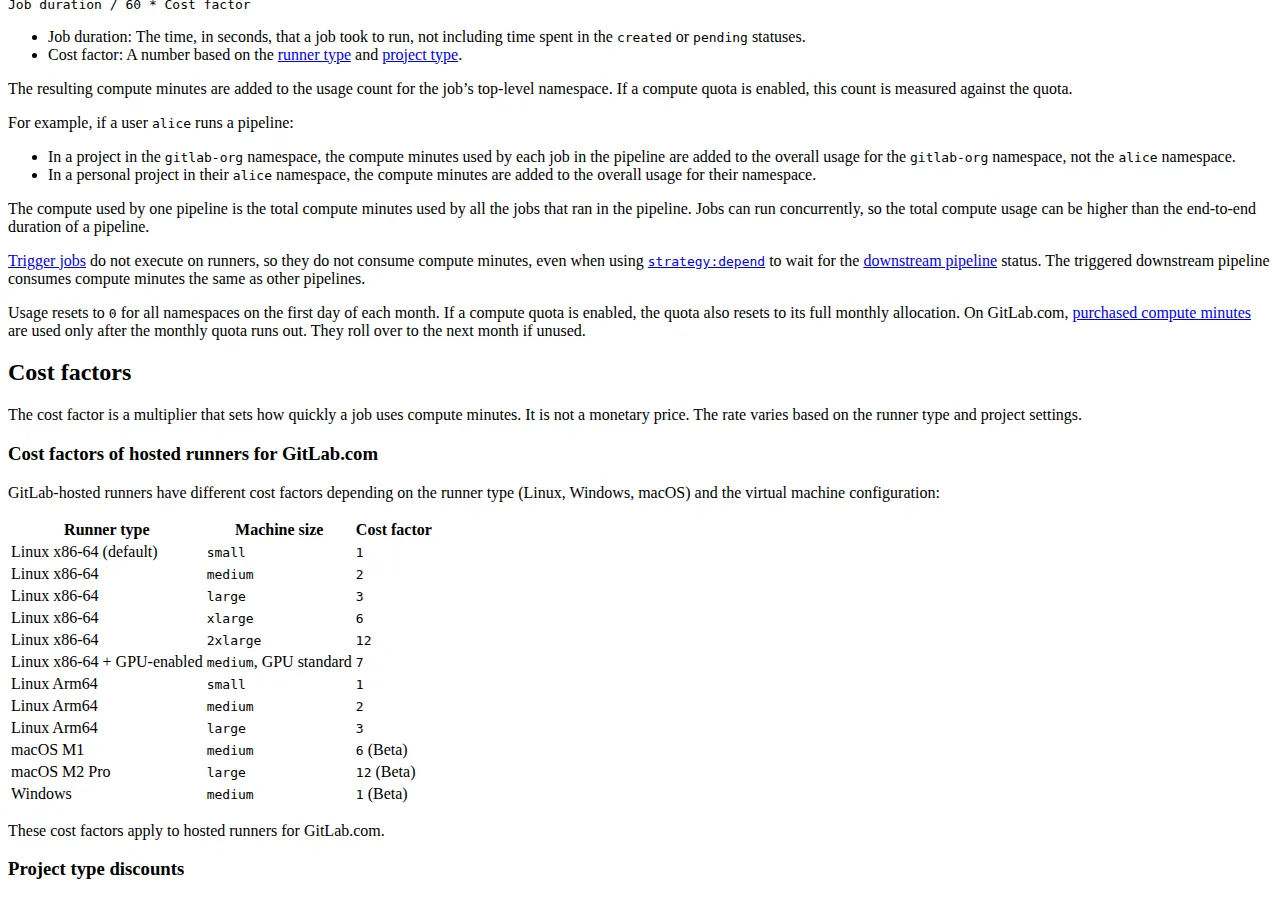
GitLab sells compute minutes: each job's consumption is its duration multiplied by a cost factor set by runner type and machine size. Small Linux has a factor of 1. Medium Linux costs 2, large 3, xlarge 6, and 2xlarge 12; Arm64 follows the same 1, 2, 3 ladder. Windows medium carries a factor of 1, while macOS is expensive by design: M1 medium is 6 and M2 Pro large is 12. A ten-minute macOS job on the M2 Pro burns 120 compute minutes.
Allowances are per group, not per user. Free includes 400 compute minutes a month, Premium 10,000, and Ultimate 50,000. Free is capped at 5 users per top-level group with private visibility. Premium costs $29 per user per month billed annually; Ultimate is custom pricing. Extra minutes sell as an add-on at $10 per 1,000 minutes, or $0.01 per compute minute — a cent a minute on the small Linux runner once the allowance is gone, against GitHub's $0.006. The escape hatch is real: your own runners consume no compute minutes, on any plan.
How CircleCI meters: credits for everything
CircleCI's unit is the credit, and nearly everything consumes it: compute, seats, Docker Layer Caching, IP ranges, network, and storage. Free costs $0 a month and includes 30,000 credits, up to 5 active users, and 30x concurrency — 6,000 build minutes on the small Docker resource class. Performance starts at $15 a month, includes the same 30,000 credits, covers 5 active users with additional users at $15 a month, and allows 80x concurrency. Scale is custom priced and billed annually. Additional credits cost $15 per 25,000, so one credit costs $0.0006. Paid credits roll over and expire after a year; free-plan credits expire monthly and never roll over.
The price list sets the burn rate per resource class. Docker on x86 Gen 1 costs 5 credits a minute for small, 10 for medium, 15 for medium-plus, 20 for large, 40 for x-large, 80 for 2x-large, and 100 for 2x-large-plus; Gen 2 runs a 20 percent premium at every size. At $0.0006 a credit, Docker Medium costs $0.006 a minute — exactly GitHub's Linux 2-core rate — and Docker Small costs $0.003. The 6,000-minute headline holds only on the smallest machine; the same credits buy 3,000 minutes on Medium.

Per-use features bill separately: Docker Layer Caching is 200 credits per job run ($0.12), IP ranges 450 credits per GB, and network and storage beyond the included thresholds 420 credits per GB ($0.252). A Performance seat consumes 25,000 credits a month. A resource class left on large instead of medium doubles the burn, and caching left on for a thousand short jobs can cost more than the compute it was meant to save.
Who pays, and how the bill is booked
The CI invoice lands on whoever holds the company card. The vendor invoice carries the company's legal name and EIN, and the CPA who closes the books records the spend as operating expense under GAAP. Whether the company is an LLC, an S-Corp, or a C-Corp changes nothing about the meter, but it changes who approves the spend. Finance teams pull usage through the vendor API into a CSV and split it in their SaaS spend tool. Security review runs on a different track: the vendor's SOC 2 report, not its price list, decides whether the platform may touch the codebase.
> [!KEY TAKEAWAY]
> GitHub and CircleCI charge the same $0.006 a minute for a standard 2-vCPU Linux job; GitLab's add-on minute is $0.01. The bill is decided by the included allowance, the seat floor, and the multipliers on bigger machines — not by the headline rate.
The decision table
| Question | GitHub Actions | GitLab CI | CircleCI | Authority |
| --- | --- | --- | --- | --- |
| Free allowance, standard Linux | $12 included, 2,000 min | 400 compute min | 30,000 credits, 3,000 Medium min | GitHub docs; GitLab pricing; CircleCI pricing |
| Marginal Linux 2-vCPU rate | $0.006 / min | $0.01 / compute min | $0.006 / min (10 credits) | GitHub docs; GitLab pricing; CircleCI price list |
| macOS marginal rate | $0.062 / min | $0.06 / wall min at factor 6 | $0.12 / min, M4 Pro Medium | GitHub docs; GitLab docs; CircleCI price list |
| Seat floor | Plan fee plus seat | $29 / user / mo, Premium | $15 / mo base, $15 per extra user | GitLab pricing; CircleCI pricing |
| Concurrency ceiling | 20 Free, 60 Team, 500 Enterprise | Not stated on pricing page | 30x Free, 80x Performance | GitHub limits docs; CircleCI pricing |
| Own-runner escape | Free of per-minute charges | Unlimited, no minutes consumed | No per-minute charge, egress billed | GitLab docs; CircleCI FAQ |
| Billing unit | Dollars of compute | Compute minutes | Credits | GitHub docs; GitLab pricing; CircleCI pricing |
The exposed math
CircleCI's credit price is $15 per 25,000 credits, and Docker Medium burns 10 credits a minute:
$
\text{CircleCI Medium} = 10 \times \frac{\$15}{25{,}000} = 10 \times \$0.0006 = \$0.006\ \text{per minute}
$
GitHub's Linux 2-core runner is $0.006 a minute, and GitLab's add-on minute is $10 per 1,000, or $0.01 a compute minute. Free-tier ceilings in common units: GitHub Free buys $12 divided by $0.006, or 2,000 Linux minutes; GitLab Free states 400 compute minutes; CircleCI Free buys 30,000 credits divided by 5 credits a minute on small Docker, or 6,000 minutes, and half that on Medium:
$
\text{CircleCI Free (Medium)} = \frac{30{,}000\ \text{credits}}{10\ \text{credits/min}} = 3{,}000\ \text{minutes}
$
Worked example: three profiles, three bills
Price three monthly volumes for a team of ten on 2-vCPU Linux: GitHub on Team ($18 allowance), GitLab on Premium ($29 a user, 10,000 included minutes), CircleCI on Performance ($15 a month, 30,000 included credits), with no storage overage.
At 5,000 minutes a month, GitHub bills the 2,000 minutes beyond its 3,000 included at $0.006, which is $12. GitLab's 10,000 included minutes cover the volume, so the bill is the seat floor alone: ten users at $29 is $290. CircleCI burns 50,000 credits for 5,000 Medium minutes, holds 30,000 included, and must buy one 25,000-credit block at $15, for $30. The gap to CircleCI is exactly $18 at every volume here: both include 3,000 Linux minutes and charge $0.006 beyond them.
At 50,000 minutes a month, GitHub bills 47,000 minutes at $0.006, which is $282. GitLab bills 40,000 minutes beyond its allowance at $0.01, which is $400, plus $290 of seats, for $690. CircleCI needs 500,000 credits, holds 30,000, and must buy 470,000 more — 19 blocks at $15, or $285 — plus $15 base, for $300. Annualised: $3,384, $8,280, and $3,600 — a GitLab premium of $4,896 a year. At 500,000 minutes a month: GitHub bills 497,000 minutes for $2,982, GitLab bills 490,000 for $4,900 plus $290 of seats for $5,190, and CircleCI buys 199 blocks for $2,985 plus $15 for $3,000. Annualised: $35,784 against $62,280 against $36,000. The Enterprise check softens GitHub further: its $300 allowance covers 50,000 minutes, so at 500,000 minutes the overage is 450,000 minutes at $0.006, or $2,700.
A thousand Docker jobs a month with caching on costs $120 before compute, against $60 of Medium compute for the same jobs at ten minutes each — so caching pays only when it saves more than 20 minutes of Medium runtime per job. A thousand macOS wall minutes a month costs $62 on GitHub, $120 on CircleCI's M4 Pro Medium, and $60 on GitLab as add-on minutes at factor 6.
> [!WARNING]
> GitLab's $0.01 add-on minute looks close to GitHub's $0.006 until the cost factor applies: a macOS M2 Pro job at factor 12 costs $0.12 a wall minute in add-on minutes, and a 2xlarge Linux job at factor 12 does the same. Price the factor, not the minute.
The 5-step switch sequence
1. Measure your real volume first. Export one month of pipeline history, count wall-clock minutes by runner type, and separate macOS and Windows from Linux.
2. Convert the volume into each vendor's unit: divide Linux minutes by the free allowance, multiply macOS minutes by GitLab's cost factor of 6 or 12, and divide CircleCI credits by the resource class you actually use.
3. Run one representative pipeline on each finalist for a week, keeping the resource class fixed, and record the billed units next to the wall time.
4. Price the whole year: multiply the monthly bill by twelve, add the seat floor, and add one caching or storage line.
5. Switch the lowest-risk repository first and keep the old pipeline read-only for a month. Migrate the build definitions, secrets, and status checks together, and delete the old pipeline only after the new one has shipped a release.
> [!FOUNDER]
> "GitHub and CircleCI charge six tenths of a cent for the same Linux minute. The bill is never about the minute. It is about the allowance you were given, the seats you were forced to buy, and the multiplier you forgot to read. Price those three and the vendor chooses itself."
> — Enow A. Jovial, Founder & Chief Executive Officer
The execution checklist
1. Count last month's pipeline minutes by runner type, and the people who commit.
2. Convert the minutes into each vendor's unit using the rates in the decision table.
3. Check the free tier against your volume: GitHub 2,000 Linux minutes, GitLab 400 compute minutes, CircleCI 3,000 Medium minutes.
4. Price the seat floor separately from compute; GitHub's per-seat prices are not stated on the billing page opened for this guide.
5. Check the concurrency ceiling against your busiest hour, especially the macOS cap of 5 on GitHub's lower plans.
6. Price Docker Layer Caching per job before switching it on, and switch it off for short jobs.
7. Run one pipeline on the finalist for a week and reconcile the billed units against your estimate.
8. Put a monthly budget alert on the vendor's usage dashboard before the first paid invoice.
9. Re-price every quarter; the vendors revise these pages.
10. Keep the figures file beside the decision memo, so the next reader can re-perform every number.
What the free tiers actually buy
None of the three free tiers survives a team of ten running a real test suite: price the paid tier on day one and treat the free tier as a trial with a known expiry. GitHub Free buys 2,000 Linux minutes a month plus unlimited public-repository builds. GitLab Free buys 400 compute minutes and five private users. CircleCI Free buys 6,000 small-Docker minutes or 3,000 Medium minutes. The profit calculator models the margin behind the decision. The Docker versus Kubernetes versus Amazon ECS pricing guide prices the infrastructure the pipelines deploy into, and the Terraform versus Pulumi versus AWS CDK pricing guide prices the tooling that provisions it. The automated pull-request QA with GitHub Actions covers what Actions does beyond minutes.
> [!TIP]
> Put your own runners behind GitLab before you pay for minutes: the escape hatch is unlimited on every plan, and one spare machine can erase a four-figure annual compute bill.