Playwright vs Cypress vs Puppeteer: E2E Testing Pricing, Parallel Runs & Browser Matrix
Two of these three tools have no price. Playwright is free under the Apache License 2.0, and Puppeteer is a free library with no vendor behind it. Cypress is also free as a runner under the MIT License — but its paid dashboard, Cypress Cloud, meters every recorded test result. This playbook prices all three from their own pages, read on 2026-11-13: a small suite (300 tests, 20 runs a month, one browser) and a large suite (1,000 tests, 40 runs a month, three browsers).
What each tool actually is — and what it meters
Playwright is a full test framework from Microsoft: a test runner with auto-waiting, web-first assertions, tracing, and parallelism across Chromium, Firefox, and WebKit. It runs on the CI runners a team already pays for. What costs money is the optional managed runner, Playwright Workspaces inside Azure App Testing, which bills per test minute on cloud-hosted browsers.
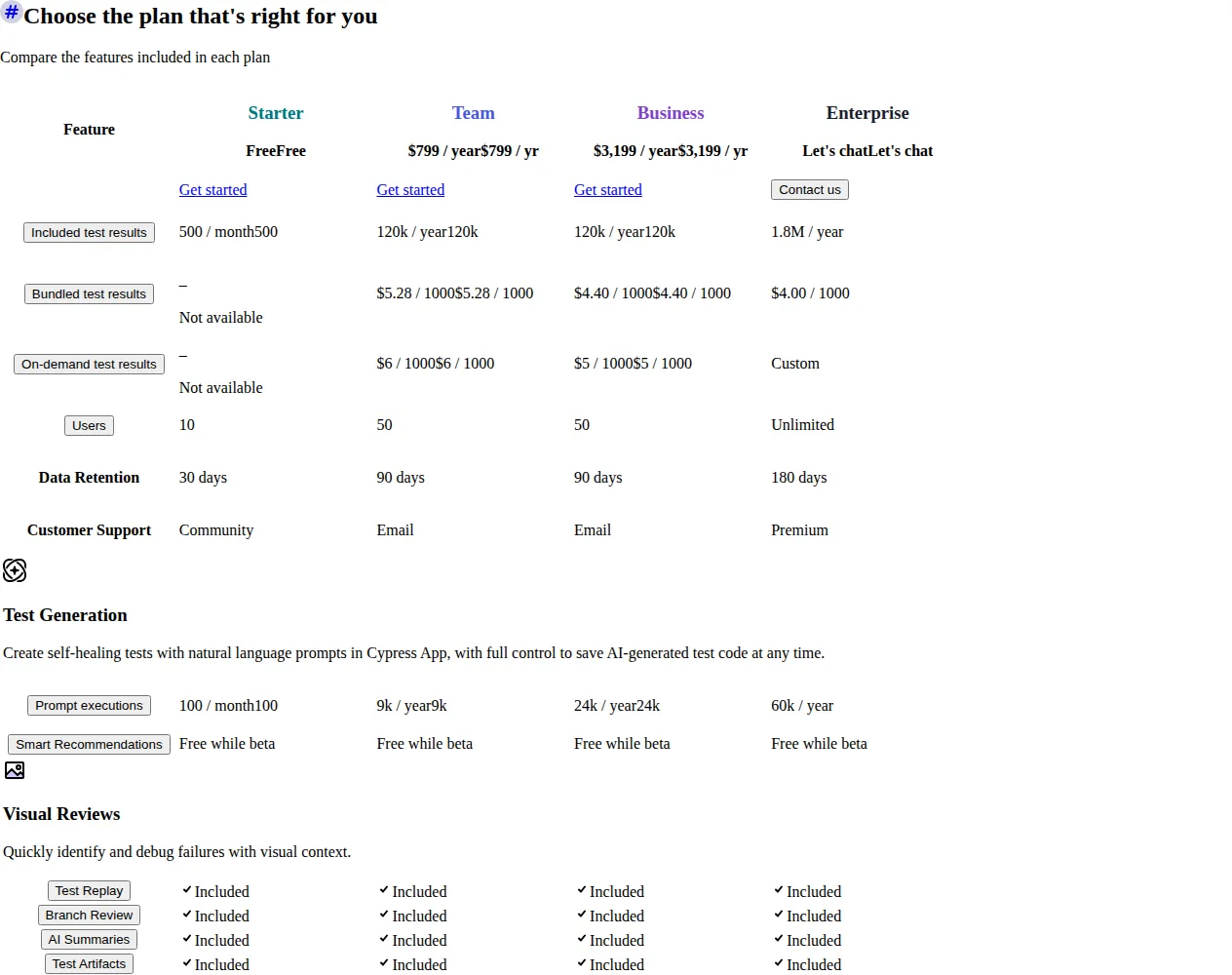
Cypress is two products. Cypress App is the free, open-source test runner under the MIT License. Cypress Cloud is the paid SaaS dashboard on top of it: recorded runs, Test Replay, and flake detection. Cloud meters test results — each run of an individual it() function recorded with the --record flag; local runs and skipped tests are not counted, and retries count as one result. Starter is free: 10 users, 500 test results a month, 30-day retention. Team is $67 a month billed annually ($799 a year): 50 users, 120,000 results a year, 90-day retention. Business is $267 a month billed annually ($3,199 a year): the same 50 users and 120,000 results, plus Smart Orchestration, spec prioritization, and SSO. Enterprise is custom pricing: unlimited users, 1,800,000 results a year, 180-day retention. Annual billing saves 11% against monthly billing.
Puppeteer is neither a framework nor a service. It is a JavaScript library that provides a high-level API to control Chrome or Firefox over the DevTools Protocol or WebDriver BiDi, running headless by default. It ships no test runner, no assertions, no dashboard, and no cloud — you bring your own runner, machines, and reporting. There is no price: the cost is whatever your CI compute costs, and the maintenance is yours.
Founder & CEO Insight — Enow A. Jovial
The decision table
| Factor | Playwright | Cypress | Puppeteer |
|---|---|---|---|
| Licence | Free, Apache 2.0 | App free, MIT; Cloud paid | Free library, no vendor |
| What you pay for | Cloud test minutes (optional) | Recorded test results | CI compute only |
| Entry paid tier | $0.01/min Linux, $0.02/min Windows | Team $67/mo billed annually | None exists |
| Browsers | Chromium, Firefox, WebKit | Chrome-family, Firefox, WebKit (experimental) | Chrome, Firefox only |
| Parallel runs | Built in, shard across machines | Needs Cloud recording | You build it yourself |
| Free tier ceiling | None; 100 trial minutes on Azure | 500 results/mo, 10 users, 30-day retention | None — no meter at all |
| Authority | playwright.dev; Azure | cypress.io/pricing | pptr.dev |
Worked cost math: Playwright
The meter is the test minute: total browser time across all tests, billed by the second. Microsoft's example on the pricing page is 50 tests at 12 seconds each, billed as 10 test minutes. The rates come from Microsoft's retail price data, read on 2026-11-13: $0.01 per Linux test minute and $0.02 per Windows test minute in US regions. Rates vary by region. The first workspace gets a 30-day trial covering the first 100 test minutes; after that, every minute is metered.
Scenario A — 300 tests, 12 seconds each, 20 runs a month, one browser.
Scenario B — 1,000 tests, 15 seconds each, 40 runs a month, three browsers.
Self-hosted, both scenarios cost $0 in Playwright fees — the bill is your CI provider's runner rate. The only number Microsoft publishes is the cloud-browser rate.
Run the $12 total through the Business Profit Margin Calculator before you commit.
Worked cost math: Cypress
Cypress prices results, not minutes. In Scenario A, 300 tests run 20 times a month is 6,000 results a month, or 72,000 a year — 12 times Starter's 500 a month, so Starter cannot hold the suite, but comfortably inside Team's 120,000 a year.
Scenario B is where the meter bites: each test runs in three browsers and each browser run records its own results, so 1,000 tests run 40 times a month is 120,000 results a month — 1,440,000 a year, twelve times the included allowance. The excess is 1,320,000 results; on-demand extras cost $6 per 1,000 on Team and $5 on Business.
Note the inversion: Business costs more than Team here, because both tiers include the same 120,000 results — Business charges $3,199 for features, not results. Bulk pre-buying trims it: bundled rates of $5.28 per 1,000 on Team and $4.40 on Business put Scenario B at $647.38 and $750.58 a month. At 1.44 million results a year the honest conversation is Enterprise: 1,800,000 results a year at custom pricing.
Worked cost math: Puppeteer
There is no Puppeteer math to print, and that is the point. The library costs $0, there is no cloud runner to meter, and no dashboard to subscribe to. At both scenarios the licence line is $0 and the bill is the CI compute your runners consume, plus the engineering time to keep the suite green. The honest comparison is not Puppeteer versus a price, but Puppeteer versus the work the other two tools do for you: Playwright ships the runner, parallel execution, trace viewer, and reporting; Cypress Cloud ships recording, replay, and flake detection. With Puppeteer you build each of those yourself, and the cost lands on your team, not on an invoice.
Browser matrix: what each tool can actually cover
Playwright covers the full matrix from one API: Chromium, Firefox, and WebKit on Linux, macOS, and Windows, headless or headed. For Safari users, Playwright is the only tool here that tests the real WebKit engine without extra setup.
Cypress covers Chrome-family browsers (Chrome, Chrome for Testing, Chromium, Edge) and Firefox as its stable matrix, with WebKit only as an experiment: set experimentalWebKitSupport to true and install the playwright-webkit package, accepting that the docs call the support experimental. Electron, the old default, is deprecated and will be removed. Safari-heavy teams can use Cypress only through an experimental path that borrows Playwright's browser build.
Puppeteer covers Chrome and Firefox only, over the DevTools Protocol or WebDriver BiDi. There is no WebKit, no Safari, and no Edge-specific target. For a product split across Safari and Chrome, Puppeteer leaves the Safari half untested.
The Postman vs Insomnia vs Bruno playbook prices the API testing tools beside these three; the Sentry vs Rollbar vs Bugsnag comparison prices the error tracking that catches what a green E2E run hides.
Parallel runs: where the clock actually goes
Playwright runs tests in parallel by default across all configured browsers and shards across multiple machines, with no vendor ceiling — the ceiling is the number of CI machines you pay for. On Azure Workspaces the same parallelism applies, and the meter still counts total browser minutes.
Cypress parallelization needs a recorded Cloud run: pass the --record flag and a record key, and Cloud splits specs across CI machines. That makes parallelization a paid feature in practice, and load-balanced Smart Orchestration sits on the Business tier.
Puppeteer has no parallel runner. Parallelism is code you write: worker pools, sharded spec lists, and your own retry logic — or a test runner like Jest that supplies it. Picking Puppeteer for the $0 licence means budgeting the sprint that builds the runner Playwright ships by default.
Putting it together in a real pipeline
Our editorial analysis found the implementation shape matters more than the licence line. A typical B2B team wires the JS test suite into its CI/CD pipeline with a config file listing the projects — Chromium, Firefox, WebKit — and a JSON reporter writing one result file per run. The UI under test is driven through the tool's API, and the SDK each tool exposes is what the tests import: Playwright's runner and assertions, Cypress's cy commands, or Puppeteer's page handles. On a SaaS product, the same pipeline runs the suite against staging on every pull request and production on a schedule. None of that needs a paid tier on Playwright or Puppeteer; on Cypress it needs a recorded Cloud run.
Operator boundaries: who should not buy which
Playwright is the wrong buy for a team that needs a managed dashboard, flake analytics, and a support contract without building any of it. It is the right buy for any team that wants the full browser matrix, free parallelism, and a bill that scales with minutes rather than results.
Cypress is the wrong buy for a high-volume, multi-browser suite: Scenario B passes $700 a month while the same runs cost $300 on Playwright's Linux grid. It is the right buy for a team that values the Cypress App experience — time-travel debugging, Test Replay, flake detection — and whose suite stays inside the 120,000-a-year allowance.
Puppeteer is the wrong buy for a team that wants an E2E framework: it is a browser automation library, and the runner, assertions, parallelism, and reporting are all work you take on. It is the right buy for automation that is not testing — scraping, PDF generation, screenshots, scripted flows — where the Chrome-or-Firefox-only matrix is enough.
The failure mode no vendor price covers is flakiness: a suite that fails intermittently gets muted, then ignored, then deleted — and no runner, dashboard, or support contract rescues a suite the team no longer trusts. Budget the flake triage alongside the subscription, or the cheapest runner in this article is still money lost.
Run the decision
- Count the suite the vendor way: tests times runs times browsers, times 12 for the yearly Cypress count.
- Convert to test minutes for Playwright: tests times average seconds divided by 60, times runs, times browsers — then $0.01 for Linux or $0.02 for Windows.
- Price Cypress at your count: under 120,000 a year, Team is $67 a month; above it, add the excess at $6 per 1,000 on Team or $5 on Business.
- Check the browser matrix first: for Safari coverage, Playwright is the only stable WebKit option here.
- Price the Puppeteer build honestly: list the runner, parallelism, reporting, and flake triage you will build, and cost the sprints.
- Confirm the region rate: read the Azure rate for the region you will actually run in.
- Test the parallel run before you commit: run the suite sharded and confirm the time and the meter agree.
- Re-price every quarter at the current test, run, and browser counts.
Pre-publish checklist
- [x] Suite counted as tests times runs times browsers, not as tests alone
- [x] Playwright priced per test minute, region confirmed
- [x] Cypress priced at the recorded-result count, allowance checked
- [x] Browser matrix confirmed: WebKit stable only on Playwright
- [x] Puppeteer build cost listed as engineering time