Vite vs Webpack vs esbuild: The Bundler Performance Playbook
Every frontend team pays for its bundler twice: in waiting time, and in CI minutes. Vite serves source code on demand over native ES modules and pre-bundles dependencies once, so cold start stays near-instant. Webpack is the static module bundler that defined the category: it builds a dependency graph from entry points and emits bundles, with plugins and loaders for almost any requirement. esbuild is a linker written in Go that does one job — transform and bundle JavaScript and CSS — faster than anything else in common use, and deliberately refuses the rest. This playbook compares the three on five questions: cold start, HMR, bundle splitting, config surface, and CI-minute cost. Framework choice is a different question; see the Svelte vs Vue vs Angular playbook.
Three tools, three different jobs
Vite's model is the cleanest to explain. When it was created, browsers had just gained wide support for ES modules — JavaScript files loaded directly. Traditional tools processed the whole application upfront, so the larger the app, the longer the wait. Vite split the work: dependencies pre-bundled once; source served on demand, the browser loading only what the page needs. Vite once paired esbuild for development with Rollup for production; both are now unified into Rolldown, a Rust bundler using Oxc.
Webpack's model is older and more general. It builds a dependency graph from entry points and combines modules into bundles. Core concepts: entry, output, loaders, plugins and mode. Loaders transform file types Webpack cannot handle; plugins handle optimization, assets and environment injection. Since version 4.0.0 no config file is required, but its docs call it incredibly configurable.
esbuild's model is the narrowest by design. Its author calls it a linker for the web: it transforms and bundles JavaScript and CSS, and little else. Written in Go, it parallelises parsing and code generation, touching the JavaScript AST only three times. The FAQ states what will never enter the core: other frontend languages, type checking, a custom AST API, HMR, and module federation. That refusal is what makes the speed possible.
The comparison table
| Dimension | Vite | Webpack | esbuild | Authority |
|---|---|---|---|---|
| Dev server | On-demand ESM, deps pre-bundled | Bundles app before serving | None; build only | Vite; esbuild |
| HMR | Vue and React, under 50 ms | Via dev server | Not planned | Vite; esbuild |
| Production bundler | Rolldown (Rust, Oxc) | Webpack 5 | esbuild (Go) | Vite; Webpack |
| Code splitting | codeSplitting | Entries, SplitChunksPlugin, import() | Primitive | Vite; Webpack; esbuild |
| Type checking | Transpile only | Loaders or tsc | Not included | Vite; esbuild |
| Module federation | Via plugins | Built in | Not planned | Webpack; esbuild |
| Config surface | defineConfig | Entry, output, loaders, plugins | JS API, plugins | Vite; Webpack |
| Browser target | Chrome 111+ | ES5 browsers | Per-build | Vite; Webpack |
Vite and esbuild trade breadth for speed; Webpack trades speed for breadth. The choice depends on which column your team feels daily: old browsers or federation rule out the fastest tool, and twenty dev-server restarts a day rule out the slowest model.
Cold start and the HMR model
Cold start is the wait between starting the dev server and seeing the app. In a bundle-based dev server, the whole app is bundled before it can be served, so the wait grows with the codebase. Vite avoids the wait by not bundling in development: dependencies are pre-bundled once and strongly cached, source files transformed only when requested. The cost moves from startup to first page load — better for large codebases. The limit: very large codebases can see slow page loads from many unbundled requests; a full bundle mode is being explored.
HMR is where the three diverge most. Vite provides HMR over native ESM, with first-party Vue and React integrations, and its docs put updates under 50 milliseconds. State survives; the page does not reload. Webpack's dev server also supports HMR, but on the bundled model, so an edit rebuilds the affected graph first. esbuild has no HMR, and its FAQ says adding it is not planned. Raw esbuild as dev tooling means full page reloads, or a hand-built reload loop — fine for a small site, poor for a team that edits all day.
Production bundle splitting
One bundle is inefficient: nested imports mean extra round trips. Webpack splits most deliberately: manual entry points, SplitChunksPlugin, and dynamic import(). Its worked example: lodash in two entries, naive entry points emit two 553 KiB bundles with lodash duplicated; SplitChunksPlugin with chunks set to all extracts lodash into a 549 KiB vendor chunk, leaving app entries at 8.92 KiB and 8.8 KiB. Dynamic import() is the recommended route for lazy routes, and Webpack documents the failure mode: a chunk that fails to load throws a ChunkLoadError, usually from an unreachable chunk file or a wrong publicPath.
Vite's production splitting uses build.rolldownOptions.output.codeSplitting. When a deployment deletes old assets, a user on the old version can hit a failed dynamic import, surfaced as a vite:preloadError event the app can answer with a reload; the guide warns to set Cache-Control to no-cache on the HTML file. Default production targets are Chrome 111+, Edge 111+, Firefox 114+ and Safari 16.4+; legacy browsers need the plugin-legacy package.
esbuild's splitting is the weakest, and its author says so: the FAQ calls it pretty primitive, improving it the primary issue in future work. A team needing fine control over chunk boundaries and vendor-chunk caching will write more of that logic itself. Where code runs also shapes how it should be split: Cloudflare Workers vs Vercel Edge Functions playbook.
The vendor benchmark, read honestly
esbuild publishes its own benchmark, the only head-to-head timing here. The JavaScript benchmark duplicates three.js ten times to approximate a large codebase — 547,441 lines — and builds one minified bundle with source maps from scratch, with no caches. Each time is the best of three runs, on a 6-core 2019 MacBook Pro, 16 GB of RAM, Spotlight disabled. esbuild finishes in 0.39 seconds, Webpack 5 in 41.21; the TypeScript benchmark on the old Rome codebase, 131,836 lines: esbuild 0.10 seconds, Webpack 5 16.69. Output sizes are close — 5.80 MB against 5.84 MB — so the gap is time, not output.
Those speeds match the vendor's table. But the honest reading matters more: one machine, one codebase, one bundle shape, best of three, run by the tool's own author. Your app is not three.js times ten, and your build runs loaders and plugins the benchmark does not. The gap will still be large — carry the order of magnitude, not the second decimal. No independent timing of Vite's production build against Webpack was found in the vendor docs opened; this article does not invent one. Same discipline for containers: Docker vs Podman vs nerdctl playbook.
Plugin and config surface
Webpack's surface is the largest and oldest. Loaders transform file types; plugins handle optimization, assets and environment injection; mode switches built-in optimizations between development, production and none. Configuration can be zero files or hundreds of lines; the ecosystem is the deepest of the three. Webpack 5 also carries the persistent cache, where its speed story lives for repeat builds: cache defaults to memory in development and off in production, while the filesystem cache under node_modules/.cache/webpack can be shared between CI builds on the same absolute path. It is off by default exactly where CI needs it.
Vite's surface is deliberately smaller: defineConfig, a Rollup-based plugin API, build options passing through to Rolldown. Frameworks — Nuxt, SvelteKit, Astro, React Router — adopt it, and Vite runs ecosystem CI against every change. esbuild's surface is smaller still: a JavaScript API, a build command, and a plugin API for community-added features. The FAQ advises pinning the exact version — worth it for a tool maintained primarily by one developer, however stable its API has proven.
CI-minute cost math: what the build time is worth
Build speed becomes money only through the runner's per-minute rate. GitHub's billing page puts a standard Linux 2-core runner at $0.006 per minute, gives the Free plan $12 of included compute a month, and works the example: a 10-minute job deducts $0.06.
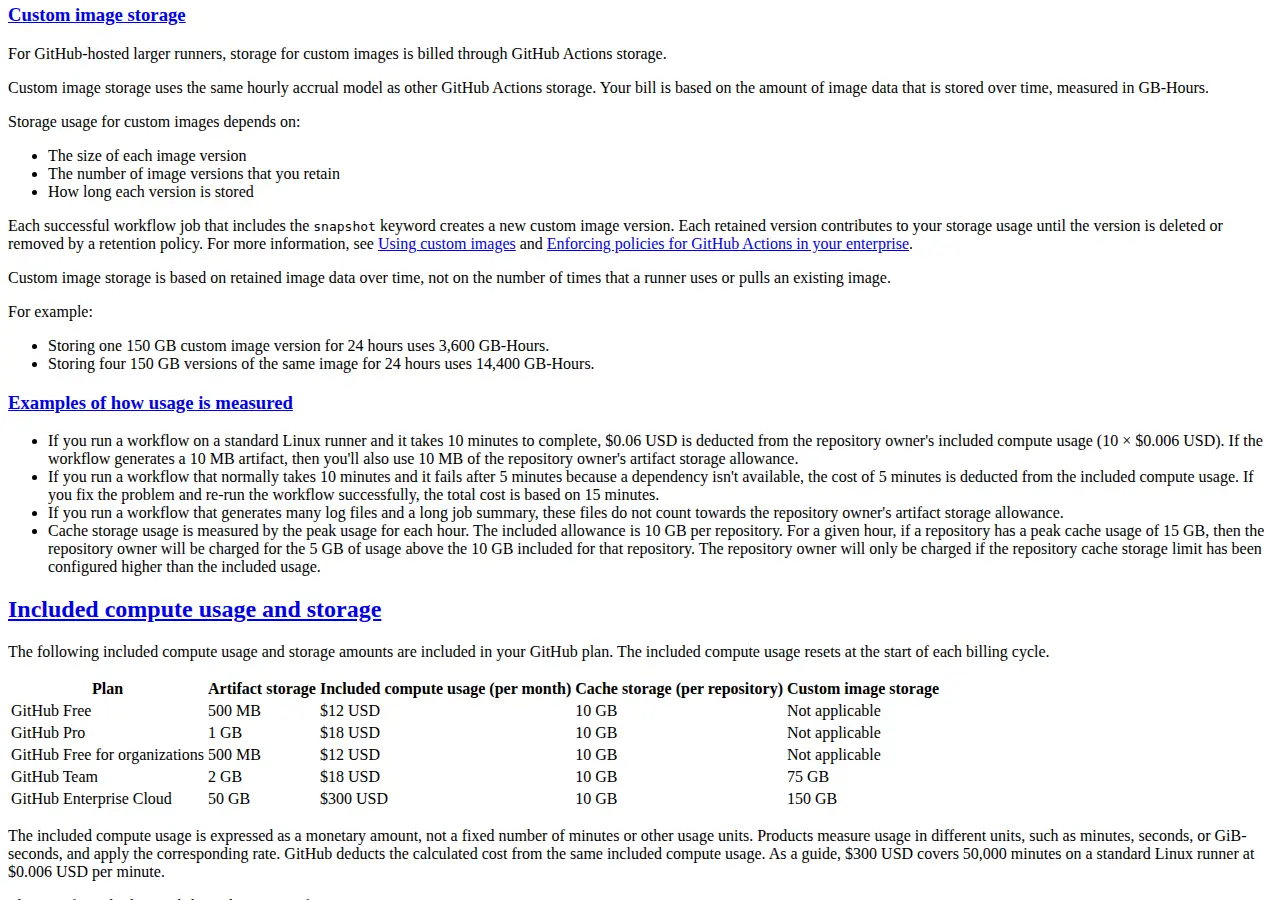 Public repositories run standard runners free; this math applies to private repositories. Stated assumptions: 20 builds a day, 22 working days a month, a 6-minute build on the slow path, a 30-second build on the fast path.
The benchmark gives a second number: the wall-clock the bundler consumes. The gap is 41.21 minus 0.39 seconds, or 40.82 seconds per build; at 440 builds a month that is 17,960.8 seconds — 299.35 minutes, just under 5 hours. Bundler time only — install, tests and deployment still dominate most pipelines.
Suppose the switch costs 16 engineer-hours at $75 per hour — $1,200 — against $14.52 saved monthly. Break-even is 82.6 months — about 6.9 years. The return is in developer waiting time, priced per engineer-hour. Run your own margin through the profit calculator first.
One more number: the Webpack filesystem cache keeps unused entries for 5,184,000,000 milliseconds — 60 days. A cache that survives 60 days of inactivity survives a holiday. Turn it on and share it between CI builds.
Scenario: Harborline Media prices a switch
Scenario: Harborline Media, nine developers, runs 20 CI builds a day over 22 working days a month. Its Webpack build takes a stated 6 minutes, an esbuild build 30 seconds. Monthly CI minutes fall from 2,640 to 220, the bill from $15.84 to $1.32 — $14.52 a month saved, about 5 hours of bundler wall-clock saved. But the developers restart the dev server roughly 40 times a day, and Vite removes the bundling wait from every restart. The team keeps Webpack for the admin panel needing module federation, moves the main app to Vite, and uses esbuild only for the marketing site, which needs no HMR. The CI saving is small; the developer-loop saving is the reason; federation is the constraint.
Operator Boundaries
This playbook is for whoever chooses a team's bundler: the tech lead, the staff engineer, or the founder paying the CI bill. It is written for teams shipping a browser app with a real production build, a CI pipeline, and developers waiting on the dev server daily — not a framework guide. Who must avoid a switch: anyone depending on module federation should not adopt raw esbuild; anyone shipping to browsers older than Vite's baseline should not adopt Vite without the legacy plugin; anyone whose build is a thicket of custom Webpack loaders should price the rewrite first. A bundler switch is a migration, not a config change — it deserves a plan with a rollback.
Founder & CEO Insight — Enow A. Jovial
The switch, run as a checklist
- Time your own builds first. Cold start, HMR time, production build time — slowest machine, three runs each.
- List the hard requirements. Module federation, legacy browsers, custom loaders, SSR — any one can veto a tool.
- Read the benchmark conditions. Machine, codebase, cache state, run count — before quoting any ratio.
- Turn on the cache you already own. For Webpack, set the filesystem cache, share it between CI builds, measure the second build.
- Price the CI minutes. Use the formulas here with your own counts and rate; do not present the saving as larger than the arithmetic supports.
- Price the migration. Engineer-hours times your loaded rate, divided by the monthly saving, is break-even in months.
- Pilot on one surface. Move the smallest app first, keep the old tooling runnable, compare the same three timings.
- Decide on developer time, not CI dollars. If the pilot does not speed the daily loop visibly, the switch is not worth it.
The decision in advance
Pick the bundler by the wait your team feels, not the ratio on a benchmark page. Vite for the daily loop, esbuild for raw speed where its limits do not bind, Webpack where breadth and federation decide. Measure first, pilot small, keep the old build working until the new one earns the traffic.