SurveyMonkey publishes every price. Google Forms charges nothing. Qualtrics publishes no price at all. If you need a number for a budget this week, two of these three vendors will give you one and the third will give you a form that says "Request Pricing." Price the responses, not the plan names: the cheapest paid route to 50,000 responses a year is SurveyMonkey Team Advantage at $1,080 a year for three seats, against $3,168 on its individual Premier plan once overage is counted.
The ladder: what each vendor actually publishes
SurveyMonkey sells two price lists: individual plans for one person, and team plans starting at three users. Free Basic allows unlimited surveys with up to 10 questions per survey, and lets you view only a limited number of responses; SurveyMonkey does not publish that number. Every paid plan charges $0.15 per response above its allowance and carries unlimited surveys and unlimited questions.
Qualtrics publishes no price. Every product tier — Customer Experience, Employee Experience, Market Research — carries a "Request Pricing" button and a form asking for name, company, job title, and email. Its pricing page states the metric instead of the money: customer experience and market research are priced per interaction — a data record collected or processed to deliver experience-management insight — and employee experience on employee count. Every product includes an unlimited number of users, and you pay only for the usage you plan. Its free account is concrete where the paid page is not: 500 responses, three active surveys, 30 questions per survey, more than 50 templates.
Google Forms has no price because there is nothing to sell. It is free with any personal Google account, with unlimited forms and no published cap; Google's own help page confirms real-time analysis, with answers flowing into Google Sheets. The only money nearby is Google Workspace, from Business Starter at $7 per user per month, which includes Forms alongside business email, storage, and meetings.
| Plan | Price | Responses included |
|---|---|---|
| Google Forms (personal account) | $0 | No published cap; unlimited forms |
| Qualtrics free account | $0 | 500 responses; 3 surveys; 30 questions each |
| SurveyMonkey Basic (free) | $0 | Viewable responses limited; 10 questions per survey |
| SurveyMonkey Standard Monthly | $149 / month | 1,000 / month |
| SurveyMonkey Advantage Annual | $39 / month, $468 / year | 15,000 / year |
| SurveyMonkey Premier Annual | $139 / month, $1,668 / year | 40,000 / year |
| SurveyMonkey Team Advantage | $30 / user / month, 3+ users | 50,000 / year |
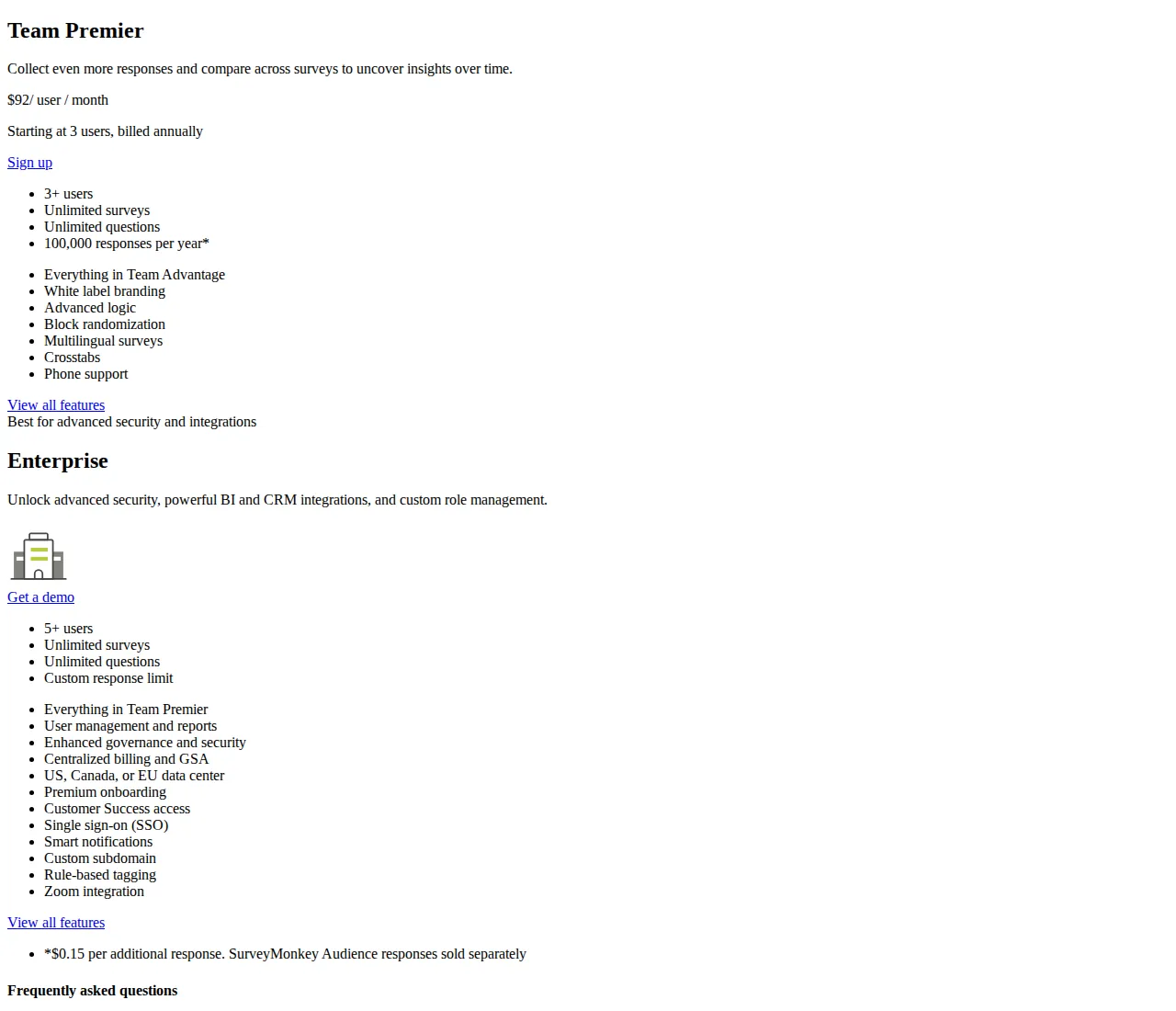
| SurveyMonkey Team Premier | $92 / user / month, 3+ users | 100,000 / year |
| SurveyMonkey Enterprise | Quote only, 5+ users | Custom |
| Qualtrics paid plans | Quote only | Priced per interaction; unlimited users |
The math: cost per 1,000 responses
Divide the price by the responses it buys:
Worked from the published ladder, for a single user unless stated:
Standard Monthly is the most expensive way to buy a SurveyMonkey response at $149 per 1,000 — nearly five times the Advantage rate — because it is the only individual plan billed month to month. And Premier Annual costs more per response ($41.70) than Advantage Annual ($31.20), the opposite of the usual volume discount: the extra $1,200 a year buys advanced logic, multilingual surveys, crosstabs, white-label branding, and phone support, not cheaper responses. Team Advantage is cheaper still at $21.60 — if you have three seats to fill, since the three-user minimum sets its floor at $1,080 a year.
At $0.15 per response above your allowance, overage costs $150 per 1,000 responses — more than any plan's included rate except Standard Monthly, which ties it exactly. Buying Standard for a full year is identical to buying nothing and paying overage on 12,000 responses. Past a quarter, Standard stops being a plan and becomes a penalty for indecision.
Annual cost at 1,000, 10,000, 50,000, and 100,000 responses
The table below prices the same four volumes on the cheapest honest route — the lowest published plan that covers the volume, or the plan plus overage where that beats stepping up.
| Annual volume | Google Forms | Cheapest SurveyMonkey route | Annual cost | Cost per 1,000 |
|---|---|---|---|---|
| 1,000 responses | $0 | Advantage Annual | $468 | $468.00 |
| 1,000 responses, one-off | $0 | Standard Monthly for one month | $149 | $149.00 |
| 10,000 responses | $0 | Advantage Annual | $468 | $46.80 |
| 50,000 responses | $0 | Team Advantage, 3 users | $1,080 | $21.60 |
| 100,000 responses | $0 | Team Premier, 3 users | $3,312 | $33.12 |
A team collecting 1,000 responses a year pays $468 on Advantage for an allowance it uses 7 percent of, or $149 for a single month of Standard if the survey is a one-off. The honest comparison at that volume is $0 on Google Forms against $149 or $468 on SurveyMonkey: are skip logic, custom design, and CSV exports worth $149 for one survey? At 10,000 responses Advantage costs $468 for the year, $46.80 per 1,000, against $1,788 on Standard Monthly. At 100,000, staying on Team Advantage past its allowance costs $1,080 + 50,000 × $0.15 = $8,580 — more than double Team Premier's $3,312.
Break-even volumes: when the bigger plan wins
First, Standard against Advantage: three months of Standard costs $447, less than Advantage's $468; four months costs $596, more. A programme needing a paid plan for three months or fewer should buy Standard month to month; anything longer should buy Advantage Annual. The break-even sits at 3.14 months:
Second, the volume at which Premier Annual beats Advantage Annual plus overage. Above Advantage's 15,000-response allowance, each extra response costs $0.15, so the Advantage bill grows until it meets Premier's flat $1,668:
At 23,000 responses a year the two routes cost exactly $1,668. Below 23,000, Advantage plus overage is cheaper; above it, Premier is cheaper — at 40,000 responses, Advantage plus overage costs $4,218 against Premier's $1,668. The same calculation puts the Team Premier break-even at 64,880 a year. A team collecting 60,000 saves by staying on Team Advantage and paying $1,500 in overage; a team collecting 70,000 pays $4,080 that way against $3,312 on Team Premier, a $768 saving for moving up. Run your trailing-twelve-months count through both thresholds before every renewal.
Founder & CEO Insight — Enow A. Jovial
Qualtrics: the quote-only problem, stated plainly
Qualtrics is the strongest survey engine of the three and the hardest to budget for. Its pricing page offers no plan names with prices, no response allowances, and no overage rate — only "Request Pricing" buttons, a form, and a pricing philosophy that says you pay for planned usage, measured in interactions, with unlimited users included. For a research team needing conjoint analysis, MaxDiff, video feedback, brand tracking, AI analysis, and API access, that may be the right trade; for a finance team that needs a number this week, it is a procurement cycle with a sales call in the middle. Our editorial analysis of the published pages found no Qualtrics price point anywhere on its pricing or free-account pages, and no third-party price we could trace to a Qualtrics-published source — so this guide prints none.
What is published is the free account: 500 responses, three active surveys, 30 questions per survey, more than 50 templates. That cap fits one person testing one or two surveys — and where it ends: a 600-response customer survey exhausts it, and a fourth active survey cannot exist until you upgrade. The interaction metric tells you how a quote will be built: count your survey responses, video-feedback minutes, and brand-tracking mentions before the call, because those are the numbers the quote will be priced on. The Typeform vs Jotform vs Google Forms survey pricing playbook covers the form-builder side of this market, where every price is published and the comparison is arithmetic rather than negotiation.
Google Forms: the $0 baseline, and where it ends
Google Forms wins every price comparison here by not participating. It is free with any personal Google account, publishes no response cap, and sends answers straight into Google Sheets in real time. For a school collecting permission slips, a startup running a five-question survey, or a team polling 2,000 employees, there is no cheaper correct answer. The paid SaaS tools must justify themselves on features Forms lacks — advanced logic, custom branding, white labelling, payments, significance testing, crosstabs, multilingual surveys — rather than on price. The same logic holds in other tool classes — see the Klaviyo vs Mailchimp vs ConvertKit email marketing pricing playbook.
Forms does have limits, and a buyer should know them before collecting 50,000 responses on a tool with no support line. Google publishes no response cap, but its product behaviour sets practical ceilings: third-party testing reports summaries becoming unavailable past roughly 50,000 responses and Sheets synchronisation stopping past roughly 100,000, and a linked Sheet caps at 10 million cells. File uploads draw on the owner's 15 GB of shared free Drive storage. None of that matters at 1,000 responses; at 100,000, Team Premier at $3,312 starts to look like insurance. Buy Workspace for the suite, never for Forms alone.
Who should buy which
The decision is a volume question, not a brand question. The table below maps each volume band to the cheapest honest route; the Qualtrics row is the only one without a price, because there is none to print.
| Buyer | Annual volume | Buy | Why | Authority |
|---|---|---|---|---|
| Solo, simple survey | Under 500 | Google Forms, $0 | No cap, no cost | Google Docs Editors Help |
| Solo or small team | 1,000–15,000 | Advantage Annual, $468 | $31.20 per 1,000 | SurveyMonkey pricing page |
| Research team | 23,000–40,000 | Premier Annual, $1,668 | Flat price wins past 23,000 | Break-even math above |
| Team of 3+, 50,000 | 50,000 | Team Advantage, $1,080 | $21.60 per 1,000 | surveymonkey.com/pricing |
| Team of 3+, 65,000+ | 65,000–100,000 | Team Premier, $3,312 | Wins past 64,880 | Break-even math above |
| Enterprise research | Quote | Qualtrics, quote only | Interaction pricing, no published price | qualtrics.com/pricing |
Buy it in this order
- Count your trailing twelve months of responses. The actual count, from your current tool's export, not the forecast. This number picks the plan.
- Price that count on the table above. Find the cheapest route that covers it, then check the break-even: 23,000 for Premier, 64,880 for Team Premier.
- Run a one-month test on the plan you would buy. Standard Monthly costs $149 for one month of the real product — logic, exports, everything — before you commit $468 or $1,668 for a year.
- Get the Qualtrics quote in parallel if you need enterprise features such as SSO. Start early — it takes weeks — and anchor it against the SurveyMonkey team price for your volume.
- Export everything before any downgrade or switch. SurveyMonkey deletes responses over the free limit older than 365 days after a downgrade; Google Forms data lives in your Sheet.
- [x] Count trailing-twelve-months responses from the export, not the forecast.
- [x] Price the count on the cost-per-1,000 table: Advantage $31.20, Team Advantage $21.60, Standard $149.
- [x] Check the two break-even volumes. Below 23,000 responses, Advantage plus overage beats Premier; below 64,880, Team Advantage plus overage beats Team Premier.
- [x] Test one month of Standard before committing to a year — $149 for a month against $468 to $1,668 for a wrong annual plan.
- [x] Get the Qualtrics quote only if you need what it alone sells. Conjoint, MaxDiff, video feedback, enterprise governance — and bring a volume forecast the quote can be priced on.
- [x] Export all responses as CSV before any downgrade — the free tier's 365-day deletion rule is the most expensive line in this guide.