Three backends, three meters. Supabase meters your users and your gigabytes. Appwrite meters your compute size. PocketBase meters nothing at all — you bring the server, and the license costs $0 at any scale. The cheapest platform is therefore not a property of the platform; it is a property of your workload. A 10,000-user app with a 5 GB database pays $25 a month on both cloud platforms and $0 plus a server on PocketBase. A 100,000-user app with 50 GB of data pays $52.75 on Supabase, $25 plus a compute tier on Appwrite, and still $0 plus a server on PocketBase. The meter, not the marketing, decides the bill.
This guide is for the founder or engineer choosing the backend for a production app: auth, database, storage, and functions in one place. The Supabase vs Firebase vs PlanetScale guide covers the Firebase comparison, and the Neon vs PlanetScale vs Turso guide covers serverless databases without the backend layer. What follows is pricing only, computed on one stated workload, from the vendors' own pricing pages as read on November 17, 2026.
The workload
Every number in this guide is computed from one workload, so the reader can reproduce it and substitute their own figures:
| Dimension | Stated workload | Scale workload |
|---|---|---|
| Monthly active users | 10,000 | 100,000 |
| Database size | 5 GB | 50 GB |
| File storage | 20 GB | 20 GB |
| Monthly egress | 50 GB | 500 GB |
| Projects | 1 | 1 |
The scale workload changes only users, database, and egress. Storage stays at 20 GB because file storage grows slower than users in most apps, and holding it constant isolates the three meters that actually move.
Supabase: the per-user, per-gigabyte meter
Supabase prices the platform as a base plan plus overage rates on four dimensions. The Free plan costs $0 and includes 50,000 monthly active users, 500 MB of database size, shared CPU with 500 MB RAM, 5 GB egress, 5 GB cached egress, and 1 GB file storage — but free projects are paused after one week of inactivity and the account is limited to two active projects. The stated workload's 5 GB database exceeds the Free plan's 500 MB database by ten times, so Free fails on database size alone even though its 50,000-user allowance covers the 10,000 users.
The Pro plan starts at $25 a month, first project included, additional projects from $10 a month. Inside Pro: 100,000 monthly active users, then $0.00325 per MAU; 8 GB disk per project, then $0.125 per GB; 250 GB egress, then $0.09 per GB; 250 GB cached egress, then $0.03 per GB; 100 GB file storage, then $0.0213 per GB. Paid plans include $10 a month in compute credits, enough to cover one Micro instance (1 GB RAM, shared compute); compute scales from Micro at $10 to 16XL at $3,730 a month.
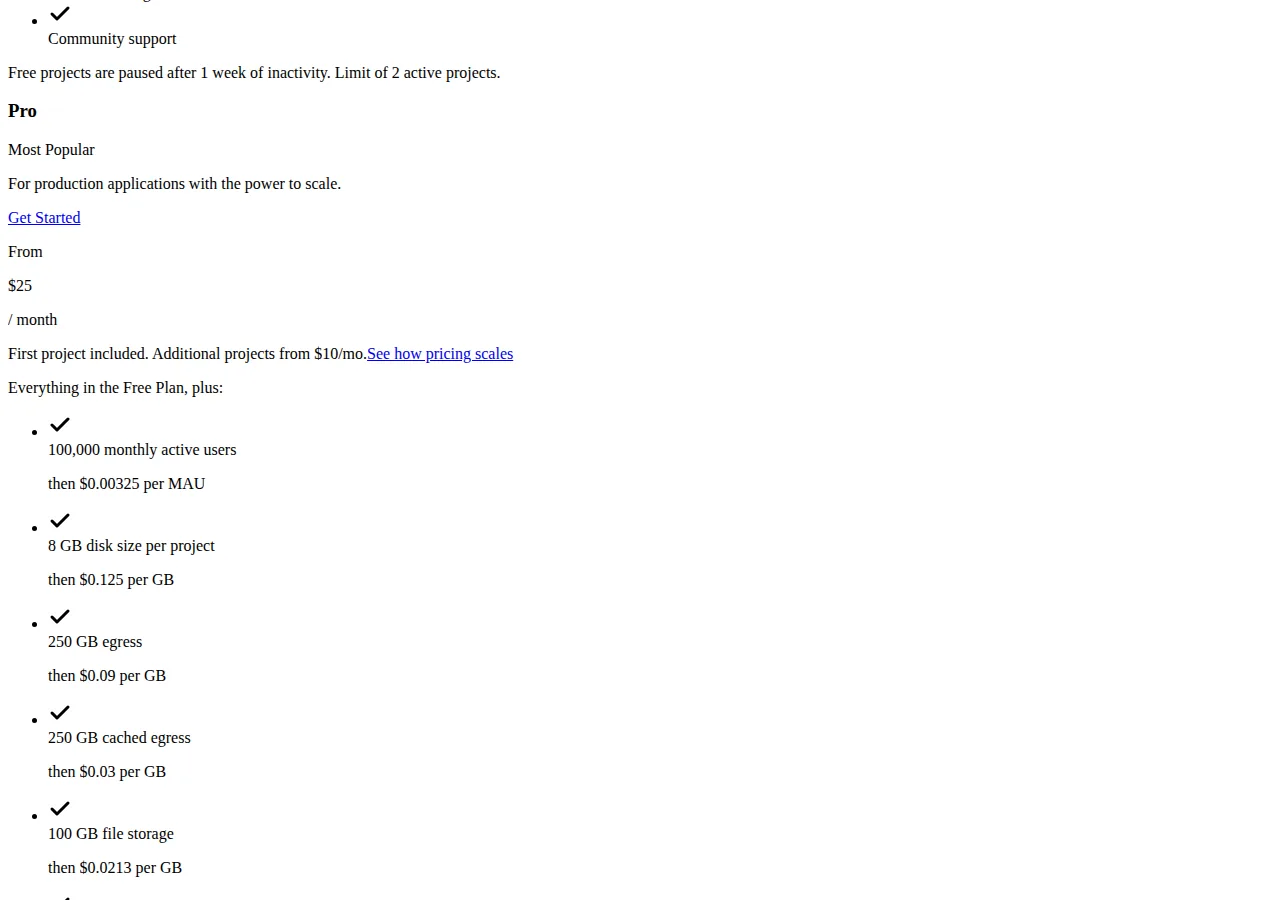
On the stated workload, Pro costs $25 a month and nothing more. The 10,000 users sit inside the 100,000 allowance with 90,000 of headroom. The 5 GB database sits inside the 8 GB disk with 3 GB of headroom. The 50 GB egress sits inside the 250 GB allowance with 200 GB of headroom. The 20 GB storage sits inside the 100 GB allowance. The Micro compute is covered by the $10 credit. The bill is $25.00, and every dimension has headroom — which is the correct way to read a Pro plan: the overage rates matter only when a dimension crosses its line, and at this workload none does.
The Team plan starts at $599 a month and adds SOC 2 and ISO 27001, project-scoped and read-only access, HIPAA as a paid add-on, SSO, priority support with SLAs, 14-day backups, and 28-day log retention. It is a compliance purchase, not a capacity purchase: nothing in the stated workload needs it.
Appwrite: the compute-size meter
Appwrite Cloud prices differently. The plan is Free at $0 — "a great fit for passion projects and small applications" — and Pro at $25 a month — "for production applications that scale with included resources and pay as you go." The meter inside Pro is compute size, not users or gigabytes. Database compute comes in two forms: serverless, with a $0 fixed fee and a plan quota followed by overage, and dedicated, with fixed monthly tiers from Starter at 1 core and 1 GB for $10 a month to Scale Max at 32 cores and 256 GB for $4,099 a month. Ten dollars of compute credits for database usage are included every month.
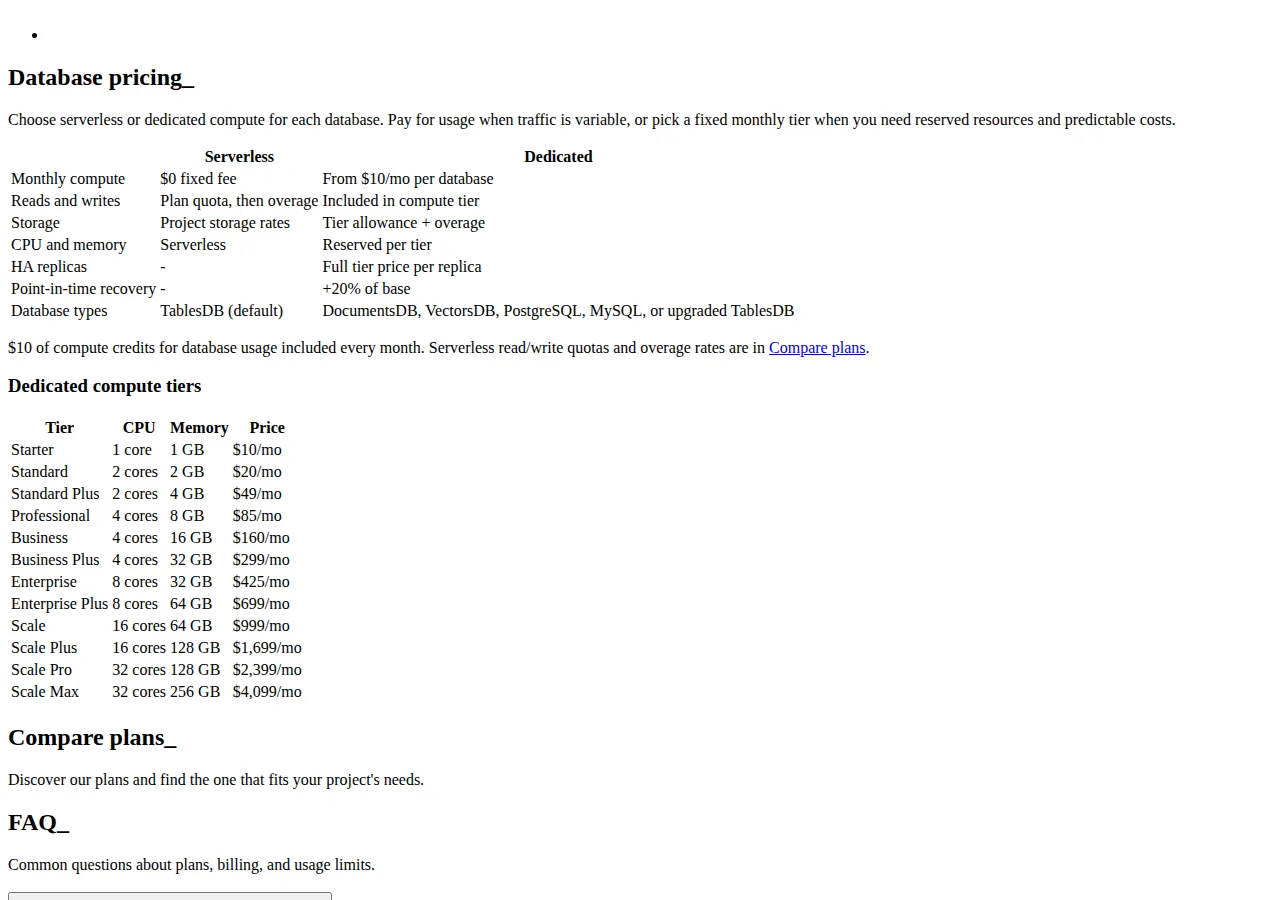
Two behaviours matter more than the ladder. First, when a Free plan project reaches a resource limit, the project freezes and the console continues in read-only mode until the operator upgrades, removes resources, or waits for the next billing cycle. Second, when a Pro plan project reaches a limit, it keeps running and additional charges apply, with email reminders at 75% and 100% of the limits — and the operator can set a budget cap on the organisation to stop the charges. Free fails closed; Pro fails open with a cap the operator must set. That asymmetry is the single most important operational difference between the two Appwrite plans, and the reason a production app belongs on Pro: a frozen auth service at 2 a.m. costs more than $25.
On the stated workload, Appwrite Pro costs $25 a month as a floor. The $10 monthly compute credit absorbs the Starter dedicated tier, so a small production database on the smallest dedicated tier is $25 in total. The honest statement is that the page as rendered does not publish the included monthly-active-user or gigabyte quotas, so no total beyond the $25 floor can be computed from the pricing page alone — the workload's cost is $25 plus whatever compute tier the load requires, and at this size that tier is the smallest one.
PocketBase: the $0 license and the server you bring
PocketBase is not a cloud. It is an open-source backend — an embedded database (SQLite) with realtime subscriptions, built-in auth management, a dashboard UI, and a simple REST-ish API — shipped as a single prebuilt executable of about 12 MB. Version 0.42.3 runs with ./pocketbase serve, serves the dashboard at port 8090, and keeps application data in a pb_data directory and migrations in pb_migrations. There is no per-user price, no per-gigabyte price, and no cloud bill, because there is no cloud. The cost is the server it runs on.
The docs carry one warning: PocketBase is still under active development, full backward compatibility is not guaranteed before version 1.0.0, and it is "NOT recommended for production critical applications yet, unless you are fine with reading the changelog and applying some manual migration steps from time to time." PocketBase is the cheapest backend at every workload and the only one whose vendor tells you not to trust it with the application that pays your salary.
The server cost is the operator's choice, and this guide states its planning figure as an assumption rather than a vendor price: plan on $5 a month for the smallest VPS. The license is $0 either way, so the PocketBase line in every table below is $0 plus the server. The self-hosted PaaS guide covers running that server with Coolify, Dokploy, or Caprover — PocketBase deploys onto any of the three as a single binary, which is the point of the comparison: the self-hosted route and the PocketBase route are the same skill.
The math, both workloads
| Monthly cost | Stated workload | Scale workload |
|---|---|---|
| Supabase Pro | $25.00 | $52.75 |
| Appwrite Pro | $25.00 (floor) | $25.00 + compute tier by load |
| PocketBase | $0 + server | $0 + server |
The Supabase scale figure is fully reproducible. Database: 50 GB against an 8 GB included disk leaves 42 GB at $0.125, which is $5.25. Egress: 500 GB against a 250 GB allowance leaves 250 GB at $0.09, which is $22.50. Users: 100,000 sits exactly at the Pro allowance, so the overage is $0. Storage: 20 GB sits inside the 100 GB allowance. Total $25.00 + $5.25 + $22.50 = $52.75. One caveat: the $10 compute credit covers a Micro instance; if the 50 GB database needs a Small instance at $15, add $5 net a month. The compute size is the operator's choice, and the guide does not invent a requirement.
The Appwrite scale figure cannot be completed from the rendered pricing page, and the guide says so rather than inventing a quota. What the page does state is the floor ($25 Pro base), the credit ($10 a month), and the dedicated tiers ($10 to $4,099). A 100,000-user app picks its tier by measured load, not by the pricing page — and the budget cap is the control that keeps the meter honest.
The PocketBase figure does not change with scale, because the meter does not exist. What changes is the architecture: a single binary with an embedded SQLite database scales vertically on one node, with no managed multi-region replication and no horizontal read scaling. The cost stays $0 plus the server; the constraint moves from price to architecture.
The decision table
| Attribute | Supabase | Appwrite | PocketBase | Authority |
|---|---|---|---|---|
| Production floor | $25/month | $25/month | $0 + server | Vendor pricing pages |
| What the meter counts | MAU, disk, egress, storage | Compute size | Nothing | Vendor pricing pages |
| Free tier | $0; 50k MAU, 500 MB DB; pauses after 1 week idle | $0; freezes at limits | N/A — no cloud | Vendor pricing pages |
| Scale workload (100k MAU) | $52.75/month | $25 + compute tier | $0 + server | Computed above from vendor rates |
| Overage behaviour | Per-unit rates, billed | Pro keeps running, charges apply; budget cap available | N/A | Vendor pricing pages |
| Database | Managed Postgres | TablesDB, DocumentsDB, VectorsDB, Postgres, MySQL | Embedded SQLite, single file | Vendor docs |
| Auth | Included, 50k–100k MAU | Included | Built-in | Vendor pricing / docs |
| Production-readiness caveat | None stated | None stated | Pre-1.0; vendor advises against critical production use | PocketBase docs, v0.42.3 |
| Lock-in shape | Managed Postgres exports cleanly | Open-source core, self-hostable | Your server, your file | Vendor docs |
The last row is the one founders skip and regret: Supabase data is Postgres and exports with standard tooling, Appwrite's core is open source and self-hostable, and PocketBase data is a single SQLite file the operator already owns. All three are escapable — the switching cost is a migration weekend, not a rewrite.
Founder & CEO Insight — Enow A. Jovial
The choosing checklist
- [x] Count your users first: if monthly active users are under 50,000 and the database under 500 MB, Supabase Free is real — but remember the one-week pause.
- [x] Measure the database, not the users: the stated workload breaks Supabase Free on 5 GB of database, not on users. Database size is the dimension that forces the upgrade.
- [x] Price the overage, not the plan: at 100,000 users the Supabase bill is $52.75, not $25. Run the scale workload through the overage rates before committing.
- [x] Set the Appwrite budget cap on day one: Pro fails open by design. The cap is the only thing between a traffic spike and a surprise invoice.
- [x] Read the PocketBase pre-1.0 warning as a contract: if the application is production-critical and the team cannot read changelogs and run manual migrations, PocketBase is the wrong buy at $0.
- [x] Keep the exit open: export the database on a schedule from day one, whichever platform you pick — Postgres dump, Appwrite backup, or a copy of the SQLite file.
- [x] Re-price every quarter: the vendors change the meter — re-read the overage rates and tiers, not the headline plan prices. Run the totals through the pricing calculator before you commit.
Phase 1: measure the workload — users, database, egress. Phase 2: price the stated workload and the scale workload on each platform. Phase 3: set the budget cap and the export schedule on day one.