Three vendors, three different things being sold
A founder choosing a backend usually compares three prices and picks the lowest. That comparison fails here, because the three vendors are not selling the same thing. Supabase sells a Postgres project with a plan price plus a set of overage meters. Firebase sells a bundle of Google services — Firestore, Authentication, Storage, Hosting, and more — each with its own free quota, on a pay-as-you-go Blaze plan behind a no-cost Spark plan. PlanetScale sells database resources — compute, topology, storage, backup, and egress — priced through a calculator, with no fixed tier ladder to compare against. The cheapest vendor at one profile is the most expensive at the next, and the meter that flips the ranking is different in each case.
This guide prices all three at two stated profiles, from the vendors' own pricing pages read this week, and refuses to invent the one number PlanetScale does not publish. Every figure below is either a vendor list price or a derivation from one, with the derivation shown. Where a vendor defers pricing to another page — Firebase to Google Cloud for Firestore operations — the guide says so instead of filling the gap with a guess.
> [!KEY TAKEAWAY]
> At a small app, Firebase Spark costs $0 inside its quotas and PlanetScale starts at $5, while Supabase Pro is $25. At a growth app with 150,000 monthly active users, Supabase Pro reaches $202.50 before compute because the MAU meter charges $0.00325 per user over 100,000 — and Firebase's bill cannot be finished from its own page, because Firestore operation rates live on Google Cloud pricing by region. The meter, not the plan, is the decision.
Who this guide is for, and who should stop here
This guide is for a founder or engineering lead choosing the backend for a production web or mobile app — a SaaS product, a marketplace, or a content app with user accounts — who will pay the invoice monthly and wants to know which meter grows fastest. It assumes a Postgres or document data model, a need for authentication, and traffic describable in users, reads, and gigabytes.
Stop here and get a quote instead if you need HIPAA, PCI, or single-tenant deployment, if you run multi-region writes with strict consistency, or if your database exceeds a few hundred gigabytes. At that scale, negotiated terms replace list pricing, and a list-price comparison will mislead you in both directions. If you already run Postgres with extensions Supabase does not allow, or Firestore queries that need joins, the data model decides before price does.
The three price lists, side by side
Supabase's pricing page lists a Free plan at $0 a month for passion projects: 50,000 monthly active users, 500 MB of database size, shared CPU with 500 MB of RAM, 5 GB of egress, and unlimited API requests. The Pro plan costs $25 a month and includes 100,000 monthly active users, 8 GB of disk per project, 250 GB of egress, 250 GB of cached egress, 100 GB of file storage, daily backups stored for 7 days, and email support. Paid plans include $10 a month in compute credits, enough to cover one Micro instance. Beyond the included amounts, Pro charges $0.00325 per monthly active user, $0.125 per GB of disk, $0.09 per GB of egress, $0.03 per GB of cached egress, and $0.0213 per GB of file storage. Compute sizes run from Micro at $10 a month with 1 GB of RAM, 60 direct connections, and 200 pooler connections, through Small at $15, Medium at $60, and Large at $110 with dedicated 2 vCPUs and 8 GB of RAM, up to 16XL at $3,730 with 64 vCPUs and 256 GB of RAM. The pooler connection counts matter: a serverless fleet that opens a connection per request will hit the direct limit long before it hits the CPU limit, which is why the pooler exists.
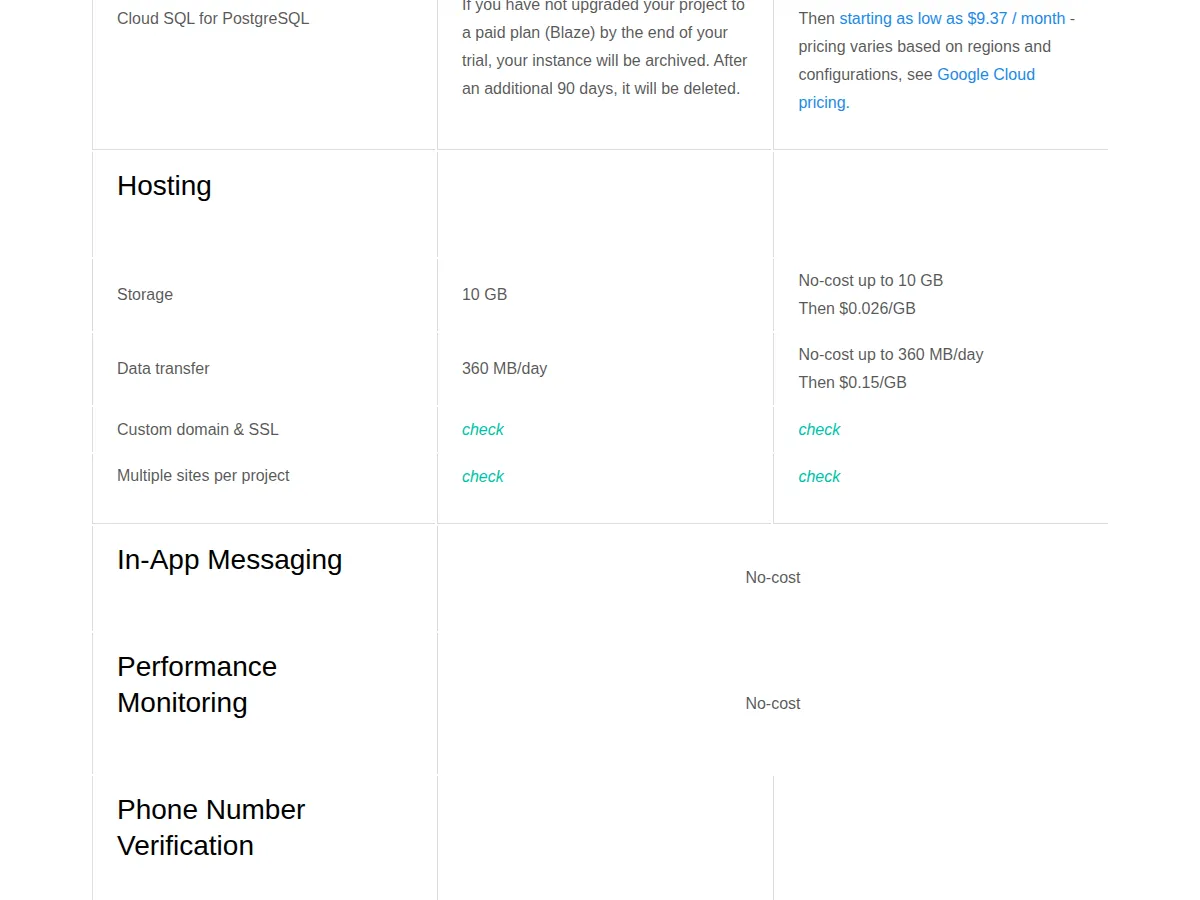
Firebase's pricing page splits into two plans. Spark is the no-cost plan: generous no-cost usage limits, no payment method needed. Blaze is pay as you go: access to more services and higher usage levels, no-cost Spark usage included, and $300 in free credit if eligible. The per-product quotas are the real price list. Firestore on the no-cost tier allows 50,000 document reads a day, 20,000 writes a day, 20,000 deletes a day, 1 GiB of stored data, and 10 GiB a month of network egress, with further usage billed through Google Cloud pricing. Cloud Storage on the no-cost tier allows 5 GB stored, then $0.026 per GB; 1 GB a day downloaded, then $0.12 per GB; 20,000 upload operations a day, then $0.05 per 10,000; and 50,000 download operations a day, then $0.004 per 10,000. Firebase Hosting allows 10 GB of storage free, then $0.026 per GB, and 360 MB a day of data transfer free, then $0.15 per GB. The critical gap is Firestore operations beyond quota: Google Cloud's Firestore pricing page prices reads, writes, deletes, and storage by region and by consumption model, including committed-use discounts, so no single per-operation figure from the Firebase page can be quoted as the rate.
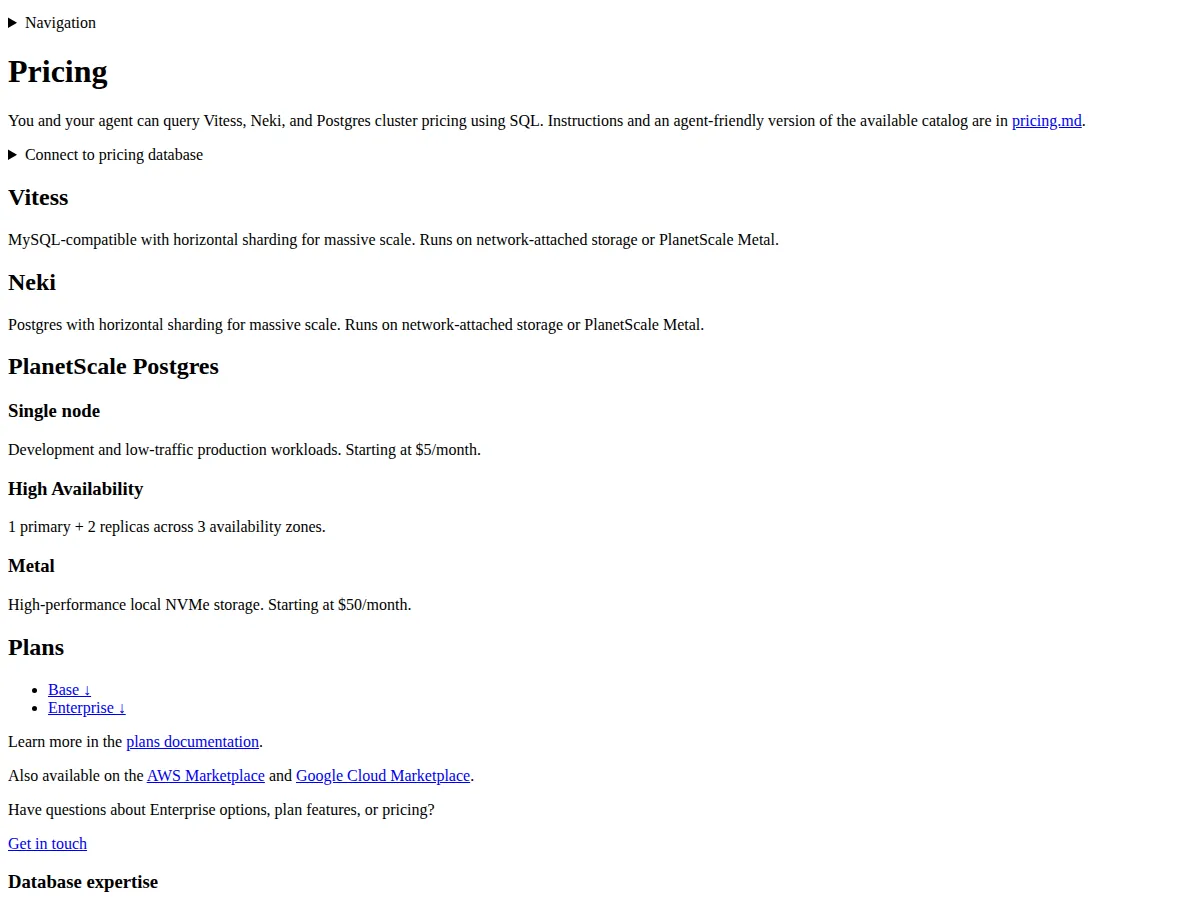
PlanetScale's pricing page, as rewritten for its current lineup, does not offer a tier ladder at all. It offers a Base plan with resource-based pricing and an Enterprise plan with custom pricing. The Base plan prices Vitess, its MySQL-compatible sharded engine, and Neki, its sharded Postgres engine, by cluster size, router or VTGate configuration, replicas, storage, backup storage, and network usage. PlanetScale Postgres, the single-node offering, starts at $5 a month for development and low-traffic production workloads. Metal, the high-performance local NVMe offering, starts at $50 a month. High availability means 1 primary plus 2 replicas across 3 availability zones. The page directs readers and their agents to query cluster pricing with SQL against a pricing database, which is the vendor's own admission that the price is a calculation, not a table. Enterprise adds business support, a shared Slack channel, architecture consultation, and deployment inside the customer's own AWS or GCP account, where the customer pays the cloud provider directly plus a percentage to PlanetScale.
Worked math: a small app, then a growth app
Profile A, the small app: 20,000 monthly active users, 2 GB of database, 10 GB of egress, 10 GB of hosted files, and usage inside every free quota it touches. Supabase Free fails on disk: 20,000 users sit under the 50,000 allowance, but 2 GB exceeds the 500 MB database allowance, so the honest small-app Supabase price is Pro at $25 a month, with the Micro compute instance covered by the $10 compute credit. Firebase Spark covers it at $0, provided Firestore reads stay under 50,000 a day and writes under 20,000 a day; the Hosting allowance covers 10 GB of storage and roughly 10.8 GB a month of transfer at 360 MB a day. PlanetScale Postgres single node starts at $5 a month, before any storage, backup, or egress the calculator adds. Small-app ranking on list prices: Firebase $0, PlanetScale from $5, Supabase $25.
Profile B, the growth app: 150,000 monthly active users, 20 GB of database disk, 400 GB of egress, and 100 GB of file storage. Supabase Pro math, with every meter shown:
$
ext{Supabase Monthly} = $25 + ( ext{MAU over 100,000} imes $0.00325) + ( ext{Disk over 8 GB} imes $0.125) + ( ext{Egress over 250 GB} imes $0.09) + ( ext{File storage over 100 GB} imes $0.0213)
$
$
ext{Supabase Monthly} = $25 + (50{,}000 imes $0.00325) + (12 imes $0.125) + (150 imes $0.09) + (0 imes $0.0213) = $25 + $162.50 + $1.50 + $13.50 = $202.50
$
At this profile, Supabase Pro costs $202.50 before compute, with the Micro instance covered by the $10 credit, and the MAU meter at $162.50 is 80% of the bill. A team that reads only the $25 plan price will under-budget this profile by a factor of eight.
Firebase at Profile B cannot be finished from its own page, and that unfinished total is itself the finding. Hosting alone is computable: 100 GB of storage against a 10 GB free allowance leaves 90 GB at $0.026, which is $2.34, and 400 GB of transfer against roughly 10.8 GB a month of free transfer at 360 MB a day leaves about 389 GB at $0.15, which is about $58.38, for a Hosting subtotal of $60.72. But Firestore operations — the reads and writes the app actually serves — are priced by Google Cloud by region and consumption model, and no region is stated in this profile, so no honest Firestore total exists here. PlanetScale at Profile B is a floor, not a total: single node from $5 a month, Metal from $50, high availability as 1 primary plus 2 replicas, and everything else through the calculator.
| Attribute | Supabase | Firebase | PlanetScale | Authority |
| :--- | :--- | :--- | :--- | :--- |
| What you buy | A Postgres project: plan plus overage meters | A bundle of Google services, each with free quotas | Database resources through a calculator | Vendor pricing pages, November 2026 |
| Entry price | Free $0; Pro $25 a month | Spark $0; Blaze pay as you go, $300 credit if eligible | Postgres single node from $5 a month; Metal from $50 | Supabase, Firebase, PlanetScale pricing pages |
| User meter | MAU: 50,000 free, 100,000 on Pro, then $0.00325 each | Authentication and Firestore quotas per product, not per MAU | None stated; compute and topology instead | Supabase pricing; Firebase pricing |
| Storage meter | Disk $0.125 per GB over 8 GB on Pro; file storage $0.0213 per GB over 100 GB | Hosting $0.026 per GB over 10 GB; Storage $0.026 per GB over 5 GB | Resource-based: storage, backup, egress via calculator | Vendor pricing pages |
| Egress meter | $0.09 per GB over 250 GB; cached $0.03 per GB over 250 GB | Hosting $0.15 per GB over 360 MB a day; App Hosting $0.20 per GiB uncached over 10 GiB | Resource-based via calculator | Vendor pricing pages |
| Growth-app total at Profile B | $202.50 before compute (MAU meter dominates) | Hosting $60.72; Firestore total not computable without a region | Floor only: from $5 single node, from $50 Metal | Derived in this guide from vendor list prices |
| Scaling ceiling | Compute to 64 vCPUs and 256 GB RAM on 16XL | Google Cloud pricing by region and consumption model | Sharded Vitess and Neki for massive scale | Supabase compute table; Google Cloud Firestore pricing; PlanetScale pricing |
Operator boundaries: who should not pick which
Do not pick Supabase if your user count grows faster than your revenue per user, because the MAU meter charges every monthly active user whether or not that user pays. Do not pick Firebase if your read pattern is chatty — thousands of small reads per session — because the Firestore operation meter, priced by region on Google Cloud, is the bill you cannot preview from the Firebase page. Do not pick PlanetScale if your team cannot run its calculator and defend the output in a budget review, because a calculator-only price is a quote you must generate. Do not pick any of the three if you need to leave: Supabase locks least, because it is Postgres you can dump and move; Firebase locks most, because Firestore queries, security rules, and Cloud Functions are Google-shaped; PlanetScale sits between, because Vitess is MySQL-compatible and its Postgres offering is newer, so the exit path deserves a test migration before the entry decision, not after.
> [!FOUNDER]
> "Founders compare plan prices and then act surprised by the meter. The plan price is the cover charge; the meter is the bill. Supabase tells you its meter plainly, Firebase hides its main meter on another vendor's page, and PlanetScale hands you a calculator and walks away. Pick the vendor whose meter you can forecast, because the meter you cannot forecast is the one that will forecast you."
> — Enow A. Jovial, Founder & Chief Executive Officer
> [!WARNING]
> Never launch on a free tier without naming the quota that ends it. Firebase Spark ends at 50,000 Firestore reads a day, Supabase Free ends at 50,000 monthly active users and 500 MB of database, and PlanetScale's $5 single node ends where production traffic begins. The day the quota ends is not a failure; the day you discover it without a budget line is. Put the quota, the overage rate, and the upgrade trigger in the runbook before launch, or the first traffic spike will write the runbook for you.
Migration and launch protocol
1. Name the meter before the vendor. Write down the unit that grows fastest for your app — MAU, reads, or gigabytes — and rank the vendors by that meter alone.
2. Run the calculator for the vendor that has one. For PlanetScale, run the pricing calculator with your shard count, replicas, storage, and egress, and save the output as the quote.
3. Price Firestore by region. For Firebase, pick the region, read the Google Cloud Firestore rates for that region, and compute reads, writes, and deletes at your measured per-session counts.
4. Load-test the connection limit. For Supabase, test the pooler under your serverless concurrency, because 60 direct connections on Micro and 200 pooler connections are the ceiling that breaks before CPU does.
5. Test the exit before the entry. Dump the data, restore it elsewhere, and time the restore.
> [!TIP]
> Start on the vendor whose free tier covers your first six months, and set a calendar reminder for the month the quota ends. The cheapest backend is the one you outgrow on schedule, with the next vendor already priced — not the one you outgrow by surprise in the middle of a launch week.
Related reading on this site: the Postgres connection pooling guide, the headless WordPress vs Next.js decoupling guide, and the CDN pricing guide. Budget the full build with the website cost calculator. For the frontend half of the same build — Vercel vs Netlify vs Cloudflare Pages, priced per gigabyte — see the frontend hosting pricing guide.