Smartsheet vs monday.com vs Wrike: Enterprise Project Management Pricing Playbook
This is not the small-team comparison. The Asana comparison covers the task-list class; the engineering-tracker comparison covers the engineering class. The three platforms here sit one class higher, selling portfolio visibility, resource planning, and governance to organizations running dozens of projects at once. Each vendor hides the real cost differently: Smartsheet in the ten-member cap, monday.com in the Enterprise tier, Wrike in the Team-to-Business cliff. Every figure here comes from the vendors' own pricing pages, read November 11, 2026.
The three price lists at a glance
| Vendor | Entry paid tier | Working tier | Enterprise tier |
|---|---|---|---|
| Smartsheet | Pro $9 annual, 1–10 members | Business $19, 3+ members | Enterprise custom, 10+ members |
| monday.com | Basic $9 annual, from 3 users | Standard $12, Pro $19 | Enterprise custom |
| Wrike | Team $10 annual, 2–15 users | Business $25, 5–200 users | Pinnacle and Apex custom |
Smartsheet and monday.com agree on the entry price: $9. Wrike opens $1 higher at $10, then jumps to $25 at Business. All three stop publishing numbers at the enterprise tier: Smartsheet Enterprise, monday.com Enterprise, Wrike Pinnacle and Wrike Apex are all custom-priced — any article that prints a dollar figure for those tiers is inventing it.
Smartsheet: the spreadsheet that grew a price ladder
Smartsheet Pro costs $9 per member per month billed annually, or $12 billed monthly, for 1 to 10 members with unlimited free Contributors — and a team of eleven cannot buy Pro at any price. It includes Gantt, table, board, and calendar views, unlimited sheets and reports, and 250 automations a month, but no proofing.
Business costs $19 per member per month billed annually, or $24 billed monthly, for 3 or more members. Automations become unlimited, proofing for images and video is included, and it adds Timeline view, workload tracking, and 1 TB of storage against Pro's 20 GB, with attachments rising from 30 MB to 250 MB.
Enterprise is custom-priced for 10 or more members and adds Portfolios, Collections, and Scenario Planning, plus SAML single sign-on and unlimited storage. Advanced Work Management adds Advanced Portfolios and the premium apps — Dynamic View, Data Shuttle, DataMesh, Calendar App, Pivot App.
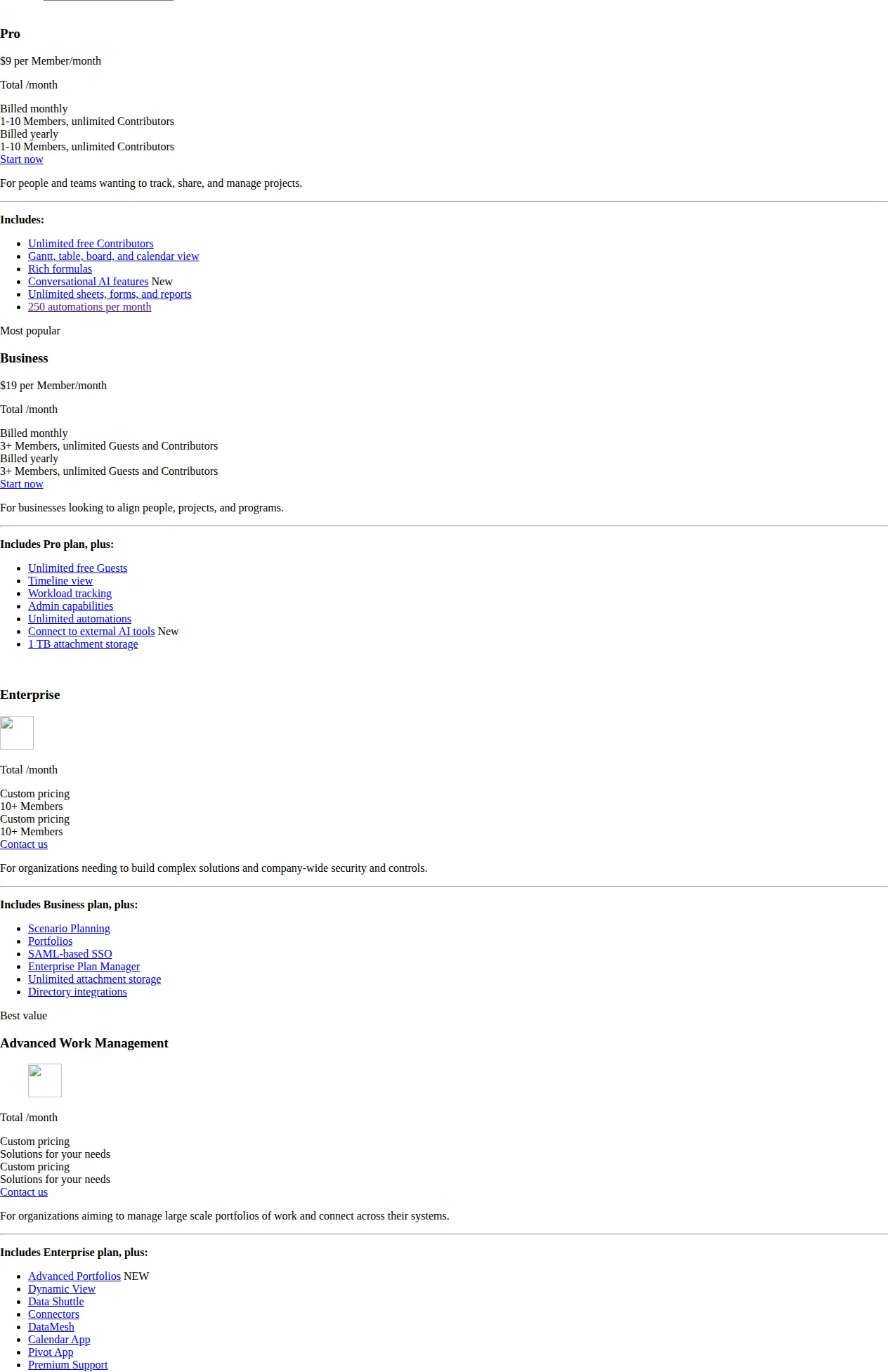
Resource Management — workload balancing and demand forecasting — is not bundled in any tier: the pricing page lists it as an add-on for Business and Enterprise, with no price published, so a buyer who budgets $19 a seat for Business and expects resource planning has budgeted wrong.
monday.com: the cheapest automation ceiling in the group
monday.com opens with a free plan at $0 for up to 2 seats and 3 boards. Basic is $9 per seat per month billed annually. Standard is $12, adding Timeline and Gantt views, guest access, and 250 automation plus 250 integration actions a month. Pro is $19, raising automations and integrations to 25,000 actions a month each, with time tracking. Enterprise is custom-priced, adding portfolio and resource management, up to 250,000 actions a month, and a 99.9 percent uptime SLA.
Two details change how those numbers should be read. The page shows Standard at $12 with a $14 list price struck through, and Pro at $19 with a $22 list price struck through, under a limited-time special offer — confirm they still hold at checkout. The FAQ states plans start from 3 users, yearly billing saves 18 percent, and buyers wanting more than 40 users should request a quote. The 100-seat monday.com totals below are therefore the published per-seat rate extended to 100 seats, not a quoted price.
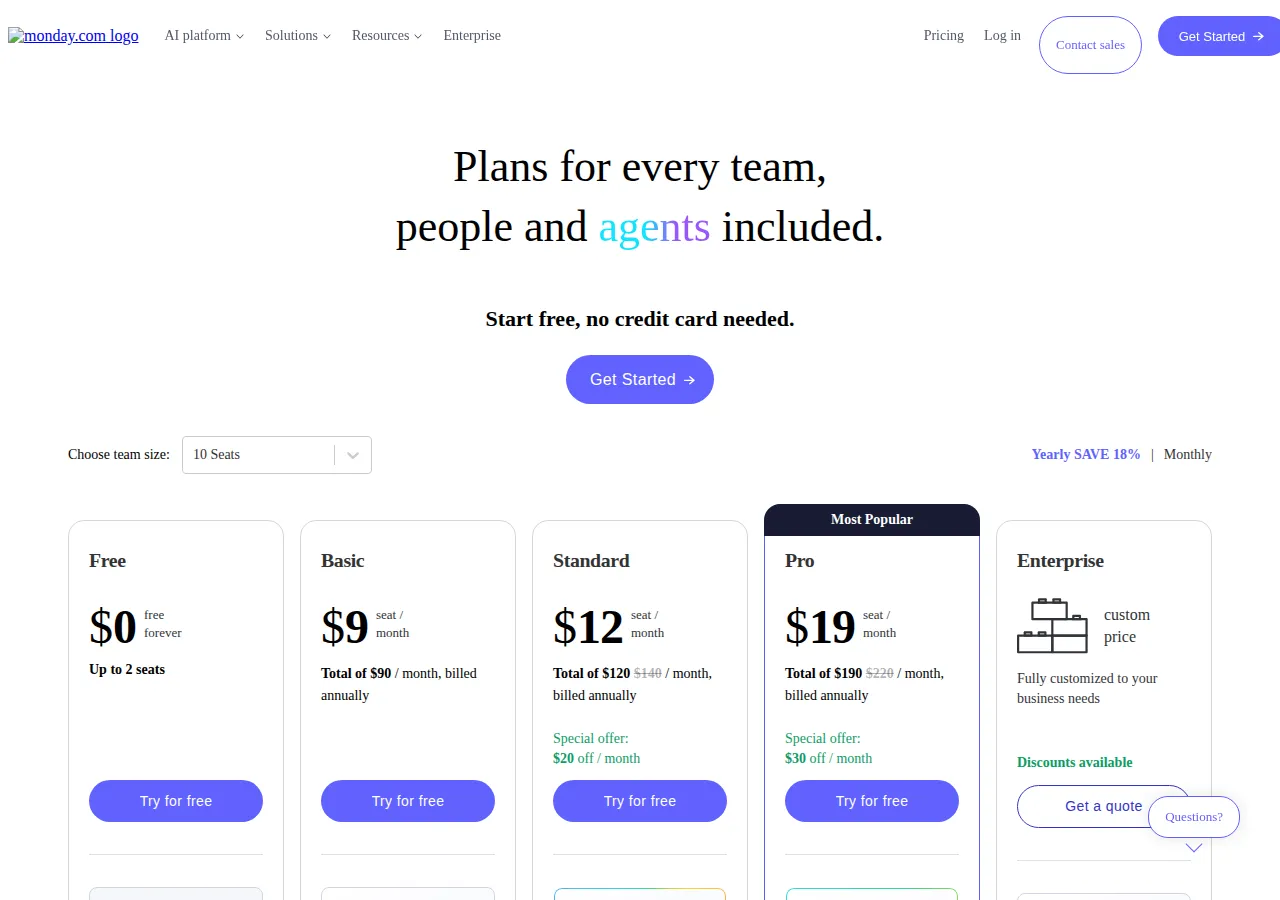
The monday.com shape mirrors Smartsheet's: Standard allows 250 actions a month — the same number as Smartsheet Pro — then Pro multiplies the ceiling by one hundred, to 25,000. That 100x jump for $7 a seat is the best automation bargain here — and why Standard traps any team that automates seriously.
Wrike: the $15 cliff between Team and Business
Team costs $10 per user per month billed annually for 2 to 15 users, with shareable dashboards, interactive Gantt charts, and starter AI features. Business costs $25 per user per month billed annually for 5 to 200 users. Pinnacle and Apex are custom-priced; the vendor no longer lists an Enterprise tier at all.
Business is where Wrike actually starts: proofing and approvals, request forms, time tracking, and resource management all begin at Business, confirmed by two independent reviews. Pinnacle adds advanced resource and capacity planning, budgeting, and advanced reporting and business intelligence. Apex adds unlimited Whiteboards and includes Wrike Integrate and Wrike Sync, the two-way sync with Jira and GitHub — paid add-ons everywhere below it. Whiteboard alone is a $15 per user per month add-on.
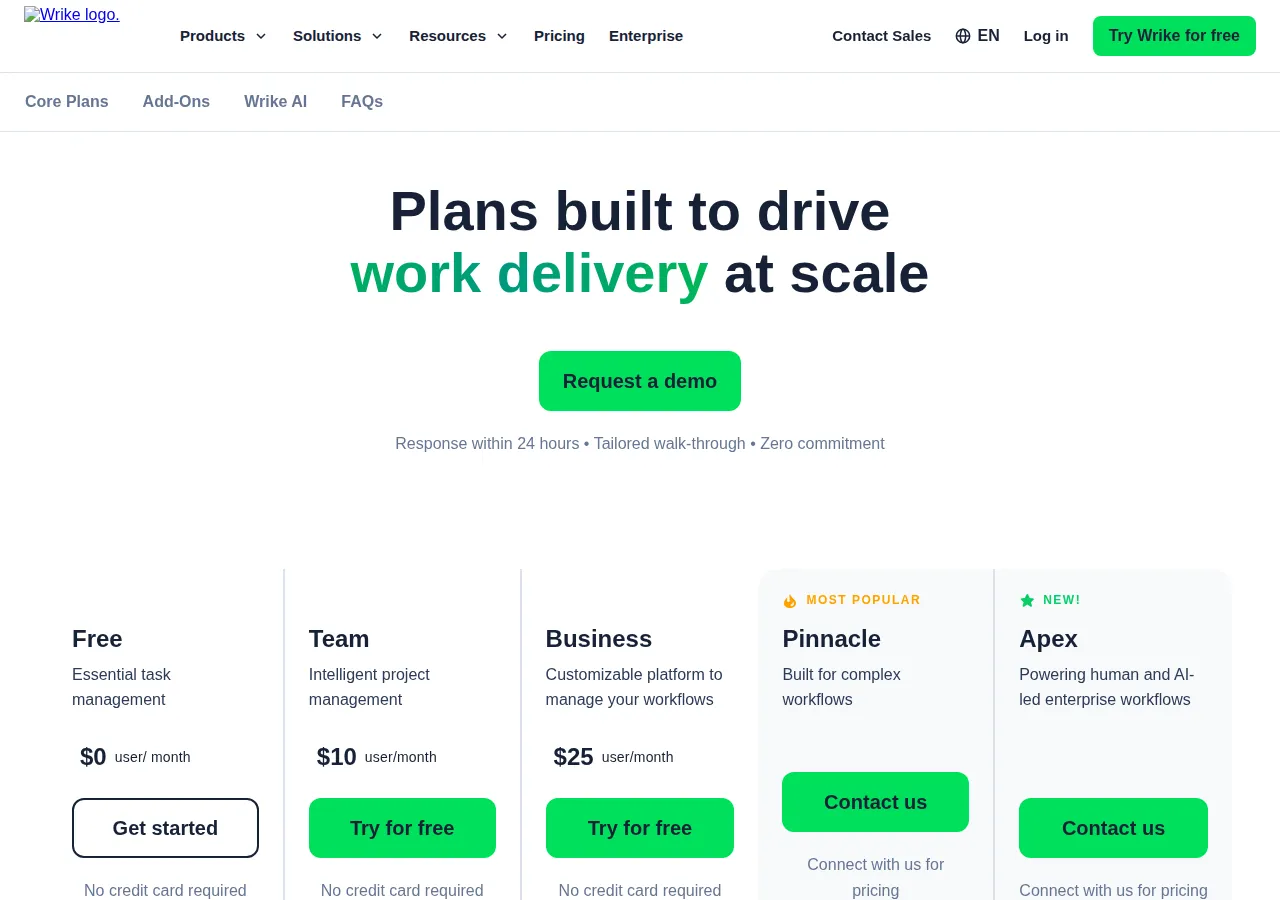
Wrike also controls how seats are bought: up to 30 in groups of five, 30 to 100 in groups of ten, above 100 in groups of twenty-five. The 5, 25, and 100-seat totals below all land on valid group sizes. Business and above are annual subscriptions only; the published rates are valid for new purchases on or after January 21, 2026.
The cost math: 5, 25, and 100 seats
All totals below use the annual-billed rate:
At 5 seats, the platforms nearly tie: Smartsheet Pro and monday.com Basic are $45 a month and $540 a year each; Wrike Team is $50 and $600. The working tier costs more: Smartsheet Business and monday.com Pro are $95 and $1,140 each; Wrike Business is $125 and $1,500 — a $30-a-month gap over monday.com Pro:
At 25 seats, two plans drop out: Smartsheet Pro caps at 10 members, Wrike Team at 15 users. Smartsheet Business is $475 a month and $5,700 a year, monday.com Standard $300 and $3,600, monday.com Pro $475 and $5,700, Wrike Business $625 and $7,500 — $150 a month more than the $475 tie:
At 100 seats, the same tie holds and the Wrike gap widens: Smartsheet Business and monday.com Pro are $1,900 a month and $22,800 a year each, monday.com Standard $1,200 and $14,400, Wrike Business $2,500 and $30,000 — a $600-a-month premium:
Over three years at 100 seats, that gap becomes $21,600: $90,000 for Wrike Business against $68,400 each for the other two; at 25 seats it is $5,400. Run the break-even calculator on those totals: Wrike must earn its premium every year, because the gap repeats on every renewal. Monthly billing changes the Smartsheet numbers only: Business at $24 a seat monthly-billed costs $600 a month at 25 seats against $475 billed annually, a $125-a-month saving.
The decision table
| Decision factor | Smartsheet | monday.com | Wrike | Authority |
|---|---|---|---|---|
| Entry rate | Pro $9, 1–10 members | Basic $9, from 3 users | Team $10, 2–15 users | Vendor page |
| Working tier | Business $19, 3+ members | Pro $19 | Business $25, 5–200 users | Vendor page |
| Portfolio management | Enterprise, custom | Enterprise, custom | Pinnacle, custom | Vendor page |
| Resource management | Paid add-on, Business/Enterprise | Enterprise only | Business+; advanced at Pinnacle | Vendor pages |
| Proofing | Business $19, included | None listed | Business $25 | Agency Shed; Professionals Toolkit |
| Automation | Pro 250/mo; Business unlimited | Standard 250/mo; Pro 25,000; Enterprise 250,000 | AI Elite, counts unpublished | Vendor pages |
| Monthly billing | Yes, Pro $12, Business $24 | Higher rate; 18% saving | No; annual only | monday.com FAQ |
| 25 seats, annual | Business $5,700 | Pro $5,700; Standard $3,600 | Business $7,500 | Recomputed above |
Portfolio and program management: all three want a sales call
Portfolio management is the feature this comparison exists to price, and none of the three vendors prices it. Smartsheet puts Portfolios, Collections, and Scenario Planning in Enterprise; monday.com puts portfolio management in Enterprise; Wrike puts portfolio-level budgeting and advanced reporting in Pinnacle. The $5,700-a-year figure for Smartsheet Business or monday.com Pro at 25 seats is the price of the tier below portfolio, not the portfolio price. A buyer who needs a portfolio view across twenty projects should budget for a quote, not for $19 a seat.
Resource management: bundled, gated, or extra
Resource management splits three ways. monday.com is the cleanest: it is an Enterprise feature, period, and a buyer on Pro does not get it at any price. Wrike is the most generous at the working tier: resource management starts at Business at $25 a seat, with advanced capacity planning reserved for Pinnacle. Smartsheet is the most expensive in practice: Resource Management is a paid add-on for Business and Enterprise, with no price published, so the $19 Business rate does not buy it. A team that only needs to see overload can live with Smartsheet Business workload tracking or Wrike Business; a team that must forecast hiring needs Smartsheet's add-on, Wrike Pinnacle, or monday.com Enterprise.
Proofing and approvals: the creative-work gate
Proofing is the most lopsided feature in this comparison. Smartsheet includes proofing for images and video on Business at $19, while Pro has none. Wrike puts proofing and approvals on Business at $25, with reviewers able to mark up images, video, PDF, and Office files, and approvals able to go to external guests. monday.com lists no proofing feature on any tier: approvals there are built from automations on Pro, with no native markup tool. For a creative team, that decides the shortlist before price does: a team that routes artwork through review cannot use monday.com without a separate proofing tool.
Automation ceilings: where 250 actions a month runs out
Automation is the quiet budget-killer here: the ceilings are monthly, and the remedy is an upgrade, not a bill. Smartsheet Pro allows 250 automated triggers a month; Business is unlimited — $9 rations it, $19 removes the cap. monday.com Standard allows 250 automation and 250 integration actions a month; Pro allows 25,000 of each; Enterprise up to 250,000 combined. Wrike publishes no numeric cap: Business includes a starter pack of AI Elite actions, Pinnacle three times more, Apex ten times more. At 25 seats, monday.com Standard costs $300 a month for 250 actions, or 0.83 per dollar, while Pro costs $475 for 25,000 actions, or 52.63 per dollar:
Pro buys about 63 times the automation actions per dollar Standard buys. The $175-a-month gap at 25 seats is $2,100 a year, buying a 100x automation ceiling, time tracking, and 20 workflows. Any team that automates status changes will cross 250 actions in the first week of the month.
Operator boundaries: who should pick which, and who should avoid each
Pick Smartsheet Business if your team thinks in spreadsheets and needs proofing included at $19 without paying Wrike's $25. Avoid Smartsheet Pro above ten members — the cap is absolute — and avoid Smartsheet entirely if resource forecasting is core and the add-on is unpriced.
Pick monday.com Pro if your team automates heavily and does not need proofing or portfolio management. Avoid monday.com Standard if anyone will build automations; 250 actions a month is a trial allowance, not a working budget. Avoid monday.com entirely if proofing is a daily workflow — no tier offers it — or if portfolio is a requirement, which lives only in Enterprise.
Pick Wrike Business if proofing, request forms, time tracking, and resource management must live in one subscription at a published price, and your team is between 5 and 200 users. Avoid Wrike Team beyond simple project tracking: it cannot do proofing, resource planning, or time tracking. Avoid Pinnacle and Apex until you have the quote in writing; neither publishes a price. The Notion workspace comparison covers lighter alternatives.
The buying checklist
- Count seats, then check the caps: Smartsheet Pro stops at 10, Wrike Team at 15, monday.com starts at 3.
- List the three enterprise gates — portfolio, resource, proofing — and mark which tier holds each.
- Get the Smartsheet Resource Management add-on priced in writing.
- Get the monday.com Enterprise quote and confirm the $12 and $19 rates at checkout.
- Get the Wrike Pinnacle quote in writing.
- Count monthly automation actions on your current tool: 250 on Smartsheet Pro and monday.com Standard, 25,000 on monday.com Pro, unlimited on Smartsheet Business.
- Run the 5, 25, and 100-seat totals against your headcount, including Wrike's seat groups and monday.com's 40-user threshold.
- Trial the tier you intend to buy and test proofing, resource views, and one automation chain before signing.
Founder & CEO Insight — Enow A. Jovial
Three vendors, three different places to hide the cost: Smartsheet in the ten-member cap and the resource add-on, monday.com in the Enterprise tier and the 250-action ceiling, Wrike in the $15 step and the unpriced Pinnacle tier. The published rates are honest — $9, $12, $19, $10, $25 — and the totals recompute cleanly. Price the rest before the trial ends.