Notion vs ClickUp vs Asana: Project Management Pricing Playbook
Three tools, three pricing philosophies, one decision that sets your monthly burn. Notion sells a workspace that happens to manage projects. ClickUp sells the cheapest seat and charges for the automation that makes it useful. Asana sells the most expensive seat and the cleanest guest math. None is cheap once you count the whole bill.
Every figure below is vendor-read from the vendors' own pricing pages on November 9, 2026, or corroborated by at least three independent 2026 reads, flagged where that is the case.
Founder & CEO Insight — Enow A. Jovial
The three vendors at a glance
| Vendor | Free tier | Cheapest paid seat | Automation | Guests | Authority |
|---|---|---|---|---|---|
| Notion | $0, 1,000-block cap with a second owner | Plus $10/member/month | Custom automations, no published cap | 10 free, 100 Plus, 250 Business | Notion pricing page |
| ClickUp | Free Forever $0, 100 actions/month | Core $9/user/month | 1K Core, 10K Business, 1M Max | Unlimited, permissions locked on Free | ClickUp pricing page |
| Asana | Personal $0, 2 users | Starter $10.99/user/month | Unlimited rules | Unlimited free guests | Asana pricing page |
The cheapest paid seat at every team size is ClickUp Core at 9 dollars, then Notion Plus at 10 dollars, then Asana Starter at 10 dollars and 99 cents. That ordering holds at 5, 25, and 100 seats. It does not hold once automation, guests, or AI enter the math.
The price ladder: what a seat actually costs
| Plan (annual billing) | 5 seats / month | 25 seats / month | 100 seats / month | 25 seats / year |
|---|---|---|---|---|
| Notion Plus $10 | $50 | $250 | $1,000 | $3,000 |
| Notion Business $20 | $100 | $500 | $2,000 | $6,000 |
| ClickUp Core $9 | $45 | $225 | $900 | $2,700 |
| ClickUp Business $17 | $85 | $425 | $1,700 | $5,100 |
| ClickUp Max $100 | $500 | $2,500 | $10,000 | $30,000 |
| Asana Starter $10.99 | $54.95 | $274.75 | $1,099 | $3,297 |
| Asana Advanced $24.99 | $124.95 | $624.75 | $2,499 | $7,497 |
At 100 seats, ClickUp Core costs 900 dollars a month against Asana Advanced at 2,499 dollars, and ClickUp Max costs 10,000 dollars, five times Notion Business.
Monthly billing adds 20 percent on Notion, 33.3 percent on ClickUp Core, 47.1 percent on Business, and about 22 percent on Asana. At 25 seats the penalty is 600 dollars a year for Notion Plus, 900 for ClickUp Core, 2,400 for ClickUp Business, and 750 for Asana Starter.
Notion: the cheapest doc-first workspace
Notion Plus at 10 dollars per member per month on annual billing is the middle seat of the three, and Notion Business at 20 dollars is the cheapest top tier. The pricing page offers a monthly-or-yearly toggle, with yearly billing saving up to 20 percent.
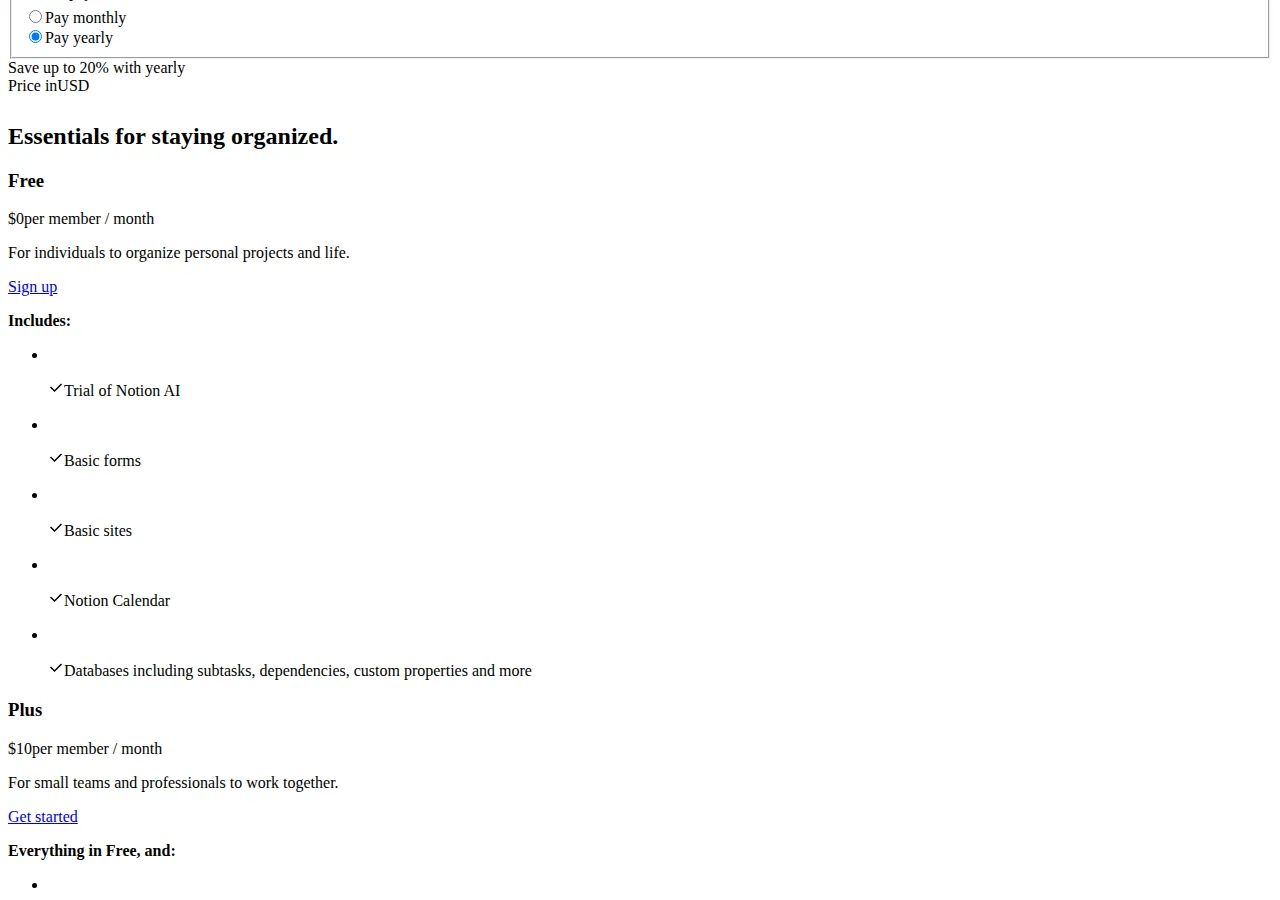
The free tier ceiling matters. A solo workspace has unlimited blocks, but once a second owner joins, the workspace caps at 1,000 blocks in total, counted from signup, and deleting content does not give any back. Six independent 2026 reads report this rule.
Plus adds custom database automations, custom forms, sites, and charts. Business adds full Notion AI, AI meeting notes, enterprise search, and SAML single sign-on, with SCIM on Enterprise. Notion AI is metered in credits: after the trial, AI costs 10 dollars per 1,000 monthly credits.
ClickUp: the cheapest seat, the steepest automation ladder
ClickUp Core at 9 dollars per user per month on annual billing is the cheapest paid seat of the three, and the pricing page prints the monthly rates as struck-through regular prices: Core 12 dollars, Business 25 dollars, Max 120 dollars. Free Forever costs 0 dollars, with unlimited tasks and members, 60 MB of storage, and 5 spaces. Core adds unlimited storage, forms, Gantt charts, Chat, and guest permissions. Business adds advanced dashboards, webhooks, Google SSO, private views, and timesheets. Enterprise adds white labeling, unlimited custom roles, advanced SSO, SCIM, SAML, and HIPAA support.
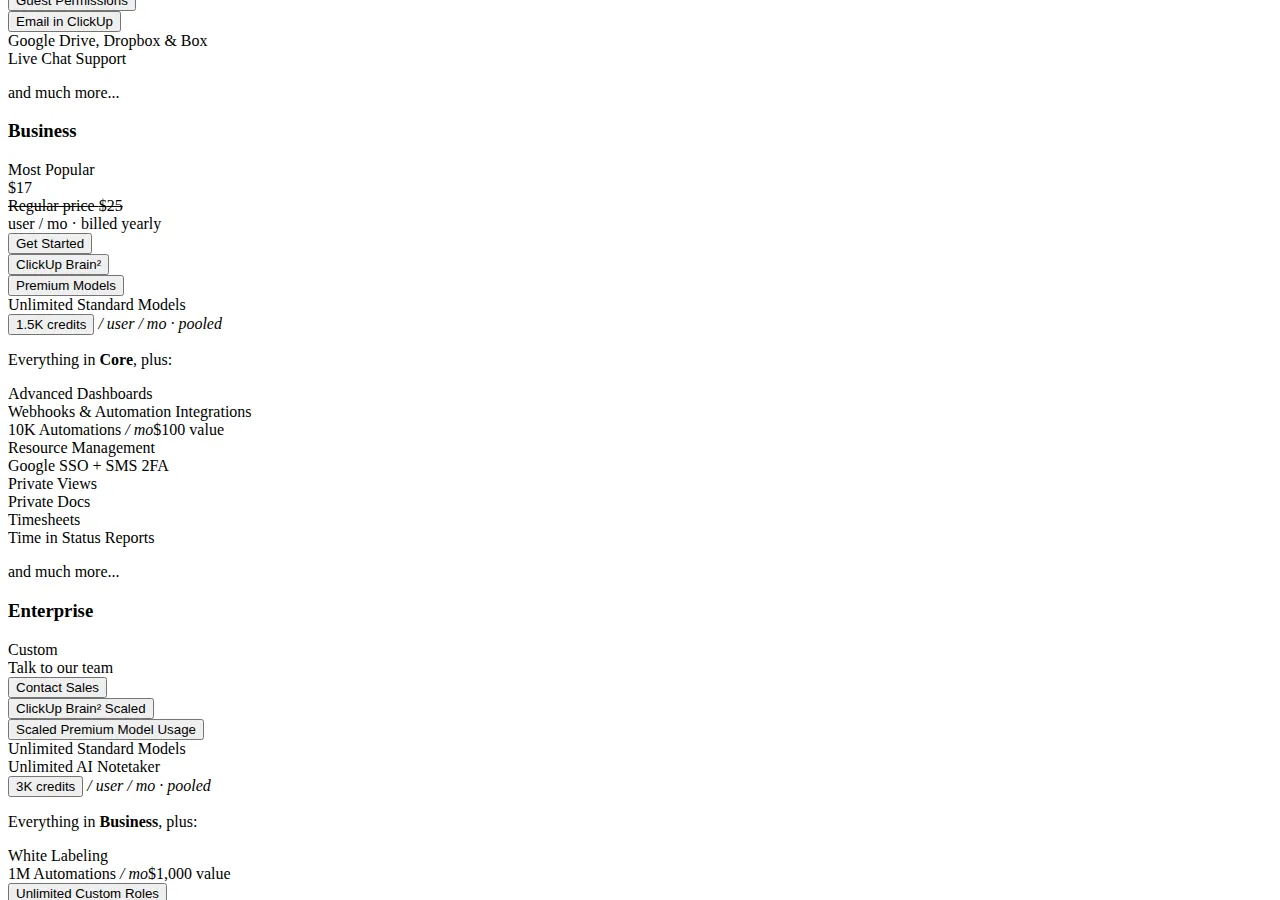
Core includes 1,000 automation actions a month, Business 10,000, and Enterprise and Max 1,000,000. Free Forever caps at 100 actions a month with 5 active rules, corroborated by five independent 2026 reads. The Core-to-Business upgrade costs 8 dollars per user per month — 200 dollars a month for 25 users — and buys ten times the allowance. Per action, Business is far cheaper:
Business actions cost about one-fifth as much per action as Core actions, so a team that automates heavily should skip Core and price Business.
Asana: the most expensive seat, the cleanest guest math
Asana Starter at 10 dollars and 99 cents per user per month on annual billing is the most expensive cheapest seat of the three, and Advanced at 24 dollars and 99 cents is the priciest standard tier. Starter is 13 dollars and 49 cents on monthly billing, Advanced is 30 dollars and 49 cents. The pricing page offers a free trial, and three independent 2026 reads put its length at 30 days.
Asana's automation story is the opposite of ClickUp's: rules are unlimited on Starter and Advanced, with no numeric cap. Older guides still print a 250-action monthly limit for Starter, but that limit was lifted years ago, and an Asana community answer from December 2025 confirms it is unlimited now.
Asana imposes seat increments instead: 2 to 5 users in steps of 1, up to 30 in steps of 5, up to 100 in steps of 10, up to 500 in steps of 25, above 500 in steps of 50. A team of 11 pays for 15 seats, and a team of 26 pays for 30. Paid plans include unlimited free guests, so a 25-member team with 40 external guests pays for 25 seats and nothing more. Enterprise adds SAML, SCIM, an admin console, and view-only licenses.
Automation limits: where the caps actually bite
ClickUp rations actions per month and sells more with the plan upgrade. Asana charges nothing for rules. Notion gives custom automations on Plus and Business with no published cap.
| Vendor | Plan | Automation allowance | At the cap |
|---|---|---|---|
| Notion | Free | Basic buttons only | No custom automations |
| Notion | Plus / Business | Custom automations, no published cap | No cap |
| ClickUp | Free Forever | 100 actions/month, 5 active rules | Stops |
| ClickUp | Core | 1,000 actions/month | Upgrade or wait |
| ClickUp | Business | 10,000 actions/month | Upgrade or wait |
| ClickUp | Enterprise / Max | 1,000,000 actions/month | 1M ceiling |
| Asana | Starter / Advanced / Enterprise | Unlimited rules | No cap |
A team running 8,000 automation actions a month cannot live on ClickUp Core, which caps at 1,000. It needs Business at 425 dollars a month for 25 users, while the same team on Asana Starter pays 274 dollars and 75 cents a month with unlimited rules, and on Notion Plus pays 250 dollars a month with no published cap. The gap is 150 dollars and 25 cents a month, or 1,803 dollars a year, because of the cap, not the seat price.
Guests and external collaborators
Guests decide the bill for any team that works with clients. Asana is the clearest: unlimited free guests on paid plans, no counting, no upgrade trigger. ClickUp includes guests on every plan, but Free cannot restrict them, and only Core and above add limited-access and view-only guests. Notion is the strictest: 10 guests on Free, 100 on Plus, 250 on Business, and the 101st guest moves a whole team to Business, 250 dollars a month more than Plus for 25 members.
Related: asana-vs-monday-vs-trello-project-management-pricing-automation, notion-vs-airtable-vs-coda-team-workspace-pricing-automation, linear-vs-jira-vs-clickup-engineering-issue-tracking.
AI: three different meters
Each vendor meters AI differently. Notion charges by the credit: 10 dollars per 1,000 monthly credits after the trial, with custom agents drawing from the same pool. A team that uses 10,000 extra credits in a month pays 100 dollars, or 1,200 dollars a year. ClickUp charges by the credit too, with a larger allowance: Core pools 1,000 credits per user per month, Business pools 1,500, and a top-up is 10 dollars per 10,000 credits. A 25-user Business workspace starts each month with 37,500 pooled credits. Asana charges by the request: 5 AI Teammate requests per user per month, up to 50 per account on Starter and 250 on Advanced, AI Studio credits of 75,000 on Starter and 200,000 on Advanced, and extra requests at 50 cents prepaid or 60 cents on demand.
Prepaying saves 100 dollars a month, or 1,200 dollars a year, at that volume.
Worked examples
Example: the Asana seat-increment waste. A team of 11 users on Asana Starter cannot buy 11 seats. It buys 15. Fifteen seats at 10 dollars and 99 cents is 164 dollars and 85 cents a month, while 11 seats would be 120 dollars and 89 cents — 43 dollars and 96 cents a month, or 527 dollars and 52 cents a year, for empty seats. A team of 26 pays for 30 seats, with the same monthly waste.
Example: the monthly-billing penalty at 25 seats. A 25-seat team on ClickUp Business pays 425 dollars a month on annual billing and 625 dollars a month on monthly billing — 5,100 dollars a year against 7,500. The penalty is 2,400 dollars a year for the same seats and the same team.
Example: the automation-heavy team. A 25-user team runs 8,000 automation actions a month. On ClickUp Core it hits the 1,000-action cap in the first week and must buy Business at 425 dollars a month. On Asana Starter it pays 274 dollars and 75 cents a month with unlimited rules. On Notion Plus it pays 250 dollars a month with no published cap. The cheapest seat, ClickUp Core at 225 dollars a month, is not available to this team, because the cap disqualifies it.
Which tool for which team
| Team | Buy | Why | Who should not buy it |
|---|---|---|---|
| Docs-first team, under 100 guests | Notion Plus | Docs, databases, projects in one place | Teams with 100+ guests or heavy automation |
| Small team, light automation | ClickUp Core | Cheapest seat at 9 dollars, generous free tier | Teams over 1,000 actions a month |
| Automation-heavy team | Asana Starter or Notion Plus | Unlimited rules on Asana, no cap on Notion | Teams that need the cheapest seat only |
| Client-facing team, many guests | Asana Starter | Unlimited free guests, no upgrade trigger | Teams under 5 seats on Personal |
| Enterprise controls, HIPAA | ClickUp Enterprise or Asana Enterprise | SAML, SCIM, audit logs, admin console | Teams that do not need compliance controls |
A practitioner note for the person who will administer whichever tool wins: per-seat billing means every joiner and leaver changes the invoice, so reconcile the member list monthly against payroll. SAML single sign-on and SCIM provisioning make that automatic, and they sit on Notion Business, ClickUp Enterprise, and Asana Enterprise, not on the cheaper tiers. Export your data before you commit: a CSV export of tasks and a PDF proof of the archive give you an exit route, and a GDPR data export request is the legal backstop if the vendor will not provide one. Put the SLA in writing for any paid plan, and check the DNS CNAME record for any custom domain. The MRR impact of a wrong plan choice is small per seat and large per year: a 10 dollar per seat mistake across 25 seats is 3,000 dollars a year.
Execution checklist
- Count the team. List every paid seat and every external guest, then check each vendor's guest cap against that list.
- Count the automation. Measure monthly automation actions for two weeks, double the number for growth, then check it against ClickUp's 1,000 and 10,000 caps.
- Price three sizes. Run the 5, 25, and 100 seat math from the price ladder section on annual billing, then add the monthly-billing penalty if cash flow forces monthly payment.
- Check the seat increments. On Asana, round your headcount up to the next increment step and price the rounded number.
- [x] Team size and guest count written down first
- [x] Monthly automation actions measured for two weeks
- [x] Annual billing selected unless cash flow forbids it
- [x] AI meter priced at real weekly usage
Price the plan that fits those three numbers with the pricing calculator.