Content decay is the slow version of a traffic drop. A page that earned its ranking two years ago does not fall off a cliff — it leaks: the title that once won the click now sits under a fresher rival, its statistics two years stale. Search Console's Performance report shows the leak first. This playbook diagnoses it from the four numbers Google reports, decides between refresh, rewrite, consolidate and prune, and prices the refresh.
How Google counts the four numbers
Four numbers from the Search Console Performance report carry the diagnosis. Impressions count how often someone saw a link to your site on Google; clicks count how often someone clicked one; average position is a relative ranking where 1 is the topmost position. Click-through rate, CTR, is clicks divided by impressions:
ext{CTR} =
rac{ ext{Clicks}}{ ext{Impressions}}
An impression is counted whenever an item appears in the current page of results, whether or not it is scrolled into view; scrolling away and back does not count again. A click is any click that sends the user to a page outside of Google Search, Discover, or News; clicking the same link again after returning counts as only one click. All click, impression, and position data are attributed to the canonical URL of the link.
Position is the number owners misread most: the topmost position occupied by a link to your page, averaged across all queries it appeared for. Google's worked example: positions 2, 4, and 6 for one query count as 2; 3, 5, and 9 for another count as 3; the average across the two is 2.5:
ext{Average position} =
rac{2 + 3}{2} = 2.5
A link must get an impression for its position to be recorded — an unviewed page-3 result shows a dash. Monitor position over time — particularly sudden changes — as well as its absolute value. Read the Queries tab per query, never the site-wide average. Our Google Search Console SEO audit playbook walks the full Performance report setup.
The worked example: one decaying page
The worked example is a B2B SaaS pricing guide, published in 2024, the site's third-best page. Baseline: the 28 days ending 2026-10-19. Current: the 28 days ending 2026-11-16. The inputs are stated, not measured from a live property — run your own numbers through the same formulas.
| Window | Clicks | Impressions | Average position | CTR |
|---|---|---|---|---|
| Baseline, 28 days | 1,200 | 40,000 | 6.4 | 3.00% |
| Current, 28 days | 780 | 38,500 | 9.1 | 2.026% |
CTR comes straight from Google's definition:
ext{CTR baseline} =
rac{1{,}200}{40{,}000} = 3.00%
ext{CTR current} =
rac{780}{38{,}500} = 2.026%
The click loss is 420 clicks in 28 days — 35.0% of the baseline, 15.0 clicks a day:
ext{Click loss share} =
rac{420}{1{,}200} = 35.0%
ext{Click loss per day} =
rac{420}{28} = 15.0 ext{ clicks per day}
Left unaddressed, that is 5,475 clicks a year. First, the loss has to be split: the split decides the treatment.
Split the loss: impressions or CTR
Clicks are impressions times CTR, so a click loss decomposes into an impressions part and a CTR part. Hold CTR at 3.00%: 38,500 times 3.00% is 1,155 clicks, so the impressions shortfall is 45 clicks. Hold impressions at 38,500: 38,500 times the 0.974-point drop is 375 clicks. The two parts add back to 420:
ext{CTR share of the loss} =
rac{375}{420} = 89.3%
Impressions fell only 3.75% while CTR fell by roughly a third: the topic kept its audience, and the page lost the contest for the click — a refresh-or-rewrite signal, not a demand signal. The split also sets the recovery target: 1,200 clicks at 38,500 impressions needs a CTR of 3.12%:
ext{CTR needed} =
rac{1{,}200}{38{,}500} = 3.12%
To return to 1,200 clicks at the current 2.026% CTR, the page would need 59,230 impressions — a 53.8% rise. Only the CTR route is under the operator's control this quarter: a better title, fresher content, a first screen that answers the query.
The decision table
The wrong treatment is expensive in both directions: refreshing a page that should be pruned burns hours on a corpse, and pruning a page that should be refreshed deletes an asset.
| Treatment | Use when | Cost | Risk | Authority |
|---|---|---|---|---|
| Refresh | Facts stale, structure sound, CTR loss dominates | Low: hours, not days | Low | Google helpful-content self-assessment |
| Rewrite | Intent changed, wrong question answered | High: a new draft | Medium: restructure can reset signals | Google core updates guidance |
| Consolidate | Pages split one query, each too thin | Medium: merge and redirect | Medium: canonical choice decides the winner | GSC help: data assigned to canonical URL |
| Prune | No audience, facts unfixable | Low: delete and redirect | High if wrong | Google core updates: deleting is a last resort |
Refresh when the page still ranks and the facts went stale; rewrite when the query changed; consolidate when thin pages split one query.
When the cause is a core update
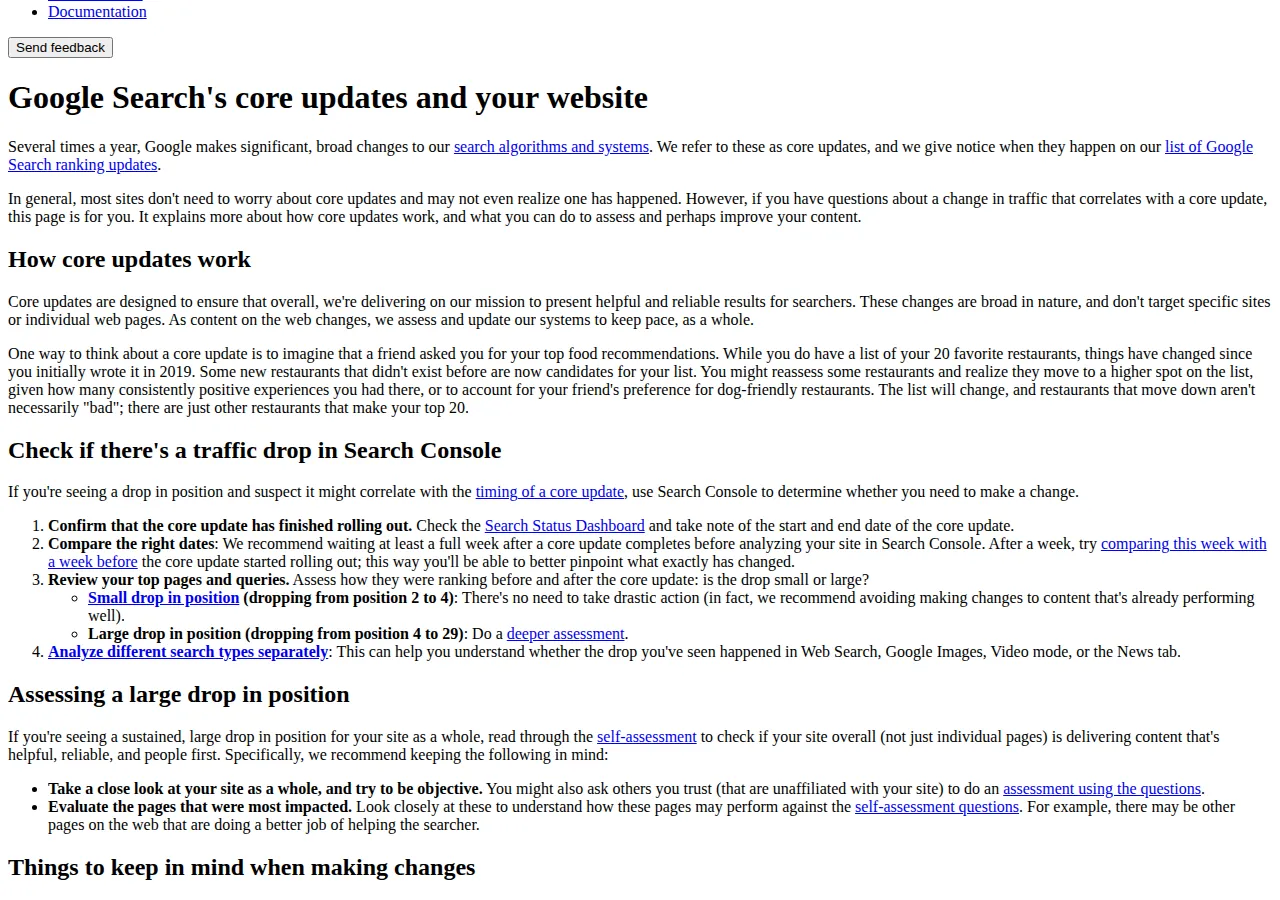
Not every decay is the page's fault. Google makes significant, broad changes to its search algorithms several times a year — core updates — which do not target specific sites or pages. A page can lose position because the list around it changed. Before rewriting anything, run Google's own check, in order. Confirm the update has finished rolling out on the Search Status Dashboard. Wait at least a full week after it completes before analysing, then compare a week after with a week before the rollout started. Then review the top pages and queries and ask whether the drop is small or large. Google's cases: a small drop, from position 2 to 4, needs no drastic action — avoid changing content that is already performing well. A large drop, from position 4 to 29, calls for a deeper assessment. Avoid quick fixes; focus on changes that make sense for users and last.
The ranking systems guide adds two facts. First, the helpful content system is listed under retired systems: in March 2024 it became part of the core ranking systems — no separate score to chase, no standalone update to wait for. Second, the freshness systems show fresher content for queries where it would be expected — a pricing guide two years stale loses to a fresher rival on freshness-eligible queries.
The refresh workflow
A refresh is a rewrite with constraints: same URL, same intent, same audience, new facts. Do not skip the measurement steps — a refresh without a before-and-after read is a guess with a publish date.
- Freeze the baseline: export 28-day clicks, impressions, CTR, and position, plus the top 10 queries.
- Read the queries that fell: sort the Queries tab by clicks lost and list the five biggest losers — the refresh must answer those five better.
- Read the pages that replaced you: open the three pages ranking above yours and note what yours misses.
- Update the facts, not the date: replace every stale number, version, price, and screenshot with a current one.
- Tighten the first screen: title, first paragraph, and first heading must answer the query.
- Republish and log the change: record the date, what changed, and the baseline; set measurement dates at four and twelve weeks.
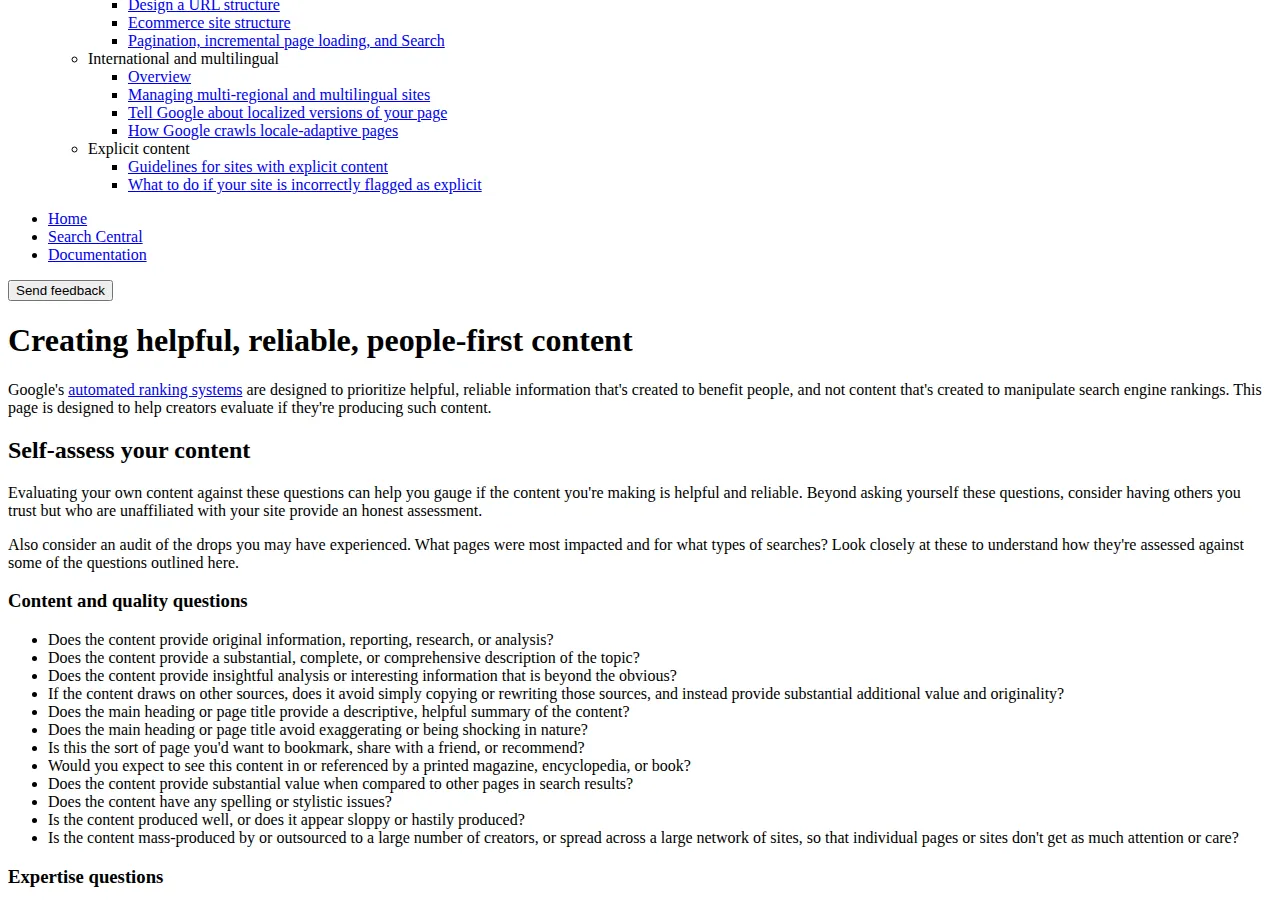
Google's self-assessment questions are the refresh checklist in disguise: original information or analysis; a substantial, complete description; insight beyond the obvious; no copying of sources; content you would bookmark; produced well, not sloppily. A refresh that fails most of those has changed the date, not the page. If the page is slow or broken on mobile, no refreshed prose fixes it — fix the technical layer first: our technical SEO for decoupled web apps guide.
Pricing the refresh
A refresh is a spend, so it needs a payback date. The inputs below are stated assumptions — substitute your own labour rate and value per click. Assume 6 hours at $75 per hour, and a recovered click worth $0.40. The refresh cost is then $450:
ext{Refresh cost} = 6 ext{ hours} imes $75 = $450
The worked example lost 420 clicks per 28 days — 450 clicks a 30-day month, worth $180 a month at $0.40:
ext{Recovered clicks per month} = 420 imes
rac{30}{28} = 450
ext{Monthly value} = 450 imes $0.40 = $180 ext{ per month}
Payback is the cost divided by the monthly value:
ext{Payback} =
rac{$450}{$180} = 2.5 ext{ months}
If the recovery holds for twelve months, the first-year value is $2,160 against a $450 cost — a return of 380%:
ext{First-year return} =
rac{$2{,}160 - $450}{$450} = 380%
Break-even is 1,125 recovered clicks — $450 divided by $0.40 — which at 450 a month arrives in the same 2.5 months. The sensitivity is the decision: at $0.10 per click the monthly value is $45 and payback stretches to 10 months; at $1.00 per click the monthly value is $450 and payback is one month. Check the arithmetic with our ROI calculator. Refresh a page whose clicks convert; consolidate or prune one whose clicks never convert, no matter how cheap the refresh looks.
Consolidate and prune without breaking the site
Consolidation is a redirect operation, not an editing operation. Pick the strongest page as the survivor, move the best facts from the weaker pages into it, then redirect the weaker URLs to it and update internal links. The threshold is stated, not promised: three thin pages at 40 clicks each per 28 days is 120 combined, so the consolidated page must earn more than 120 to justify the merge on clicks alone. Data is assigned to the canonical URL, so the survivor must be the canonical the site signals.
Prune only after the page has failed the refresh test: no audience would miss it, no query it serves has a better answer you can write, its facts are wrong beyond repair. Redirect the URL to the closest surviving page and remove it from the sitemap. Our SEO vs PPC budget allocation playbook prices the paid alternative, and our marketing attribution multi-touch playbook covers how a recovered click is credited.
Founder & CEO Insight — Enow A. Jovial
Who should NOT run this playbook
A site with fewer than twenty indexed pages has no corpus to decay. Traffic lost to a migration or broken links is a technical problem — fix the migration first, not the prose. A news site should not apply a 28-day window to stories with a 48-hour life; this cadence is built for evergreen guides. A team that cannot export a baseline should not start: without the before numbers, the after numbers prove nothing.
Measuring recovery, and what failure means
Measure recovery the way the loss was measured: two equal windows, same metric, split the same way. Compare the 28 days after the refresh with the 28 days before it, across the same four numbers, per query, not just site-wide. Google's timing: some changes take effect in a few days, but it could take several months for its systems to confirm the site is producing helpful content — no effect after a few months could mean waiting until the next core update. Unannounced smaller core updates can also lift an improved page. Judge at four weeks for direction and twelve weeks for the verdict.
If the refresh does not recover, the failure has a short list of causes: impressions recovered but CTR did not means rewrite the title, not the body. If CTR recovered but impressions did not, the ranking has not moved — the page needs stronger sourcing or consolidation. If neither moved, the query's intent changed — rewrite, as the decision table pointed to. If the whole site fell at once, the problem is site-wide: site-wide signals contribute to how pages are understood, so apply the self-assessment to the site as a whole.
Execution checklist
- [x] Step 1: Export the baseline: pull the page's 28-day clicks, impressions, CTR, and position, plus the top 10 queries.
- [x] Step 2: Split the loss: compute the impressions effect and the CTR effect.
- [x] Step 3: Check the calendar: confirm whether a core update rolled out, and wait a full week after it completes.
- [x] Step 4: Decide by the table: refresh, rewrite, consolidate, or prune — record the decision and the evidence.
- [x] Step 5: Refresh the facts, not the date: update every stale number, version, and screenshot with a current one.
- [x] Step 6: Price the work: run the payback formulas at your own rates.
- [x] Step 7: Measure at four and twelve weeks: compare equal 28-day windows per query; do not re-edit between reads.