SaaS Pricing Tiers & Packaging Playbook
SaaS Pricing Tiers & Packaging Playbook
A 25-person team pays $250 a month for Linear Basic and $400 a month for Linear Business. The $150 gap is not a price — it is a package: unlimited teams, private teams and guests, and the intelligence features. This playbook is the mechanics of that gap: good-better-best tier design, seat versus usage metering, add-on and overage ladders, and the price-rise sequence with its grandfathering cost. The pricing-strategy decision — value-based versus cost-plus versus competitor-based — sits in the value-based-pricing-playbook.
Step 1: What packaging actually is
Packaging is the allocation of value across tiers, and three decisions make up almost all of it. First, the meter: what you count — seats, contacts, API calls, AI credits, storage, or a combination. Second, the fence: which features sit on which side of each tier boundary. Third, the ladder: what it costs to cross from one tier to the next, and what happens when a customer exceeds an included allowance.
The vendors here use three different meters. Slack, Linear, Figma, and Zoom meter seats: a license for one person. HubSpot meters contacts and sends: Marketing Hub Starter includes 1,000 marketing contacts, Professional 2,000, Enterprise 10,000, with send limits of 5 times the tier on Starter, 10 times on Professional, 20 times on Enterprise. Figma meters seat types too — Full, Dev, and Collab seats at three different prices. Notion meters members, then sells add-ons per domain and per 1,000 AI credits.
The fence is where packaging earns or loses money. A fence too low gives the product away: the free tier does the job and nobody upgrades. A fence too high starves adoption: nobody reaches the value that would justify paying. Each tier must solve a complete job for a specific buyer, and the next tier must solve the next job that buyer grows into. Linear's ladder does this: Free is unlimited members with 2 teams and 250 issues; Basic at $10, billed yearly, removes the issue cap; Business at $16 adds unlimited teams and the intelligence features.
Step 2: The 2026 vendor ladder, on the vendors' own pages
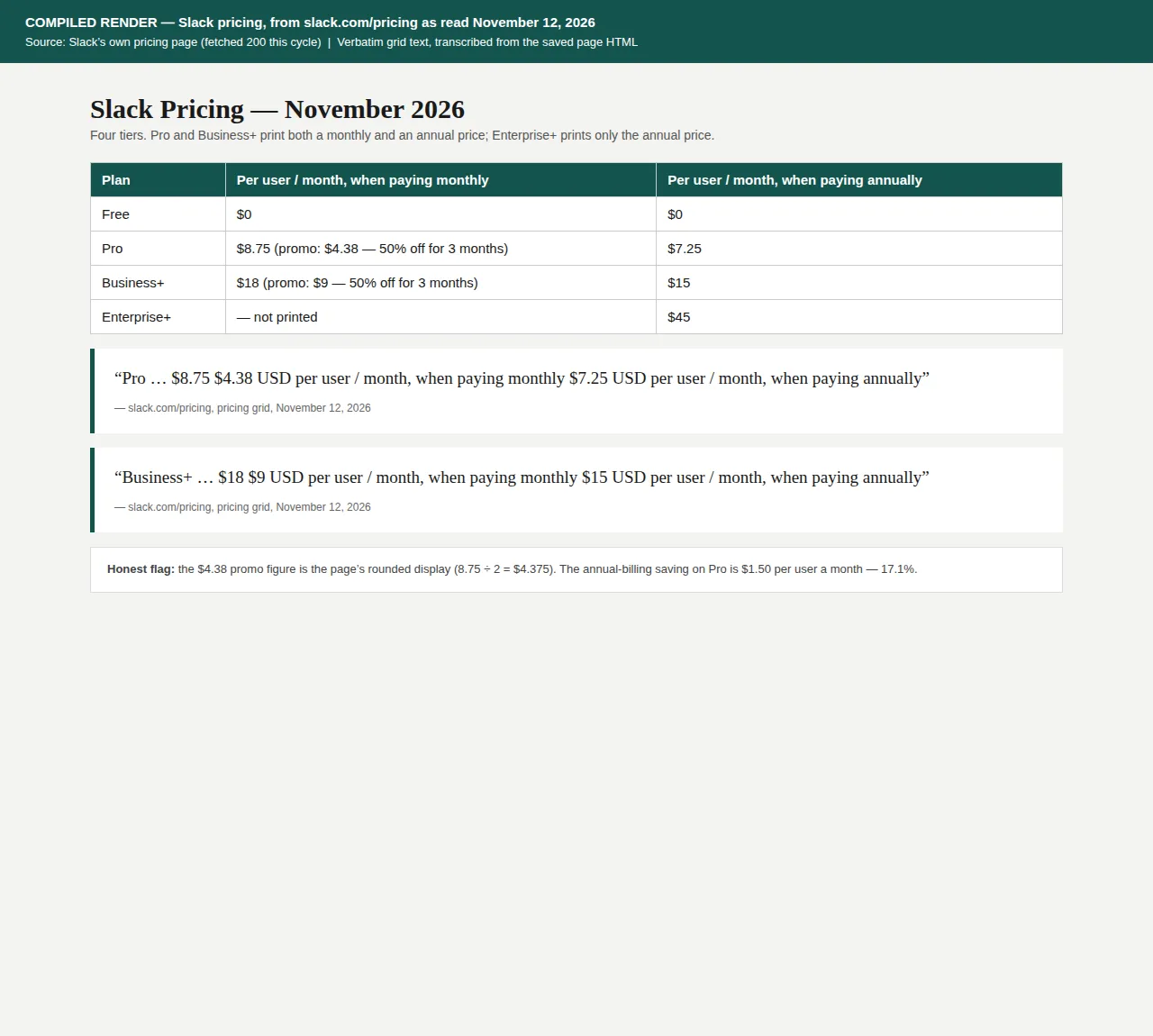
Every price in this table was read from the vendor's own pricing page on November 12, 2026. Where a page prints a billing basis, it is stated; where it does not, no basis is claimed.
| Vendor | Free tier | Paid tiers (per user/month unless stated) | Authority |
|---|---|---|---|
| Slack | $0 | Pro $7.25/yr-billed, $8.75/mo-billed; Business+ $15/$18; Enterprise+ $45/yr-billed | slack.com/pricing |
| Notion | $0/member | Plus $10/member, Business $20/member (yearly); Enterprise contact sales | notion.com/pricing |
| Linear | $0, unlimited members, 2 teams, 250 issues | Basic $10/yr-billed; Business $16/yr-billed; Enterprise custom, annual only | linear.app/pricing |
| Figma | Starter, limited AI credits | Professional: Full $16, Dev $12, Collab $3; Organization: Full $55, Dev $25, Collab $5; Enterprise: Full $90, Dev $35, Collab $5 (Org/Ent billed annually) | figma.com/pricing |
| Zoom | Basic, 40-min meetings, 100 participants | Pro $16.99/mo, $14.16/mo ann.; Business $21.99/mo, $18.33/mo ann.; Enterprise custom | zoom.us/pricing |
| HubSpot Marketing Hub | Free CRM tools | Starter / Professional / Enterprise by contact tier; no dollar prices on the pricing page | hubspot.com/pricing/marketing |
Three patterns stand out. The annual-billing discount is nearly identical everywhere: Slack Pro drops 17.1% from monthly to annual billing, Zoom Pro 16.7%, Zoom Business 16.6%. The spread is wide: Figma's Full seat runs $16 on Professional and $90 on Enterprise, a 5.6-times spread, the difference bought in administration, security, and support.
Step 3: Worked example — the seat ladder at 5, 25, and 100 seats
Take Linear's two paid tiers: Basic at $10 per user a month, Business at $16, both billed yearly.
| Team size | Basic $10/seat | Business $16/seat | Upgrade premium |
|---|---|---|---|
| 5 seats | $50/mo, $600/yr | $80/mo, $960/yr | $30/mo, $360/yr |
| 25 seats | $250/mo, $3,000/yr | $400/mo, $4,800/yr | $150/mo, $1,800/yr |
| 100 seats | $1,000/mo, $12,000/yr | $1,600/mo, $19,200/yr | $600/mo, $7,200/yr |
The upgrade premium is $6 a seat a month, and it scales linearly with headcount. At 5 seats the buyer asks whether Business is worth $360 a year; at 100 seats the same question costs $7,200 a year.
Figma splits the seat itself. A 35-person team of 10 Full, 5 Dev, and 20 Collab seats costs, on Professional:
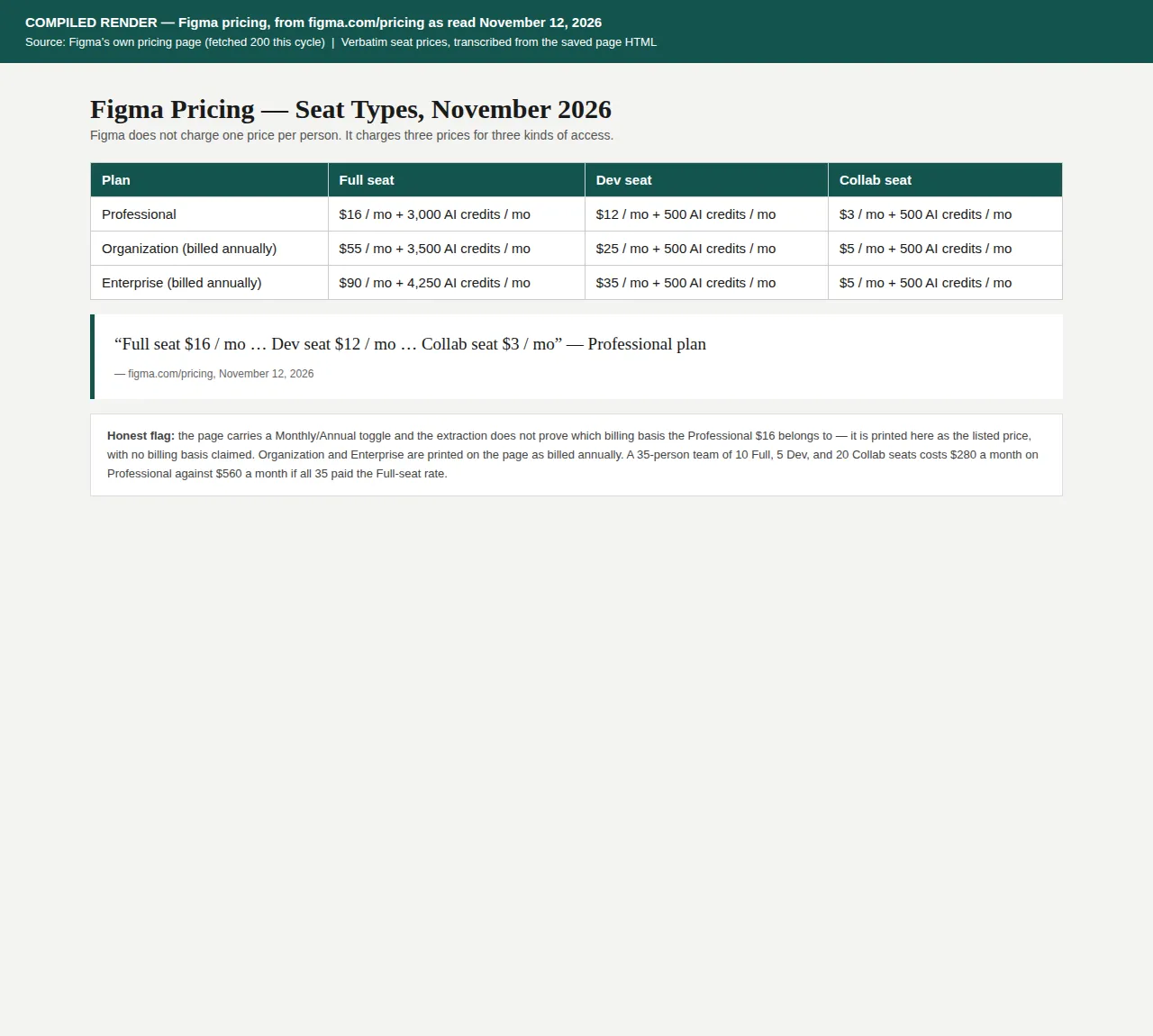
The same mix on Organization, billed annually, is $10 \times \$55 + 5 \times \$25 + 20 \times \$5 = \$550 + \$125 + \$100 = \$775$ a month, or $9,300 a year against Professional's $3,360 — a gap of $495 a month, $5,940 a year. Charging all 35 the Full-seat rate would cost $35 \times \$16 = \$560$ a month, so the split saves $280 a month, $3,360 a year.
Step 4: Worked example — metering, overage, and the crossover point
Seat pricing is simple and leaves money on the table: the customer who uses the product ten times as much pays the same as the one who barely logs in. Usage-based pricing fixes that, and Stripe's Billing documentation names the three shapes it takes: fixed fee and overage, pay as you go, and credit burndown. Stripe defines the tiered variant as: "The unit cost changes with quantity (volume-based pricing) or usage (graduated pricing)." Metronome is now Stripe's primary usage-based platform.
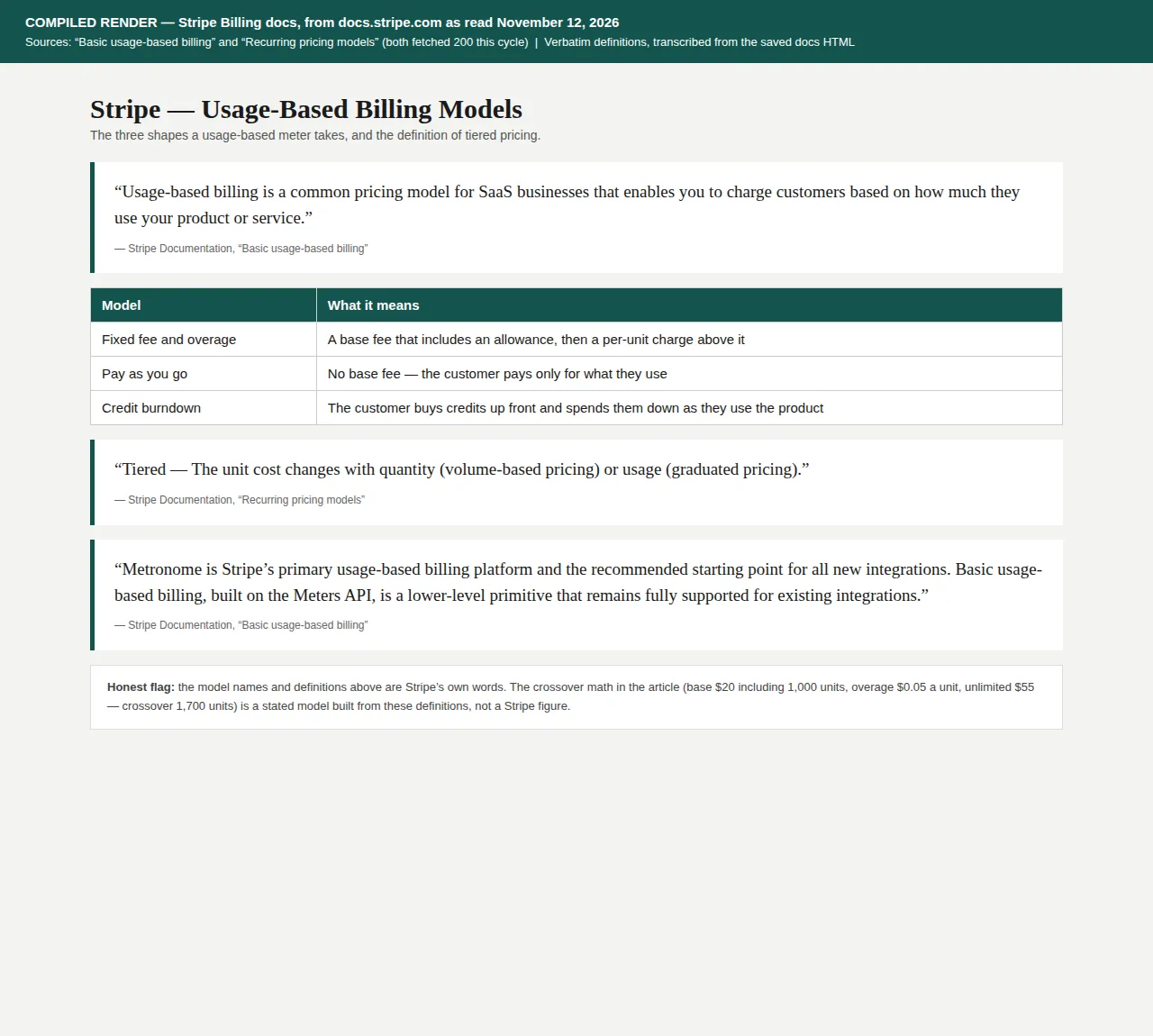
The model to build before you ship a meter is the crossover: the usage level at which the customer should stop paying overage and move to the unlimited tier. Take a stated model — a base plan at $20 a seat that includes 1,000 units, overage at $0.05 a unit, and an unlimited tier at $55 a seat:
At 1,200 units the metered plan costs $30 a seat against $55 unlimited — metered wins by $25 a seat. At 2,500 units it costs $95 a seat — unlimited wins by $40. For a 25-seat team at 2,500 units: $2,375 a month metered against $1,375 unlimited — a $1,000-a-month gap, $12,000 a year.
Step 5: Add-ons and annual billing
Add-ons are the third ladder: features sold beside the tier instead of inside it. Notion's Sites add-on is a clean example — a custom domain costs $8 a month per domain paid annually, or $10 a month paid monthly. Five domains cost $480 a year on annual billing against $600 monthly, a $120-a-year saving.
Annual billing is the vendor's cheapest discount to give and the customer's easiest saving to take. Slack Pro at 25 seats costs $2,175 a year on annual billing against $2,625 monthly — a $450-a-year saving, 17.1%. At 100 seats the saving is $1,800 a year. Zoom Pro at 50 users saves $2.83 a user a month, $1,698 a year; Zoom Business saves $3.66 a user a month, $2,196 a year at 50 users.
Step 6: Grandfathering and the price-change sequence
Sooner or later the price must rise, and the question is never whether to raise it — it is who pays the new price and when. Grandfathering is the answer most vendors reach for: existing customers keep the old price for a fixed period, new customers pay the new one. The cost of that kindness is exactly computable. Take a stated model: a vendor raises the price from $10 to $12 a seat with 500 seats on the books.
Twelve months of grandfathering costs $12,000; six months costs $6,000. The rise itself gains $12,000 a year if nobody leaves. If 10% of seats churn, 450 seats at $12 pay $64,800 a year against the old $60,000: a net gain of $4,800 a year despite losing 50 seats. The break-even is 83 seats: each lost seat costs $144 a year, and $12,000 divided by $144 is 83.3. Lose more than 83 of 500 seats — 16.7% — and the rise loses money.
The communication sequence is as mechanical as the math, and the order matters more than the wording:
- Freeze the grandfather terms in writing first: who keeps the old price, for how long, and what ends it — a date, not a vague promise.
- Announce 60 to 90 days before the change, to the billing contact and the admin, in separate messages.
- State the old price, the new price, the date, and the grandfather terms in the first three lines. Nothing before the numbers.
- Give every customer a one-click path to lock the annual rate at the old price before the change.
- On the change date, apply the new price only to new signups and to grandfathered accounts whose term has expired. Never back-bill a grandfathered account.
- Thirty days after the change, count the churned seats against the break-even number and report it. If churn is past break-even, extend the grandfather rather than defending the rise.
Notion's own billing rules show how the machinery underneath should behave: adding a member mid-month creates a prorated charge; removing a member opens the seat for reuse but gives no credit; downgrading takes effect at the end of the billing cycle; a failed payment is retried up to 8 times within the next month.
The decision
| Packaging model | Meter | Best for | Failure mode | Authority |
|---|---|---|---|---|
| Flat per-seat tiers | Seats | Team tools, uniform usage: Slack, Linear, Zoom | Heavy users subsidized by light users | Slack, Linear, Zoom pricing pages |
| Seat-type split | Seat types | Distinct user roles: Figma Full/Dev/Collab | Misclassified seats; gaming the cheapest seat | Figma pricing page |
| Usage-based with overage | Units, API calls, credits | Variable workloads; Stripe fixed fee + overage, pay-as-you-go, credit burndown | Surprise overage invoices; no crossover computed | Stripe Billing docs |
| Contact-tier | Contacts and sends | Marketing platforms; HubSpot 5x/10x/20x send multiples | Audience growth punished; no downgrade until renewal | HubSpot pricing page |
| Add-on ladder | Per-domain, per-credit | One-feature buyers who will never cross a tier fence | Add-on sprawl; a cheaper Enterprise assembled by parts | Notion pricing page |
Who should pick which
Pick flat per-seat tiers when usage is roughly uniform across the team and the sale is simple enough to close on a pricing page — Slack, Linear, and Zoom all do this, because a seat is the easiest meter to explain. Pick a seat-type split when the product has genuinely different users: Figma's Collab seat at $3 exists because a stakeholder who only comments should not pay the $16 Full-seat rate. Pick usage-based metering when usage varies tenfold between customers and the heavy user's cost to serve is real — but only after computing the crossover and setting the 80% alert.
Avoid usage-based pricing when the customer cannot predict or control their usage. And avoid grandfathering without an end date. The revenue a price rise touches is recognized over the subscription term, not at the invoice — the asc-606-revenue-recognition-saas-contracts playbook runs that timing, and the deferred-revenue-saas-balance-sheet-recognition-playbook shows where the cash sits while it waits.
The build operation, start to finish
- [x] Pick the meter first — seats, usage, contacts, or seat types — and write down what the customer optimizes against.
- [x] Draw three tiers where each tier solves a complete job for a specific buyer, and the next tier solves the job that buyer grows into.
- [x] Compute the seat ladder at 5, 25, and 100 seats, and the upgrade premium at each size, before publishing any price.
- [x] Compute the overage crossover and print it in the plan comparison — the usage level where unlimited beats metered.
- [x] Set the usage alert at 80% of the included allowance, and cap the overage or require opt-in to exceed it.
- [x] Price the add-on ladder separately from the tiers, and check that the add-ons cannot be assembled into a cheaper Enterprise.
- [x] Quote the annual price in sales and the monthly price on the page.
- [x] Before any price rise, compute the grandfather cost and the break-even churn, and announce 60 to 90 days ahead.
- [x] Run the tier decision through the roi-calculator before moving customers between tiers: the upgrade revenue has to beat the churn it causes.
Founder & CEO Insight — Enow A. Jovial