QuickBooks Desktop vs Online: 2026 Migration Playbook
Founder & CEO Insight — Enow A. Jovial
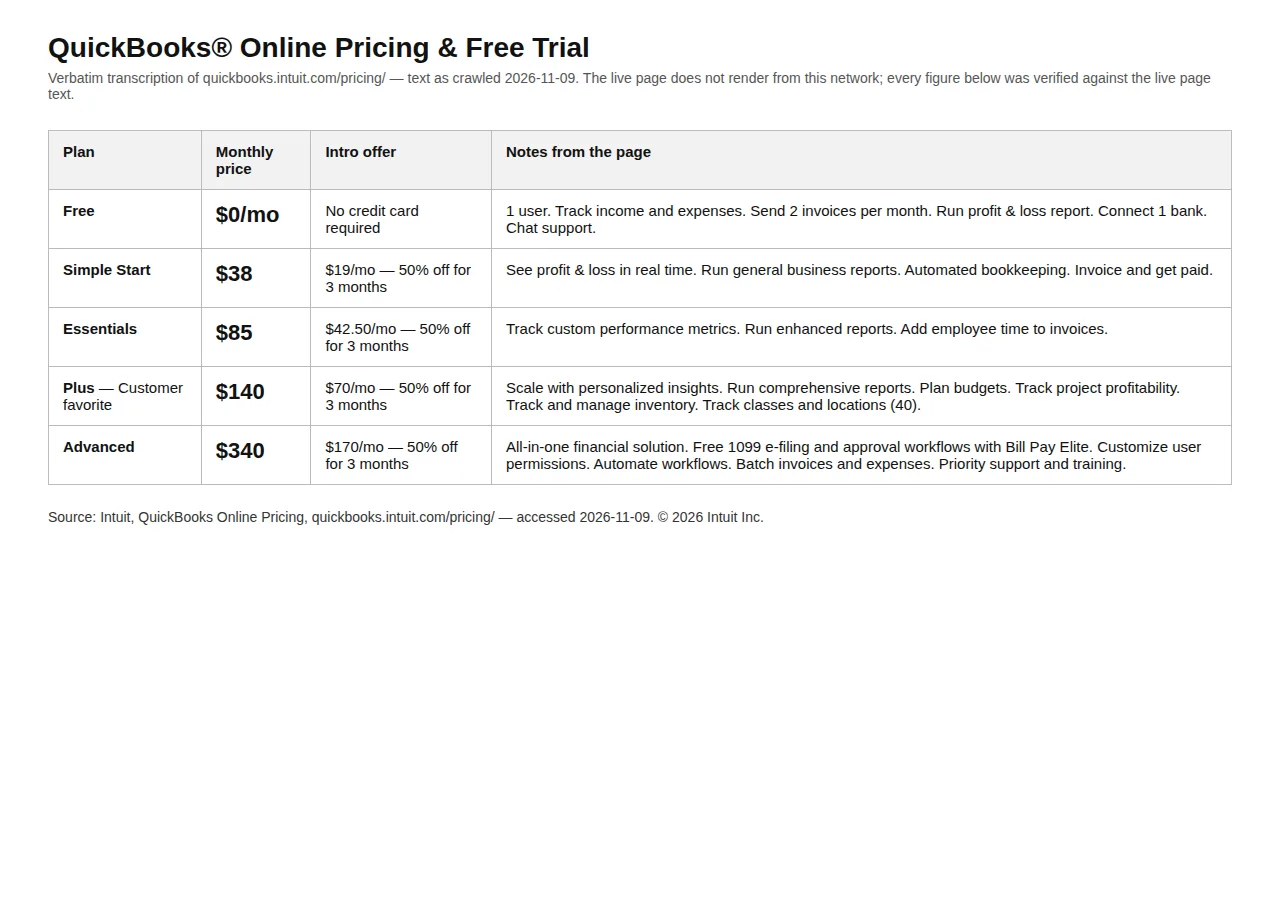
QuickBooks Desktop Pro Plus renews at $1,351 a year for one user. QuickBooks Online Simple Start lists at $38 a month. The gap looks like the whole story until you count payroll, seats, and the data that does not survive the move — then the answer flips by team size. This playbook works the decision with Intuit's own dates and prices and three stated profiles.
The decision in one table
| Route | What you pay | Users | Payroll | Who it fits |
|---|---|---|---|---|
| Stay: Desktop Pro Plus 2024 | $1,351/yr renewal (1 user) | Up to 3 seats | Enhanced Payroll $870/yr | Solo operator |
| Stay: Desktop Premier Plus 2024 | $1,891/yr + $406/seat | Up to 5 seats | Enhanced Payroll $870/yr | Inventory, 4–6 users |
| Stay: Desktop Enterprise | Silver $1,873/yr, Gold $2,210, Platinum $2,717 | Up to 40 (Diamond) | Gold/Platinum include payroll | Advanced inventory, 7+ users |
| Move: Online Simple Start | $38/mo ($399 year one) | 1 | Workforce $50/mo + $7/employee | Solo, no inventory |
| Move: Online Plus | $140/mo ($1,470 year one) | 5 | Workforce $50/mo + $7/employee | Default move |
| Move: Online Advanced | $340/mo ($3,570 year one) | 25 | Workforce $50/mo + $7/employee | 6+ users, 250+ accounts |
Prices are Intuit's US list prices from its pricing page and, for Desktop renewals, as reported from Intuit's July 2026 notice — Intuit publishes no Desktop renewal price list. Year-one Online figures use the 50% intro; per-employee payroll fees are never discounted.
What actually happened: the timeline
Intuit changed course mid-2026.
| Date | What happened | Authority |
|---|---|---|
| September 30, 2024 | Intuit stopped selling new US subscriptions for Desktop Pro Plus, Premier Plus, Mac Plus and Enhanced Payroll. Existing subscribers can still renew. | Intuit stop-sell statement |
| May 31, 2025 | Support ended for Desktop 2022. | Intuit discontinuation schedule |
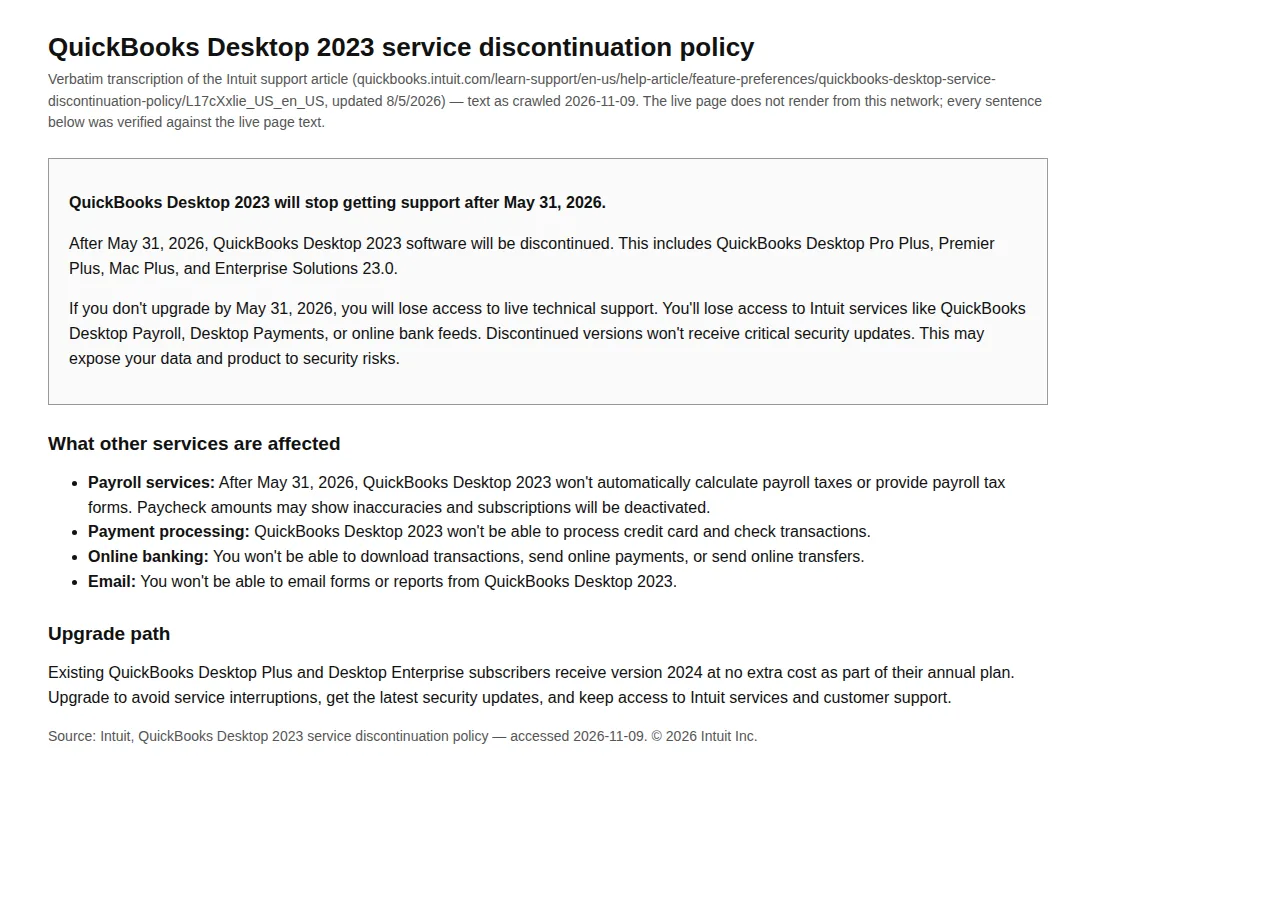
| May 31, 2026 | Support ended for Desktop 2023, including Enterprise 23.0. Payroll, bank feeds, payment processing, live support and security updates stopped. | Intuit, Desktop 2023 policy (8/5/2026) |
| August 2026 | Intuit withdrew the planned May 2027 retirement of Desktop 2024. | Intuit 2024 update |
| No sunset date | Desktop 2024 has no announced end date; Intuit will keep version 24.0 current through in-product updates. | Intuit 2024 update |
A business on Desktop 2024 is not on a deadline. A business on 2023 or earlier is already past one: the software still opens, but payroll, bank feeds and security patches have stopped. The first question is therefore not "should I move" but "which version am I on" — 2023 or older means the migration is overdue, not optional.
What Online can and cannot do that Desktop did
The binding constraints are caps, not features.
| Capability | Desktop Pro/Premier 2024 | Online Plus ($140/mo) | Online Advanced ($340/mo) | Authority |
|---|---|---|---|---|
| Billable users | 1–3 seats (Pro), 1–5 (Premier) | 5 | 25 | Intuit usage limits |
| Chart of accounts | No published cap | 250 maximum | Unlimited | Intuit usage limits |
| Classes + locations | No published cap | 40 combined | Unlimited | Intuit pricing page |
| Inventory tracking | Yes, Premier and up | Yes | Yes | Intuit pricing page |
| Reports | 200+ customizable (Enterprise) | Comprehensive, fewer custom options | Advanced reporting, batch transactions | Intuit policy |
| Bank feeds | Lost on discontinued versions | Included, always current | Included, always current | Intuit policy |
| Payroll | Enhanced Payroll $870/yr flat | Workforce $50/mo + $7/employee | Workforce $50/mo + $7/employee | Kantivo; Fit Small Business |
Three caps decide most migrations. First, the 250-account ceiling: all plans below Advanced cap the chart of accounts at 250. Second, Plus caps classes and locations at 40 combined: a nonprofit with 30 programs and 15 locations is already over it. Third, users: the sixth billable user is a $200-a-month tier jump, from Plus at $140 to Advanced at $340.
Desktop's remaining advantages are specific: industry editions of Premier, job costing and landed-cost calculations, and reporting depth Online still does not match. Online's advantages: bank feeds that never go stale, any-browser access, automatic updates, ACH bill pay, and payroll still sold to new customers.
The worked math: three profiles, three answers
All three profiles use current list prices, flat for three years — an understatement, since 2026 saw two rises on both sides.
Profile A — Solo operator, one user, no payroll
Simple Start year 1 is $399 (3 × $19 + 9 × $38):
One Desktop renewal buys 35.6 months of Simple Start:
Profile B — Five-person team, inventory, six employees
Year one is cheaper still: the 50% intro halves both base fees for three months — Plus $1,470, payroll base $525 — while the $504 of per-employee fees is charged in full: $2,499.
Profile C — Six users, inventory, six employees
Six users force Online Advanced at $340 a month, while Desktop takes Premier Plus with six seats — and the answer flips.
The break-even sits between six and seven users. On subscription alone, Premier Plus costs $1,485 + 406n$ a year for $n$ users against Advanced at $4,080:
At seven users Premier Plus reaches $4,327 and Advanced wins. At six or fewer, Desktop is cheaper — and payroll widens the gap, since Enhanced Payroll is a flat $870 a year against $92 a month for six employees on Workforce. The counterweight: Desktop Pro Plus rose 35% in 2026, so today's advantage may not survive the next renewal.
Migration labour and the payback clock
Moving is not free even when the conversion itself costs nothing. Budget 16 hours for a clean solo file and 24 hours for a five-user file with inventory, at $85 an hour:
Profile A recovers the move in a year and a half; Profile B in about fifteen months — migrate at renewal, in a quiet month. Sensitivity: at 10% annual rises, Profile A's three-year totals become $4,471.81 on Desktop against $1,452.36 on Simple Start.
What moves, what does not, and what it costs
Intuit's migration guide names two routes: its internal tool for Desktop files, and Dataswitcher, its third-party conversion partner.
| Item | Intuit internal tool | Dataswitcher | Authority |
|---|---|---|---|
| Cost | No charge | Last 2 years free; extra years carry small fees | Intuit migration guide |
| File size | Unlimited | Up to 700,000 lines; larger files lists only | Intuit migration guide |
| Payroll | Employee lists only; history does not convert | Payroll information is not converted | Intuit migration guide |
| Does not convert | Budgets, memorized transactions, templates, sales orders, projects, attachments, estimates | Same exclusions | Intuit migration guide |
What moves: the chart of accounts, customer and vendor lists, products and services, open invoices and bills, and transaction history for the years you select. What stays behind is the operational memory of the file — memorized transactions, templates, budgets, sales orders, and every payroll record.
Two further constraints decide the plan. First, Intuit's migration guide reports a US ceiling of 4,000,000 total targets — the combined count of lists and transactions, visible under File Information — above which only a lists-and-balances conversion is possible. Second, data cannot be migrated into an Online company file that already contains data, so the Online company must be created clean and the migration finished inside the window Intuit shows when you create it. Do not create it until the Desktop file is cleaned — creating it starts the clock.
The 2026 decision sequence
- Check your version. Press F2. On 2023 or earlier, move now — you are already unsupported. On 2024, there is no deadline.
- Count the caps. Billable users, accounts against 250, classes plus locations against 40, and total targets in File Information. Any cap breached forces Advanced or Enterprise.
- Price your exact profile. Use the formulas above with your seats and headcount, and compare annual totals with payroll included.
- Check the renewal date. If the renewal is more than 60 days out, wait — a renewal just paid is sunk, and $1,351 buys 35.6 months of Simple Start.
- Clean the Desktop file first. Condense old transactions, delete unused accounts and classes, fix unreconciled items. Every Desktop error becomes an Online error.
- Create the Online company clean and run the migration. Use Intuit's internal tool for a standard Desktop file; use Dataswitcher only if you need tiered year selection.
- Reconcile both systems for one full close. Run the balance sheet, profit and loss, and A/R and A/P ageing in both systems; tie every balance before anyone posts in Online — and have your CPA sign off the trial balance, the EIN and the FICA wage base first.
- Rebuild what did not convert. Budgets, memorized transactions, templates, payroll setup — before the next payroll run.
- Cancel Desktop only after the tie-out. Keep the Desktop file readable for one tax year; a lapsed Plus subscription cannot be repurchased.
Who should stay, who should move, who should go Enterprise
Stay on Desktop 2024 if you have six or fewer users, use Premier's industry editions or job costing daily, hold more than 250 accounts or 40 classes, and your renewal still beats Advanced — whichever entity holds the file: an LLC, an S-Corp or a C-Corp. Staying is a real choice now — but budget for the next rise, because nothing caps it.
Move to Online Plus if you have five or fewer users, 250 or fewer accounts, and your team works from more than one location. The $5,088 three-year saving in Profile B is the typical case.
Move to Online Advanced if you have seven or more users, need workflow approvals and custom roles, or your chart of accounts has outgrown 250. Advanced is the only Online tier without list caps, and at seven users it beats Premier Plus.
Go to Desktop Enterprise if you need advanced inventory with landed cost, multi-entity management in one file, or more than 25 users — Online Advanced caps at 25 and one company per subscription. Silver starts at $1,873 a year, Gold at $2,210, Platinum at $2,717, and Diamond at $5,364 a year billed monthly.
Execution checklist
- [x] Confirm the Desktop version — F2; 2023 or earlier means migrate now, 2024 means decide on your schedule.
- [x] Count users, accounts, classes and total targets — against the 5/25 user caps, 250 accounts, 40 classes and locations, and 4,000,000 targets.
- [x] Price your exact profile with payroll included — run the formulas above; never compare headline prices.
- [x] Time the move to the renewal date — migrate at renewal, not the week after paying $1,351.
- [x] Clean the Desktop file before creating the Online company — the Online file must be empty, and creating it starts the clock.
- [x] Reconcile both systems for one full close — balance sheet, P&L, A/R and A/P ageing must tie under GAAP before anyone posts in Online.
- [x] Rebuild budgets, templates and payroll setup — they do not convert.
- [x] Keep Desktop readable for one tax year after cancelling — and run the numbers through our business loan calculator.
The Desktop decision in 2026 is not a deadline. It is a renewal that rose 35% in a year against a subscription that rose 55%, a 250-account cap, a 40-class cap, and a migration that leaves your budgets and payroll history behind. Price your seats, count your accounts, check your version — and move at renewal, in a quiet month, with both books tied out. See also our QuickBooks vs Xero comparison, our payroll cost playbook, and our Form 941 playbook.