Sentry vs Rollbar vs Bugsnag: Error Tracking Pricing, Retention and the Real Monthly Cost
Error tracking tells you production is broken before your customers do. Sentry, Rollbar and Bugsnag all do the same core job: an SDK catches an exception, the service groups identical failures into one issue, and your team gets a stack trace with the release and the breadcrumbs that led to the crash.
The entry prices look close, 26 dollars against 20 dollars against 9 dollars a month, and all three vendors offer a free tier. But each vendor meters a different unit, and only one publishes a complete per-event rate card. Our editorial analysis found the cheapest vendor at 10,000 events a month is not the cheapest at 500,000.
> [!FOUNDER]
> "I have watched teams pick an error tracker on the strength of a 26 dollar sticker price and then stare at a 1,900 dollar invoice after one bad deploy. The plan fee is never the bill. Count your events first, then read the overage table, then choose. That order is the whole article."
> — Enow A. Jovial, Founder & Chief Executive Officer
What error tracking actually buys you
An unhandled exception in production is a revenue event, not a log line. A checkout crash that fires 40,000 times in an hour is 40,000 customers who could not pay. Error tracking shortens the gap between the first occurrence and the fix: grouping turns 40,000 identical crashes into one issue, and release tracking ties that issue to the deploy that introduced it.
> [!KEY TAKEAWAY]
> Grouping, retention and the overage table decide the purchase. The headline plan price is the least informative number on any of these three pricing pages.
Sentry pricing: the most transparent rate card in the category
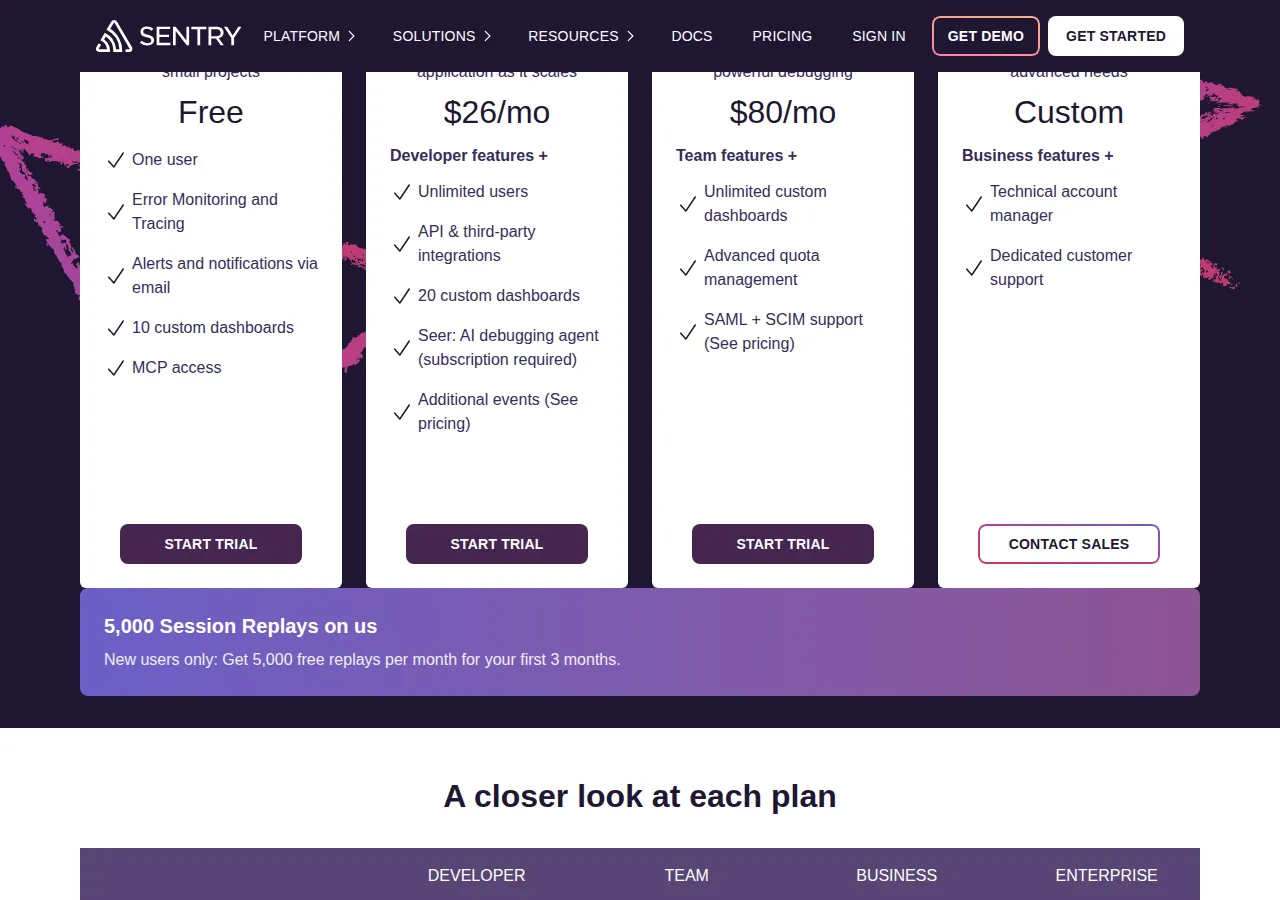
Sentry sells four tiers. Developer is free: one user, 5,000 errors a month, 5 million tracing spans, 50 session replays, 5 GB of logs and a 30-day lookback. Team costs 26 dollars a month on annual billing, or 29 dollars month to month, with unlimited users. Business costs 80 dollars a month on annual billing, or 89 dollars month to month.
Team and Business include exactly the same base quota: 50,000 errors, 5 million spans, 50 replays and 5 GB of logs per month, with a 90-day lookback. The 54 dollar jump from Team to Business buys features, not volume: SAML, SCIM, a HIPAA BAA and advanced quota management.
Everything above the included quota bills pay as you go, in five buckets: errors, spans, replays, logs and attachments. The error rates on Team, read directly from the pricing calculator on sentry.io/pricing, are 0.0003625 dollars per error from 50,000 to 100,000 errors, 0.0002188 dollars from 100,000 to 500,000, 0.0001875 dollars from 500,000 to 10 million, 0.0001625 dollars from 10 million to 20 million, and 0.00015 dollars above 20 million. Reserving volume in advance cuts each rate by 20 percent.
Business overage is the trap inside the trap. According to the vendor's published pricing documentation, corroborated by three independent 2026 pricing guides, Business charges roughly two to three times the Team rate for the same overage error: 0.0011125 dollars per error in the first band, 0.000625 dollars in the second, and 0.000375 dollars in the third.
!Sentry pricing tiers: Free, Team 26 dollars a month, Business 80 dollars a month, Custom Enterprise
Rollbar pricing: cheap to start, quoted by slider at scale
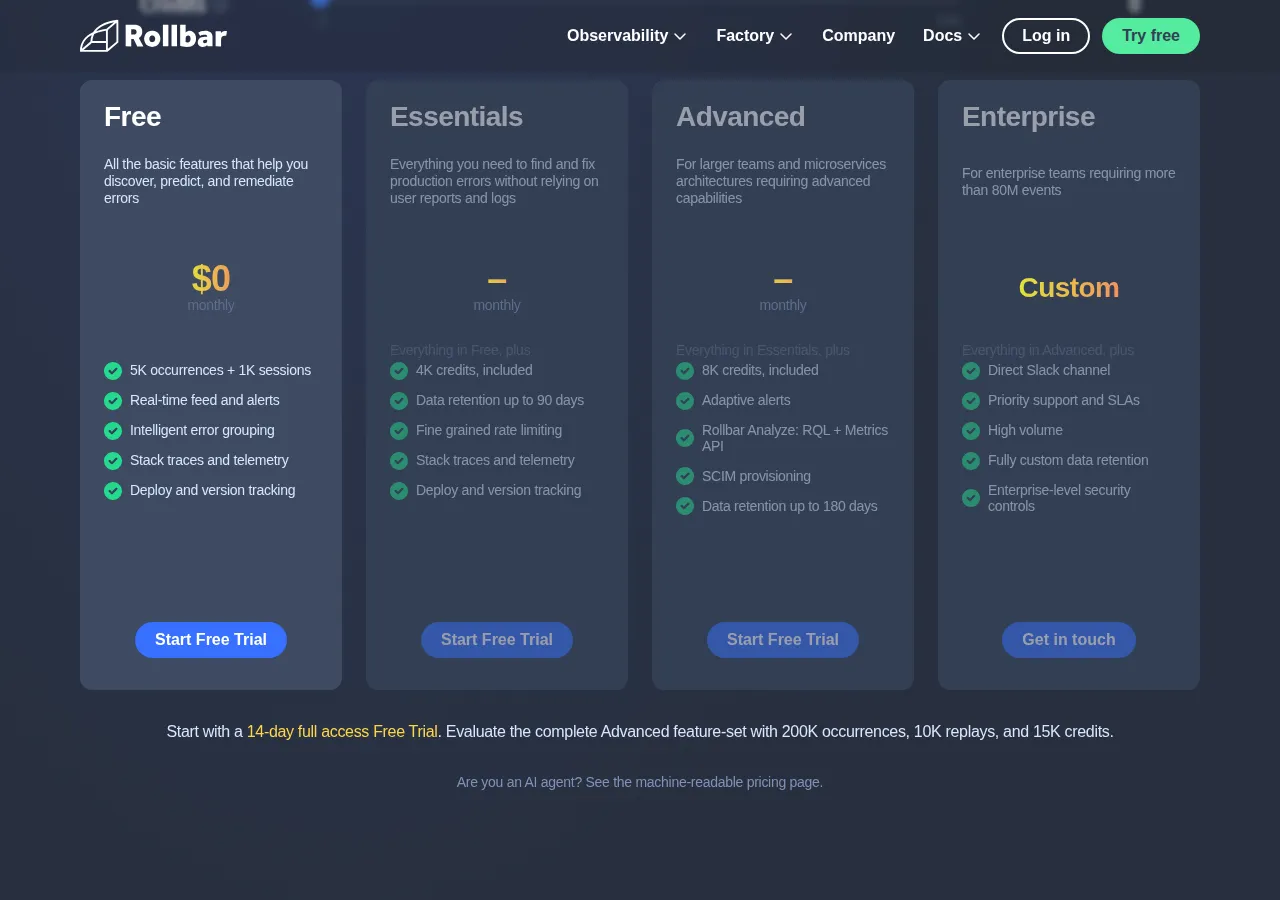
Rollbar sells four tiers: Free, Essentials, Advanced and Enterprise. Pricing scales on three dimensions: events, which are errors, messages and crash reports sent to the API; session replays; and AI credits that power the Resolve Agent. Every tier includes unlimited users and unlimited projects.
The free tier gives 5,000 events and 1,000 session replays a month with 30-day retention. Essentials starts at 9 dollars a month for 10,000 events, or about 7.50 dollars annually, with 90-day retention and 4,000 AI credits. Advanced starts at 13 dollars a month for 10,000 events, or about 10.83 dollars annually, with 180-day retention and 8,000 AI credits. Enterprise is custom priced.
The honest complication: Rollbar's pricing page shows occurrence bands from 10,000 to 50 million events a month but no dollar amounts attached to them. The dollar figures here come from Rollbar's own pricing explainer on its blog: Essentials at 50,000 events costs 29 dollars a month, or 48 dollars with 5,000 replays and 15,000 AI credits. Advanced at 500,000 events costs 339 dollars a month for events alone, or 542 dollars with 50,000 replays and 100,000 AI credits. Advanced at 5 million events costs 1,749 dollars a month for events alone, and 3,403 dollars with replays and AI credits added.
The safe option is the default: a hard cap that stops processing new events when you hit your monthly limit, so there is no surprise bill unless you opt into on-demand events.
Bugsnag pricing: the cheapest entry, and the least published
Bugsnag, now sold as SmartBear Insight Hub, sells four tiers: Free, Select, Preferred and Enterprise. The free tier covers one user with 7,500 events and 1 million spans a month, the most generous free allowance of the three, but only 7 days of retention, the shortest. Select covers 50,000 to 500,000 monthly events; Preferred covers 100,000 to 300,000 events on its entry band and adds stability benchmarks, advanced segmentation and SSO. Paid retention is 60 days. Enterprise adds on-premises deployment.
Bugsnag's own pricing page, opened on 6 November 2026, lists plan features and a volume selector but no dollar figure for any paid tier. Two independent 2026 guides confirm the same finding: Select and Preferred both display a starting price of 0 dollars a month with a volume slider, and budgeting requires a sales conversation. G2, which publishes vendor-supplied pricing, still lists Select from 20 dollars a month and Preferred from 33 dollars a month. Those numbers are corroborated secondary reads, not figures from the live pricing page. Do not put a Bugsnag number into a budget without a written quote.
Bugsnag leads with release health: stability scores, crash-free users and version adoption.
Worked cost math: Sentry at 100K, 1M and 10M errors
All Sentry math below uses the Team plan on annual billing, pay-as-you-go rates read from sentry.io/pricing on 6 November 2026, errors only. Reserved volume is prepaid at 20 percent below pay-as-you-go.
At 100,000 errors a month:
$ ext{Monthly} = 26 + 50{,}000 imes 0.0003625 = 26 + 18.13 = $44.13 $
Reserved: 40.50 dollars.
At 1 million errors a month:
$ ext{Overage} = 50{,}000 imes 0.0003625 + 400{,}000 imes 0.0002188 + 500{,}000 imes 0.0001875 = 18.13 + 87.52 + 93.75 = $199.40 $
$ ext{Monthly} = 26 + 199.40 = $225.40 $
Reserved: 185.50 dollars.
At 10 million errors a month:
$ ext{Overage} = 50{,}000 imes 0.0003625 + 400{,}000 imes 0.0002188 + 9{,}500{,}000 imes 0.0001875 = 18.13 + 87.52 + 1{,}781.25 = $1{,}886.90 $
$ ext{Monthly} = 26 + 1{,}886.90 = $1{,}912.90 $
Reserved: 1,535.50 dollars a month.
Business at the same volumes: 135.63 dollars at 100,000 errors, 573.13 dollars at 1 million, and 3,948.13 dollars at 10 million.
> [!WARNING]
> A single frontend retry loop can emit 5 million errors in a month. On Sentry Team pay-as-you-go that month costs about 975 dollars. Set a pay-as-you-go budget cap and per-project rate limits on day one, before the first bad deploy, not after it.
Rollbar and Bugsnag at the same volumes
Rollbar publishes no per-event rate card. At 500,000 errors a month, Sentry Team pay-as-you-go costs 131.65 dollars: 26 plus 18.13 plus 87.52. Rollbar Advanced at the same 500,000 events costs 339 dollars for events alone, or 542 dollars with 50,000 replays and 100,000 AI credits. At 50,000 events the order reverses: Rollbar Essentials costs 29 dollars against Sentry Team at 26 dollars, essentially a tie, and at 10,000 events Rollbar Essentials at 9 dollars beats Sentry Team at 26 dollars clearly.
The crossover sits somewhere between 50,000 and 500,000 events a month. Bugsnag cannot be computed at any of the three volumes: its entry prices are starting prices at the lowest band, not the price at 100,000 or 1 million events. Get the quote.
Three-year totals and the break-even volume
Three years of Sentry Team pay-as-you-go, errors only: 100,000 errors costs 1,588.68 dollars, or 1,458.00 dollars reserved; 1 million errors costs 8,114.40 dollars, or 6,678.00 dollars reserved; 10 million errors costs 68,864.40 dollars, or 55,278.00 dollars reserved.
Three years of Rollbar at its published anchors, events only, monthly billing: 50,000 events on Essentials costs 1,044.00 dollars; 500,000 events on Advanced costs 12,204.00 dollars; 5 million events on Advanced costs 62,964.00 dollars.
At low volume Rollbar Essentials undercuts Sentry Team, 9 dollars against 26 dollars at 10,000 events. At mid volume the order flips: at 500,000 events Sentry Team at 131.65 dollars is less than half of Rollbar Advanced at 339 dollars.
See our Datadog vs Grafana Cloud vs New Relic observability pricing playbook, and run the numbers through our profit calculator.
The decision table
| Decision | Sentry | Rollbar | Bugsnag | Authority |
| --- | --- | --- | --- | --- |
| Entry paid price | Team 26 dollars a month, 50K errors | Essentials from 9 dollars a month for 10K events | Select from 20 dollars a month, vendor listing | sentry.io/pricing; rollbar.com; g2.com |
| Free tier | 5,000 errors, 1 user, 30-day lookback | 5,000 events, 1,000 replays, 30 days | 7,500 events, 1 user, 7 days | sentry.io/pricing; rollbar.com; inventivehq.com |
| Retention on paid tiers | Up to 90 days | 90 days Essentials, 180 days Advanced | 60 days | sentry.io/pricing; rollbar.com; inventivehq.com |
| Cost at 500K errors a month | 131.65 dollars, Team pay-as-you-go | 339 dollars, Advanced events only | Not published, quote required | sentry.io/pricing; rollbar.com; bugsnag.com |
| Cost at 1M errors a month | 225.40 dollars, Team pay-as-you-go | Not published, between 339 and 1,749 dollar anchors | Not published, quote required | sentry.io/pricing; rollbar.com; bugsnag.com |
| Overage protection | Pay-as-you-go budget cap, set it yourself | Hard cap by default, on-demand or budget ceiling | Error burst protection on custom plans | sentry.io/pricing; rollbar.com; bugsnag.com |
| Self-hosted or on-prem | Yes, source-available self-host | No | Enterprise on-prem only | develop.sentry.dev; inventivehq.com |
The risk layer
Bill shock is the first risk. Metered pricing means your worst month is your most expensive month: a retry loop emitting 5 million errors costs about 975 dollars on Sentry Team in one month. Set the pay-as-you-go budget cap on day one, set per-project rate limits, and sample noisy endpoints at the SDK. On Rollbar the default hard cap prevents the surprise bill, but when the cap hits, new events stop processing and you are blind to the next regression until the billing period resets.
Retention loss is the second risk. Retention runs 90 days on Sentry paid, 180 days on Rollbar Advanced, 60 days on Bugsnag paid, and 7 days on Bugsnag free. A bug reported three weeks after it started is uninvestigable on a 7-day tier.
Sampling blindness is the third risk. Every vendor lets you drop events before they are billed, and dropping is right for a known noisy endpoint. But sampled-away errors are invisible errors. Sample the noise, never the money path.
Self-hosting and the operator boundary
Sentry is the only one of the three with a real self-hosted option. Its source is available under the Functional Source License, which converts to Apache 2.0 after two years, and the Docker Compose setup needs at least 4 CPU cores, 16 GB of RAM plus 16 GB of swap, and 20 GB of disk. Sentry's docs describe self-hosted as the Business plan without software limitations and no paid tier. Bugsnag offers on-premises deployment on Enterprise only.
Self-hosting trades a per-event bill for a server bill and an on-call burden: you own upgrades and backups. It wins when volume is high and steady or data residency rules forbid a US SaaS.
The operator boundary is blunt. Do not buy a paid tier if your error count and retention need fit inside a free tier. Do not buy Business on Sentry for volume, since it adds zero errors and charges two to three times the Team overage rate. And do not choose Bugsnag without a written quote at your volume. The same discipline applies to hosting bills: see our Vercel vs Netlify vs Cloudflare Pages pricing guide.
Execution checklist
1. Export your trailing 90-day error count by service and environment.
2. Identify your noisiest endpoint and your money path, and set sampling for each.
3. Run the Sentry bands above at your real count, pay-as-you-go and reserved.
4. Request a Rollbar quote at your exact event count, including replays and AI credits, and a Bugsnag quote at your exact counts.
5. Compare retention: confirm 90 days on Sentry, 90 or 180 days on Rollbar, 60 days on Bugsnag covers your window.
6. Set the spend control on day one: a pay-as-you-go budget cap on Sentry, or the hard cap default on Rollbar.
7. Set per-project rate limits and SDK sampling for noisy endpoints, and leave payment paths unsampled.
8. Run the free tier or the 14-day trial at production volume for one full deploy cycle before paying.
9. Re-price every quarter: a tool cheapest at 50,000 events may not be cheapest at 500,000.