The second trio
The first password-manager trio is settled. Our 1Password vs Bitwarden vs Dashlane password manager playbook priced that group on per-seat annual math, and the market has not moved since. This is the second trio — LastPass, Keeper, and NordPass — and it is a different argument. One lost an encrypted copy of its customers' vaults in 2022. One charges more than double its rivals for a family of five. One is the cheapest on the market — and the one whose price is a promotion with an unpublished renewal. Price alone picks the wrong winner here; the breach record and the renewal terms pick the right one.
One person, one year
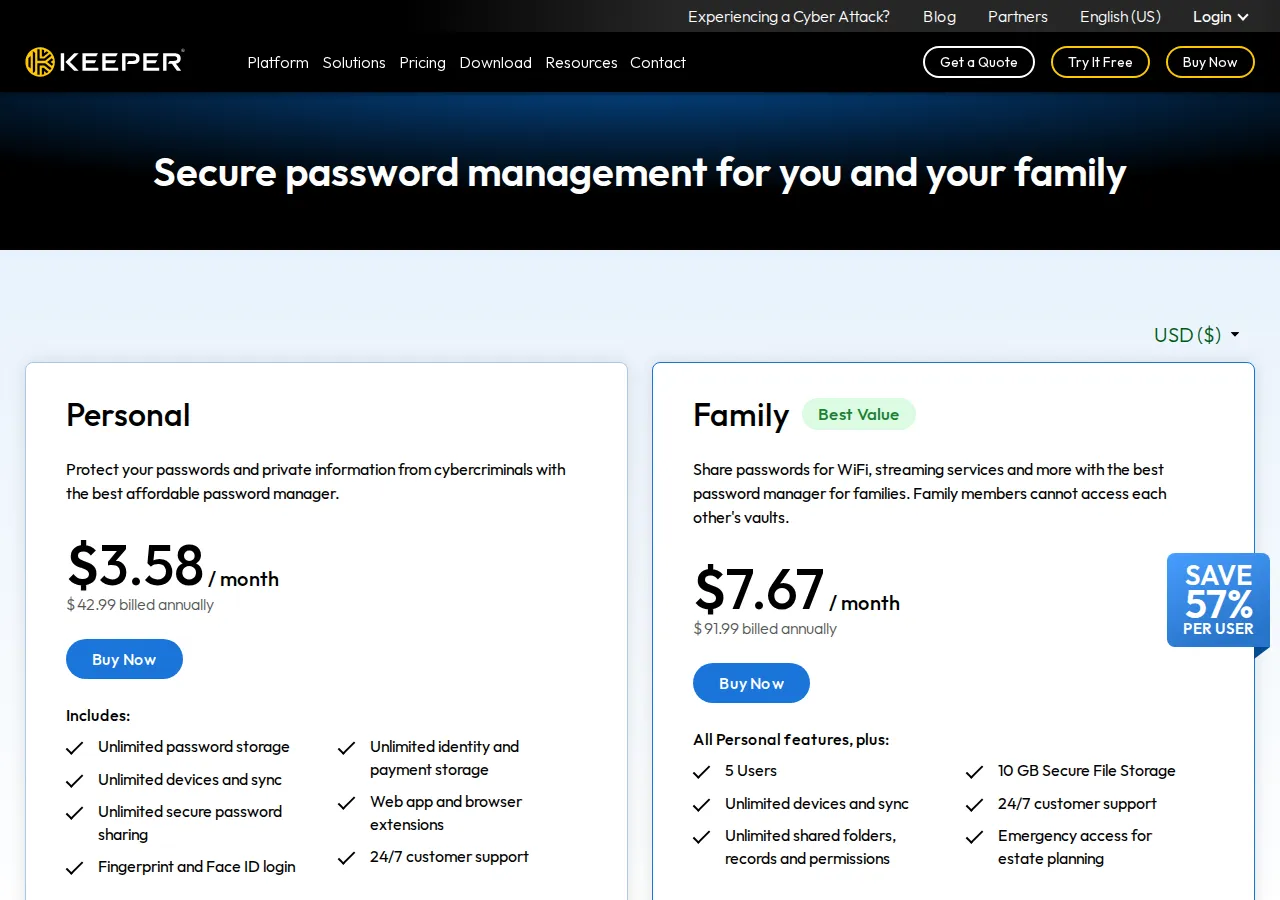
All three vendors sell a one-year term, and that is the honest comparison basis. LastPass Premium is $36 a year — $3 a month, billed annually — from LastPass's own price catalog, the catalog its pricing page loads. Keeper Unlimited is $42.99 a year — $3.58 a month, billed annually — from Keeper's personal pricing page. NordPass Premium is $23.88 a year on the one-year plan — $1.99 a month — from NordPass's pricing page. The $19.11 spread is real money over a decade, but not what should decide the purchase — what each plan includes, and what each vendor has done with entrusted vaults, should.
The feature sets at those prices are close. LastPass Premium covers all devices, one-to-many sharing, emergency access, hardware MFA including YubiKey, and FIDO2 biometrics. Keeper Unlimited covers unlimited passwords, unlimited devices and sync, unlimited sharing, fingerprint and Face ID login, and 24/7 support. NordPass Premium covers unlimited devices, secure sharing, password health, a data breach scanner, email masking, and an authenticator, with the vault encrypted with XChaCha20 on the device. The differences that matter are in the free tier, the family plan, and the incident record.
The family test
Family plans expose the real price difference, because the vendors count family members differently. LastPass Families is $48 a year for six people. Keeper Family is $91.99 a year for five people. NordPass Family on the one-year plan is $3.69 a month, $44.28 a year, for six people. Divide by the headcount and the ranking flips from the personal ranking: NordPass is cheapest per seat, LastPass is a close second, and Keeper costs more than double either of them.
Keeper's family price is not a mistake; it is a bundle. The Family plan includes 10 GB of secure file storage, unlimited shared folders, and emergency access for estate planning — and every Keeper Business user gets a free Family plan for up to five members. A household buying Family standalone pays $18.40 per person for file storage it may never use. The per-member figure is the test: if the household needs encrypted file storage, Keeper's price buys something; if it needs only passwords, Keeper charges double for a feature nobody asked for.
NordPass Family's two-year promotional price is lower — $2.49 a month for 27 months — but renewal is at the unpublished price in force at renewal time, so budget on the one-year list price.
Business tiers: ten users, twenty-five users
LastPass Plus, the personal bundle that adds a VPN on up to ten Windows devices, is $7 a month — $84 a year. The business figures live in the table below.
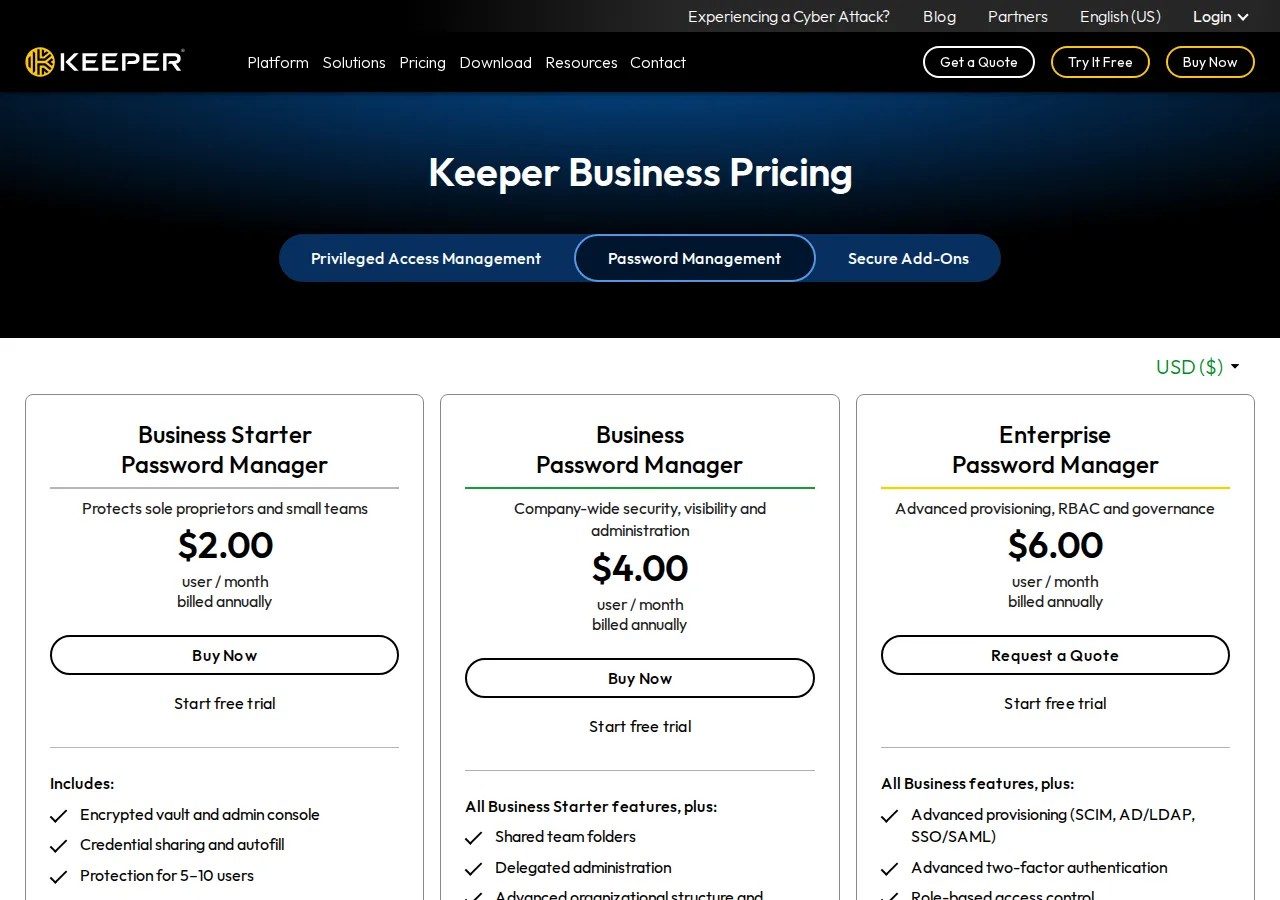
Keeper Business Starter is $2.00 per user per month billed annually — $24 per user a year — for 5 to 10 users, with an encrypted vault, admin console, and credential sharing. Keeper Business is $4.00 per user per month — $48 per user a year — adding shared team folders, delegated administration, and a free Family plan for every user. Keeper Enterprise is $6.00 per user per month — $72 per user a year — adding SCIM, AD/LDAP, SSO/SAML provisioning, role-based access control, and developer APIs. These are B2B SaaS prices: the per-seat rate is the headline, but the SCIM API, SSO provisioning, and SIEM feed are what the admin console actually buys.
NordPass business pricing runs on two-year terms: Teams $1.79 per user per month as a fixed 10-user pack, Business $3.59 from five users, Enterprise $5.39 from five users. On the one-year plan the same tiers are $1.99, $3.99, and $5.99. Teams carries Google Workspace SSO; Business adds group sharing and breach monitoring for one domain; Enterprise adds Entra ID, ADFS, and Okta SSO and provisioning, plus Sentinel and Splunk integrations.
| Buyer | LastPass per year | Keeper per year | NordPass per year | Authority |
|---|---|---|---|---|
| One person, 1-year term | $36.00 (Premium) | $42.99 (Unlimited) | $23.88 (Premium) | Vendor pricing pages, Nov 2026 |
| Family, 1-year term | $48.00 (6 people) | $91.99 (5 people) | $44.28 (6 people) | Vendor pricing pages, Nov 2026 |
| 10 users, small team | $510 (Teams) | $240 (Business Starter) | $238.80 (Teams, 1-year) | Vendor pricing pages, Nov 2026 |
| 25 users, business | $2,100 (Business) | $1,200 (Business) | $1,197 (Business, 1-year) | Vendor pricing pages, Nov 2026 |
At ten users Keeper Starter costs less than half of LastPass Teams — $240 against $510 — and NordPass Teams is within two dollars of Keeper at $238.80 on the one-year plan. At twenty-five users Keeper Business and NordPass Business are effectively tied — $1,200 against $1,197 — while LastPass Business costs $2,100, seventy-five percent more. The business ranking is the opposite of the personal ranking: LastPass is the most expensive business option by a wide margin, and the gap is the admin console, the policy count, and the directory integrations. A team that needs 100+ policies and SIEM feeds pays for them; a team that needs shared folders and an admin console does not need to.
The breach record
Price is the easy part of this comparison. The hard part is the incident record, and it belongs in the open before any recommendation. In December 2022 LastPass disclosed that a threat actor, using information taken from an August 2022 incident, copied a backup of customer vault data from third-party cloud storage. The backup held basic account information — names, billing addresses, email addresses, telephone numbers, IP addresses — and the vault data itself. Website URLs were unencrypted; usernames, passwords, secure notes, and form-fill data were AES-256 encrypted, decryptable only with the master password under LastPass's zero-knowledge architecture.
LastPass's defences, stated in its own notice, are specific: a twelve-character minimum for master passwords since 2018, and 100,100 iterations of PBKDF2, the password-strengthening function that makes each guess expensive. A master password following those defaults would take millions of years to guess with generally available cracking technology, by LastPass's own assessment. The qualifier matters: a password that does not follow the defaults is significantly easier to guess, and the notice says so. The breach did not break the cryptography. It removed the rate limit: an attacker with a copy of the vault can guess offline, at machine speed, for as long as the vault is worth guessing.
No equivalent incident is printed for Keeper or NordPass: none was verified from a primary source this cycle, which is a limit of this cycle's evidence, not a clean bill of health. What is verified for NordPass is its architecture and audits: XChaCha20 vault, ISO 27001, SOC 2 Type 2, HIPAA, Cure53. For Keeper, the verified surface is the encrypted vault, biometric login, and 24/7 support.
The three-year test
Price the three-year term, not the first year: the vault accumulates logins every month, and switching costs rise with every entry.
Add-ons change the ranking. Keeper's BreachWatch — dark-web monitoring that alerts when a stored password appears in a breach — is $26.99 a year as an add-on, not included in Personal. A Keeper user who wants breach monitoring pays $42.99 plus $26.99, $69.98 a year, against $36 for LastPass Premium, which bundles dark-web monitoring, and $23.88 for NordPass Premium, which includes its data breach scanner. The headline price buys the vault; the feature that justifies the purchase is sold separately. Check the add-on list before the headline price.
The decision matrix
| Buyer | Pick | Why | Avoid |
|---|---|---|---|
| One person, price first | NordPass Premium | $23.88 a year on the one-year list price; XChaCha20 vault; breach scanner included | Budgeting on the $1.39 promo — renewal is unpublished |
| One person, support first | Keeper Unlimited | 24/7 support; biometric login; unlimited devices and sync | Adding BreachWatch — $69.98 a year all-in |
| Family of six | LastPass Families | $48 a year, $8.00 per person; six private vaults | The free tier — one device type only |
| Family that needs file storage | Keeper Family | 10 GB secure file storage; emergency access for estate planning | Paying $18.40 per person for passwords alone |
| Team of 10 | Keeper Starter or NordPass Teams | $240 vs $238.80 a year; both under half of LastPass Teams | LastPass Teams at $510 for the same seats |
| 25 users, admin controls | Keeper Business | $1,200 a year; shared folders; delegated admin; free Family per user | LastPass Business at $2,100 without a policy need |
| Regulated, SSO + SIEM | LastPass Business or NordPass Enterprise | 100+ policies, SIEM feeds, SSO — the only tiers that carry them | Keeper Starter — no SSO/SAML provisioning |
One row overrides the matrix: anyone storing business credentials should weigh the breach record above the price. LastPass's vaults were copied in 2022 and the cryptography held — a fact from LastPass's own notice. A buyer who cannot accept that an attacker holds an encrypted copy of their vault should not buy LastPass at any price; a buyer who accepts it gets the cheapest family plan and the most mature admin console in the trio.
Founder & CEO Insight — Enow A. Jovial
Moving vaults: the migration checklist
Switching password managers is a weekend job if done in order: export first, import second, verify third, delete last.
- Export from the old vault: export to CSV from the desktop app, on a machine you trust, and keep the file off any shared drive. The export is unencrypted by definition.
- Import to the new vault: import the CSV, then confirm the count matches — items imported against items exported, with no silent drops.
- Rotate the critical ten: email, bank, cloud admin, domain registrar, the password manager itself, and any account with payment details. A vault that was ever copied is a vault whose contents should be re-keyed.
- Set up emergency access: every vendor in this trio offers it — LastPass emergency access, Keeper emergency access for five contacts, NordPass emergency access. Set it up on day one, not after the emergency.
- Turn on the breach scanner: LastPass bundles dark-web monitoring in Premium; NordPass includes its data breach scanner in Premium; Keeper sells BreachWatch as a $26.99 add-on. Whichever you buy, turn it on.
- Delete the export: shred the CSV after the import verifies. An unencrypted export sitting in Downloads is a vault with no lock.
- Cancel the old subscription: only after the new vault is verified and the critical ten are rotated. Never cancel first.
- [x] Export verified: item count matches between the old vault and the new one.
- [x] Critical ten rotated: email, bank, cloud, registrar, and payment accounts have new passwords.
- [x] Emergency access set: at least one trusted contact can open the vault.
- [x] Breach scanner on: dark-web monitoring active on the new plan.
- [x] Export deleted: the unencrypted CSV is shredded, not sitting in Downloads.
- [x] Old plan cancelled: only after the new vault is verified end to end.
If the first trio fits better, our 1Password vs Bitwarden vs Dashlane password manager playbook prices it on the same math; if the vault travels over a VPN, our NordVPN vs ExpressVPN vs Surfshark VPN pricing playbook prices that side. The manager guards the credentials; the VPN guards the connection.