A password manager is a per-seat line item now
A password manager used to be a 3 dollar personal subscription. For a business it is a per-seat line item, priced three ways: 1Password sells polish and admin control, Bitwarden sells the same vault for about half the money, Dashlane sells the vault plus a risk-detection layer at a second per-seat charge.
Prices below come from the vendors' own pricing pages, opened November 7, 2026. Every figure is vendor-published except Dashlane's personal prices — the latest independent 2026 checks, since Dashlane publishes none.
> [!KEY TAKEAWAY]
> Short version: Bitwarden is the cheapest seat at every team size. 1Password is the most expensive seat and the most complete admin console. Dashlane alone charges separately for watching credentials after they leave the vault — that second charge is where its bill doubles.
The plans at a glance
| Plan | Monthly price (annual billing) | Seats included | Authority |
| :--- | :--- | :--- | :--- |
| 1Password Individual | 3.99 dollars | 1 user | 1Password |
| 1Password Families | 5.99 dollars | Up to 5 members | 1Password |
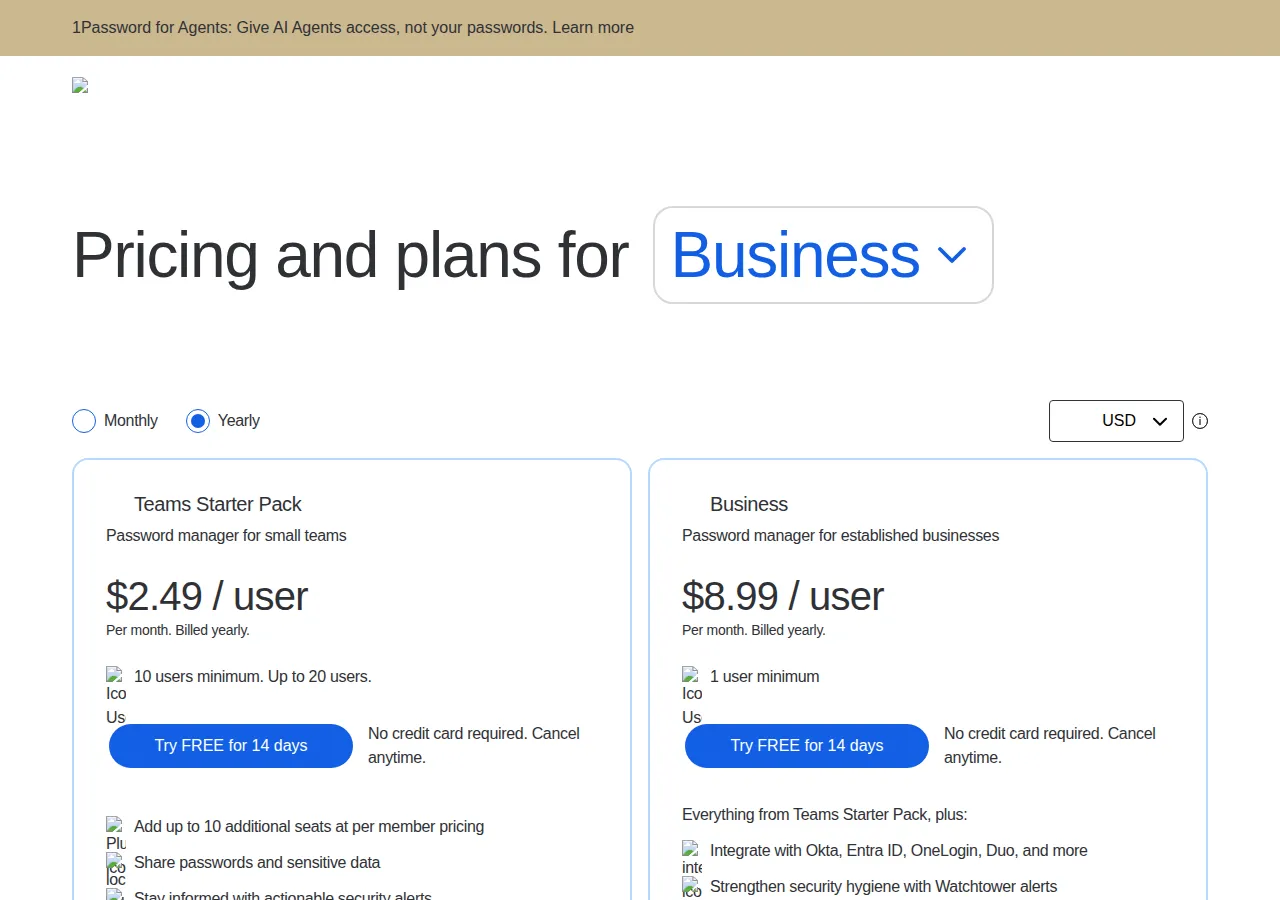
| 1Password Teams Starter Pack | 24.95 dollars flat | 10 members, up to 20 | 1Password |
| 1Password Business | 8.99 dollars/user | 1 user minimum | 1Password |
| Bitwarden Free | 0 dollars | 1 user | Bitwarden |
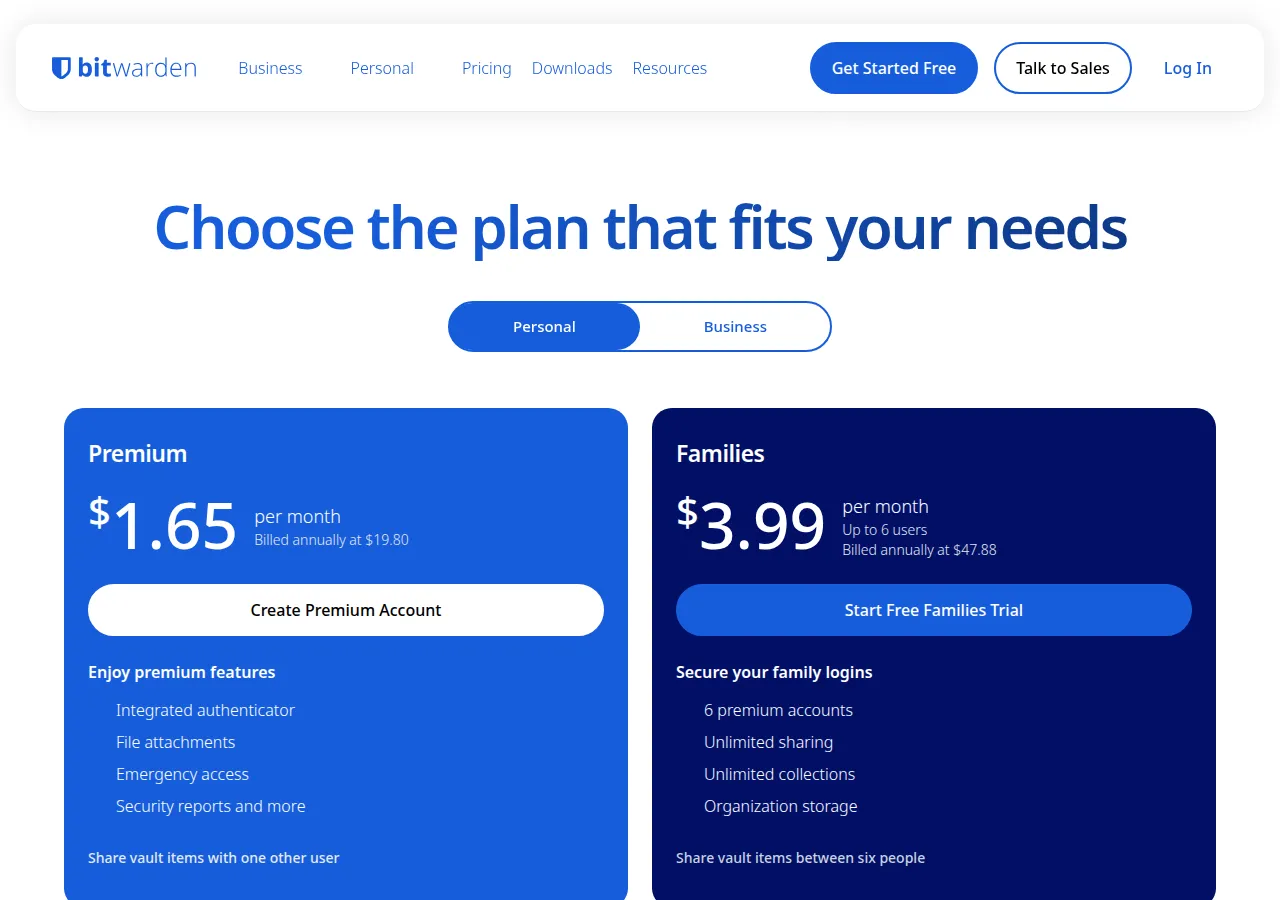
| Bitwarden Premium | 1.65 dollars | 1 account | Bitwarden |
| Bitwarden Families | 3.99 dollars | Up to 6 users | Bitwarden |
| Bitwarden Teams | 4.00 dollars/user | — | Bitwarden |
| Bitwarden Enterprise | 6.00 dollars/user | — | Bitwarden |
| Dashlane Omnix Password Management | 8.00 dollars/user | — | Dashlane |
| Dashlane Omnix Credential Protection | 4.00 dollars/user | Add-on | Dashlane |
| Dashlane Omnix Enterprise | Custom | 50+ users | Dashlane |
| Dashlane Premium | 5.42 dollars (secondary) | 1 member | Vetteroo; Nuanyue |
| Dashlane Friends & Family | 8.13 dollars (secondary) | Up to 10 members | Vetteroo; Nuanyue |
Bitwarden alone has a usable free tier: unlimited devices and passwords at 0 dollars. 1Password's Teams Starter Pack is the only flat rate: 24.95 dollars a month for 10 members. Dashlane alone sells risk detection as a second subscription.
Personal plans: the per-person math
One person: 1Password Individual is 3.99 dollars a month on annual billing, 47.88 dollars a year. Bitwarden Premium is 1.65 dollars a month, 19.80 dollars a year — 58.6 percent less for the same job. The extra 28.08 dollars at 1Password buys Watchtower alerts, 1 GB of document storage, Travel Mode, and a 14-day trial on a product with no free tier.
Dashlane Premium is 5.42 dollars a month billed annually, 65.04 dollars a year, per Vetteroo (October 26, 2026) and Nuanyue (October 7, 2026). Older 2026 reviews show 4.99 dollars for Premium and 7.49 dollars for Friends & Family; first-year promos show 2.50 dollars. Treat 5.42 dollars as the renewal price. Dashlane's own site publishes no personal price — its pricing page is business-only.
> [!WARNING]
> Dashlane discontinued its free plan on September 16, 2025. No free tier, no monthly billing on personal plans — you pay the full year up front. Export your vault to an encrypted file before any trial ends, on any vendor.
Family plans invert the ranking. 1Password Families: 5.99 dollars a month for 5 members, 71.88 dollars a year, 1.20 dollars/member. Bitwarden Families: 3.99 dollars a month for 6 users, 47.88 dollars a year, 0.67 dollars/user, each a full Premium account, 5 GB personal plus 5 GB family storage. Dashlane Friends & Family: 8.13 dollars a month for 10 members, 97.56 dollars a year, 0.81 dollars/member; the VPN covers the account holder only.
New customers get 25 percent off the first 12 months: Individual falls to 2.99 dollars a month, 35.88 dollars for year one, then renews at 47.88 dollars — a 33.4 percent jump. Families falls to 4.49 dollars, 53.88 dollars for year one, then renews at 71.88 dollars. Budget the renewal, not the teaser.
!Bitwarden pricing: Premium 1.65 dollars a month, Families 3.99 dollars a month for up to 6 users
Business plans: the per-seat math at 1, 5, and 25 seats
Business pricing is where the three vendors actually compete. Fix the seat count and multiply — every figure below uses annual billing:
$
\text{Monthly Cost} = \text{Seats} \times \text{Per-Seat Rate}, \qquad \text{Annual Cost} = \text{Monthly Cost} \times 12
$
Monthly cost, dollars, annual billing. Per-seat rates: 1Password Business 8.99 dollars, Bitwarden Teams 4.00 dollars, Bitwarden Enterprise 6.00 dollars, Dashlane Omnix Password Management 8.00 dollars.
| Seats | 1Password Business | Bitwarden Teams | Bitwarden Enterprise | Dashlane Omnix PM |
| :--- | :--- | :--- | :--- | :--- |
| 1 seat | 8.99 | 4.00 | 6.00 | 8.00 |
| 5 seats | 44.95 | 20.00 | 30.00 | 40.00 |
| 25 seats | 224.75 | 100.00 | 150.00 | 200.00 |
| 25 seats/yr | 2,697.00 | 1,200.00 | 1,800.00 | 2,400.00 |
At 25 seats, Bitwarden Teams saves 124.75 dollars a month against 1Password Business — 1,497.00 dollars a year — and 100.00 dollars a month against Dashlane, 1,200.00 dollars a year. Bitwarden Enterprise costs 150.00 dollars a month at 25 seats: 74.75 dollars less than 1Password Business and 50.00 dollars less than Dashlane.
Teams Starter Pack breaks the pattern. At 10 members it costs 24.95 dollars a month — 2.50 dollars per member — against 89.90 dollars for 10 Business seats, saving 64.95 dollars a month. At 20 members it costs 74.85 dollars a month — 3.74 dollars per member — against 179.80 dollars, saving 104.95 dollars a month. The catch: 20 members maximum, no SSO, no SCIM, 5 guests against 20 on Business.
!1Password business pricing: Teams Starter Pack 2.49 dollars per user, Business 8.99 dollars per user
The annual-versus-monthly penalty
1Password alone publishes a monthly-billed rate alongside its annual rate. Bitwarden is annual-only; Dashlane's business packages are annual-only too:
$
\text{Penalty} = (\text{Monthly Rate} - \text{Annual Rate}) \times 12, \qquad \text{Penalty Percent} = \frac{\text{Monthly Rate} - \text{Annual Rate}}{\text{Annual Rate}} \times 100
$
| Plan | Annual rate | Monthly rate | Penalty per year | Penalty percent |
| :--- | :--- | :--- | :--- | :--- |
| 1Password Individual | 3.99 | 5.99 | 24.00 | 50.1 percent |
| 1Password Families | 5.99 | 8.99 | 36.00 | 50.1 percent |
| 1Password Teams Starter Pack | 2.49/user | 3.49/user | 12.00/user | 40.2 percent |
| 1Password Business | 8.99/user | 12.99/user | 48.00/user | 44.5 percent |
At 25 seats, monthly billing is 324.75 dollars a month against 224.75 dollars annual — an extra 100.00 dollars a month, 1,200.00 dollars a year, the entire annual cost of Bitwarden Teams at the same headcount. If cash flow forces monthly billing, diarise the switch to annual at renewal.
Vault sharing, item limits, guests, and storage
1Password shares around vaults: unlimited vaults on Families, role-based permissions on Business, guest accounts into specific vaults only — 5 on Teams Starter Pack, 20 on Business. Bitwarden shares around organizations and collections: Premium shares items with one other user, Families shares among six with unlimited collections, Teams and Enterprise share through organization vaults. Dashlane shares around collections with granular permissions and audit logs.
None of the three publishes a hard item limit. Bitwarden's free tier is unlimited devices and unlimited passwords; its paid tiers add storage and features, not caps. 1Password caps people, not items — 5 on Families, 10 to 20 on Teams Starter Pack — and storage at 1 GB/user. Dashlane caps people and feature placement, not passwords. The practical limit is seats, guests, and whether the controls you need sit in the tier you bought.
Storage differs in print. Bitwarden Premium includes 5 GB of personal encrypted file storage, expandable; Families adds 5 GB. 1Password gives 1 GB/user on personal plans. Dashlane publishes no file-storage figure. If the vault doubles as a document store, Bitwarden's 5 GB is the roomiest allowance and the only one stated as expandable.
SSO, SCIM, and admin controls: the tier that decides the buy
For a business, the vault is table stakes. The decision is made by three controls: single sign-on, automated provisioning, and audit visibility.
1Password Business includes SSO unlock through Okta, Entra ID, OneLogin, and Duo, plus provisioning through Azure AD, Google Workspace, Okta, and OneLogin. Teams Starter Pack has neither. The line is drawn at SSO: need it, pay 8.99 dollars a seat; do not, pay 2.49 dollars inside the pack. Business adds Watchtower alerts, access reviews, credential governance, usage reporting, and 20 guests.
Bitwarden draws its line one tier higher. Teams, at 4.00 dollars a seat, includes directory sync, SCIM provisioning, event logs, and centralized ownership — but passwordless SSO is an Enterprise feature at 6.00 dollars a seat, with enterprise policies, self-hosting, and Access Intelligence. Needing SSO costs 6.00 dollars, still 2.99 dollars less than 1Password Business. Needing SCIM but not SSO stops at Teams at 4.00 dollars.
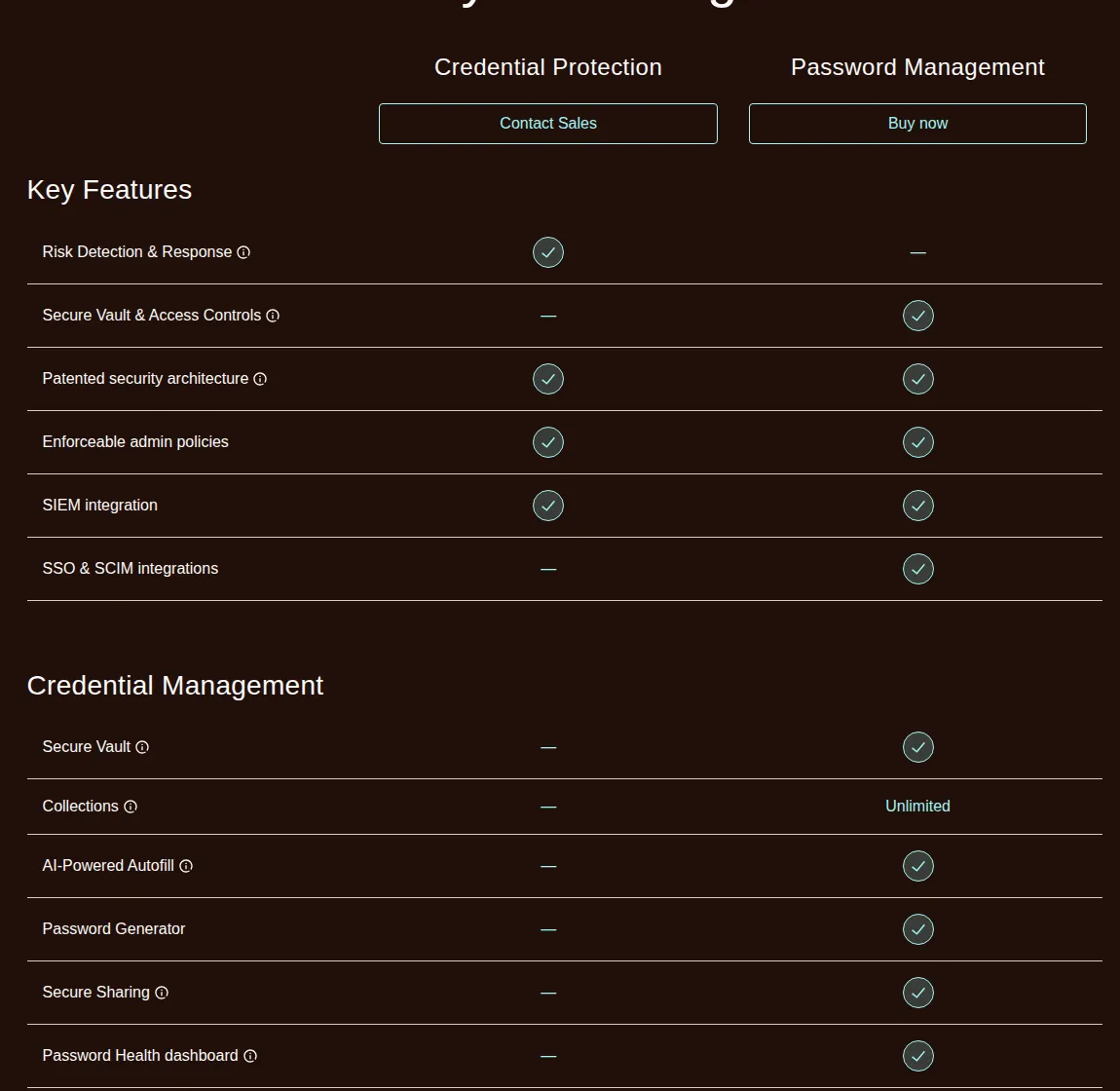
Dashlane draws its line between packages, not tiers. Its comparison table puts SSO and SCIM in Omnix Password Management only; the 4.00 dollar Credential Protection add-on has neither. Password Management also carries the vault, admin policies, and SIEM integration. Credential Protection carries risk detection, AI phishing detection, and response controls. Vault with SSO and SCIM: 8.00 dollars a seat; plus the risk layer: 12.00 dollars. Enterprise, over 50 users, bundles both at custom pricing.
!Dashlane Omnix comparison: SSO and SCIM in Password Management only
The Cloudflare Tunnel vs Tailscale vs ngrok comparison makes the same point. The Sentry vs Rollbar vs Bugsnag comparison prices the same tier boundary. The Datadog vs Grafana Cloud vs New Relic playbook shows a second metered add-on doubling the bill.
The 5-step rollout: moving a team without losing a login
Buying the plan is the easy part. Moving a team onto it without locking anyone out is the work — five steps, the same on all three vendors.
1. Inventory every shared login before you buy. List shared accounts from the spreadsheet, chat, and saved browser passwords; count seats from that list, not headcount.
2. Buy the tier that holds SSO, not the tier that holds the vault. With Okta, Entra ID, or Google Workspace, the SSO tier is the floor: 1Password Business, Bitwarden Enterprise, or Dashlane Omnix Password Management.
3. Create the organization, groups, and collections before inviting anyone. Map groups to real teams, put shared logins in group-owned collections, set admin policies first: mandatory two-factor authentication, vault timeout, export rights.
4. Migrate in waves of five, with a rollback copy. Move five users, confirm SSO sign-in and shared collections appear, then move the next five. Keep the old store read-only for 30 days.
5. Revoke, audit, and diarise the renewal. On day 30, revoke the old store, pull the event log, confirm every seat has a real person, and calendar the renewal with a 30-day warning.
> [!TIP]
> Price the rollout with the pricing calculator: per-seat rate × seats × 12, plus the monthly-billing penalty. A 25-seat Bitwarden Teams rollout is 100.00 dollars a month, 1,200.00 dollars a year — write both down.
Worked example: a 25-seat company for three years
Three years, annual billing, 25 seats, SSO required. 1Password Business: 224.75 dollars a month, 2,697.00 dollars a year, 8,091.00 dollars over three years. Bitwarden Enterprise: 150.00 dollars a month, 1,800.00 dollars a year, 5,400.00 dollars over three years. Dashlane Password Management: 200.00 dollars a month, 2,400.00 dollars a year, 7,200.00 dollars over three years; with Credential Protection, 300.00 dollars a month, 3,600.00 dollars a year, 10,800.00 dollars over three years.
The three-year gap is 5,400.00 dollars: Bitwarden Enterprise at 5,400.00 dollars against Dashlane's two packages at 10,800.00 dollars, 1Password between them at 8,091.00 dollars. Skipping SSO for Bitwarden Teams cuts it to 3,600.00 dollars — until the first auditor asks for SSO-gated access. Price the tier you will need in year two.
On 1Password's monthly billing instead: Business at 12.99 dollars a seat is 324.75 dollars a month, 3,897.00 dollars a year, 11,691.00 dollars over three years — 3,600.00 dollars more than annual billing for the same seats, the entire three-year cost of Bitwarden Teams at 25 seats.
What the vault holds besides passwords
A password manager in a real company ends up holding more than logins, and the identifiers inside it are the ones a tax or payroll audit asks for first. The vault holds the company's EIN and the LLC registration, the S-Corp election letter, and the C-Corp charter. It holds the payroll credentials for the systems that file FICA and SECA, the CPA's portal login, and the GAAP close checklist. It holds the owner's SSN and ITIN, the API keys for the billing system, and the CSV exports the accountant reconciles. SSO and SCIM are the controls that decide who can open that vault and whose access dies the day they leave. Treat the vault as a financial record, not a browser convenience: export it encrypted, store the export offline, and keep a second person able to open it if the owner is unreachable.
The verdict: buy the tier, not the brand
One person: Bitwarden Premium, 19.80 dollars a year — against 47.88 dollars at 1Password, 65.04 dollars at Dashlane. One family: Bitwarden Families, 47.88 dollars a year, cheapest per person at 0.67 dollars; Dashlane Friends & Family, 97.56 dollars a year, wins only at ten people. One team under 20 without SSO: 1Password Teams Starter Pack, 24.95 dollars a month — until SSO is needed.
Needing SSO and SCIM: Bitwarden Enterprise 6.00 dollars a seat, Dashlane Password Management 8.00 dollars, 1Password Business 8.99 dollars — the ranking holds at 1, 5, and 25 seats. Dashlane earns 8.00 dollars only if the team uses the console, SIEM, and health reporting weekly. Bitwarden earns 6.00 dollars as the only Enterprise tier cheaper than both rivals' business tiers.
> [!FOUNDER]
> "A password manager is the cheapest insurance a small business will ever buy, and the most expensive line item it will ever ignore. The breach that costs a company its bank account does not start with a firewall. It starts with a reused password on a shared login that nobody owned. Buy the tier with SSO, provision every seat on day one, revoke access the day someone leaves — the rest is arithmetic."
>
> — Enow A. Jovial, Founder & Chief Executive Officer
Buy the tier that holds the controls you need, pay annually, count seats from the shared-login inventory, and diarise the renewal with the penalty in writing. The vault is the easy purchase. The discipline around it is the product.