WordPress as a database, Next.js as the storefront
A traditional WordPress site does three jobs in one codebase: it stores content, it renders pages, and it serves them. Headless WordPress splits the first job from the other two. WordPress keeps storing content and exposes it through the REST API, and a Next.js application fetches that content, renders pages with React Server Components, and serves them from the edge. The question founders actually face is not whether decoupling is modern — it is whether the split pays for itself on their content volume, their publishing cadence, and their team's ability to run two systems instead of one.
This guide prices that decision in requests, builds, and revalidation windows, using the WordPress REST API handbook and the Next.js caching documentation as the authorities. It compares three architectures: coupled WordPress, headless WordPress with a Next.js frontend, and a Next.js frontend fed by a purpose-built content API. The comparison is architectural, not tribal: WordPress wins some shapes of site outright, and this guide says which ones.
> [!KEY TAKEAWAY]
> Decoupling pays when content changes are frequent enough that rebuild cost matters and traffic is high enough that edge caching matters — and it costs you the WordPress plugin ecosystem, native preview, and single-vendor support. Below roughly 500 pages with weekly publishing, coupled WordPress usually wins on total effort; above roughly 2,000 pages with daily publishing, the headless build and revalidation math starts to dominate.
Who this guide is for, and who should stop here
This guide is for teams choosing the architecture for a content site they will operate for years: marketing sites, documentation hubs, editorial properties, and catalogs where content editors work in WordPress today and engineers want a React frontend.
Stop here and stay coupled if your site is under 200 pages, publishes less than weekly, and relies on WordPress plugins for forms, search, membership, or commerce. Decoupling throws away the plugin layer that makes WordPress valuable, and rebuilding each plugin's function in Next.js is where headless budgets die. A coupled site with a good cache plugin and a content delivery network in front of it — see the CDN caching guide — already answers most performance complaints without a second codebase.
Read on if your editors publish daily, your page count is in the thousands, your frontend team ships React, and your WordPress theme has become the bottleneck rather than the asset.
How the content actually moves
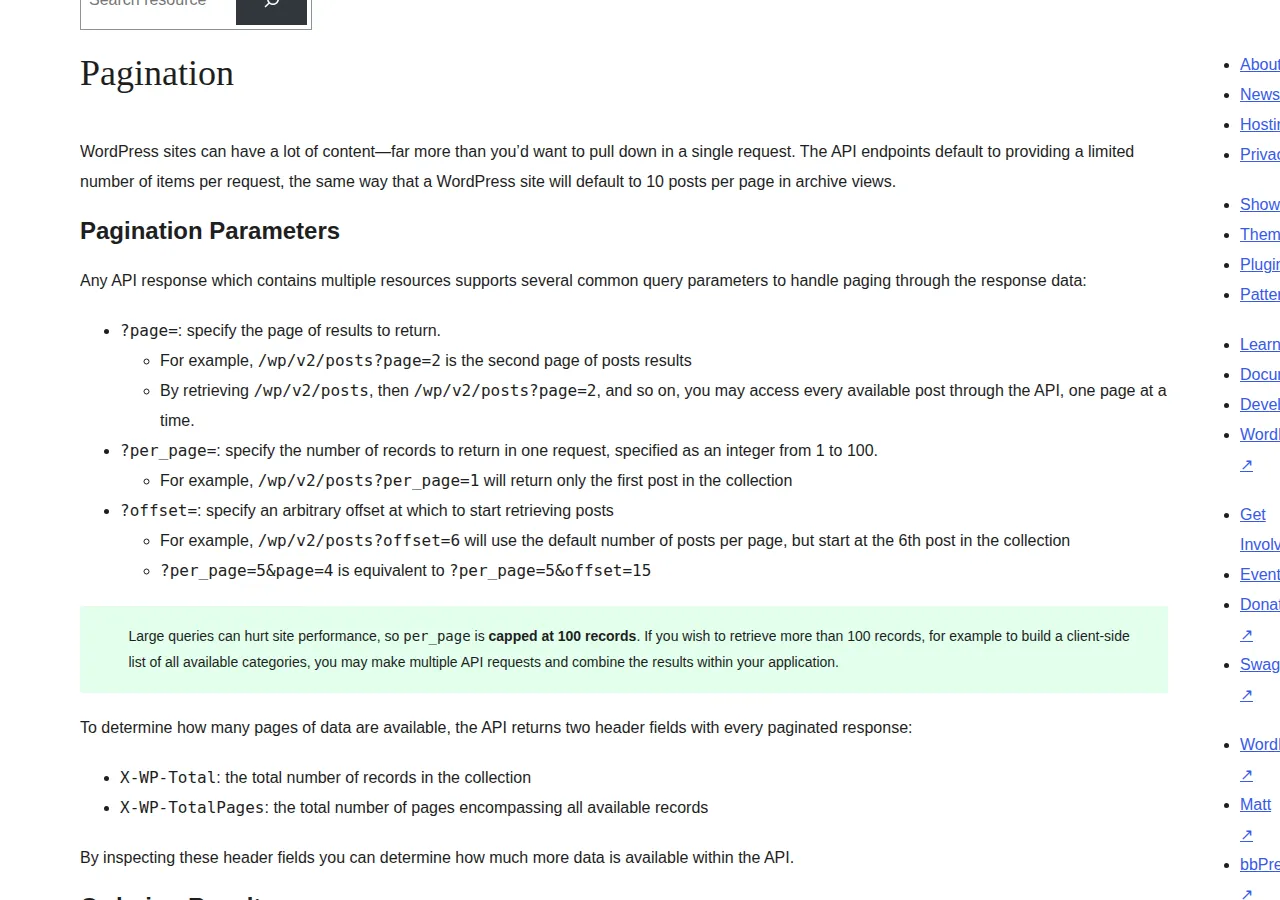
In headless WordPress, the frontend never queries the WordPress database. It calls endpoints like /wp/v2/posts, /wp/v2/pages, and /wp/v2/categories over HTTP, receives JSON, and renders it. The WordPress REST API handbook's pagination rules govern the whole sync: collections are paged, per_page accepts an integer from 1 to 100, per_page is capped at 100 records, and every paginated response carries X-WP-Total and X-WP-TotalPages headers so the frontend knows how many pages exist before it finishes fetching.
That cap is the first piece of reproducible math in the decision. A full content sync costs:
$
\text{Sync requests} = \lceil \text{Total posts} / 100 \rceil
$
A 500-post site syncs in 5 requests at per_page=100, or 50 requests at the default per_page=10. A 2,400-post site syncs in 24 requests at the cap, or 240 at the default. Any headless implementation that fetches at the default page size is doing 10x the requests it needs to, and on a build that runs hourly, that multiplier lands directly on build minutes and on WordPress server load. Set per_page=100 on every collection fetch, read X-WP-TotalPages once, and fetch pages concurrently within the server's rate limits — the handbook gives you the headers to do it correctly.
The second piece of math is build time. A statically generated Next.js site builds one page per route, so:
$
\text{Build time} \approx (\text{Page count} \times \text{seconds per page}) + \text{sync time}
$
At 2,400 pages and 0.5 seconds per page, the page render alone is 20 minutes, before sync and asset work. That is the number that kills naive headless builds: every deploy rebuilds every page unless the architecture avoids it. Next.js answers with incremental static regeneration and on-demand revalidation — a page rebuilds when its content changes, not when any content changes — but only if the team wires the webhook that triggers it. Without that wiring, headless WordPress is slower to publish than coupled WordPress, because coupled WordPress publishes instantly and headless waits for a build.
Revalidation: the mechanism that decides freshness
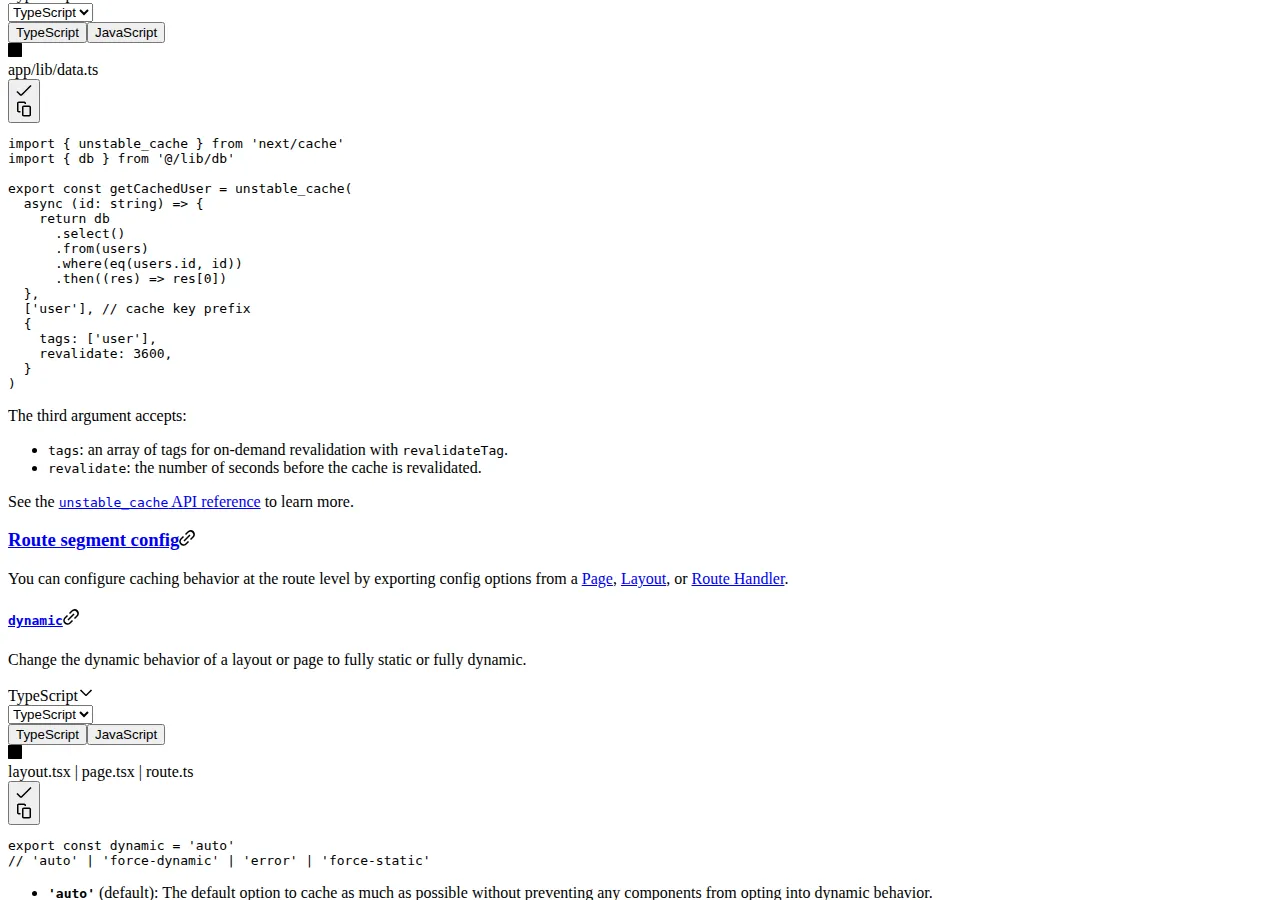
Next.js documents two on-demand mechanisms that matter here: revalidatePath, which revalidates a specific route, and revalidateTag, which revalidates every cached entry carrying a tag. The documented pattern is a webhook: WordPress fires on post save, the Next.js route handler receives it, verifies a secret, and calls revalidateTag for the post's tag and revalidatePath for the affected routes. The cache API also accepts a revalidate interval in seconds for time-based freshness.
The freshness window is therefore a choice, not an accident:
$
\text{Maximum staleness} = \text{revalidate interval} + \text{webhook delivery delay} + \text{rebuild time for the route}
$
With on-demand revalidation wired, maximum staleness is roughly the webhook delay plus one route rebuild — seconds to a minute. With only a 3,600-second (one-hour) time-based interval and no webhook, a corrected article stays wrong for up to an hour. With a full rebuild on every publish, staleness is the whole build time. Editors feel this difference immediately: in coupled WordPress, pressing Publish changes the live page. In headless, pressing Publish changes the live page only after the webhook, the revalidation, and the rebuild all succeed — three systems that must all work, monitored by someone.
The decision matrix
| Attribute | Coupled WordPress | Headless WordPress + Next.js | Next.js + purpose-built content API | Authority |
| :--- | :--- | :--- | :--- | :--- |
| Publishing latency | Instant on save | Seconds to minutes, webhook-dependent | Seconds to minutes, webhook-dependent | WordPress core behavior; Next.js caching docs |
| Full sync cost, 2,400 posts | None (same database) | 24 requests at per_page=100 | Vendor-dependent, usually paged similarly | WP REST API handbook, pagination |
| Full build, 2,400 pages at 0.5s/page | None (no build) | About 20 minutes without incremental regeneration | About 20 minutes without incremental regeneration | Build-time formula above |
| Preview of drafts | Native, exact | Requires authenticated preview route and token handling | Vendor preview tooling | Next.js draft-mode pattern |
| Plugins, forms, search, membership | Native ecosystem | Rebuild each one in the frontend | Rebuild each one in the frontend | WordPress plugin architecture |
| Frontend performance ceiling | Theme and plugin bound | React Server Components, edge caching, partial prerendering | Same as headless WordPress | Next.js App Router docs |
| Operating burden | One system, one host | Two systems, webhook monitoring, two deploys | Two systems, vendor contract | Operational reality |
| Editor experience | WordPress admin, as-is | WordPress admin, but preview and scheduling need custom work | New editor tooling to learn | Implementation experience |
The matrix exposes the real trade: headless buys frontend performance and developer velocity, and pays with preview, plugins, and operational surface. Teams that already run React and already feel the theme as a constraint get value from that trade. Teams whose editors live inside plugins — page builders, form builders, membership gates — pay for it twice: once to rebuild the function, once to maintain the rebuild.
What you lose, stated plainly
Plugin loss is the most underestimated cost. A coupled site's contact form, site search, related-posts block, SEO meta handling, redirect manager, and caching layer are plugins with settings screens editors understand. In headless, each becomes frontend code: forms need an endpoint and spam handling, search needs an index, SEO meta needs to be mapped from WordPress fields or a plugin's REST output, redirects need a route table. None of this is impossible; all of it is unbudgeted in most headless proposals, because the proposal counts the theme rebuild and forgets the plugin rebuild.
Preview is the second loss. Coupled WordPress preview shows the exact page, because the preview is the page. Headless preview requires a draft-mode route that fetches the draft revision with authentication, renders it through the same components, and never leaks it to search engines or the public cache. WordPress REST draft access needs credentials, and those credentials must never ship to the browser — preview is a server-side route with a secret, or it is a vulnerability. The Next.js vs Remix comparison covers the framework side of this choice; the CMS side is where preview breaks.
Search is the third loss. WordPress native search queries the database across post types with filters editors expect. A headless frontend either calls the REST search endpoint on every keystroke — slow, and rate-limited by the WordPress host — or builds a search index at build time, which is stale between builds. Either answer is worse than coupled search until the team budgets a real search service.
> [!WARNING]
> Never expose the WordPress REST API's draft, revision, or user endpoints to the public internet without authentication, and never embed a WordPress application password in frontend code. Headless frontends fetch published content only, over server-side routes, with credentials held server-side. A public REST endpoint that returns drafts is a content leak; a leaked application password is a site takeover. Audit the exposed routes before launch, not after the first scrape.
What you gain, and when it pays
The gains are real for the right shape of site. React Server Components render on the server and ship minimal JavaScript, which moves Core Web Vitals in ways a plugin-laden theme cannot match — the decoupled SEO analysis in the decoupled web apps guide works through the rendering side in detail. Edge caching puts the rendered page near the reader, and partial prerendering lets a mostly static page carry dynamic islands without rebuilding the whole route. For a documentation hub with 5,000 pages and a team shipping React daily, those gains compound: every page loads faster, every deploy is a frontend deploy, and the content team keeps the WordPress admin they already know.
The operating-cost formula keeps the decision honest. Price all three lines before choosing:
$
\text{Monthly headless cost} = \text{WordPress hosting} + \text{Frontend hosting} + (\text{Build minutes} \times \text{price per minute}) + \text{monitoring and maintenance hours} \times \text{hourly rate}
$
Coupled WordPress has one hosting line and no build line. Headless has two hosting lines, a build line that grows with page count and publish frequency, and a maintenance line for the webhook, preview, and sync code that nobody else maintains. Run the formula at your real page count and publish cadence — a site publishing 5 posts a week at 500 pages has a small build line, and a site publishing 50 posts a day at 5,000 pages has a build line that can exceed both hosting lines combined. Cost the build before you commit to the architecture, using the website cost calculator to keep the hosting and build lines in one view. If the coupled side wins and you are choosing between hosted WordPress and a visual builder, see our Webflow vs Framer vs WordPress.com pricing guide.
Operator boundaries: who should not decouple
Do not decouple if your editors depend on a page builder — the builder's output is theme markup, and headless rendering of builder content is a reconstruction project, not a migration. Do not decouple if nobody on the team will own the webhook and preview code; an unwatched webhook fails silently, and silent failure means published corrections never reach readers. Do not decouple a commerce or membership site on WordPress plugins without budgeting the replacement of every plugin function, because the storefront and the gate are the business, not the theme. Do not decouple for a redesign alone — a new theme on coupled WordPress delivers the redesign without the second system.
Do decouple when the frontend team is fluent in React, the page count is in the thousands, publishing is daily, and the WordPress theme is measurably the performance bottleneck after caching is already in place. The order matters: cache first, measure, then decouple only if the bottleneck survives caching.
Execution checklist
> [!TIP]
> Migrate in slices, not in one cutover: move one content type — documentation, then blog, then pages — behind the headless frontend while the rest stays coupled, and keep the coupled site as the fallback until the last slice's webhook, preview, and search paths have run clean for a full publishing cycle.
> [!FOUNDER]
> "Decoupling is a staffing decision dressed as a technology decision. Two systems need two owners, and the seam between them needs a third. If your team cannot name the person who owns the webhook on a Saturday night, you do not have a headless architecture — you have a publishing outage waiting for a weekend."
> — Enow A. Jovial, Founder & Chief Executive Officer
For the database layer behind the frontend, see the Supabase vs Firebase vs PlanetScale backend pricing guide, which prices all three at a small app and a growth app. The Terraform vs Pulumi vs AWS CDK pricing guide prices the tools that provision the whole stack: $0, $100, and $182.50 a month at 1,000 resources.