The free listing that decides who gets the call
A Google Business Profile is the free listing that puts a business on Google Search and Google Maps. When a customer searches for "dentist near me," the profile is what they read first: name, address, hours, phone, photos, and star rating, beside the map pack at the top of the page. That box is the local pack, and the profile is the ticket into it.
Google states the stakes: customers are 2.7 times more likely to consider a business reputable with a complete profile, 70 percent more likely to visit, and 50 percent more likely to consider purchasing from one. A suspended profile vanishes from Search and Maps until an appeal succeeds. Online-only shops are not eligible: Google states a business operating online only, with no in-person service, cannot get or verify a profile.
> [!KEY TAKEAWAY]
> The profile is a ranking asset and a conversion asset at once. Completeness decides whether Google shows the business; photos, reviews, and posts decide whether the person who sees it taps Call. Work both halves, in that order.
The three factors Google actually states
Local results are mainly based on relevance, distance, and prominence, and there is no way to request or pay for a better local ranking.
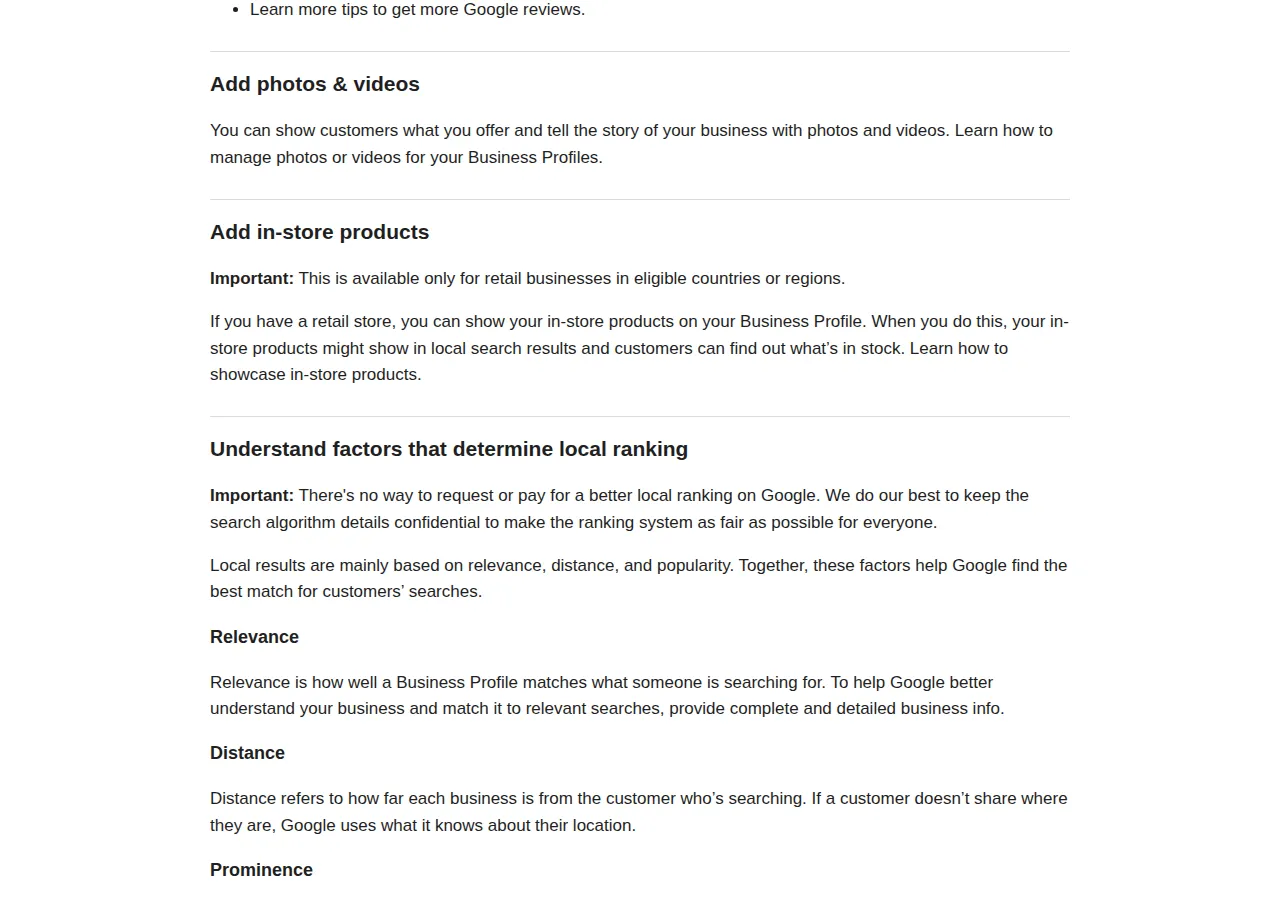
| Factor | What Google means | What the owner controls | Authority |
| :--- | :--- | :--- | :--- |
| Relevance | How well the profile matches the search | Complete information: category, services, attributes, description | Google local ranking help |
| Distance | How far the business is from the searcher | The address or service area, and the map pin on the real entrance | Google local ranking help |
| Prominence | How well-known the business is | Review count and ratings, links, photos, posts, completeness | Google local ranking help |
A practitioner survey puts weights on the same picture. Whitespark's 2026 survey of local search experts attributes about 32 percent of local pack weight to Business Profile signals, 20 percent to reviews, 15 percent to on-page signals, 9 percent to behavioral signals, 8 percent to links, 6 percent each to citations and personalization, and 5 percent to social signals — shares that sum to 101 percent through rounding, so treat them as expert opinion, not Google's formula.
Verification first: the gate everything else passes through
Nothing can be managed until the business is verified: verification tells Google the claimant is authorized. Google decides which methods a profile is offered, and the owner cannot change them; in some cases Google requires more than one method.
| Method | What it demands | Timing Google states | Authority |
| :--- | :--- | :--- | :--- |
| Video recording | One unedited take, at least 30 seconds, live on mobile; show location, signage, proof of management | Review up to 5 business days | Google video verification help |
| Phone or text | Answer the business phone or receive a text; an automated phone menu will not receive the code | Code entered at once | Google verification help |
| Email | Access to the email address shown on the verification screen | Code sent by email | Google verification help |
| Live video call | Show the business to a representative during opening hours | Call within opening hours | Google verification help |
| Mail (postcard) | A code mailed to the business address, entered on the profile | Most codes arrive within 14 days; codes expire after 30 days | Google verification help |
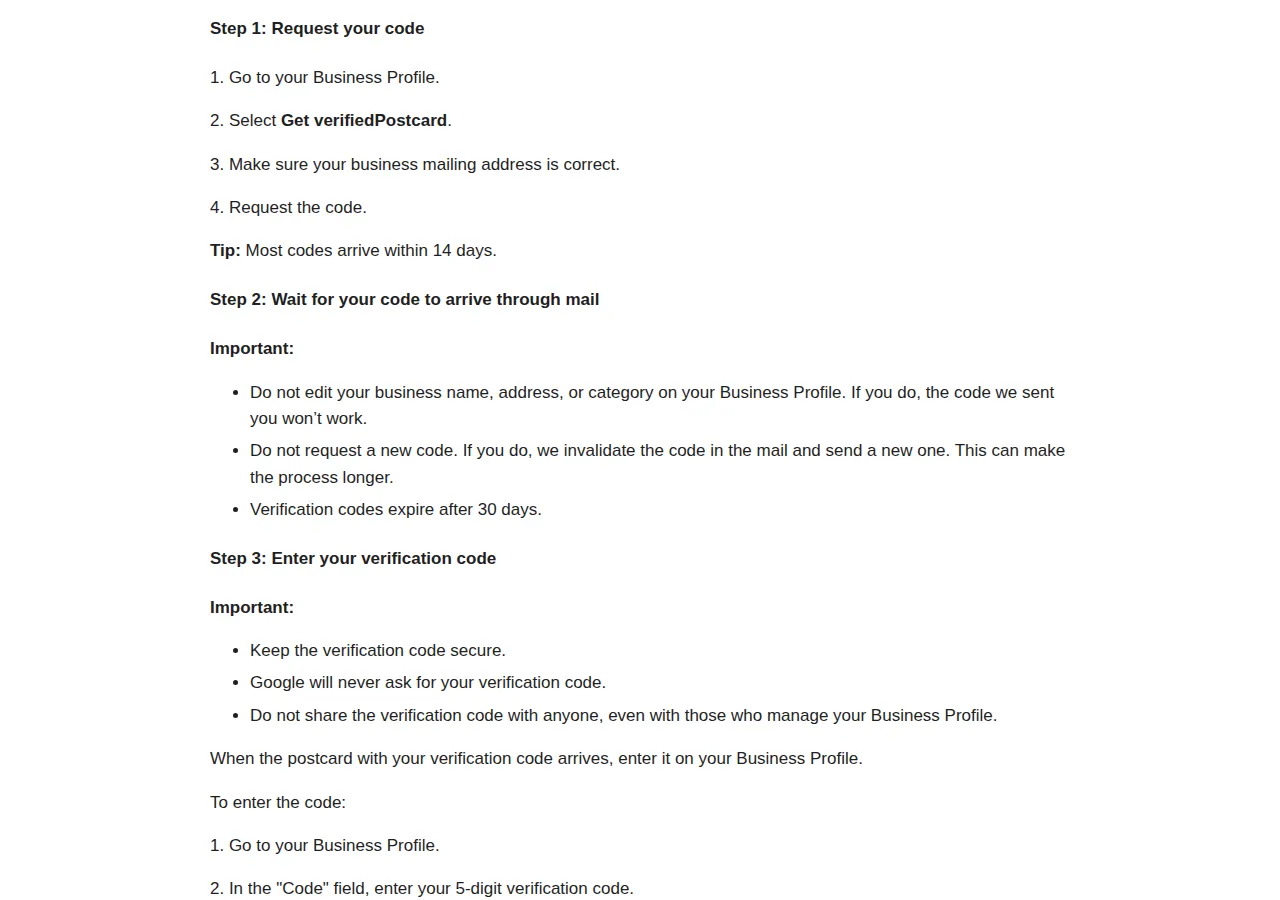
Verification reviews take up to 5 business days. A postcard code expires after 30 days. While a postcard is in transit, do not edit the name, address, or category, and do not request a new code. The code is five digits, and Google will never ask for it.
Video verification is the method Google now recommends for eligible businesses. The video must be an unedited, complete recording with no breaks, at least 30 seconds long, recorded live on a mobile device through the Business Profile; pre-recorded videos are not allowed. It must not include bank account, tax, or ID numbers, private information, or other people's faces. A storefront shows street signs, matching signage, and proof of management; a service-area business shows landmarks, tools or a branded vehicle, and a matching permit, invoice, or utility bill.
Multi-location chains verify through GSC and manage profiles through the Business Profile API instead of one dashboard at a time.
The field rules: name, category, address, description
Google's guidelines decide suspensions: avoid prohibited content, reflect the business accurately, and comply with the product guidelines. Represent the business as it appears in the real world, keep the address or service area accurate, choose the fewest categories that describe the core business, and keep one profile per business.
The business name is where owners get suspended most often. The rule: the name should reflect the business's real-world name, as used on the storefront, website, stationery, and as known to customers. Unnecessary information in the name is not permitted and could result in suspension. Google's examples: "TD Bank, America's Most Convenient Bank" must be "TD Bank"; "Midas Auto Service Experts" must be "Midas". If the words are not on the sign above the door, they do not go in the name field.
Categories decide which searches the profile can match. Use as few as possible, choose them as specific as possible, and never use categories as keywords. The test: choose categories that complete "This business IS a" rather than "This business HAS a." A plumber IS a plumber; drain cleaning is a service, not a category. The owner picks one primary category and can add up to 9 more; Google caps the description at 750 characters, with no links, no HTML, and no promotions, prices, or sales copy.
Address and service area follow the business model. A business with a location customers visit shows its precise address and maintains permanent fixed signage of its name there. A P.O. box, a remote mailbox, and a virtual office the business does not operate from are not eligible. A service-area business gets one profile for its central office, hides its address, and keeps the boundary within about 2 hours of driving time from its base; up to 20 service areas can be set, by city, postal code, or other area, with no radius option.
> [!WARNING]
> Keyword-stuffing the name is the fastest route to a suspension, and the most pointless: the keywords belong in services, and the name field is the one Google polices by suspension. "Best Cheap Plumber Austin 24/7" is not a ranking tactic. It is a suspension waiting for a competitor report.
Photos and posts: the two levers that move clicks
Photos are the highest-return work on a profile after verification. Businesses with photos receive 42 percent more requests for driving directions and 35 percent more clicks through to their website than profiles without photos, according to Google's published figures, quoted consistently across independent guides. Both the business and its customers can upload photos. Build the set a customer needs: storefront, interior, team at work, finished job.
> [!TIP]
> Photograph the work, not the office: a finished job or a stocked shelf answers the question a searcher is asking, and those are the photos Google's figures tie to more direction requests and clicks.
Posts come in three types: Update, Offer, and Event. A post can be scheduled for later, set to repeat, and published across multiple profiles at once. After publishing, Google reviews the post, and its status decides whether customers see it: Live means it is public on Search and Maps; Pending means it does not show, because it is still processing or the profile is unverified; Not approved means it does not show, and the marker names the policy it violates. Keep posts professional, free of misspellings, respectful and family-friendly, with links only to trusted sites. A post is not a ranking switch: it does not change relevance, distance, or prominence directly. What it does is keep the profile current and give a searcher a reason to choose this business today.
Worked example: what the photo lift is worth in dollars
Worked example: Riverside Dental Studio is a fictional two-dentist clinic in Austin, Texas. Its baseline, from its own Business Profile data before any photo work, is 1,000 profile views a month, 120 direction requests, 80 website clicks, and 60 calls. The clinic adds a full photo set and nothing else changes. Google's published photo lift is 42 percent more direction requests and 35 percent more website clicks for profiles with photos.
$
\text{Direction Requests}_{\text{with photos}} = 120 \times 1.42 = 170.4
$
$
\text{Website Clicks}_{\text{with photos}} = 80 \times 1.35 = 108.0
$
That is 50.4 more direction requests and 28 more website clicks a month. The clinic's own records say about 40 percent of direction requests become a visit, and about 25 percent of website clicks become a booked appointment; those rates are the clinic's own figures, stated as assumptions, not as Google data. Average first-visit revenue is 185 dollars.
$
\text{Extra Visits} = 50.4 \times 40\% = 20.16 \approx 20
$
$
\text{Extra Bookings} = 28.0 \times 25\% = 7.0
$
$
\text{Extra Revenue} = (20 \times \$185) + (7 \times \$185) = \$3{,}700 + \$1{,}295 = \$4{,}995 \text{ per month}
$
$
\text{Annual Value} = \$4{,}995 \times 12 = \$59{,}940
$
The photo set is a one-time job with a monthly return. Readers can re-run the same formula with their own baseline using the ROI calculator. The review engine runs on the same arithmetic: 120 customers asked a month at a 15 percent response rate — a rate the business measures itself — gains 18 reviews a month, and a profile with 40 reviews reaches 100 in under four months. The ahrefs-vs-semrush-vs-moz-seo-tool-pricing-playbook covers the tooling behind the links input, and the google-ads-vs-meta-ads-small-business-roas-playbook prices the paid route.
Reviews: the engine, the rules, and the replies
Reviews are the prominence factor an owner builds one customer at a time. Reviews must reflect a genuine experience. Offering incentives, such as free or discounted goods or services, in exchange for posting, changing, or removing a review is fake and misleading content and is strictly prohibited. Soliciting reviews through incentives or review stations at a place of business is also against policy, and reviews that violate the policies can be removed. Ask the boring way: share the profile's review link after the job is done.
Keep them professional, short, and personal; for negative reviews, protect privacy, apologize when appropriate, address the reviewer by name, and respond promptly.
The failure mode here is expensive. A business that buys reviews or trades discounts for five stars does not always get a warning first: the reviews can be removed, the profile can lose the rating that was bringing in calls, and a pattern of fake engagement can put the profile itself under review. Genuine reviews, asked for consistently and answered promptly, are the only review strategy that survives contact with Google's policy team. The tiktok-ads-vs-meta-ads-ecommerce-roas-playbook shows the same discipline on the paid side.
Suspension and reinstatement: the appeal is a one-shot process
Reinstatement is an appeal, not a negotiation. Before appealing, fix every violation — the appeal tool will not fix one left in place. The evidence is documentary: business registration, a license, tax certificates, or utility bills. On every document, the name and address must match the profile under appeal.
The appeal runs through the Google Business Profile appeals tool: open it, confirm the signed-in account, select the profile and the decision, attach evidence, explain why the profile should be reinstated, and submit. One detail decides whether the evidence arrives at all: once the evidence form is opened, it must be submitted within 60 minutes or it will not be attached. Appeals can only be submitted once, so do not file until the violation is fixed and the evidence is ready. Do not create a new profile for the same business while an appeal is under review. If the account itself is restricted, its profiles are suspended; appeal the restriction first, from the account's own page, then the profile suspension. If a request is denied, Google may offer an additional review with evidence not added originally. The tool reports five statuses: Submitted, Approved, Not Approved, Can't be appealed, and Eligible for appeal. A suspension zeroes the profile's contribution while it is dark.
The 30-day execution checklist
1. Claim and verify the profile. Record the method and date; for a postcard, diary the 30-day expiry.
2. Fix the name against the sign. Remove taglines, codes, numbers, locations, and service words.
3. Set one primary category and up to 9 more. Apply the "IS a" test.
4. Set the address or the service area. Storefront shows the address; service-area hides it, up to 20 areas inside 2 hours of driving.
5. Write the description inside 750 characters. No links, no HTML, no promotions or prices.
6. Fill hours, attributes, and services.
7. Upload the photo set. Add new photos monthly.
8. Build the review ask into the job. Never offer an incentive or buy reviews.
9. Answer every review within two business days.
10. Publish one post a week. Check the status is Live.
11. Check the profile monthly. Fix drift the week it appears.
12. Keep the evidence folder current. Registration, license, tax certificate, and a recent utility bill, all matching the profile.
> [!FOUNDER]
> "A Google Business Profile is the only marketing channel where the best work costs nothing and the worst mistake costs everything. Verification is free, the listing is free, the photos are free — and a keyword-stuffed name or a bought review can take the whole profile off the map. Do the free work properly, every week, and the map pack becomes the cheapest customer channel a local business will ever own."
> — Enow A. Jovial, Founder & Chief Executive Officer
Who this is not for
A Business Profile is the wrong tool for three kinds of business: an online-only shop, which is not eligible; a business operating from a virtual office or a P.O. box with no staffed location; and a business that wants to buy its way to the top of local results, which Google states does not exist. For those, the honest route is a website and paid search, priced in the google-ads-vs-meta-ads-small-business-roas-playbook. For everyone else, the profile is the first thing to build and the last thing to neglect.