A founder who needs an app on iOS and Android faces three serious options. Flutter compiles Dart to native code and draws every pixel itself. React Native runs JavaScript against real native components. Expo is React Native with a managed cloud around it — builds, submissions, updates, and monitoring as a service. They differ in language, rendering, app size, update economics, and what you pay every month. Pick on the wrong axis and you pay for it in hiring, in store-review delays, or in a rewrite.
The three, in one paragraph each
Flutter is Google's UI toolkit: one Dart codebase deploys to mobile, web, desktop, and embedded devices. Cupertino and Material designs are built in, so the app feels at home on both phones. The engine draws every pixel itself with hardware-accelerated graphics, so the UI looks identical on iOS and Android — the framework, not the operating system, owns the pixels. The language is Dart, compiled ahead of time to native machine code — one language covers the whole app, after a first month of learning for a team new to Dart.
React Native is Meta's framework: JavaScript or TypeScript driving real native components. The New Architecture — documented in the Architecture Overview — renders through Fabric, a cross-platform renderer, and runs JavaScript on the bundled Hermes engine. A React Native app is a real native app: its buttons and lists are the platform's own components. The hiring advantage is the point: any JavaScript or TypeScript engineer can contribute on day one, and the web and mobile teams share a language and a package ecosystem.
Expo is React Native with the operations removed. The Expo SDK is free and open source under the MIT license; the paid part is the cloud services — Expo Build, Expo Submit, Expo Update, and CI/CD Workflows. The services were formerly called EAS (Expo Application Services), and the eas CLI and the eas.json config file keep the old name. Expo is not a fourth framework; it is React Native plus a monthly bill and minus a build server.
The decision table
| Attribute | Flutter | React Native | Expo (React Native + cloud) | Authority |
|---|---|---|---|---|
| Language | Dart, compiled ahead of time | JavaScript / TypeScript on Hermes | JavaScript / TypeScript on Hermes | flutter.dev; reactnative.dev |
| Rendering | Own engine, draws every pixel | Fabric renderer, real native components | Same as React Native | flutter.dev; RN Architecture Overview |
| Framework cost | $0, open source | $0, open source | $0 SDK (MIT); cloud services $0–$199/mo | expo.dev/pricing |
| Builds | Your CI or local machine | Your CI or local machine | 15+15 builds/mo free; $45–$225 credit on paid tiers | expo.dev/pricing |
| OTA updates | Shorebird: free to 5,000 patch installs/mo | Expo Update or third-party service | Built in: 1K–50K MAUs by tier | shorebird.dev/pricing; expo.dev/pricing |
| Platforms | iOS, Android, web, Windows, macOS, Linux, embedded | iOS, Android (plus community targets) | iOS, Android | flutter.dev; expo.dev |
| Hiring pool | Dart (smaller, growing) | JavaScript/TypeScript (largest) | JavaScript/TypeScript (largest) | Market reality, not a vendor claim |
The table is the decision. A JavaScript team defaults to React Native or Expo, and Flutter must earn its place. A fresh hire makes Flutter's single language the argument. Without DevOps capacity, Expo's bill is the price of not running build infrastructure.
Rendering: who draws the pixels
Flutter's bet is that the framework should own the pixels. Its engine renders the whole interface with hardware-accelerated graphics, and the widget library adapts to each screen. The payoff is consistency: a custom animation, a non-standard layout, or a branded control looks the same on a Pixel and an iPhone, because the same engine drew it on both. The cost is that platform conventions are the framework's job — an iOS user gets Cupertino widgets because Flutter ships them, not because the phone provided them.
React Native's bet is the opposite: use the platform's own components. Fabric, the New Architecture renderer, renders natively across platforms, and Hermes runs the JavaScript. The payoff is that the app feels native by construction — accessibility, text input, and scrolling behave the way the operating system behaves, because they are the operating system. The cost is the seam between JavaScript and native code: every native module is a boundary to maintain, and performance depends on the New Architecture being fully adopted in your dependencies.
For most business apps — forms, lists, dashboards, checkouts — both render fast enough that the difference is invisible. The choice matters at the edges: heavy custom animation and brand-exact design favour Flutter; deep platform integration favours React Native's native components.
App size: the one hard number
Flutter's own documentation gives a concrete example: a release build at 5.4 MB compressed download size and 13.7 MB uncompressed on iOS. The docs also name the lever for shrinking it — building with the --split-debug-info flag, which strips debug symbols from the release binary. That 5.4 MB figure is a small example app, not a promise about yours: every image, font, and native library grows it, and a real app with maps, payments, and media will be several times larger.
For React Native there is no single vendor-published figure to quote, and this guide will not invent one. The size floor is set by the Hermes bytecode, the JavaScript bundle, and the native libraries your dependencies pull in; a bare app is small, and a real one grows with every native module. The honest practice is the same on all three: measure your own release build every week, on a real device, and treat a size regression like a bug. If download size is a first-class requirement — emerging markets, low-end Android, expensive data — Flutter's compiled output is the easier size story to defend, because there is no JavaScript runtime and no bundle to ship.
Over-the-air updates: the economics that decide the winner
Code push is the feature founders feel most. A bug in production on a Friday: with OTA updates you ship the fix in minutes; without them you wait for store review.
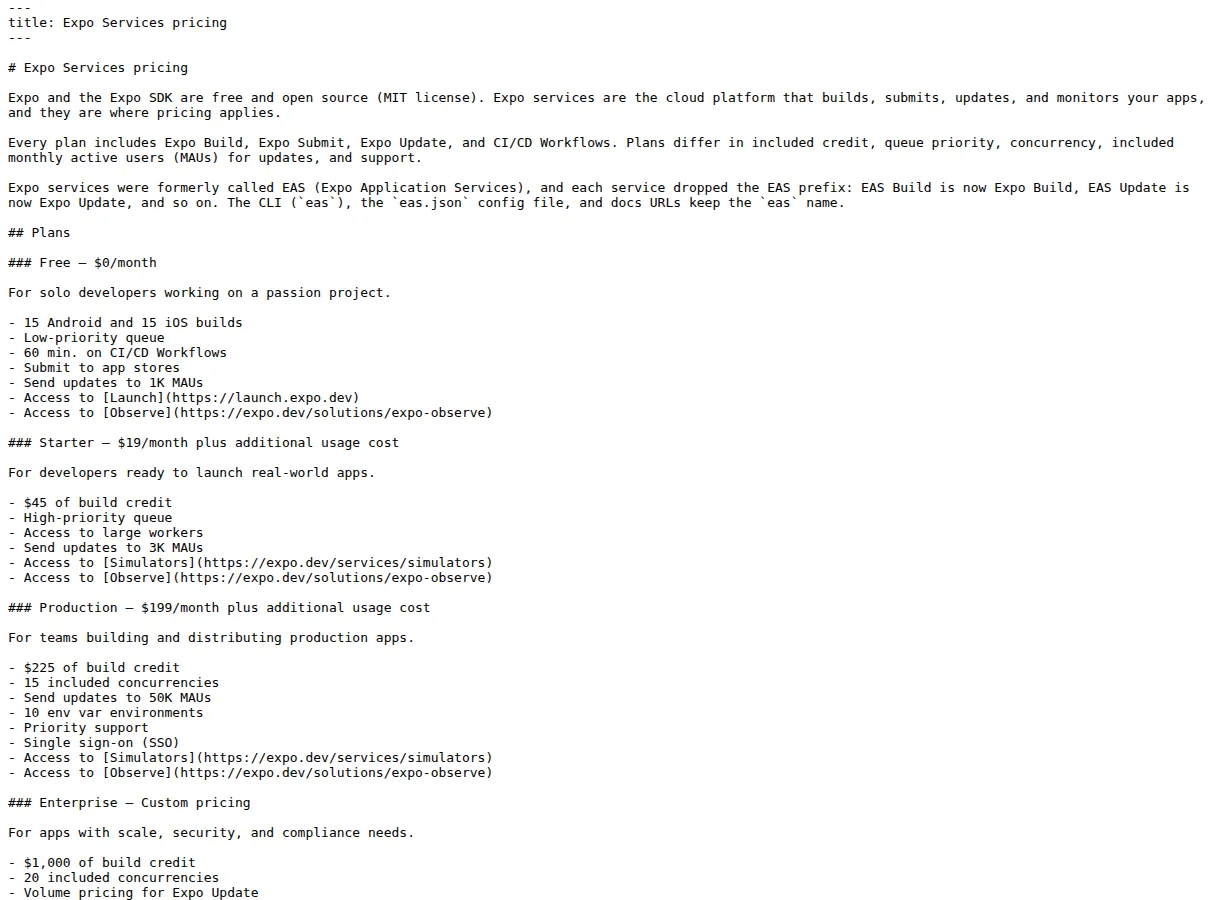
Expo Update is bundled into the Expo tiers, priced by monthly active users reached: Free sends updates to 1,000 MAUs, Starter ($19 a month) to 3,000, Production ($199 a month) to 50,000. The per-MAU cost falls as you climb: $19 / 3,000 is $0.0063 per MAU; $199 / 50,000 is $0.0040.
$
\text{Expo Update Cost per MAU (Production)} = \frac{\$199}{50{,}000} = \$0.0040
$
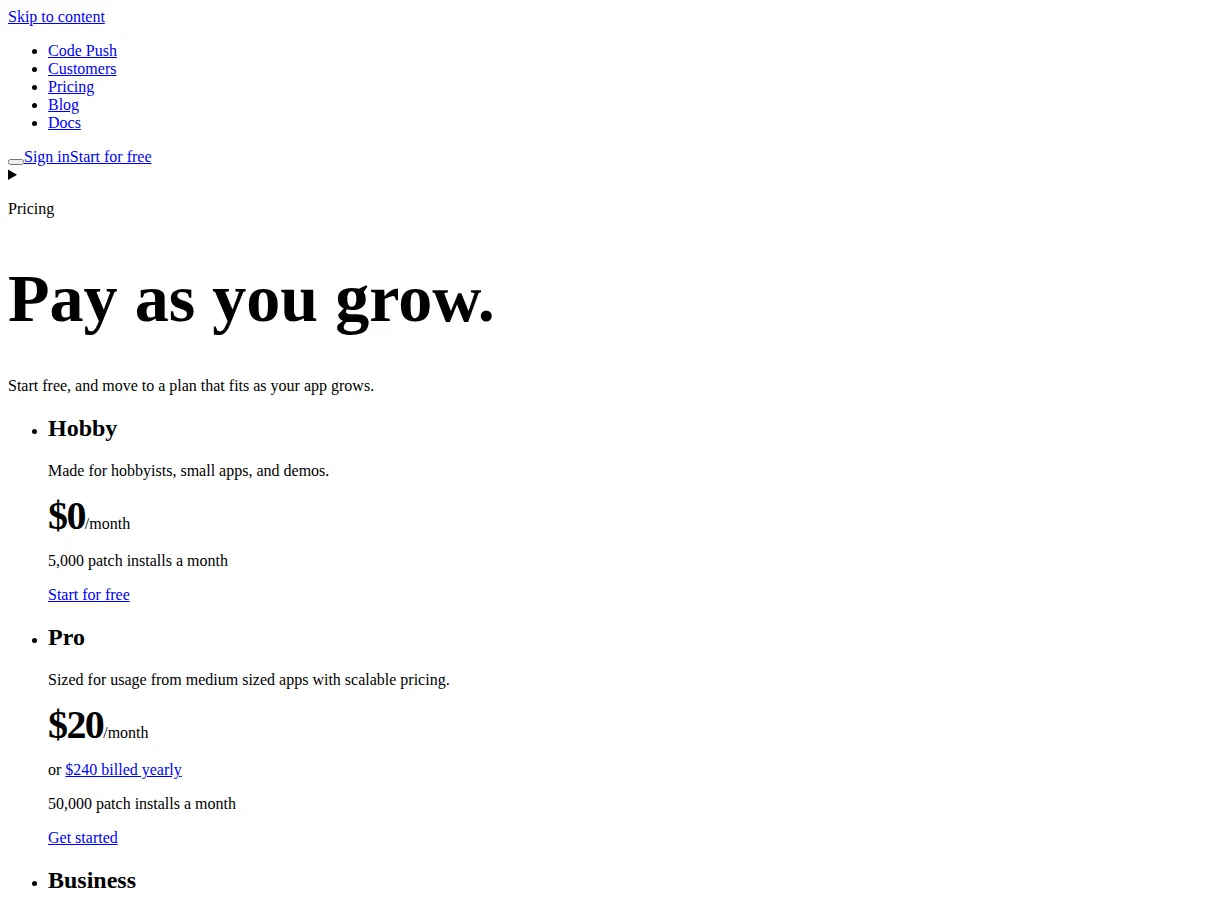
Shorebird is the Flutter equivalent, priced by patch installs: Hobby is free to 5,000 patch installs a month, Pro is $20 a month (or $240 billed yearly) for 50,000 patch installs, Business is $400 a month for 1,000,000. Every plan includes unlimited apps and releases, signed patches, and rollbacks.
$
\text{Shorebird Cost per Patch Install (Pro)} = \frac{\$20}{50{,}000} = \$0.0004
$
At the same 50,000-user scale, Shorebird Pro costs one-tenth of Expo Production per update delivered — $20 against $199. The comparison is not quite apples to apples (Expo Production also buys build concurrency, priority support, and SSO), but on the update line alone, Flutter's OTA economics are an order of magnitude cheaper. A React Native app without Expo can use a third-party update service instead, but then you are assembling the stack Expo sells as one bill.
Builds and the monthly bill
The frameworks are free; the bill is the cloud: Free is $0 a month with 15 Android and 15 iOS builds, a low-priority queue, 60 minutes of CI/CD Workflows, store submission, and updates to 1,000 MAUs. Starter is $19 a month plus usage, with $45 of build credit, a high-priority queue, large workers, and updates to 3,000 MAUs. Production is $199 a month plus usage, with $225 of build credit, 15 concurrencies, updates to 50,000 MAUs, 10 environment-variable environments, priority support, and single sign-on. Enterprise is custom, with $1,000 of build credit and 20 concurrencies.
Do the build math before choosing a tier. One iOS and one Android build a week is 8 builds a month and fits inside Free's 15+15. Daily shipping is 40-plus builds a month and needs Starter at minimum. The tier is a function of release cadence, not team size. Our CI comparison covers the build pipelines that feed these tiers.
Then the team math, stated as an assumption: two native teams of two engineers at $150,000 loaded cost each is $600,000 a year; one cross-platform team of two is $300,000. The $300,000 saving is the entire economic case for cross-platform — and it only holds if the cross-platform team ships both platforms without a native specialist on retainer. Budget one native-capable engineer for the platform-specific work (permissions, push, store compliance) whichever framework you pick.
The traps, in order of how often they bite
Choosing on language alone. A JavaScript team that picks Flutter for its rendering will spend its first quarter learning Dart and rebuilding its component library, while the product waits. A Dart team that picks React Native for its hiring pool will spend its first quarter fighting native-module boundaries it did not need. The language decision is a hiring decision — make it with the hiring manager in the room.
Expo's free tier as a production plan. Free gives 15 builds per platform and 1,000 MAUs of updates. A launch that succeeds blows past both in the first month — and the queue is low-priority, so release day is the worst day to discover it. Budget Starter from the first production release, and Production before the first marketing push.
OTA updates as a substitute for review. Code push ships code changes, not native changes. A new permission, native SDK, or dependency version still needs a store build and review. Teams that treat OTA as a way to skip the store eventually ship a native change over the air by accident.
The native-module graveyard. React Native's ecosystem is its strength and its risk: a dependency that has not adopted the New Architecture, or that is abandoned, becomes your maintenance burden. Before adopting a native module, check its last release date and New Architecture support. Flutter's widget-first design has fewer native dependencies to go stale — a real advantage for a small team.
Measuring size once. App size grows silently — a new font, a new image set, a new SDK. Measure the release build weekly and fail the build on a regression.
Who should pick what
Pick Flutter if you are hiring fresh, if brand-exact design matters more than platform-native feel, if download size is a constraint, or if you want the cheapest OTA economics. Our own Video Bible app ships on Flutter for exactly these reasons — one Dart team, one rendering engine, Shorebird patches.
Pick React Native if your team already writes JavaScript or TypeScript, if you need deep platform integration, or if you want the largest hiring pool in mobile. Our frontend framework guide covers the same language-first logic on the web.
Pick Expo if you want React Native without running build infrastructure — no Mac build server, no certificates to babysit, no CI to maintain. The $19 Starter tier is the cheapest DevOps hire you will ever make. If you already have CI and a Mac fleet, plain React Native saves the bill.
Whichever you pick, the decision is reversible at a price: the UI layer is what you rewrite, and the product logic, the API, and the data model survive. Make the choice on team and economics, not on fashion. If the budget side needs a number before the meeting, run the team cost through our Website Cost Calculator — a framework choice argued in dollars is one the whole room can judge.
Execution checklist
- [x] Count the team first: a JavaScript team means React Native or Expo; a fresh hire means Flutter is on the table.
- [x] Price the cloud, not the framework: Flutter and React Native are $0; Expo is $0–$199 a month by tier, and Shorebird is $0–$20 a month at startup scale.
- [x] Do the build math: 8 builds a month fits Expo Free; daily shipping needs Starter; count your release cadence before choosing a tier.
- [x] Price the update line: at 50,000 users, Shorebird Pro is $0.0004 per patch install against Expo Production at $0.0040 per MAU — a 10× gap on updates alone.
- [x] Measure the release build weekly: Flutter's docs example is 5.4 MB compressed; your app is not the docs example — measure yours, and fail the build on a regression.
- [x] Keep one native-capable engineer: permissions, push, and store compliance are native work on every framework; budget for it whichever way you go.
- [x] Ship the first OTA update before launch: prove the update path while the stakes are zero, not on the Friday the bug ships.
Founder & CEO Insight — Enow A. Jovial