Figma vs Sketch vs Adobe XD: Design Tool Pricing, Seats, and the Real Monthly Cost
A design tool decision is a payroll decision. The headline price is never the bill: the bill is the seat mix, the billing frequency, the viewer policy, and the withheld features. All Figma and Sketch figures come from the vendors' own pricing pages, read on 6 November 2026. Adobe XD's figures come from independent 2026 reads instead, because Adobe's own pages returned a 403 error from this network; the XD section below says so plainly.
The Adobe XD verdict, stated plainly
Adobe put XD into maintenance mode in May 2023; when its Figma acquisition collapsed in December 2023, Adobe confirmed it had no plans to invest further. Maintenance mode means bug fixes and security updates, no new features; the last release with new features was version 57 in June 2023.
Single-app sales ended in April 2023, so the only route in is the Creative Cloud all-apps bundle, now Creative Cloud Pro at 69.99 dollars per month on an annual plan billed monthly. That is the bundle price, not an XD price. Two independent 2026 reads agree on 69.99 dollars; Adobe's own pages returned a 403 error, so this guide uses 69.99.
> [!WARNING]
> Do not start a new project in Adobe XD in 2026. The file format is not the risk; the hiring pool, the plugin ecosystem, and the integration roadmap are. Every month a team keeps building in XD, the migration bill grows.
Figma pricing: four plans, three seat types, free viewers
Figma sells seats, not plans. A Full seat designs and uses the full product set; a Dev seat inspects and hands off through Dev Mode; a Collab seat works in FigJam and Slides; a View seat views, comments, inspects, and exports, and costs nothing. Wrong seat assignments are how teams overpay.
Prices are US dollars per seat per month, before tax, read from figma.com/pricing on 6 November 2026.
| Plan | Full | Dev | Collab | View | Billing | Authority |
|---|---|---|---|---|---|---|
| Starter | Free | Free | Free | Free | Free, limited | figma.com/pricing |
| Professional | 16 annual, 20 monthly | 12 annual, 15 monthly | 3 annual, 5 monthly | Free | Monthly or annual | figma.com/pricing |
| Organization | 55 | 25 | 5 | Free | Annual only | figma.com/pricing |
| Enterprise | 90 | 35 | 5 | Free | Annual only | figma.com/pricing |
The Professional monthly premium is 25 percent on a Full seat: 20 dollars against 16. Professional is the working tier: unlimited files and projects, team libraries, and advanced Dev Mode inspection with an MCP Server. Organization adds shared libraries and fonts, centralized admin, SAML-based SSO, and domain capture. Enterprise adds custom workspaces, design system theming and APIs, SCIM, and activity logs. AI credits ride on the same seats: a Full seat gets 3,000 a month on Professional, 3,500 on Organization, and 4,250 on Enterprise.
Figma runs in the browser: Windows, Mac, and Chromebook open the same file with no install, and multiplayer editing is native. FigJam, Slides, Draw, Make, and Sites sit inside the same seat. The ceiling is billing lock-in: Organization and Enterprise cannot be paid month to month, and mid-year seats added to an annual Professional plan bill at the monthly rate. Figma also publishes a plugin SDK and a REST API.
Sketch pricing: one price per editor, plus a license nobody else offers
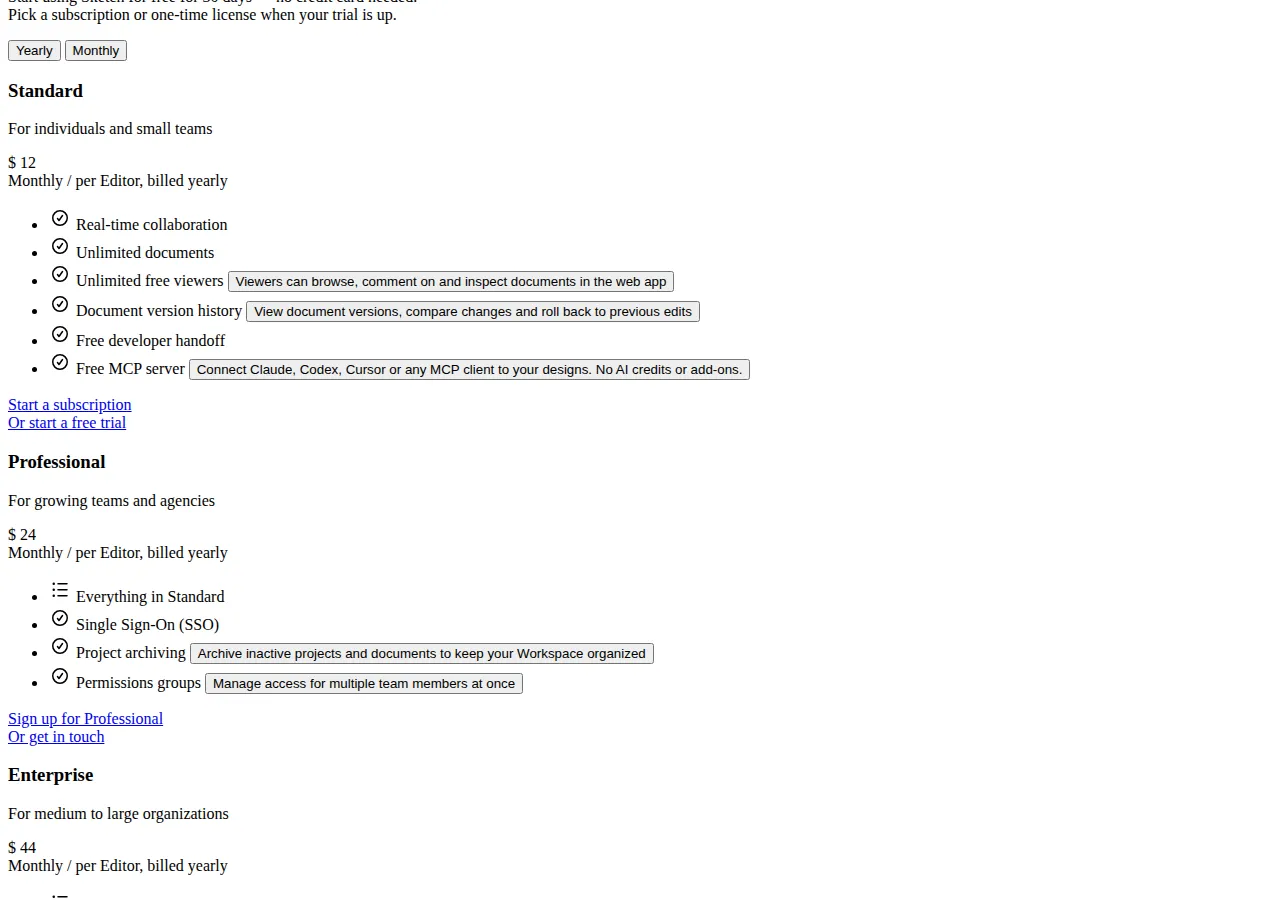
Sketch charges one flat rate per editor and gives viewers away free: no Dev or Collab seat types. Everyone who edits pays the same rate; everyone who only views, comments, or inspects pays nothing. Figures are US dollars per editor per month, read from sketch.com/pricing on 6 November 2026.
| Plan | Annual | Monthly | Storage | SSO | SCIM |
|---|---|---|---|---|---|
| Standard | 12 | 14 | 50 GB per editor | No | No |
| Professional | 24 | Annual only | 50 GB per editor | Yes | No |
| Enterprise | 44 | Annual only | Unlimited | Yes | Yes |
Standard is the entry subscription: real-time collaboration, unlimited documents and free viewers, version history, free developer handoff, and a free MCP server with no AI credits or add-ons. Professional adds SSO, project archiving, and permissions groups. Enterprise adds SCIM, BYOK encryption, dedicated support, and custom security reviews.
The Mac-only license is the outlier here: 120 dollars per seat, one time, including one year of updates, for the native Mac app used offline. It includes design, prototyping, and illustration, but not collaborative features, online sharing, or iOS preview. The pricing page does not state what updates cost after the included year.
The editor is a native Mac app: Windows and Linux users get the web app for viewing, commenting, and inspecting, but not the editor. A team with even one Windows-based designer cannot standardize on Sketch. For an all-Mac team the native app is fast, fully offline, and local-first. For a mixed-platform B2B team it is a disqualifier.
> [!FOUNDER]
> I have watched teams pick a design tool on the price of one seat and then pay for it in hiring, in handoff friction, and in files nobody can open. Price the tool on the team you will have in two years, and buy the one your next ten hires already know.
> — Enow A. Jovial, Founder & Chief Executive Officer
The seat model: one team shape, three bills
One mix at every size: 5 seats is 4 Full and 1 Dev; 25 seats is 18 Full, 4 Dev, and 3 Collab; 100 seats is 70 Full, 20 Dev, and 10 Collab. All figures are US dollars, before tax, on annual billing unless marked monthly.
| Team | Figma Pro | Figma Org | Figma Ent | Sketch Std | Sketch Pro | Sketch Ent |
|---|---|---|---|---|---|---|
| 5 seats | 76/mo, 912/yr | 245/mo, 2,940/yr | 395/mo, 4,740/yr | 60/mo, 720/yr | 120/mo, 1,440/yr | 220/mo, 2,640/yr |
| 25 seats | 345/mo, 4,140/yr | 1,105/mo, 13,260/yr | 1,775/mo, 21,300/yr | 300/mo, 3,600/yr | 600/mo, 7,200/yr | 1,100/mo, 13,200/yr |
| 100 seats | 1,390/mo, 16,680/yr | 4,400/mo, 52,800/yr | 7,050/mo, 84,600/yr | 1,200/mo, 14,400/yr | 2,400/mo, 28,800/yr | 4,400/mo, 52,800/yr |
Sketch Enterprise and Figma Organization cost exactly the same at 100 seats: 4,400 dollars a month, 52,800 a year. The tie is arithmetic, not a recommendation. Figma Professional annual beats Sketch Professional annual at every size here, because Dev and Collab seats dilute the average. The price fight that matters is Figma Professional against Sketch Standard.
$
Figma Pro annual, 25 seats = 18×16 + 4×12 + 3×3 = 288 + 48 + 9 = \$345/mo = \$4,140/yr
Sketch Std annual, 25 editors = 25×12 = \$300/mo = \$3,600/yr
Gap at 25 seats = 4,140 - 3,600 = \$540/yr
$
The monthly-billing penalty is the quietest line in these bills. A 25-seat team on Figma Professional monthly pays 435 dollars a month, 5,220 a year, against 345 a month and 4,140 a year on annual billing: a 1,080 dollar penalty for the right to drop seats month to month. Sketch Standard monthly is 14 dollars per editor against 12 annual, so the same 25 editors cost 350 a month and 4,200 a year, a 600 dollar penalty. A team sure of its headcount should never pay monthly.
$
Figma Pro monthly penalty, 25 seats = [(18×20) + (4×15) + (3×5)]×12 - 4,140 = 5,220 - 4,140 = \$1,080/yr
Sketch Std monthly penalty, 25 editors = (25×14×12) - 3,600 = \$600/yr
Full-seat gap, Figma vs Sketch Std = (16 - 12)×12 = \$48 per seat per yr
$
Worked example: the 25-seat team that leaves XD
Take a 25-person B2B SaaS team: 18 Full seats, 4 Dev seats, 3 Collab seats, with XD files in Creative Cloud Pro at 69.99 dollars per person per month.
Staying on XD costs 25 times 69.99: 1,749.75 dollars a month and 20,997 dollars a year. Figma Professional annual costs 345 dollars a month and 4,140 a year, saving 1,404.75 dollars a month and 16,857 a year. Sketch Standard annual costs 300 dollars a month and 3,600 a year, saving 1,449.75 a month and 17,397 a year, but only on Mac hardware.
Migration is not free. Assume each of the 25 people needs 4 hours to move, rebuild, and QA their active files at 75 dollars an hour loaded: 25 times 4 times 75 is 7,500 dollars of one-time labor. Against the Figma saving of 1,404.75 dollars a month, payback is 5.3 months; against the Sketch saving, 5.2 months. After payback, the team keeps roughly 1,400 dollars a month it used to spend on a tool Adobe no longer develops.
Five solo designers pay 5 times 120, which is 600 dollars once, against 720 dollars a year for Sketch Standard annual: break-even in 10 months. After month 10 it is cheaper in cash, but the buyer has given up collaboration, online sharing, cloud version history, and the iOS preview. A solo offline freelancer should take the license; a sharing team of five should not. Before budgeting the wider website spend, run the numbers through the Website Cost Estimator so design tooling sits inside the full build budget.
The seat-discipline ledger: what sloppy seats cost
The seat model above assumes discipline: reviewers on free View seats, engineers on Dev seats, only designers on Full seats. Break that discipline and the numbers move fast.
Give five reviewers Full seats on Figma Professional annual instead of free View seats and the waste is 5 times 16 dollars times 12 months: 960 dollars a year for people who never open a design file. Do the same on Sketch Standard, where every editor pays the same rate, and five extra editors cost 5 times 12 dollars times 12 months: 720 dollars a year. Give all 25 seats Full status on Figma Professional instead of the 18 Full, 4 Dev, 3 Collab mix and the bill rises from 345 dollars a month to 400, a 55 dollar monthly gap worth 660 dollars a year.
The plan jumps are steeper. Moving 25 seats from Figma Professional to Organization costs 1,105 minus 345 dollars a month, times 12: 9,120 dollars a year for SSO, domain capture, and shared libraries. Moving the same team to Enterprise costs 1,775 minus 345 dollars a month, times 12: 17,160 dollars a year for SCIM, design system theming, and activity logs. Price each jump against the single feature that forces it. If SSO is the only Organization feature the team needs, the 9,120 dollar question is whether SSO is worth 9,120 dollars, not whether Organization is a better plan.
Prototyping, Dev Mode, and handoff
Figma's prototyping is the most complete of the three: interactive components, variables, conditional logic, and smart animate transitions, all in the same browser file, with Figma Make turning prompts into working app prototypes. Sketch prototypes in the native Mac app and plays them in the web app and on iPhone and iPad. XD's prototyping has not improved since 2023.
Figma includes advanced Dev Mode inspection on Professional, with measurements, CSS values, and asset export in SVG, PNG, and PDF formats, plus the MCP Server for AI coding clients. Dev seats exist so engineers can inspect without paying for a Full seat. Sketch includes developer handoff free on every subscription, with inspect, measurements, and export, plus a free MCP server with no credit meter. XD hands off through Creative Cloud sharing and pre-maintenance-mode spec tools.
Get the SLA in writing before committing: no vendor puts a comparable uptime figure on its pricing page. Once designs become a shipped site, the stack carries its own pricing logic: read the Webflow vs Framer vs WordPress: No-Code Website Builder Pricing head-to-head, and teams decoupling a CMS should read the Headless WordPress vs Next.js CMS Decoupling Architecture Playbook first.
File, version, and storage limits
Figma's paid plans carry no published file count ceiling a normal team will hit. Sketch Standard and Professional give 50 GB of storage per editor, so a 25-editor team holds 1,250 GB, and Enterprise is unlimited. Sketch version history is included on every subscription, with compare and rollback, and documents are unlimited. XD files live in Creative Cloud storage under the bundle's terms. Figma exports UI assets with DPI control; Sketch exports PNG, SVG, PDF, and JPEG for UI and UX deliverables.
> [!KEY TAKEAWAY]
> Figma wins on collaboration and platform reach, Sketch wins on price for all-Mac teams, and XD is not a purchase any more. For most teams the cheapest correct answer is Figma Professional annual with strict seat discipline; for an all-Mac team that works offline, Sketch Standard annual.
Who should NOT use this
Do not buy Figma Enterprise for a five-person team: the 90 dollar Full seat buys SCIM, custom workspaces, and design system APIs a small team will not use, and the bill at 5 seats is 395 dollars a month against 76 on Professional. Do not buy Sketch if any designer works on Windows or Linux. Do not buy Sketch Professional for SSO alone: at 25 editors the 12 dollar jump from Standard costs 300 dollars a month. Do not stay on XD because the files are already there; the files are the sunk cost. And do not give Full seats to stakeholders who only review work: that mistake costs 16 dollars a month per person on Figma annual billing, and 12 dollars a month per editor on Sketch.
> [!TIP]
> Audit seats quarterly: export the member list, sort by last edit date, and downgrade anyone who has not edited in 90 days to a View seat on Figma or off the editor count on Sketch. A 25-seat team typically recovers two to four seats per audit.
Execution checklist: evaluate, trial, migrate, hand off
1. Count the real team: editors, inspectors, reviewers; assign seat types before looking at prices.
2. Check the platform: any Windows or Linux designer rules Sketch out.
3. Trial both on one real project: 30-day Sketch trial plus free Figma Starter; measure handoff time.
4. Price the exact seat mix at 5, 25, and 100 seats on annual billing, then add tax.
5. Test Dev Mode with the engineers who will use it: export SVG, PNG, and PDF, check CSS values, confirm the MCP connection.
6. Pilot migration on one product area: move the files, rebuild shared libraries, QA prototypes before committing the archive.
7. Write the seat policy down: who gets Full, Dev, Collab, or free viewer, with a named owner.
8. Set a freeze date: the day XD stops receiving new work.