An expense report is the smallest unit of corporate spending that still needs a human decision: a receipt is photographed, approved, reimbursed through ACH, and posted to the ledger. Three vendors sell software for that loop on three different rulers. Expensify charges per member per month. Zoho Expense charges per user per month, with a free tier that stops at three users. SAP Concur charges per expense report, with unlimited users and no published per-user rate. Pick the wrong ruler and the cheapest headline rate becomes the most expensive bill in the building.
This guide prices all three from the vendors' own pricing pages, read on November 11, 2026, and works the monthly cost at 5, 25, and 100 users. Where a vendor hides its price behind a quote, this guide says so. Where a headline rate is conditional, the condition is printed next to the rate.
Expensify: the $5 plan, and the $9 that is not $9
Collect is the honest part of Expensify's pricing: $5 per member per month, month to month, with no annual contract, and the Expensify Card is optional. The rate is flat and the billing unit is a person: $25 a month at 5 users, $125 at 25, $500 at 100.
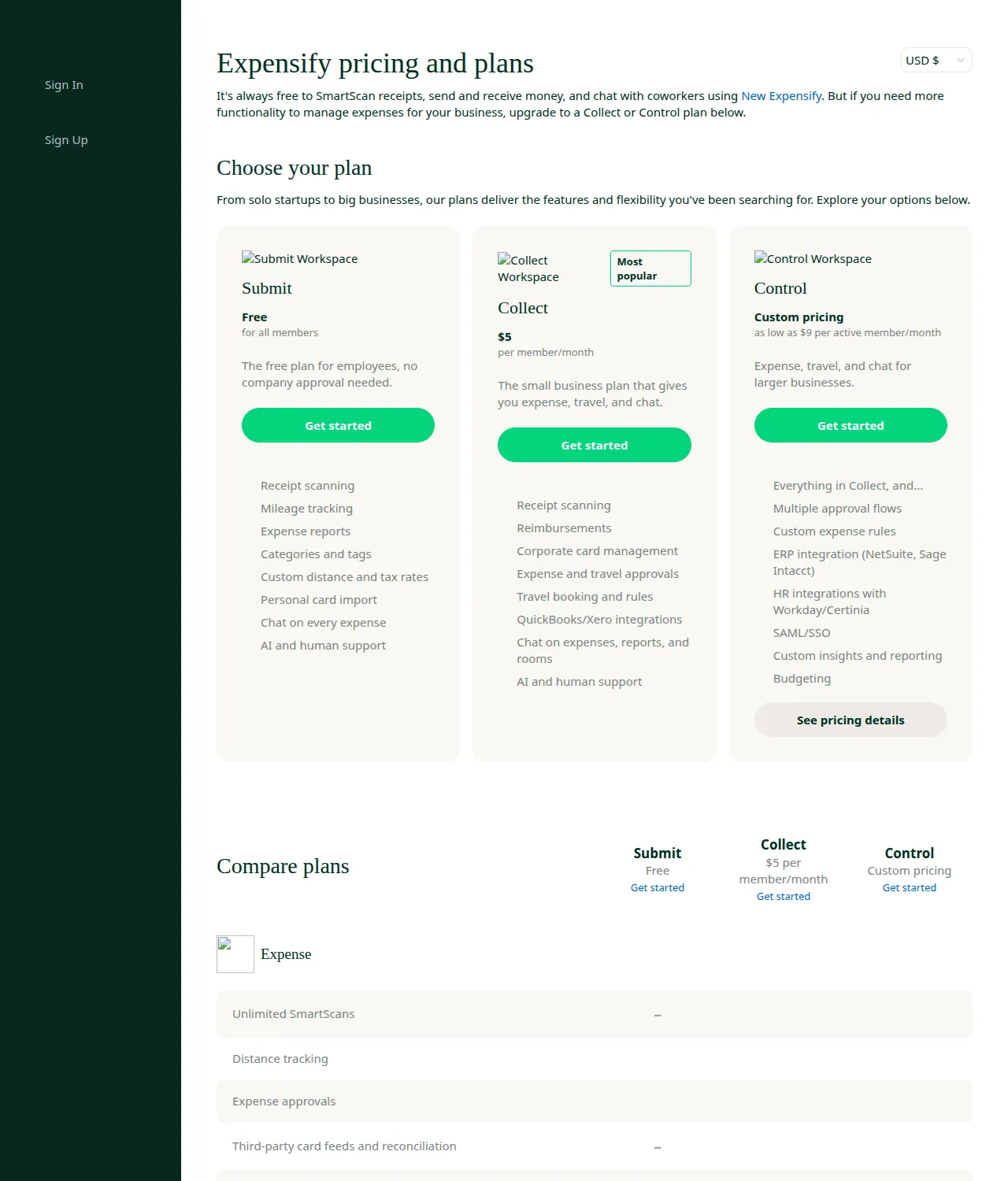
Control is where the pricing page stops telling the full story. The page shows "as low as $9 per active member per month" and labels the plan custom priced. Four independent comparisons of Expensify's own help documentation agree on what sits behind that phrase: Control costs $18 per active member per month on an annual plan, $36 with no commitment, and $9 only when at least half of the company's settled US spend runs through the Expensify Card in that month. The $9 rate is a 50 percent discount off the $18 annual rate. A team that keeps its existing Amex or Chase card program never earns it and pays $18.
At 25 users, Control at $18 costs $450 a month and $5,400 a year; at $9 it costs $225 a month and $2,700 a year.
At 100 users the gap is $10,800 a year. Pay-per-use at $36 is double the $18 annual rate and four times the $9 discounted rate.
The company bills only members who are active in a given cycle; Collect includes unlimited SmartScans. The meter that exists is the plan boundary: multi-level approvals, ERP integration, and SAML single sign-on sit behind Control.
Zoho Expense: the free tier ends at three users
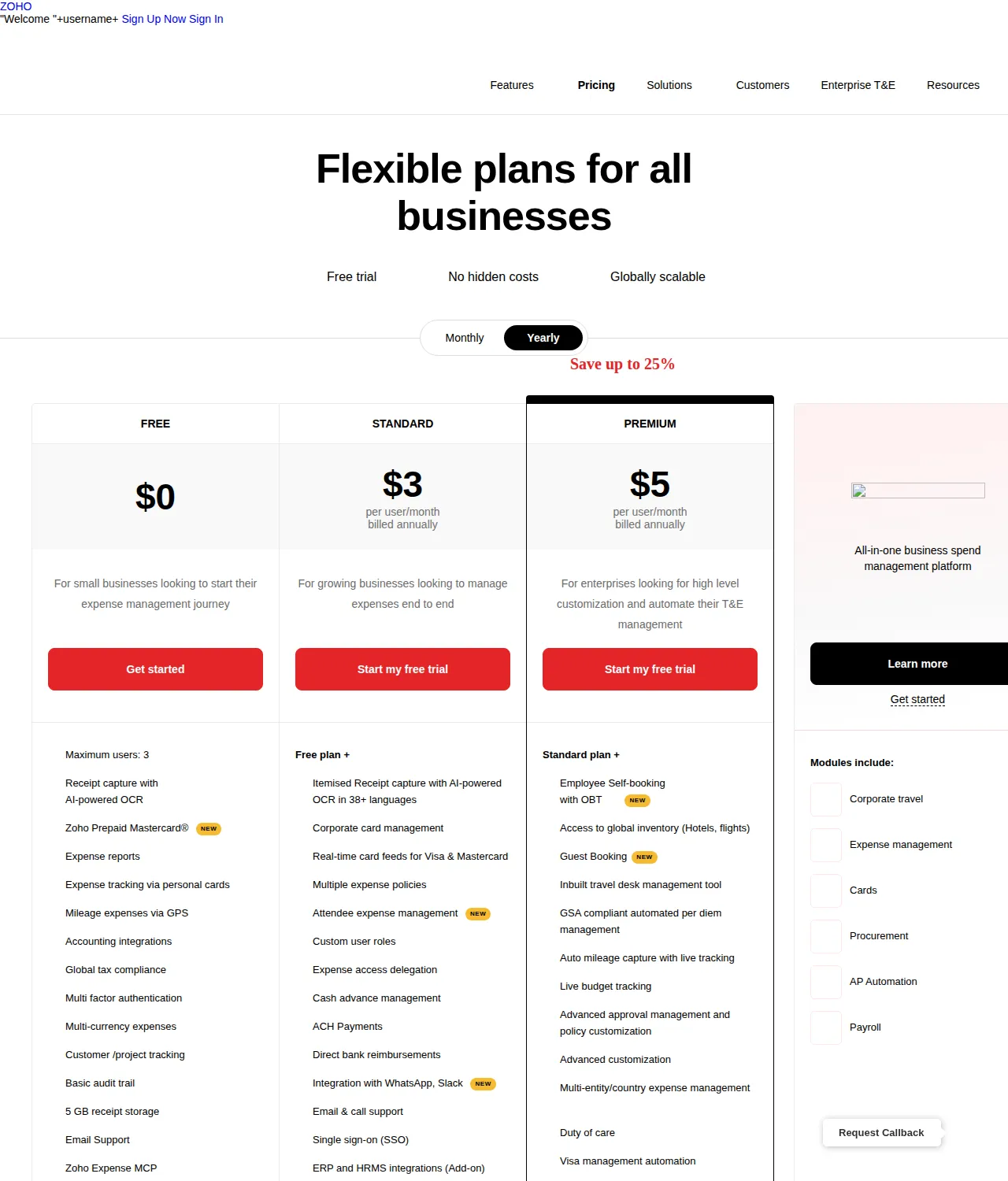
Zoho Expense is the only vendor here with a real free tier, and its limit is the most important number on the pricing page: three users maximum. A founder plus two employees can run expense reports, OCR capture, mileage, and multi-currency expenses for $0; the fourth user ends the free tier.
Standard at $3 per user per month on annual billing is the lowest paid rate in this comparison: $15 a month at 5 users, $75 at 25, $300 at 100. The monthly-billed rate is $4, so annual billing saves exactly 25 percent — (4 minus 3) divided by 4. Premium at $5 per user per month on annual billing costs $25, $125, and $500 a month at 5, 25, and 100 users; its monthly-billed rate is $6, so annual billing saves 16.7 percent.
The OCR quota is the second meter. Free allows 20 receipt scans per user per month, Standard 200, Premium 1,000. A 25-person team on Standard holds 5,000 scans a month, and a team scanning eight receipts per user per month uses 200 of them — 4 percent of the allowance. The scan limit gates automation, not entry: past the Autoscan limit, expenses can still be created manually.
Zoho's add-ons are priced in the open: travel self-booking at $9.99 per trip, Premium Support from $490 a year, Jumpstart onboarding from $500 a year. At ten trips a month the add-on costs $99.90, while moving 25 users from Standard annual to Premium annual costs $50 a month for travel bundled with per diem and multi-entity support the team may not need.
SAP Concur: unlimited users, metered reports
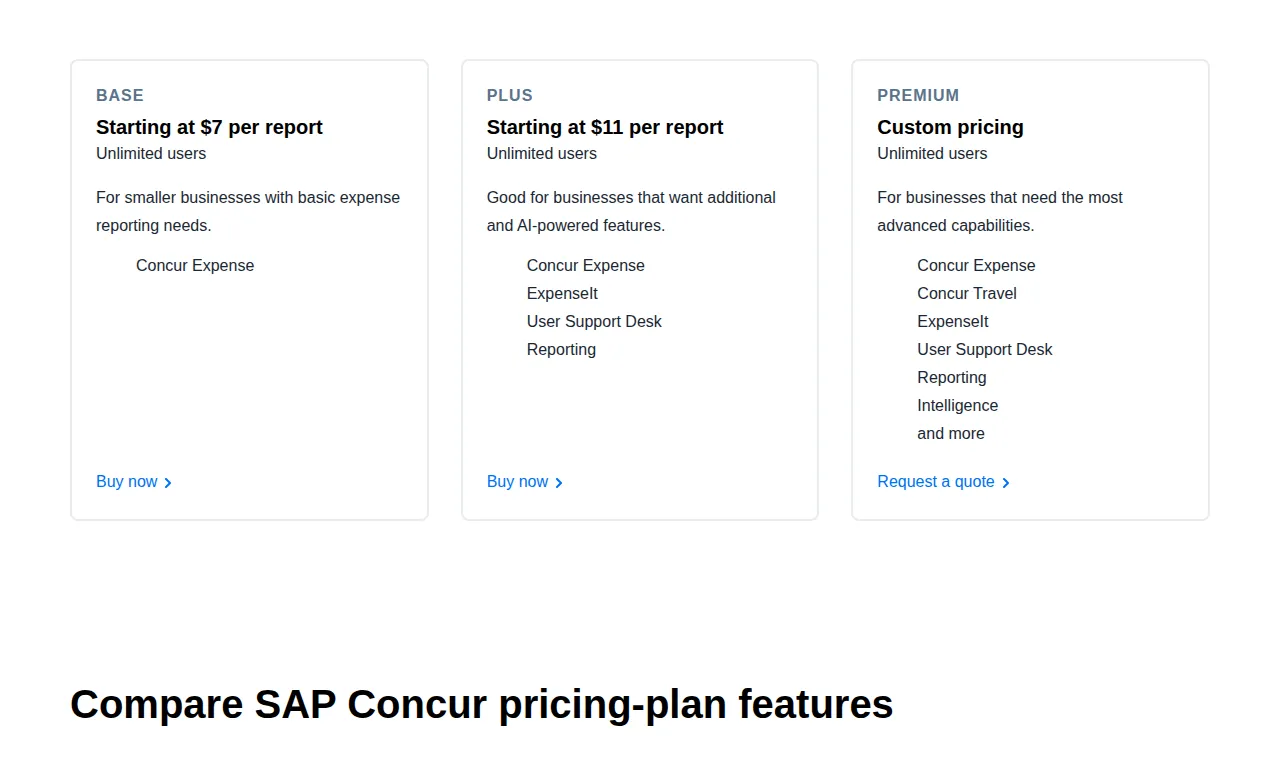
Concur inverts the other two vendors' logic: users are unlimited on every plan, and the meter is the expense report. A company where only 40 of 500 people travel files few reports per user; a consulting firm where every consultant files weekly pays for every one.
At two expense reports per user per month, Concur Base costs $70 a month at 5 users, $350 at 25, and $1,400 at 100; Concur Plus costs $110, $550, and $2,200 a month.
Report volume is the one input the buyer controls least. At one report per user per month, Base at 25 users costs $175 a month; at three reports, $525. The vendor's caveat — price can vary based on monthly commitment — is the tell: Concur's bill is a negotiated band with a floor the buyer pays whether the volume arrives or not.
Against Zoho Standard annual, Concur Base at 25 users filing two reports each per month costs $350 a month against Zoho Standard's $75 — 4.67 times the price. Break-even is 0.43 reports per user per month.
At two reports per user per month, Zoho Standard annual costs $1.50 per report, Expensify Collect $2.50, and Concur Base $7.00. Per-report pricing only wins when volume is very low and headcount is very high.
Premium is quote-only and the only tier with Concur Travel and Intelligence; get the implementation fee, the commitment floor, and the overage rate in writing, since none appears on the pricing page.
The monthly cost table
| Plan | 5 users / month | 25 users / month | 100 users / month | 25 users / year | 100 users / year |
|---|---|---|---|---|---|
| Zoho Standard annual ($3) | $15 | $75 | $300 | $900 | $3,600 |
| Zoho Premium annual ($5) | $25 | $125 | $500 | $1,500 | $6,000 |
| Expensify Collect ($5) | $25 | $125 | $500 | $1,500 | $6,000 |
| Control $9 (card discount) | $45 | $225 | $900 | $2,700 | $10,800 |
| Control $18 (annual) | $90 | $450 | $1,800 | $5,400 | $21,600 |
| Control $36 (pay-per-use) | $180 | $900 | $3,600 | $10,800 | $43,200 |
| Concur Base $7/report, 2/user | $70 | $350 | $1,400 | $4,200 | $16,800 |
| Concur Plus $11/report, 2/user | $110 | $550 | $2,200 | $6,600 | $26,400 |
Receipts, approvals, and the ledger
Receipt capture is the feature every demo leads with and the one that matters least at decision time. Expensify's SmartScan is unlimited on Collect. Zoho Expense captures receipts with AI-powered OCR in 38-plus languages, with a monthly scan quota of 20, 200, or 1,000 per user by tier. Concur's ExpenseIt captures receipts on the Plus tier and above. What matters is what happens after capture: whether the receipt is matched to a card transaction and whether the approver sees the receipt, the policy result, and the ledger code on one screen.
Approvals separate the three more sharply. Expensify Collect covers expense and travel approvals; Control adds multiple approval flows and custom expense rules. Zoho Standard covers multiple expense policies and custom user roles; Premium adds advanced approval management. Concur covers customizable administrator controls on all three tiers. A two-step approval runs on every plan here. Test a five-step approval chain in the trial rather than trusting a feature checklist. Reimbursement speed is set by approval design and bank rails, not by the software badge: all three move money through ACH, and no vendor here publishes a guaranteed reimbursement time.
An expense tool that cannot post to the ledger is a receipt drawer with a login screen. Expensify Collect syncs with QuickBooks and Xero; Control adds NetSuite and Sage Intacct, plus HR integrations with Workday and Certinia. Zoho Expense carries accounting integrations on every tier, with ERP and HRMS integrations as an add-on. Concur integrates with NetSuite, SAP, and ADP. A QuickBooks Online shop has no integration reason to leave Collect or Zoho Standard; a NetSuite shop has no reason to stay on either, because the ERP sync it needs sits behind Expensify Control or a Concur edition. All three export to CSV and expose an API on paid tiers.
The tax paragraph the purchase depends on
Expense software does not decide whether a reimbursement is taxable. The Internal Revenue Code does, through the accountable plan rules in IRS Publication 463: an arrangement is an accountable plan only when the expense has a business connection, the employee adequately accounts for it within a reasonable period, and any excess reimbursement is returned within a reasonable period. Reimbursements under an accountable plan are not reported as pay; under a nonaccountable plan they run through payroll, draw employment taxes, and land on the W-2. The publication's safe-harbor timing is 60 days to substantiate and 120 days to return excess.
That is also why the entity paragraph matters. A single-member LLC, an S-Corp, and a C-Corp all file expense reports, but the S-Corp owner who reimburses herself without an accountable plan has turned a business expense into wages. The CPA who closes the books under GAAP needs the EIN on the reimbursement file, the ACH trace on the bank statement, and the CSV export that ties the two together. Each vendor sells a SaaS subscription; the one that cannot produce the approval chain behind every reimbursement is a cost, not a control.
Founder & CEO Insight — Enow A. Jovial
The decision table
| Decision factor | Expensify | Zoho Expense | SAP Concur | Authority |
|---|---|---|---|---|
| Billing unit | Per active member/month | Per user/month | Per expense report | Vendor pricing |
| Cheapest paid rate | Collect $5/member/month | Standard $3/user/month annual | Base from $7/report | Vendor pricing |
| Receipt OCR limit | Unlimited SmartScans on Collect | 20 / 200 / 1,000 scans per user/month | ExpenseIt on Plus and above | Zoho pricing FAQ |
| Control list price | $18 annual; $36 pay-per-use; $9 with card discount | — | — | Expensify help docs |
| Approval depth | Multiple flows on Control | Advanced approval on Premium | Configurable controls, all tiers | Vendor pricing pages |
| Best fit | Card-flexible teams, heavy out-of-pocket spend | Small teams, Zoho shops | High headcount, low volume, SAP shops | Editorial |
Who should avoid each tool
Avoid Expensify Control if the company will not move card spend onto the Expensify Card: the buyer will pay $18 or $36 for a $9 headline. Avoid Expensify entirely if the team files almost no out-of-pocket expenses and lives on a single corporate card, because a card-first platform prices that pattern near zero. Avoid Zoho Expense Free the moment the fourth user joins. Avoid SAP Concur Base if every employee files weekly reports: at two reports per user per month it already costs 4.67 times Zoho Standard annual at 25 users. Avoid Concur Premium without a written quote naming the implementation fee, the commitment floor, and the overage rate.
Execution checklist
- Count the people who file expenses and the reports each files per month, then run the monthly cost formula for all three vendors at the $18 Control rate unless card spend clears the 50 percent threshold.
- Test the fourth-user edge: with three users today, price Zoho Standard.
- Build the real approval chain in the trial and submit a genuine receipt through it.
- Export a month of trial reports to CSV, post them to the ledger by hand, and confirm the project code and EIN survive.
- Confirm the accountable plan in writing: business connection, 60 days to substantiate, 120 days to return excess.
- For Concur, get the implementation fee, the commitment floor, and the overage rate in writing before signing. For Expensify Control, confirm in writing whether the $9 rate applies at the company's card mix; budget $18 if it does not.
- Re-price the decision every twelve months, and keep receipt images for the retention period the CPA sets.
The right expense tool is the one whose billing unit matches the company's spending shape: per-member pricing when every employee files, per-user pricing when the team is small and growing, per-report pricing when headcount is large and reports are rare. Run the numbers at the company's own volume, test the approval chain with a real receipt, and let the arithmetic choose. For spend control beyond expense reports, see the Ramp vs Brex vs Mercury pricing playbook. For the invoice side, see the accounts payable automation playbook. For the ledger the reports land in, see QuickBooks vs Xero. Before signing, run the annual totals through the profit calculator.