The desktop framework decision is a shipping decision before it is a coding decision. Electron ships a whole Chromium browser and a Node.js runtime inside every application. Tauri ships a Rust binary that borrows the operating system's webview. Neutralinojs ships a small C++ binary that borrows the same webview and serves the interface from an embedded static server. The user sees the download size, the startup time, and the update prompt, and those three numbers are decided by the architecture before the first line of application code is written.
The footprint math, from the release binaries
The numbers below are not benchmarks and not vendor marketing. They are the file sizes of the release binaries published on GitHub, read on November 20, 2026: Electron v45.4.1, the ChatGPT desktop application v1.1.0 built on Tauri, and Neutralinojs v6.10.0.
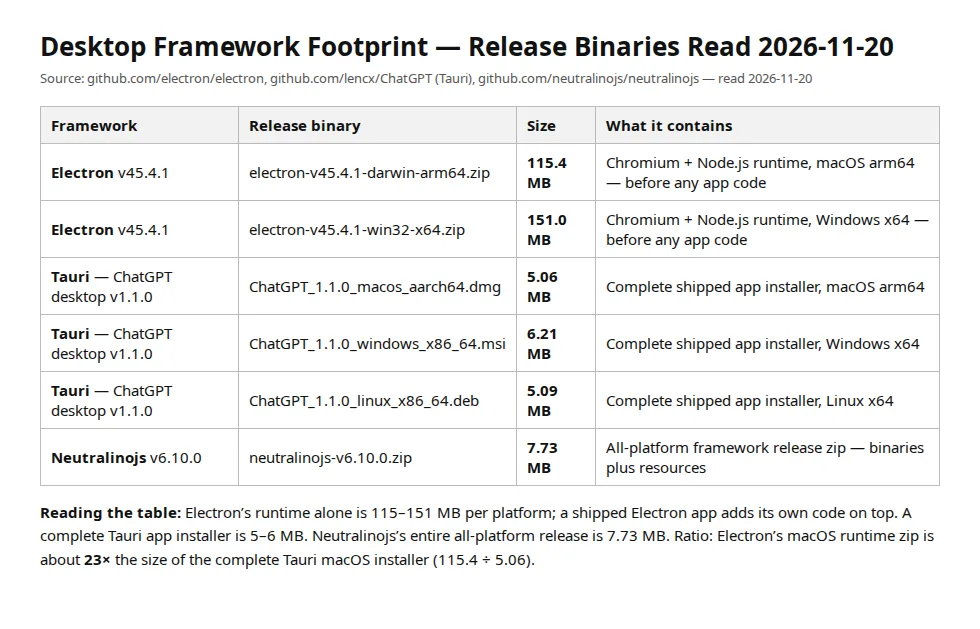
| Framework | Release binary | Size | What it contains |
|---|---|---|---|
| Electron v45.4.1 | electron-v45.4.1-darwin-arm64.zip | 115.4 MB | Chromium plus Node.js runtime, macOS arm64 — before any app code |
| Electron v45.4.1 | electron-v45.4.1-win32-x64.zip | 151.0 MB | Chromium plus Node.js runtime, Windows x64 — before any app code |
| Tauri — ChatGPT desktop v1.1.0 | ChatGPT_1.1.0_macos_aarch64.dmg | 5.06 MB | Complete shipped app installer, macOS arm64 |
| Tauri — ChatGPT desktop v1.1.0 | ChatGPT_1.1.0_windows_x86_64.msi | 6.21 MB | Complete shipped app installer, Windows x64 |
| Tauri — ChatGPT desktop v1.1.0 | ChatGPT_1.1.0_linux_x86_64.deb | 5.09 MB | Complete shipped app installer, Linux x64 |
| Neutralinojs v6.10.0 | neutralinojs-v6.10.0.zip | 7.73 MB | All-platform framework release zip — binaries plus resources |
The ratio is the decision:
That ratio compounds across every download and every update. A team shipping 12 releases a year to 10,000 users moves this much data on full downloads alone:
On a metered CDN, the Electron tax is a line item; on a slow connection where the user pays per megabyte, it is the difference between an install and an abandonment. Run the same arithmetic for your own user count and release cadence in our break-even calculator before choosing — the download bill never shows up in the framework comparison table.
What each framework actually ships
| Attribute | Electron | Tauri 2.0 | Neutralinojs |
|---|---|---|---|
| Runtime shipped | Chromium plus Node.js, bundled per app | None — OS webview plus a Rust core | None — OS webview plus a C++ core |
| Webview | Bundled Chromium, same version everywhere | WebView2 on Windows, WKWebView on macOS, WebKitGTK on Linux | System browser library — gtk-webkit2 on Linux, WebView2 or WebKit per platform |
| Backend language | JavaScript and TypeScript, Node.js APIs in the main process | Rust, with a JavaScript and TypeScript frontend | Any language, via extensions IPC and child-process IPC |
| Frontend | HTML, CSS, JavaScript — any web framework | HTML, CSS, JavaScript — any web framework, or a Rust frontend | HTML, CSS, JavaScript — any web framework |
| Native bridge | IPC between main and renderer processes, plus Node.js modules | Commands over IPC with an explicit permissions and capabilities model | WebSocket connection for native operations, plus an embedded static web server |
| Typical shipped installer | 115–151 MB runtime plus app code | 5–6 MB for a complete app | Single binary plus a resources.neu ASAR archive |
| Distribution | Electron Forge, code signing, app stores | DMG, MSI, AppImage, Debian, RPM, Snapcraft, Microsoft Store, Flathub | Portable zip, standalone setup, or network-based small setup |
| Authority | Electron v45.4.1 release binaries, GitHub | Tauri 2.0 docs, ChatGPT v1.1.0 release binaries, GitHub | Neutralinojs docs and v6.10.0 release, GitHub |
Electron's bundled Chromium is both its strength and its tax. Every user gets the same rendering engine, the same Node.js version, and the same API surface, on every machine — no webview version skew, no missing WebView2 runtime on a fresh Windows install. Tauri and Neutralinojs trade that consistency for size: they borrow the webview the operating system already has, so the rendering engine varies by machine, and on Linux the WebKitGTK version is whatever the distribution shipped. That is the central trade in the whole comparison.
The security model is the real difference
Electron's documentation opens its security tutorial with a blunt fact: Electron is not a web browser, and the code a developer writes runs with far more power than a website. The framework's defaults carry that warning: nodeIntegration is off, contextIsolation is on, and the sandbox is available — but the tutorial exists because teams keep turning the safe defaults off to make development easier, and because a renderer process with Node.js access is a full system compromise waiting for a cross-site scripting hole. The same tutorial stresses keeping Electron current, because nodeIntegration bypasses and other critical vulnerabilities are patched in new releases and cannot be fixed in an old one. An Electron application is therefore a maintenance commitment: the team owns the Chromium update cadence, and a team that ships Electron 45 in 2026 and never updates it is shipping known vulnerabilities.
Tauri inverts the model. The frontend runs in the system webview with no Node.js runtime at all, and the Rust core exposes only the commands the developer explicitly registers, under a capabilities system that scopes each permission to specific windows. Tauri's own size guide states that it provides very small binaries by default, and its App Size documentation lists the levers for pushing further — link-time optimization, opt-level set to s or z for size, stripping debug symbols, and a single codegen unit. The updater plugin requires signed updates and cannot be configured to skip the signature: the public key lives in tauri.conf.json, and an unsigned update is refused. That is a stronger default than Electron's, where signing is a packaging choice.
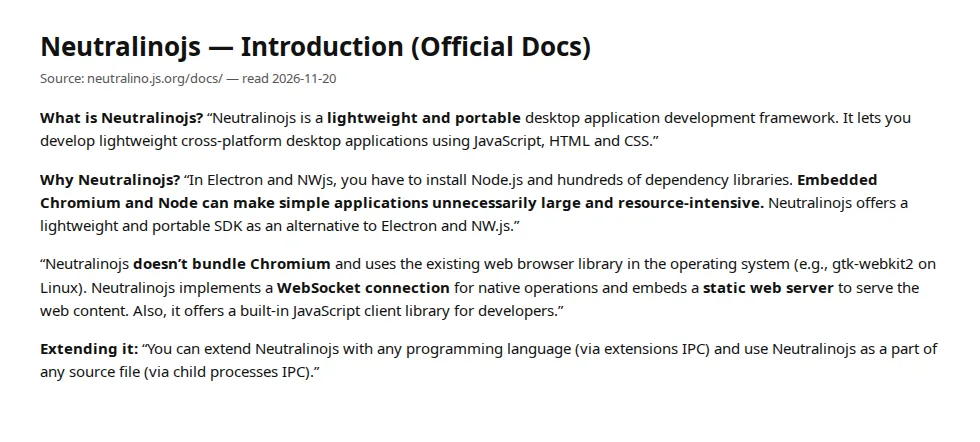
Neutralinojs sits between them. Its documentation states the position plainly: it does not bundle Chromium, it uses the existing web browser library in the operating system, and it implements a WebSocket connection for native operations with an embedded static web server serving the web content. There is no Node.js runtime inside the application, so the whole class of Node.js supply-chain attacks does not apply to the shipped binary — but the native API surface is reached over a local WebSocket, and the team must treat that channel as a trust boundary. Extensions run as separate processes over IPC, which keeps arbitrary code out of the core binary.
Updates: who re-downloads what
Every desktop application pays the update tax, and the frameworks pay it differently. Electron's standard path is electron-updater, which downloads the new installer and installs it on restart. Tauri's updater plugin checks a JSON endpoint, verifies the Ed25519 signature against the public key in the configuration, downloads the new binary, and installs it — the signature check cannot be disabled, which is the right default for an auto-updater that executes code. Neutralinojs ships no built-in auto-updater at all: its distribution documentation lists portable zip files, standalone setup files, and network-based small setup files, and an update is a fresh download installed by the user. For a team shipping weekly, that is a real operational gap — either build the update check yourself, or accept that users run stale versions until they visit the download page.
Twelve releases over 12 months at full-download size costs each Electron user about 1.38 GB a year in update traffic on macOS, against about 61 MB for a Tauri user and about 93 MB for a Neutralinojs user downloading the all-platform zip.
The decision matrix
| Your situation | Pick | Why | Avoid |
|---|---|---|---|
| Rich desktop app, heavy Node.js ecosystem, offline-first, team already ships web apps | Electron | Full Chromium plus Node.js, identical runtime everywhere, largest plugin and tooling ecosystem | If the download size or the update bill matters more than the ecosystem |
| Small utility, tray app, or internal tool where size and startup time decide adoption | Tauri | 5–6 MB installers, signed updates by default, Rust core with a scoped permissions model | If the team has no Rust capacity and no time to learn the capabilities system |
| Lightweight app in any language, smallest possible footprint, extensions in Python or Go | Neutralinojs | 7.73 MB all-platform release, any language over IPC, no Node.js runtime in the binary | If you need a built-in auto-updater or a large plugin ecosystem |
| App Store distribution with sandbox entitlements and notarization | Electron or Tauri | Both have documented store paths; Electron Forge and Tauri's distribute guides cover signing | Neutralinojs, whose distribution docs cover zip and setup files, not store submission |
| Regulated environment where every update must be signed and verified | Tauri | Signed updates are mandatory and cannot be disabled | Any framework where signing is optional and therefore forgotten |
Operator boundaries: who should not pick each one
Electron is the wrong choice when the product is a small utility whose entire value is a tray icon and a settings window — shipping 115 MB of browser to show a settings panel is a distribution failure, and users on slow connections will say so in the reviews. Tauri is the wrong choice when the team needs a Node.js native module with no Rust equivalent and no time to write one, or when the product must render identically on a five-year-old Linux distribution whose WebKitGTK predates the CSS the interface needs. Neutralinojs is the wrong choice when the product needs a mature plugin marketplace — its ecosystem is far smaller than Electron's — or when the team needs automatic updates out of the box and will not build the mechanism itself. Our Playwright vs Cypress vs Puppeteer end-to-end testing playbook covers the testing layer every desktop team needs regardless of framework, our Postman vs Insomnia vs Bruno API testing playbook covers the API layer the app will call, and our Next.js App Router vs Remix React Router v7 playbook covers the web framework most teams render inside the shell.
Founder & CEO Insight — Enow A. Jovial
Failure modes: the four ways a desktop pick goes wrong
1. The abandoned download. An Electron installer over 100 MB on a metered or slow connection loses users before the first run. Measure the install completion rate, not the download count — the gap between the two is the framework tax.
2. The frozen Electron. A team ships Electron once and never updates it. Chromium vulnerabilities accumulate in a process with file-system access. Calendar the Electron release cycle as a recurring task, or pick a framework that inherits the OS webview.
3. The webview skew. A Tauri or Neutralinojs interface that uses a CSS feature the system's WebKitGTK does not support renders broken on the oldest supported distribution. Test the interface on the oldest webview in the support matrix, not on the developer's machine.
4. The unsigned update. An auto-updater that installs unsigned binaries is a remote-code-execution feature with a friendly name. Tauri refuses unsigned updates by default; on Electron and Neutralinojs, make signing part of the release pipeline, not a manual step someone forgets.
>
Execution checklist
- [x] Measure the real installer — build the hello-world app in each framework and record the installer size on macOS, Windows, and Linux before choosing.
- [x] Price the update cadence — multiply the installer size by the release cadence and the user count; the annual download total is the framework's distribution cost.
- [x] Check the webview floor — list the oldest operating system and webview version in the support matrix, and test the interface there.
- [x] Lock the security defaults — contextIsolation on and nodeIntegration off for Electron; capabilities scoped per window for Tauri; the WebSocket channel treated as a trust boundary for Neutralinojs.
- [x] Sign every update — Tauri enforces it; on Electron and Neutralinojs, build signing into the release pipeline so it cannot be skipped.
- [x] Plan the update mechanism — electron-updater or the Tauri updater plugin for automatic updates; for Neutralinojs, build the update check or accept manual re-downloads.
- [x] Verify store requirements early — notarization, sandbox entitlements, and code signing differ by framework and by store; confirm the path before the first release candidate.
- [x] Count the ecosystem cost — a missing plugin is a week of work; check the plugin registry for the three features the product cannot ship without.