Bun vs Deno vs Node: JavaScript Runtime Performance Playbook
Node.js is the runtime almost every server, library and hosting platform targets. Bun is a single binary bundling runtime, package manager, bundler and test runner, built on JavaScriptCore and now written in Rust. Deno is a V8 runtime with TypeScript built in, secure by default, and — since version 2 — able to run existing Node.js projects directly. The current lines, verified from the vendors' own pages on 14 November 2026: Node 26.13.1 LTS, Bun 1.4.4, Deno 2.9.8. This playbook compares the three on startup, HTTP throughput, TypeScript, npm compatibility, and the server count a given volume needs. Bundlers are a different layer — see the Vite vs Webpack vs esbuild bundler playbook.
Three runtimes, three designs
Node.js runs JavaScript on V8, the engine inside Chrome, with libuv underneath for I/O. It is the reference implementation: every npm package is written against it first, and its release discipline is the most conservative — even-numbered releases move to Active LTS after six months in Current, and Node advises production use only of Active LTS or Maintenance LTS releases.
Deno is built in Rust on the same V8 engine, with TypeScript as a first-class citizen and a permission sandbox around every process. Code runs with no file, network or environment access until the operator grants it — the opposite default from Node, where a dependency can read anything the process can. Deno 2 removed the wall that kept it a niche choice: drop Deno into a repository with a package.json and node_modules and it runs, mixing npm: imports with native ES modules. JSR is its TypeScript-first registry, but npm is no longer a foreign country.
Bun is the outlier on engine choice: JavaScriptCore, the engine behind Safari, instead of V8. Bun 1.4, shipped 20 August 2026, rewrote the runtime from Zig to Rust, added 1,517 tests from Node's own test suite, and fixed over 2,900 issues. The pitch is consolidation — runtime, package manager, bundler, test runner, linter and formatter in one binary — and the price is youth.
The comparison table
| Dimension | Node 26 LTS | Deno 2.9 | Bun 1.4 | Authority |
|---|---|---|---|---|
| TypeScript | Native, type stripping, v22.18.0+ | Native, first-class | Native, transpile on run | Node.js; Deno; Bun |
| npm compatibility | Reference implementation | Runs package.json directly | 97% of Node's tests on core modules | Deno; Bun |
| Security default | Open, full process access | Sandboxed, permissions required | Open, full process access | Deno docs |
| Hello-world throughput | 56,300 req/s | 85,600 req/s | 81,900 req/s | deno.com chart |
| TypeScript startup | 50.0 ms | 19.6 ms | 14.7 ms | deno.com chart |
Bun and Deno win the speed columns, Node wins support, and Deno's security default is the only structural difference.
Startup time: where Bun's lead is real
Startup is the one measure where the gap is large, consistent across vendors, and easy to explain. Bun's docs state that Bun processes start 4x faster than Node.js, and its 1.4 blog gives the table: on Linux, Bun 1.4 starts in 5.1 ms against 27.2 ms for Node.js 26; on Windows, 15.5 ms against 40.1 ms. Deno's homepage chart measures TypeScript startup separately, on Apple M5: Bun 14.7 ms, Deno 19.6 ms, Node 50.0 ms — Bun 3.40x faster than Node, Deno 2.55x faster.
Read the last line honestly: a developer restarting a long-lived server 40 times a day saves under a second a day. Startup time is not a reason to move a monolith — it is a reason to move a CLI tool or a serverless function, where cold start is the user-visible latency. Deno makes the same point on its own page, claiming a 1.5x faster cold start since Deno 2.0.
HTTP throughput: two vendor tests, read honestly
Here the vendors disagree — the most useful fact in this article. Bun's own HTTP server docs publish a benchmark: a server responding "Bun!" to each request, where Bun.serve handles roughly 2.5x more requests per second than Node.js on Linux — about 160,000 requests per second against about 64,000 for Node 16. Deno's homepage publishes a different test: hello-world servers at 100 concurrent connections on an AMD EPYC machine with pinned cores, loaded with oha, median of three runs, uncompressed — Deno.serve at 85,600 requests per second, Bun.serve at 81,900, node:http on Node 26 at 56,300. On Deno's test, Deno leads and Bun's advantage over Node is 1.45x, not 2.5x.
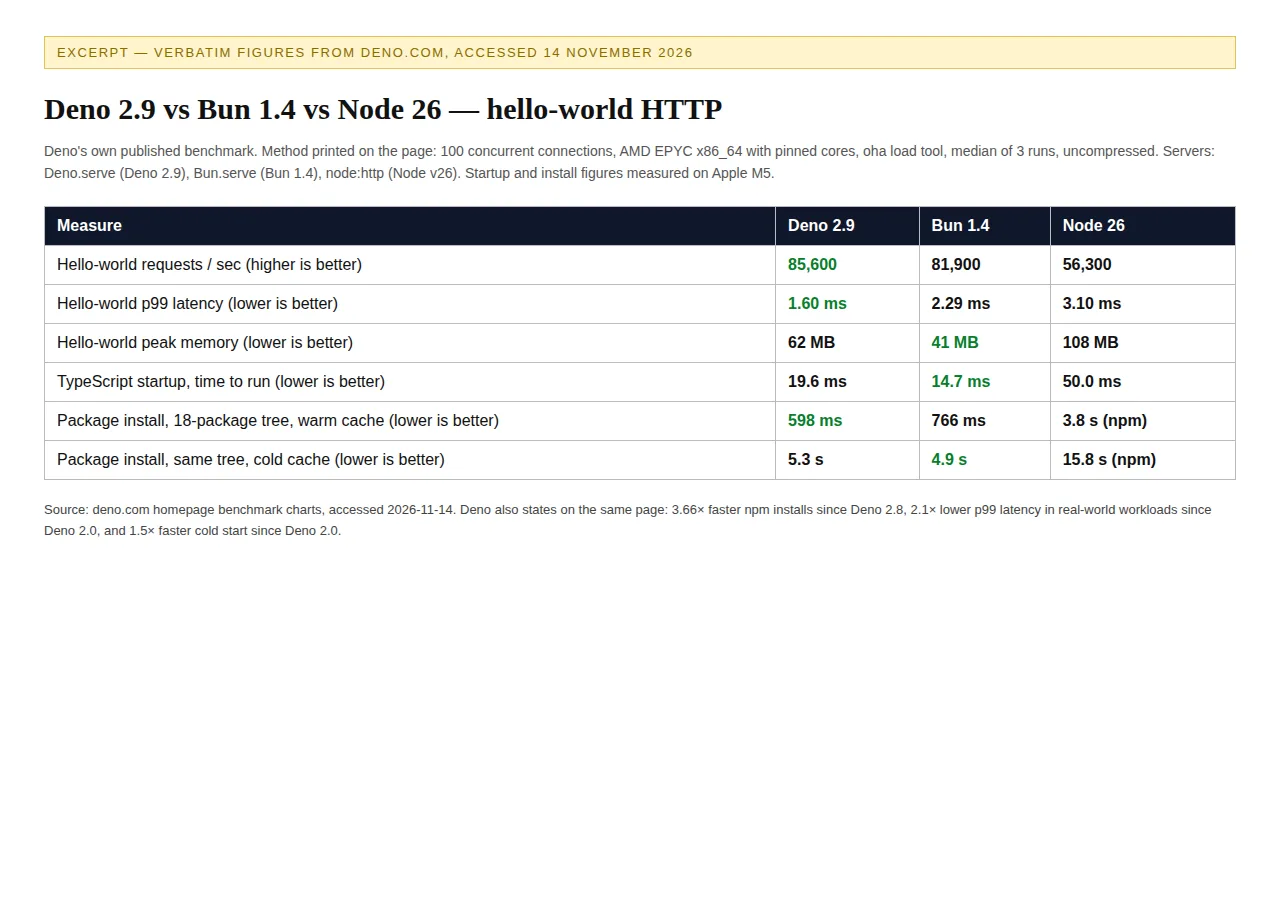 Excerpt of verbatim figures from deno.com, accessed 14 November 2026 (100 concurrent connections, oha, median of 3 runs).
Two things to carry. First, hardware and Node version change the answer: Bun's test runs against Node 16, Deno's against Node 26. Second, hello-world throughput measures the HTTP layer, not your application: once a framework and a database answer, the runtime's share of the request shrinks. Where the code runs also shapes what the runtime can do: the Cloudflare Workers vs Vercel Edge Functions playbook covers the edge layer this choice sits on.
TypeScript support: three different kinds of native
All three runtimes now run TypeScript without a build step, but "native" means something different in each. Bun transpiles .ts and .tsx on execution — its docs list TypeScript and JSX support as a headline feature. Deno is TypeScript-first in the same sense: run .ts files directly, no tsc, no build step, no config.
Node arrived last and most cautiously. Node's Learn pages document type stripping: from v22.18.0, a file containing only erasable TypeScript syntax runs with no flags — node example.ts — while earlier versions need --experimental-strip-types. Type stripping removes annotations, interfaces, type aliases and import type, then runs the remaining JavaScript. Two constraints: Node does not type-check at run time, so tsc still belongs in CI; and the Amaro loader ignores tsconfig.json, so editor settings and runtime behaviour can drift unless the tsconfig matches (TypeScript 5.7+ recommended).
npm compatibility: the wall that fell
Compatibility is where the decision usually gets made, and it is where the last two years changed the most. Node is the reference: every package is written and tested against it first, and its module system is the one the other two emulate. Deno 2 closed most of the gap in one release: drop Deno into a repository with a package.json and node_modules and it runs, mixing npm: imports with native ES modules as you migrate.
Bun's compatibility story is measured, not asserted. Bun 1.4 added 1,517 tests from Node's own test suite, and Bun reports node:http, node:fs, node:cluster, node:timers, node:zlib, node:vm and node:stream pass 97 percent of Node's own tests, while node:events, node:trace_events and node:sqlite pass 100 percent. The remaining 3 percent is where production surprises live: run your own test suite on Bun before committing a service to it. What the runtime ships inside is decided by the Docker vs Podman vs nerdctl container runtime playbook. On install speed, Bun's docs claim up to 30x faster than npm; Deno's homepage measures an 18-package tree warm at Deno 598 ms, Bun 766 ms, npm 3.8 seconds — 6.35x and 4.96x over npm, smaller than the headline but measured on a stated tree.
Memory under load: Bun's quietest win
Throughput gets the headlines; memory decides how many services fit on a box. Bun's 1.4 blog measured peak memory under load — 1,000,000 requests with 64 connections — across frameworks. Bun 1.4 peaked at 120 MB for fastify, 92 MB for Express and 81 MB for node:http, against 156, 145 and 107 MB on Node.js 26; Bun.serve itself peaked at 36 MB. Deno's chart agrees: hello-world peak memory of 41 MB for Bun, 62 MB for Deno, 108 MB for Node — Bun at 38.0 percent of Node's footprint, Deno at 57.4 percent.
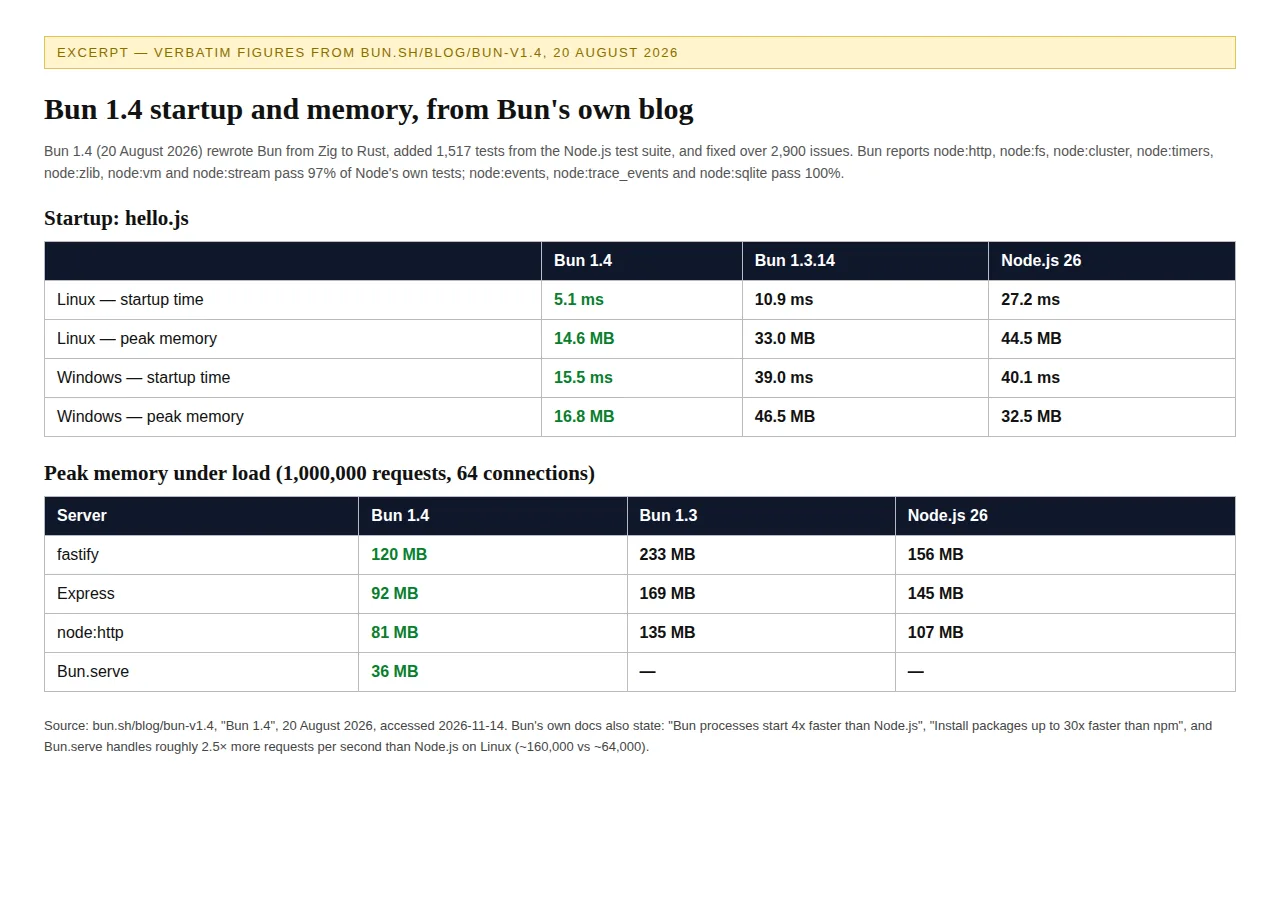 Excerpt of verbatim figures from bun.sh/blog/bun-v1.4, 20 August 2026.
Memory is the most portable of Bun's advantages: it shows up in every framework on the same test. For a team running dozens of small services on one host, it compounds without any code change.
Server-count cost math: what throughput is worth
Throughput becomes money only through the server count. Take a sustained 200,000 requests per second. On Bun's docs figures — 160,000 requests per second for Bun.serve, 64,000 for Node — Node needs four servers and Bun needs two. On Deno's chart figures — 85,600 for Deno, 81,900 for Bun, 56,300 for Node — Node needs four, Deno three, Bun three.
The 24-dollar server price is a stated assumption, not a quoted price — use your own hosting bill. On Deno's figures the saving is 24 dollars a month, 288 dollars a year. Either way the saving is modest; the real return is headroom: Node servers run at 78 percent average load, Bun servers at 63 percent, and headroom absorbs a traffic spike without a page. Run your own margin through the profit calculator first.
Scenario: Meridian Analytics prices a switch
Scenario: Meridian Analytics, twelve developers, runs an API gateway at a sustained 200,000 requests per second. On Bun's figures the gateway needs four Node servers or two Bun servers — 48 dollars a month saved, 576 a year. On Deno's figures it needs four Node servers or three Deno servers — 24 dollars a month, 288 a year. The gateway's real cost is not servers but its three native addons: one has no Bun equivalent, one behaves differently under Deno's permission sandbox, and the third is untested on either. Meridian keeps the gateway on Node 26 LTS, moves its CLI tooling to Bun, where the 5.1 ms startup is felt on every invocation, and pilots Deno for a greenfield service where the sandbox default is a feature, not friction. The throughput saving is small; the addon wall is the constraint.
Operator Boundaries
This playbook is for whoever chooses a team's runtime: the tech lead, the staff engineer, or the founder paying the hosting bill. It is written for teams shipping a JavaScript or TypeScript service with a real production load and a CI pipeline — not a framework guide. Who must avoid a switch: anyone depending on a native addon without a Bun or Deno equivalent; anyone under a compliance requirement for a formal LTS window; anyone whose service runs inside a sandbox-sensitive deployment — test Deno's permission model against every dependency first. A runtime switch is a migration, not a config change — it deserves a plan with a rollback.
Founder & CEO Insight — Enow A. Jovial
The switch, run as a checklist
- Time your own workload first. Startup, throughput, p99 latency — slowest machine, three runs each.
- List the hard requirements. Native addons, LTS windows, permission models, hosting targets — any one can veto a runtime.
- Read the benchmark conditions. Machine, Node version, connections, runs — before quoting any ratio.
- Run your test suite on the candidate. Your suite is the verdict.
- Price the server count. Use the formulas here with your own volume and hosting bill; do not present the saving as larger than the arithmetic supports.
- Price the migration. Engineer-hours times your loaded rate, divided by the monthly saving, is break-even.
- Pilot on one surface. Move the smallest service first, keep the old runtime deployable.
- Decide on headroom and developer time, not headline ratios.
The decision in advance
Pick the runtime by the constraint your team feels, not the ratio on a benchmark page. Bun for startup speed and memory where its compatibility holds; Deno for TypeScript-first development and a security default that treats every dependency as untrusted; Node where the ecosystem, the LTS window, or a native addon decides. Measure first, pilot small.