Auth0 vs Clerk vs Firebase Auth: Developer Pricing Guide
Choosing authentication means facing three different bills disguised as one decision: Auth0 charges by monthly active users, Clerk by monthly retained users, and Firebase Auth almost nothing until 50,000 users, then a few tenths of a cent per user. All prices below come from the vendors' own pricing pages as published on 14 November 2026.
The meter is the price
Auth0 and Firebase Auth meter monthly active users (MAU): any account that signs in during a month counts once. Clerk meters monthly retained users (MRU): a user counts only when they return at least 24 hours after signing up. A consumer application can record 80,000 MAU in a month while only 40,000 users return — Auth0 bills the 80,000-user tier, Clerk the 40,000-user tier. MRU is Clerk's largest pricing advantage for churn-heavy funnels.
The free ceilings, side by side
| Vendor | Free tier | Ceiling | Withheld |
|---|---|---|---|
| Auth0 | Free | 25,000 MAU | Pro MFA, RBAC, 1-day logs |
| Clerk | Hobby | 50,000 MRU per app | MFA, custom sessions, 3 social connections max |
| Firebase Auth | Spark / Blaze | 50,000 MAU | SAML/OIDC beyond 50 MAU, SMS, TOTP MFA |
Auth0's free tier includes unlimited social connections, passwordless sign-in, passkeys, one custom domain, five organizations, and one enterprise connection. Clerk's Hobby tier includes unlimited applications and a custom domain, but limits social connections to three and withholds MFA entirely. Firebase Auth costs nothing for email, social, anonymous, and custom sign-in up to 50,000 users; the Identity Platform upgrade is free to enable and only usage is billed.
Auth0: the deepest platform, the least transparent bill
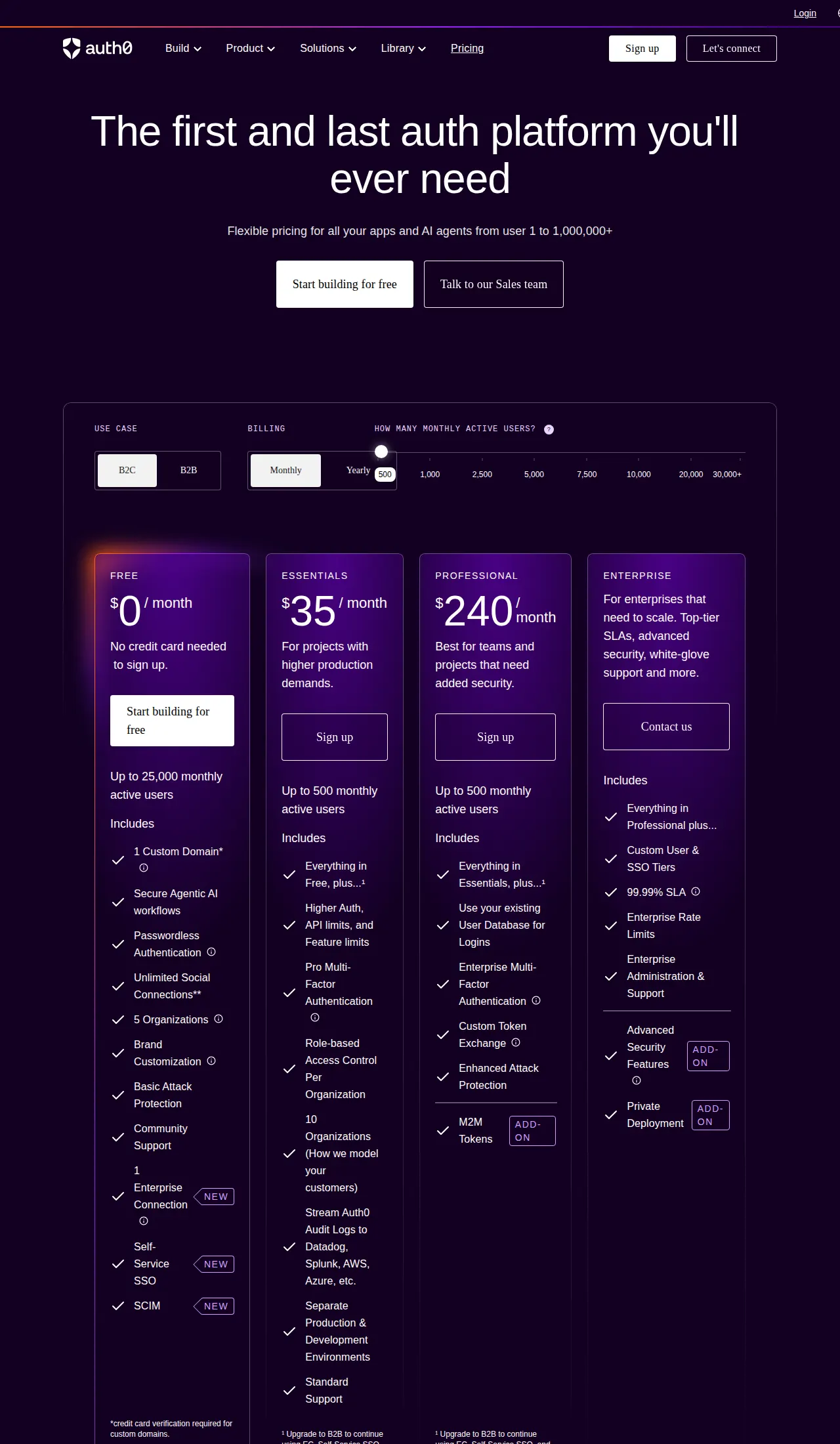
Auth0, owned by Okta, is the most capable and hardest to price. Free costs $0 up to 25,000 monthly active users; Essentials costs $35 per month and Professional $240, but both cover only 500 users. Above 500 users the price moves up a slider of MAU tiers to 30,000 or more, with no flat per-user rate printed; paid plans allow a custom user count from 1,000 to 100,000. Enterprise is a custom quote.
Essentials adds Pro MFA, role-based access control, ten organizations, and audit-log streaming; Professional adds Enterprise MFA, custom database connections, custom token exchange, and cross-app SSO. Passkeys are included on every plan. Log retention runs 1 day on Free, 5 on Essentials, 10 on Professional, 30 on Enterprise. User data can be exported through the Management API; passwords are hashed with bcrypt. Auth0 fits applications that need enterprise connections, organizations, and attack protection from one platform; it does not fit a team that needs a forecastable bill at 100,000 users without a sales conversation.
Clerk: the fastest integration, the steepest overage
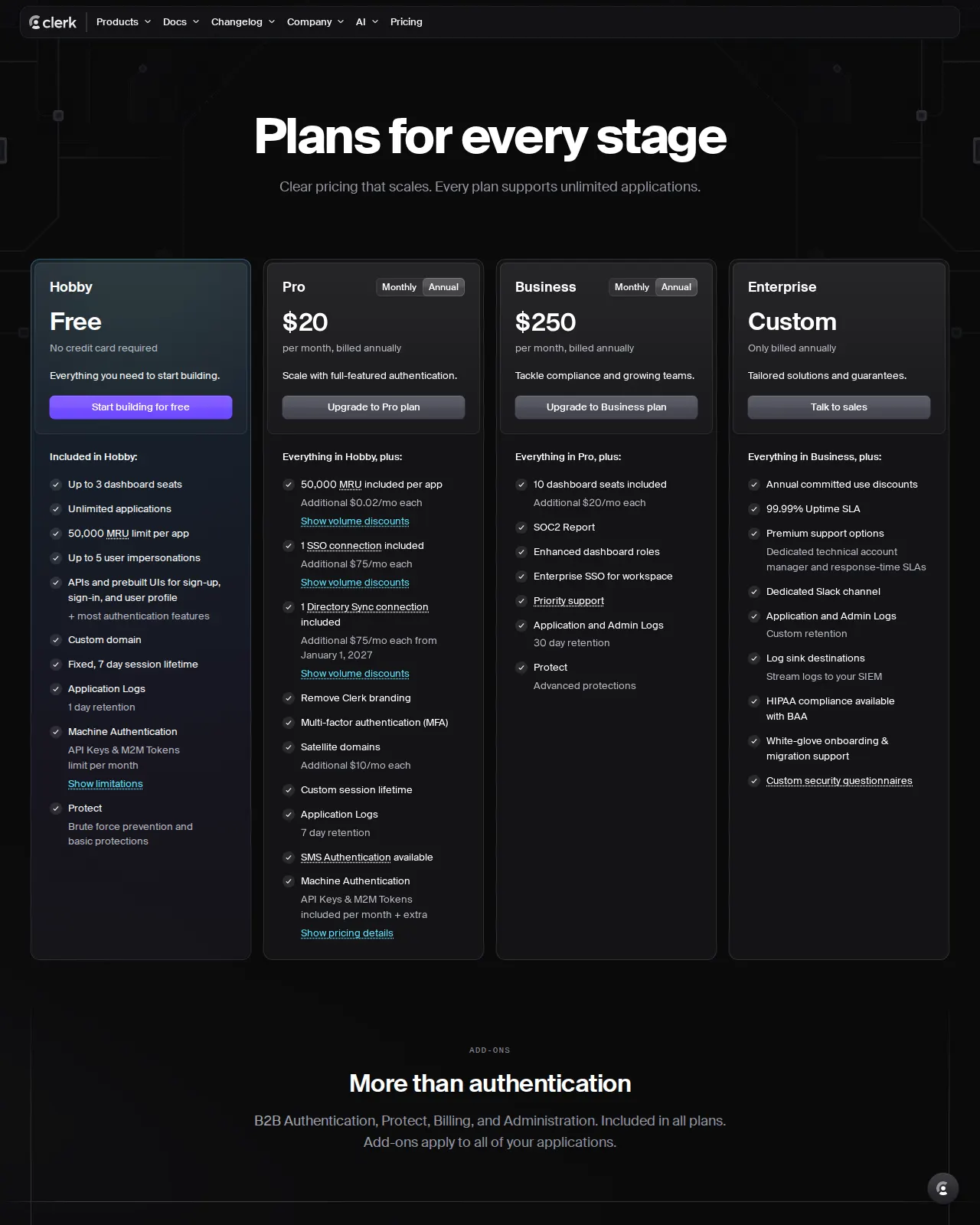
Clerk is built for teams shipping a React or Next.js application this week: prebuilt sign-up and sign-in components and an organizations model for B2B SaaS. The pricing page lists Hobby at $0, Pro at $20 per month billed annually ($25 monthly), Business at $250 per month billed annually ($300 monthly), and Enterprise as a custom annual quote.
The Clerk bill turns on the 50,000 monthly retained users included on every plan and the $0.02 per retained user above that line on Pro. Hobby is a hard cap: past 50,000 retained users the application must move to Pro. Pro includes one enterprise SSO connection and one Directory Sync connection; extras cost $75 per month each. MFA, custom sessions, satellite domains, and unbranded login all require Pro. Hobby fixes the session lifetime at 7 days and keeps logs for 1 day; Pro keeps them for 7 days. SMS codes cost $0.01 per message in the US and Canada; full data exports are available with no questions asked. Clerk fits teams that value developer speed and a published overage rate. It does not fit a consumer application that will cross 50,000 retained users and stay there — $0.02 per user is the highest first overage rate here.
Firebase Auth: the cheapest bill, the thinnest control panel
Firebase Auth is the authentication service inside Google's Firebase platform, priced as Google Cloud pricing with a generous free quota. Email, social, anonymous, and custom sign-in cost nothing for the first 50,000 monthly active users. Past that line, Identity Platform bills Tier 1 users — email, phone, anonymous, social — at $0.0055 per MAU from 50,000 to 100,000 users, $0.0046 to 1,000,000, $0.0032 to 10,000,000, and $0.0025 above; each rate applies only to the users inside its band. Tier 2 users — SAML and OIDC — are free for the first 50 monthly active users, then $0.015 per MAU. Phone sign-in and SMS codes are billed per message — $0.01 per SMS in the US and Canada, first 10 per day free; phone sign-in requires the Blaze plan.
Firebase Auth is a sign-in service, not a full identity platform: no hosted organization model, no built-in subscription billing, no authorization-code flow for third parties. Inside the Google ecosystem it is deep — Crashlytics, Cloud Messaging, Analytics, and Firestore share the project. Firebase Auth fits applications already on Firebase or Google Cloud; it does not fit a B2B product that needs enterprise SSO and organization administration as first-class features.
Reproducible monthly cost at 1,000, 10,000, and 100,000 users
List prices as published on 14 November 2026. Clerk figures assume every active user is retained, the worst case for Clerk; Auth0 at 100,000 users has no flat list price, so the table says so.
| Monthly active users | Auth0 | Clerk Pro | Firebase Auth |
|---|---|---|---|
| 1,000 | $0 (Free) | $0 (Hobby) or $25 (Pro) | $0 |
| 10,000 | $0 (Free) | $25 (Pro) | $0 |
| 100,000 | Custom tier | $1,025 | $275 |
At 100,000 retained users the overage is 50,000 times $0.02, or $1,000, plus the $25 base: $1,025 per month, $12,300 per year.
At 100,000 users the billable users are 50,000 times $0.0055: $275 per month, $3,300 per year. The gap to Clerk is $750 per month and $9,000 per year; Clerk costs 3.73 times Firebase Auth. At the 500-user tier, Auth0 Essentials is $0.07 per user and Professional $0.48 — above either rival's overage rate. Carry these figures into a full margin model on the profit calculator.
Scenario: a 25,000-user B2B SaaS outgrows the free tier
Example: a B2B SaaS product reaches 25,000 monthly active users with three enterprise customers on SAML SSO and MFA for every user. On Auth0 Free the user count fits exactly, but the product needs three enterprise connections and Free includes one, so the price becomes a custom quote. On Clerk Pro the bill is $25 plus two SSO connections at $75 each: $175 per month, $2,100 per year, with MFA included. On Firebase Auth the Tier 1 bill is $0, and the SAML bill is 100 billable users times $0.015 — $1.50 per month — if 150 users sign in through SAML. Firebase Auth is the cheapest by a wide margin and the weakest on B2B administration, with no organization model for each customer. The real comparison is $1.50 per month plus build time against $175 per month with the tooling included.
The decision table
| Decision factor | Auth0 | Clerk | Firebase Auth | Authority |
|---|---|---|---|---|
| Free ceiling | 25,000 MAU | 50,000 MRU per app | 50,000 MAU | Vendor |
| Paid base price | $35/mo Essentials, $240/mo Pro, each to 500 MAU | $25/mo Pro, $300/mo Business, monthly billing | No base fee | Vendor |
| Cost at 100,000 users | Custom tier; no flat rate | $1,025/mo | $275/mo | Vendor |
| Passkeys | Included on all plans | In the price breakdown | Via Identity Platform | Vendor |
| MFA | Pro MFA: Essentials; Enterprise MFA: Pro | Pro and above | SMS/TOTP via Identity Platform | Vendor |
| Enterprise SSO | 1 on Free; custom above | 1 on Pro; $75/mo after | SAML/OIDC $0.015/MAU after 50 free | Vendor |
| Session control | Long-lived on Enterprise | 7-day fixed on Hobby; custom on Pro | ID token 1 hour; refresh token until revoked | Docs |
| Data export | Management API | Full exports, no questions asked | Admin SDK user export | Docs |
Social login, passkeys, and MFA
All three cover Google, GitHub, Facebook, Apple, and Microsoft through OAuth; the differences sit in the limits. Auth0 includes unlimited social connections on every plan. Clerk allows 3 on Hobby and unlimited on Pro, so a third social provider forces an upgrade. Firebase Auth has no published connection cap.
Passkeys are included on every Auth0 plan, listed in Clerk's price breakdown, and available on Firebase Auth through Identity Platform. MFA is where the plans diverge: Auth0 gates Pro MFA behind Essentials and Enterprise MFA behind Professional, so step-up authentication costs at least $35 per month. Clerk withholds MFA from Hobby and includes it on Pro. Firebase Auth bills MFA by usage — $0.01 per SMS in the US and Canada, first 10 per day free — so 10,000 SMS codes in a month cost $100 on Clerk and $97 on Firebase Auth.
Sessions and tokens: JWT, rotation, and revocation
Each vendor issues a short-lived JWT for API requests and a longer-lived refresh token that mints new access tokens without another login. Firebase Auth fixes the shape: the ID token lasts one hour, and the refresh token lasts until the user is deleted, disabled, or has a major account change, or an administrator revokes it.
Auth0 makes rotation configurable: the default refresh token lifetime is 30 days, configurable to one year, and replaying an old refresh token triggers reuse detection. Clerk fixes the Hobby session at 7 days and allows a custom lifetime — 5 minutes to 10 years — on Pro, with custom JWT templates. In practice, Firebase Auth refreshes silently every hour, Clerk Hobby re-authenticates every user after 7 days, and Auth0 leaves rotation to the application.
SDK and framework coverage
Auth0 ships SDKs for every mainstream stack; Clerk is strongest in React, Next.js, Expo, and React Native; Firebase Auth is strongest inside its own ecosystem — Web, iOS, Android, Flutter, and Unity SDKs, plus the Admin SDK.
Vendor lock-in and the cost of leaving
Lock-in is not the monthly bill; it is the migration: exporting the users, exporting or resetting the passwords, and rewiring every login call. Auth0 exports user data through the Management API, Clerk offers full data exports with no questions asked, and Firebase Auth exports user records through the Admin SDK. The lock-in that matters is password hashes and code: a migration that cannot carry them forces every user through a password reset, which costs a share of returning users and a week of support tickets. Before signing, run the export once on a test tenant and confirm whether password hashes travel with it — that hour turns the exit cost from a guess into a number. Workforce identity is a different decision: the enterprise identity pricing playbook covers Okta, Auth0, and Microsoft Entra for employee SSO.
Founder & CEO Insight — Enow A. Jovial
Who each vendor fits, and who should avoid it
Auth0 fits applications that need enterprise connections, organizations, attack protection, and a 99.99 percent SLA in one platform. It does not fit a bootstrapped SaaS product that needs a forecastable bill at 100,000 users. Clerk fits React and Next.js teams that want the fastest working login screen, and B2B SaaS products that need organizations and billing in one vendor. It does not fit a consumer application that will cross 50,000 retained users and stay there — $0.02 per user is the steepest overage here — or a team that needs MFA without paying for Pro. Firebase Auth fits applications already on Firebase or Google Cloud. It does not fit a B2B product that needs enterprise SSO and organization administration. The deciding question is the user count twelve months from now: below 25,000 users it is about features; above 50,000 it is about the bill — Firebase Auth first, Auth0 by quote, Clerk last. Teams modelling the wider SaaS price structure should read the SaaS pricing tiers playbook; teams protecting credentials should read the password manager pricing playbook.
Execution checklist: choosing and switching safely
- [x] Step 1: Count in the vendor's unit — Measure MAU for Auth0 and Firebase Auth, MRU for Clerk.
- [x] Step 2: Price three volumes — Run the formulas at 1,000, 10,000, and 100,000 users.
- [x] Step 3: Test the export — Export users from a test tenant and confirm the next vendor's import accepts it.
- [x] Step 4: Confirm the MFA plan — Decide which plan or usage rate carries it.
- [x] Step 5: Set the session policy — Choose the session lifetime and rotation settings, record them.
- [x] Step 6: Wire the billing alert — Set a spend alert at the free-tier ceiling.
- [x] Step 7: Re-price every quarter — Pricing pages change without notice; re-check and re-run the formulas.