Every enterprise login is a bet on a protocol, and most teams place the bet without reading the spec. A SaaS product that needs to connect to a customer's identity provider has three options: SAML 2.0, the XML federation standard from 2005; OAuth 2.0, the authorisation framework from 2012 that everyone mistakes for a login protocol; and OpenID Connect, which is OAuth 2.0 with an identity token added in 2014. The protocols do different jobs, they fail in different ways, and the vendors charge on different meters — per user, per monthly active user, or inside a bundle you may already own. Choose the protocol first and the vendor second: a vendor can be swapped in a quarter, but a protocol choice lives in every integration your customers build. Figures as read on November 16, 2026.
OAuth 2.0: authorisation, not identity
RFC 6749 defines four grant types, and the table of contents of the spec is the clearest statement of what OAuth does. The authorisation code grant (§ 4.1) is the web flow: the user authorises at the provider, the client receives a code, and the client exchanges the code for a token. The implicit grant (§ 4.2) returns the token directly in the redirect, which is why it is now deprecated in practice — the token travels through the browser. The resource owner password credentials grant (§ 4.3) has the client collect the user's password, which defeats the purpose of delegation. The client credentials grant (§ 4.4) is machine-to-machine, with no user at all. Section 1.4 defines the access token, which authorises the request, and § 1.5 defines the refresh token, which obtains a new access token when the old one expires.
| Grant type | RFC 6749 | Who holds the password | Where the token goes |
|---|---|---|---|
| Authorisation code | § 4.1 | The provider only | Back-channel exchange, never in the browser |
| Implicit | § 4.2 | The provider only | In the redirect fragment — visible to the browser |
| Resource owner password | § 4.3 | The client collects it | Back-channel, but the client saw it |
| Client credentials | § 4.4 | Nobody — machine to machine | Back-channel |
None of these grants issues an identity assertion. An access token is an opaque string that says "the bearer may call this API". It does not say who the bearer is, when they authenticated, or how strongly. A product that accepts an access token as a login has confused a hall pass with an ID card, and the confusion is not theoretical: it is the single most common identity design error in production software, and it survives because the login appears to work right up until the failure: someone else's token replayed.
PKCE: the fix that should have been there from the start
The authorisation code grant has a hole on public clients — a mobile app or a single-page app that cannot keep a client secret. The code travels through the browser redirect, and anything that intercepts the redirect can redeem the code. RFC 7636 closes the hole with a proof key. The client creates a code_verifier, a high-entropy random string using the unreserved characters A–Z, a–z, 0–9, hyphen, period, underscore and tilde, with a minimum length of 43 characters and a maximum length of 128 characters, and sends a code_challenge derived from it with the authorisation request. With the S256 method, the challenge is:
A stolen code is useless without the verifier, and the verifier never travels in the redirect. There is no honest reason to run the authorisation code flow without PKCE in 2026, on any client, public or confidential — and the vendors in the pricing section below all support it, so a product that ships without it has chosen to ship the hole.
OIDC: OAuth with an identity token
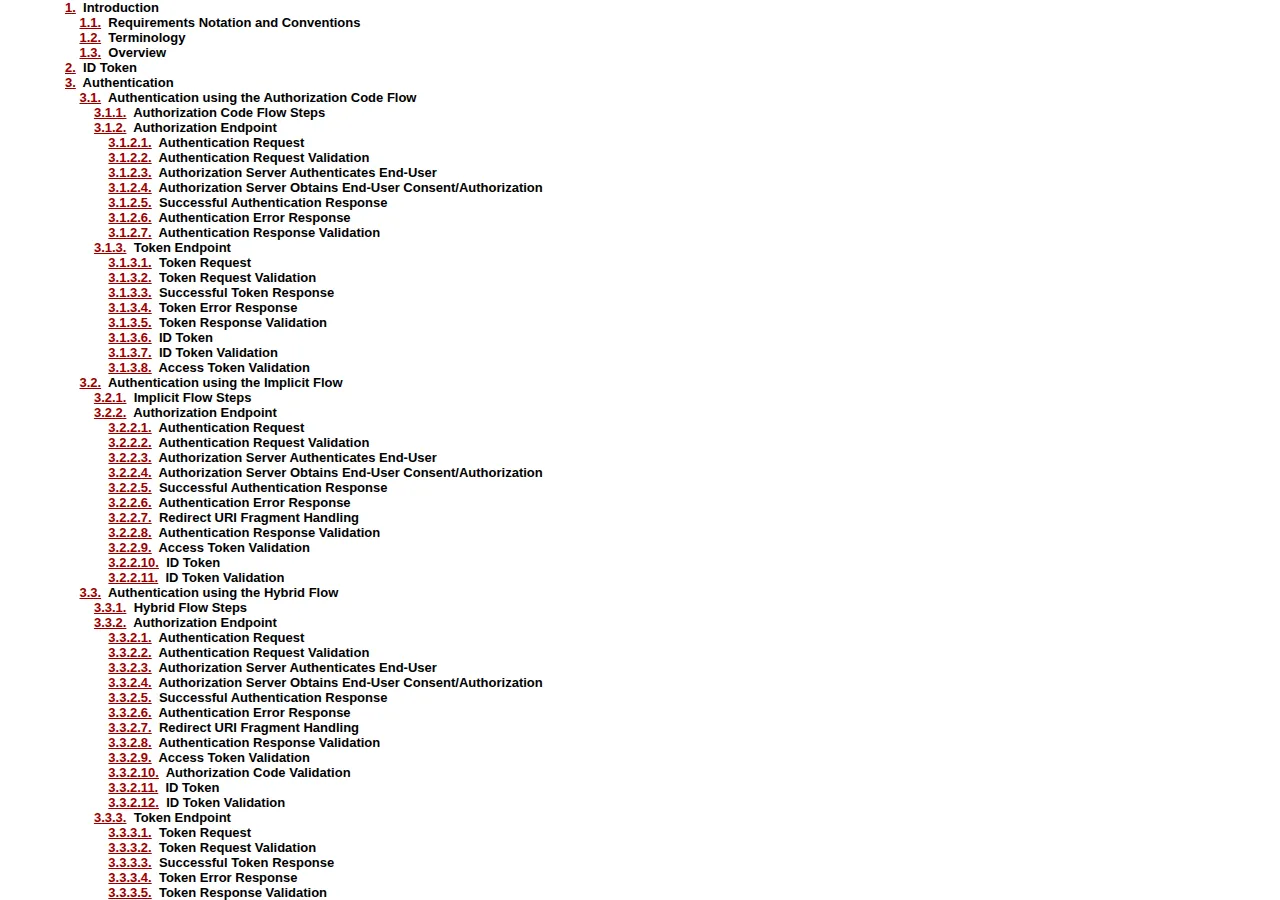
OpenID Connect Core 1.0 adds exactly one artefact to OAuth 2.0, and it is the artefact that makes login possible: the ID Token. It is a JSON Web Token that carries claims about the authentication event. The issuer identifier (iss) is a case-sensitive URL using the https scheme, with no query or fragment components. The subject (sub) identifies the user, the audience (aud) names the client the token was issued for, and expiry (exp) and issued-at (iat) bound the token in time. The nonce — a string value used to associate a client session with an ID Token and to mitigate replay attacks — is passed through unmodified from the Authentication Request to the ID Token, and clients MUST verify it when present. OIDC defines three flows in § 3: the authorisation code flow, the implicit flow, and the hybrid flow. The practical rule is the same as the PKCE rule: use the authorisation code flow with PKCE, and treat the implicit and hybrid flows as legacy compatibility, not as design choices for new work.
SAML: the XML federation the enterprise already runs
SAML 2.0 is older, heavier, and still unavoidable. The OASIS SAML V2.0 Core specification defines the structure of SAML assertions, the associated protocols, and the processing rules for managing a SAML system. Assertions and protocol messages are encoded in XML and use XML namespaces; they are typically embedded in other structures for transport, such as HTTP POST requests or XML-encoded SOAP messages. The service provider sends an AuthnRequest (§ 3.4.1), with a NameIDPolicy (§ 3.4.1.1) and Scoping (§ 3.4.1.2); the identity provider returns an assertion carrying a NameID (§ 2.2.3), optionally encrypted as an EncryptedID (§ 2.2.4). The whole exchange is XML, signed, and verbose — a single assertion can run to kilobytes where an OIDC ID Token runs to hundreds of bytes. That verbosity is the price of a standard designed for federations of universities, governments and banks, where the trust model is a signed document exchanged between institutions, not a token passed through a browser. SAML is the right answer exactly when the other side only speaks SAML, and the wrong answer whenever you get to choose.
| Attribute | OAuth 2.0 | OIDC | SAML 2.0 |
|---|---|---|---|
| Job | Authorisation | Authentication + authorisation | Federated authentication |
| Encoding | JSON / form-encoded | JSON (JWT) | XML, signed assertions |
| Identity artefact | None | ID Token with iss, sub, aud, exp, iat, nonce | Assertion with NameID |
| Mobile fit | Good with PKCE | Good with PKCE | Poor — browser POST bindings |
| Standard | RFC 6749 (IETF) | OpenID Connect Core 1.0 | SAML V2.0 Core (OASIS) |
| Where it wins | API delegation | New product login | Legacy enterprise federation |
Our 1Password versus Bitwarden versus Dashlane password-manager playbook covers the credential storage underneath every SSO deployment; our Sentry versus Datadog error-tracking playbook covers the observability you need when the login flow breaks at 3 a.m.
Founder & CEO Insight — Enow A. Jovial
The bill: three vendors, three meters
The protocol choice is technical. The vendor choice is arithmetic, and the arithmetic is treacherous because the three vendors meter different things. Okta meters per user per month. Auth0 meters per monthly active user, on a flat rate. Microsoft meters per user per month, but inside bundles most buyers already own. All figures below are from the vendors' own pricing pages, read on November 16, 2026.
Okta Workforce Identity publishes two prices. Starter is $6 per user per month and includes single sign-on, multi-factor authentication, Universal Directory, and 5 workflows. Essentials is $17 per user per month. Professional and Enterprise carry no price on the page at all — they are quote-only, and this article prints no estimate for them, because an invented Professional price would be worse than no price. Microsoft Entra ID P1 is $7.00 per user per month, paid yearly on an annual commitment, and P2 is $10.00 per user per month on the same terms; the Entra Suite is $12.00 per user per month and requires P1 underneath. P1 is included in Microsoft 365 E3 and Business Premium, and P2 is included in Microsoft 365 E5 — for a buyer already on E3 or E5, the incremental SSO cost is zero, and the standalone price is the wrong number to compare. Auth0's published ladder is different in kind: Free is $0 a month for up to 25,000 monthly active users, Essentials is $35 a month for up to 500 monthly active users, and Professional is $240 a month for up to 500 monthly active users. The plan table shows 1 enterprise connection on the lower tiers, and self-service SSO is listed as a new B2B feature — B2B SSO pricing itself is quoted, not published, so it is flagged quote-only here.
The monthly cost formula is the same for both per-user vendors:
| Users | Okta Starter $6 | Okta Essentials $17 | Entra P1 $7 | Entra P2 $10 |
|---|---|---|---|---|
| 25 | $150/mo | $425/mo | $175/mo | $250/mo |
| 100 | $600/mo | $1,700/mo | $700/mo | $1,000/mo |
| 500 | $3,000/mo | $8,500/mo | $3,500/mo | $5,000/mo |
| Annual at 100 users | $7,200 | $20,400 | $8,400 | $12,000 |
The gap that matters most is inside a single vendor. At 100 users, the step from Okta Starter to Essentials costs:
ext{Annual gap} = ($17 - $6) imes 100 imes 12 = $13,200
Thirteen thousand two hundred dollars a year for the automation tier — and the buyer who does not use the automation is paying it for nothing. Auth0's flat rate inverts the comparison: Essentials at $35 a month is $420 a year for up to 500 monthly active users, and Professional at $240 a month is $2,880 a year:
ext{Auth0 effective rate} =
rac{$35}{500 ext{MAU}} = $0.07 ext{per MAU per month}
Seven cents per monthly active user per month — absurdly cheap next to $6 per user, until you remember the units differ. A monthly active user is a customer who logged in this month; a workforce user is an employee with an account whether they logged in or not. Auth0's ladder is customer identity pricing. Comparing it with Okta's workforce pricing without converting the units is the error this article exists to prevent. Run your own volumes through our pricing calculator before the first sales call, and get the quote in writing with the meter named in the contract.
Operator boundaries
Three limits bind this playbook. First, the Okta Professional and Enterprise prices are unpublished, so no total that includes them is printed anywhere here — a comparison that needs Professional is a sales conversation, not a calculation. Second, the Auth0 figures are the published B2C ladder; workforce B2B SSO is quoted separately, so the Auth0 column is a customer-identity comparison, not a workforce one, and the article says so rather than pretending the meters match. Third, the Entra figures are the displayed US list prices on an annual commitment; a monthly commitment, a nonprofit agreement, a government cloud, or a reseller channel can produce a different amount, and a buyer already on Microsoft 365 E3 or E5 already owns P1 or P2 — for them the incremental cost of SSO is zero.
Execution checklist
- [x] Step 1: Name the protocol per customer: OIDC with the authorisation code flow and PKCE for every new integration; SAML only where the customer's identity provider is SAML-only.
- [x] Step 2: Enforce PKCE on every authorisation code flow: code_verifier of 43 to 128 unreserved characters, S256 challenge, verifier presented at the token exchange. No PKCE, no ship.
- [x] Step 3: Verify the ID Token, not just the access token: check iss, aud, exp, and the nonce against the request. A token that fails any of those checks is rejected.
- [x] Step 4: Convert the meters before you compare prices: per-user for Okta and Entra, per-MAU for Auth0's published ladder, zero incremental for a buyer already on Microsoft 365 E3 or E5. Run the 25, 100 and 500-user totals for your own headcount.
- [x] Check the bundle before you buy the standalone: Entra P1 rides inside E3 and Business Premium, P2 inside E5. Paying $7 a user for a licence you already own is the most common SSO overpayment.
- [x] Put the enterprise-connection count in the contract: Auth0's lower tiers include 1 enterprise connection. The second SAML or OIDC connection is where the quote starts.
- [x] Plan the SAML adapter as a separate workstream: one adapter, one test tenant, one customer at a time.