The three architectures: cloud database, local files, open outliner
Notion, Obsidian, and Logseq all call themselves note-taking apps, and the shared label hides three different architectures with three different bills. Notion is a cloud database: your notes live on Notion's servers, and every feature — real-time collaboration, AI, publishing — is a service Notion runs for you. Obsidian is a local file editor: your notes are plain Markdown files in a folder on your device, the app is free forever, and you pay only for Sync and Publish. Logseq is an open-source outliner: your notes are local Markdown or Org-mode files, the app is free under the AGPL licence, and official Sync is a paid extra sold through Open Collective. The same solo user pays $120 a year on Notion Plus, $48 on Obsidian Sync, and $60 on Logseq Sync — the $72 gap buys collaboration and AI, not notes.
> [!KEY TAKEAWAY]
> The price of a knowledge tool is the price of moving your notes between devices, not the price of writing them. All three apps let you write for free; the bill starts at sync. A solo user pays $48 a year for Obsidian Sync, $60 for Logseq Sync, and $120 for Notion Plus — and a five-person team pays $240, $300, and $600 a year for the same three services, before Notion Business doubles the team bill.
Why it matters: the file format is the exit fee
A note-taking tool is a long-term commitment in a way a SaaS subscription is not. Ten years of notes is ten years of thinking, and the cost of leaving is set by the file format, not the monthly price. Obsidian and Logseq store notes as plain Markdown files in a folder you own: export is opening the folder, and the notes open in any text editor, with or without the app. Notion stores notes in a proprietary block database behind an API: export produces Markdown files, but the export is lossy — database views, relations, and rollups do not survive intact, and the structure that made Notion useful does not export. That asymmetry is the real price difference: five years of structured work in Notion has an exit cost measured in days of rebuilding databases, while an Obsidian Sync subscription has an exit cost of zero, because the files were never inside the app. Price the exit before you price the subscription.
!Notion pricing page: Plus at $10 per member per month and Business at $20 per member per month
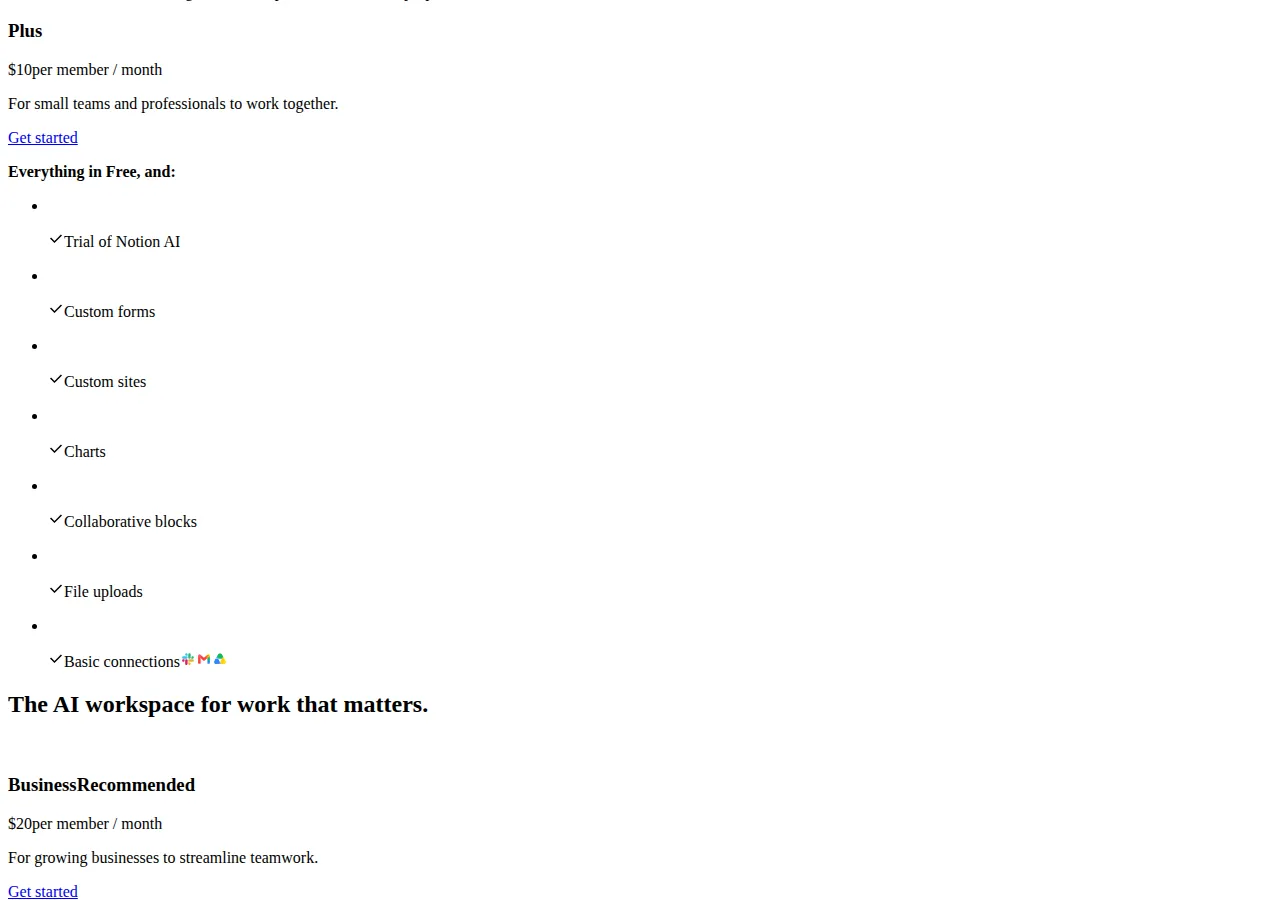
Notion's pricing page: Plus at $10 per member per month for small teams and professionals, Business at $20 per member per month for growing businesses.
The price ladders, read off the vendors' pages
All figures below are the prices each vendor lists on its own pricing page, read on 2026-11-05, in US dollars. Notion's $10 and $20 are the annual-billing prices on its pricing page; monthly billing is higher. Obsidian's $4 and $8 figures are the annual-billing prices; the monthly-billing figures are $5 and $10. Logseq has no dedicated pricing page — its Sync price comes from its Open Collective backer tiers, checked against three independent price trackers that agree on $5 a month.
| Vendor | Free tier | Paid tier | What the paid tier adds |
| :--- | :--- | :--- | :--- |
| Notion | Free, $0 | Plus $10/user/mo; Business $20/user/mo | Plus: unlimited file uploads, 30-day version history, AI trial; Business: Notion AI, SSO, advanced permissions |
| Obsidian | App free, $0 | Sync $4/user/mo annual ($5 monthly); Publish $8/site/mo annual ($10 monthly) | Sync: cross-device sync, end-to-end encryption, version history, shared vaults; Publish: notes on the web |
| Logseq | App free, $0, AGPL | Sync $5/mo backer ($60/yr); Sponsor $15/mo | Sync: end-to-end encrypted sync; Sponsor: insider builds and experimental features |
The one-off and licence figures sit outside the subscription ladder. Obsidian Catalyst is a $25 one-time payment for early access to beta versions and community badges. Obsidian Commercial is $50 per user per year, and the vendor asks organisations using Obsidian for work to buy it. Notion Sites publishes a page to a custom domain for $8 a month per domain billed annually, or $10 billed monthly. Obsidian offers a 40 percent discount on Sync and Publish for students, faculty, and nonprofit employees.
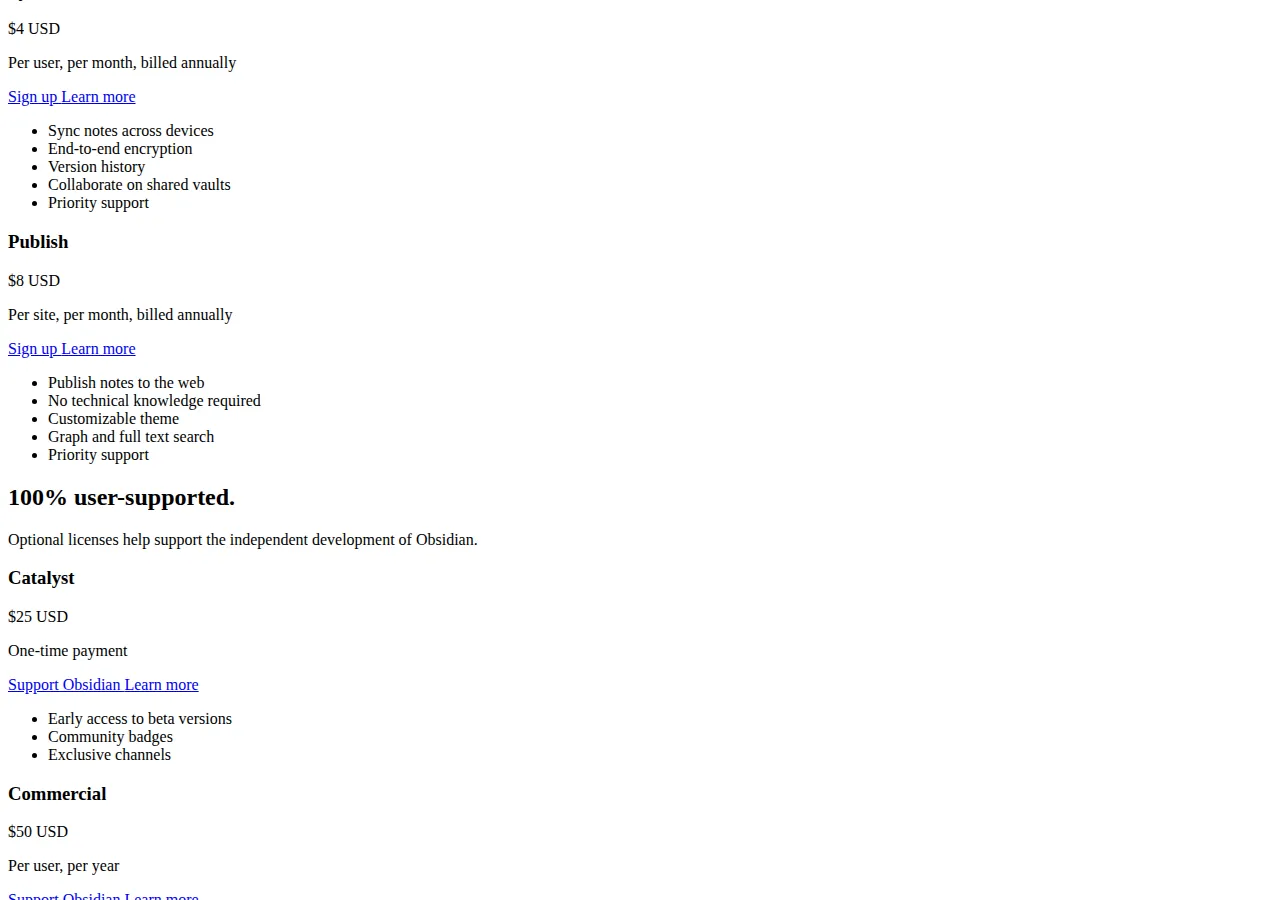
Obsidian's pricing page: Sync at $4 per user per month billed annually, with end-to-end encryption and version history; Publish at $8 per site per month billed annually; Catalyst $25 one-time; Commercial $50 per user per year.
The team ledger: one, five, and ten seats
The per-seat meter is where the three architectures diverge. Notion charges per member on every paid tier; Obsidian and Logseq charge per user for Sync only. The app itself is free on Obsidian and Logseq, so a team that does not need sync pays nothing on either — on Notion it still pays for Plus, because collaboration is the product, not an add-on.
$
\text{Team annual total} = \text{Seats} \times \text{Monthly price per seat} \times 12
$
| Team size, annual billing | Notion Plus | Notion Business | Obsidian Sync | Logseq Sync |
| :--- | :--- | :--- | :--- | :--- |
| 1 user, 1 year | $120 | $240 | $48 | $60 |
| 1 user, 3 years | $360 | $720 | $144 | $180 |
| 5 users, 1 year | $600 | $1,200 | $240 | $300 |
| 10 users, 1 year | $1,200 | $2,400 | $480 | $600 |
Two readings fall out of that table. First, the solo three-year gap between Notion Plus at $360 and Obsidian Sync at $144 is $216 — enough to buy the Obsidian Commercial licence four times over. Second, the team bill scales linearly on all three, so the ranking never changes with size: Obsidian is cheapest, Logseq second, Notion dearest, at every team size. What changes with size is the absolute gap: at ten users Notion Plus is $1,200 a year against Obsidian's $480, a $720-a-year difference. The honest exception is the organisation that needs Obsidian Commercial: five users at $50 a year add $250 to the Obsidian bill, taking the five-seat Sync-plus-Commercial total to $490 a year — still below Notion Plus at $600, and below Logseq at $300 only if the organisation skips the Commercial licence the vendor asks it to buy.
The sync ledger: what the monthly fee actually buys
Sync is the product, so compare the sync services, not the apps. Obsidian Sync encrypts notes on the device with the user's own key before upload, keeps version history, and supports shared vaults where several people edit the same folder. Logseq Sync is also end-to-end encrypted, but it is a beta service for active Open Collective supporters, and the project's own documentation warns against combining it with another sync service such as iCloud, Dropbox, or Syncthing — use one device at a time. Notion has no sync fee because there is nothing to sync: the notes live on Notion's servers, and offline access is a cache, not a copy. The trade is clear: Obsidian and Logseq sell you a copy of your own files on every device; Notion sells you access to its copy.
Worked scenario: the five-person research team
A five-person research team needs shared notes on two devices each, annual billing, no AI add-ons. Notion Plus: 5 × $10 × 12 = $600 a year. Obsidian Sync: 5 × $4 × 12 = $240, plus Commercial at 5 × $50 = $250, for $490 a year. Logseq Sync: 5 × $5 × 12 = $300 a year. Notion is dearest by $110 over Obsidian and $300 over Logseq, and the gap buys real-time collaboration — the only feature the other two do not sell.
Move in five steps
Step 1: export one real notebook from the current tool and open it in a text editor. Step 2: point the new app at the exported folder. Step 3: sync one device with the free DIY route for a week. Step 4: pay for Sync only if a conflict appears. Step 5: cancel the old subscription after one clean month.
$
\text{Solo sync cost over 3 years} = \text{Monthly sync price} \times 36
$
| Sync service | Monthly | 3-year total | Encryption | DIY alternative |
| :--- | :--- | :--- | :--- | :--- |
| Obsidian Sync | $4.00 | $144.00 | End-to-end, own key | Git, iCloud, Dropbox, Syncthing at $0 |
| Logseq Sync | $5.00 | $180.00 | End-to-end, own password | Git, iCloud, Dropbox, Syncthing at $0 |
| Notion (no sync fee) | $10.00 Plus | $360.00 | Server-side, vendor key | None — notes live on Notion's servers |
Both store plain files, so a free Git repository, iCloud folder, or Syncthing syncs the same notes for $0 a month. The paid sync buys conflict handling, version history, and convenience — not the sync itself. A solo user comfortable with Git pays $0 a year on Obsidian or Logseq and $120 a year on Notion, while Notion's $120 buys collaboration and AI.
The AI and publishing add-ons, priced
Notion AI is $10 per 1,000 monthly Notion credits after the trial, consumed by AI writing, summarising, and agents. At 5,000 credits a month the AI bill is $50 a month, or $600 a year, on top of the $120-a-year Plus subscription — the AI layer costs five times the app. Obsidian has no first-party AI subscription: the AI features live in community plugins that call an LLM API directly, so the AI bill is whatever the API provider charges per token. Logseq has none. Publishing is the second add-on: Obsidian Publish is $8 a site a month billed annually, or $96 a year per site, and it publishes notes to the web with graph and full-text search. Notion Sites charges the same $8 a month per domain billed annually, also $96 a year — the same number for a different thing, since a Notion Site publishes one page, not a knowledge graph.
Decision table
| Operator shape | Buy this | Why | Authority |
| :--- | :--- | :--- | :--- |
| Solo writer, local files, phone and laptop | Obsidian + Sync | $48 a year, plain Markdown files, end-to-end encryption, version history | Obsidian pricing page |
| Solo writer, outline-first, open source | Logseq + Sync | $60 a year, AGPL app, daily journal built in, free DIY sync via Git | Logseq Open Collective tiers |
| Small team, shared docs and AI | Notion Plus | $10 a user a month annual, real-time collaboration, AI trial included | Notion pricing page |
| Team, compliance and SSO | Notion Business | $20 a user a month annual, SSO and advanced permissions | Notion pricing page |
| Organisation, local files, audit trail | Obsidian + Sync + Commercial | $48 a user a year Sync plus $50 a user a year Commercial | Obsidian pricing page |
| Student or nonprofit | Obsidian Sync at 40% off | $2.40 a user a month, which is $28.80 a year | Obsidian pricing page |
Who should NOT buy any of these
Do not buy Notion Plus if you work alone and never share a page — the free tier covers a single user with unlimited pages and blocks, and $120 a year buys collaboration you will not use. Do not buy Obsidian Sync if you already sync a folder with iCloud or Syncthing and have never lost a file — the paid sync buys convenience, not capability, and the DIY route is $0. Do not buy Logseq Sync if you need stable multi-device sync today: the service is in beta for supporters, the database version's sync is invite-only, and the docs warn about conflicts. Do not build a team's shared knowledge base in Notion if the team needs an offline copy — the export is lossy, and the structure that makes the workspace useful is lost. And do not pay for Notion AI at $10 per 1,000 credits without counting credits first: 5,000 credits a month is $600 a year, five times the Plus subscription, and usage usually grows after month one.
> [!FOUNDER]
> "Teams buy the most expensive knowledge tool and then store their thinking in a format they cannot take with them. Own the files first. The app is a window; the folder is the house. If the vendor disappeared tomorrow, your notes should still open in a text editor."
> — Enow A. Jovial, Founder & Chief Executive Officer
> [!WARNING]
> Logseq's Sync service is a beta for active Open Collective supporters, and its database version stores notes in a database that was still in beta in October 2026, with sync and real-time collaboration in alpha — the project itself warns that data loss is possible and advises backups and a test graph. Do not put a team's only copy of critical notes into a beta sync service, and do not treat the $5-a-month backer price as a published vendor price: Logseq runs no dedicated pricing page.
> [!TIP]
> Before paying for sync, point a free Git repository or a Syncthing folder at your notes for one week and use the app on two devices. If you never hit a conflict, the paid sync buys you nothing but convenience — and you have saved $48 to $120 a year per user.
Execution checklist
Related reading on this site: the Notion vs Airtable vs Coda team workspace pricing guide for the team-database side of Notion, the Asana vs Monday vs Trello project management pricing guide for the work-tracking tools beside a knowledge base, and the pricing calculator to run your own team shape through before you commit.