A team wiki looks like a simple purchase until the invoice arrives. The three tools here do not sell the same thing in the same unit. Notion charges per member. Confluence charges per user, in bands that fall as the team grows. Coda, now sold as Superhuman Docs, charges only for Doc Makers — the people who build docs — while editors, viewers and guests cost nothing. A 25-person team can pay for 25 seats, 25 users, or 5 makers for the same wiki.
Every rate below was read from the vendors' own pricing pages on 14 November 2026, and every annual figure is reproducible from the formulas shown. The angle is the team wiki: shared pages, permissions, guest access, AI search, and governance. The workspace angle is covered in the Notion vs Airtable vs Coda workspace comparison, and the personal-knowledge angle in the Notion vs Obsidian vs Logseq comparison.
The three billing units, and why the headline price misleads
A wiki purchase has three cost drivers: the rate, the number of billed units, and the billing cycle. Notion bills every member: $10 on Plus and $20 on Business billed annually, and states annual billing saves up to 20 percent against monthly billing. Confluence bills every user, but the rate depends on the band, and annual billing is sold in fixed user tiers rather than per user. Coda bills only Doc Makers: $12 on Pro and $33 on Business per maker per month billed annually, or $15 and $40 monthly.
| Cost driver | Notion | Confluence | Coda (Superhuman Docs) | Authority |
|---|---|---|---|---|
| Billed unit | Every member | Every user, in bands | Doc Makers only; editors, viewers, guests free | Vendor pricing pages, 14 Nov 2026 |
| Team tier rate | Business $20 / member / mo, annual | Premium $14.10 / user / mo, 1-100 band | Business $33 / maker / mo, annual | notion.com/pricing; atlassian.com/software/confluence/pricing + published band tables; superhuman.com/plans/docs |
| Entry paid tier | Plus $10 / member / mo | Standard $7.15 / user / mo, 1-100 band | Pro $12 / maker / mo, annual | Vendor pricing pages + published band tables, 14 Nov 2026 |
| SAML SSO | Business and up | Enterprise only, or Guard add-on | Enterprise only | Vendor pricing pages, 14 Nov 2026 |
Confluence displays $5.78 on Standard and $11.16 on Premium — blended rates for a 300-user team. A team of 5, 25 or 100 seats pays the 1-100 band: $7.15 on Standard and $14.10 on Premium, monthly billing, after the price change of 13 October 2026. The displayed rate understates a small team bill by almost a fifth:
Notion: the flexible wiki that charges for every reader
Notion is the most flexible of the three as a wiki: pages, databases, linked views and automations live in one workspace. Business adds what a team wiki needs: private teamspaces, granular database permissions, and SAML SSO — usually the first hard requirement a security review imposes. Enterprise adds SCIM, an audit log, SIEM and DLP connections, domain management, and zero data retention with LLM providers.
The pricing is the simplest of the three and the least forgiving: every member is billed, including people who only read. Guests are free on paid plans, but can access only the individual pages they are invited to, and the Free plan caps external guests at 10. Notion AI is a trial on Free and Plus; Business bundles Notion Agent, AI Meeting Notes, and Enterprise Search in beta.
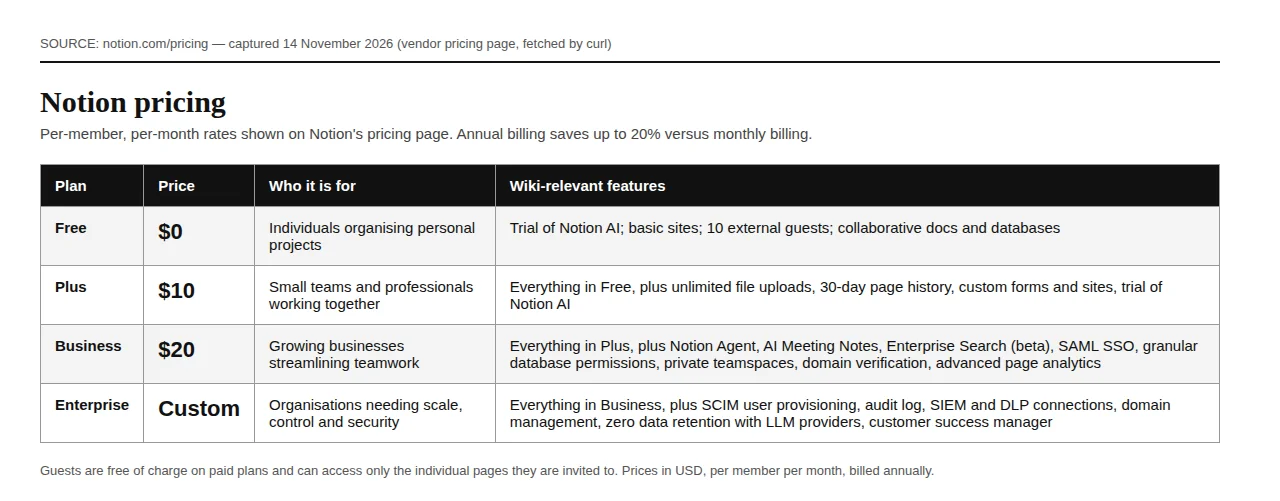
Notion suits a team that already lives in Notion, or one that wants the wiki, the project tracker and the database in one tool. It is the wrong buy for a wiki with a large read-only audience, because every reader is a billed member.
Confluence: the cheapest per-seat wiki, with the SSO paywall
Confluence is the incumbent team wiki, and the cheapest per-seat option at every size here. Standard at $7.15 per user per month buys space and page permissions, guest access, audit logs, data residency, 250 GB of storage, and 25 Rovo credits per user per month. Premium at $14.10 adds unlimited storage, the company hub, analytics, IP allowlisting, a sandbox, 70 Rovo credits, a 99.9 percent SLA, and 24/7 critical support. Free covers up to 10 users with 2 GB of storage.
Two costs hide behind the headline. First, the band structure: above 100 users the rate falls — 101 to 250 users pay $5.45 on Standard and $10.20 on Premium, and 251 to 1,000 users pay $4.05 and $8.15 — so a team crossing 100 seats gets a real discount, but a team of 25 pays the top rate. Second, SAML SSO. On Standard and Premium it requires a separate Atlassian Guard subscription; only Enterprise includes Guard Standard. A buyer who picks Standard for the $7.15 rate and then discovers the SSO requirement has bought the wrong plan. Enterprise is annual only, listed at $137,000 a year for 1,000 users — $11.42 per user per month.
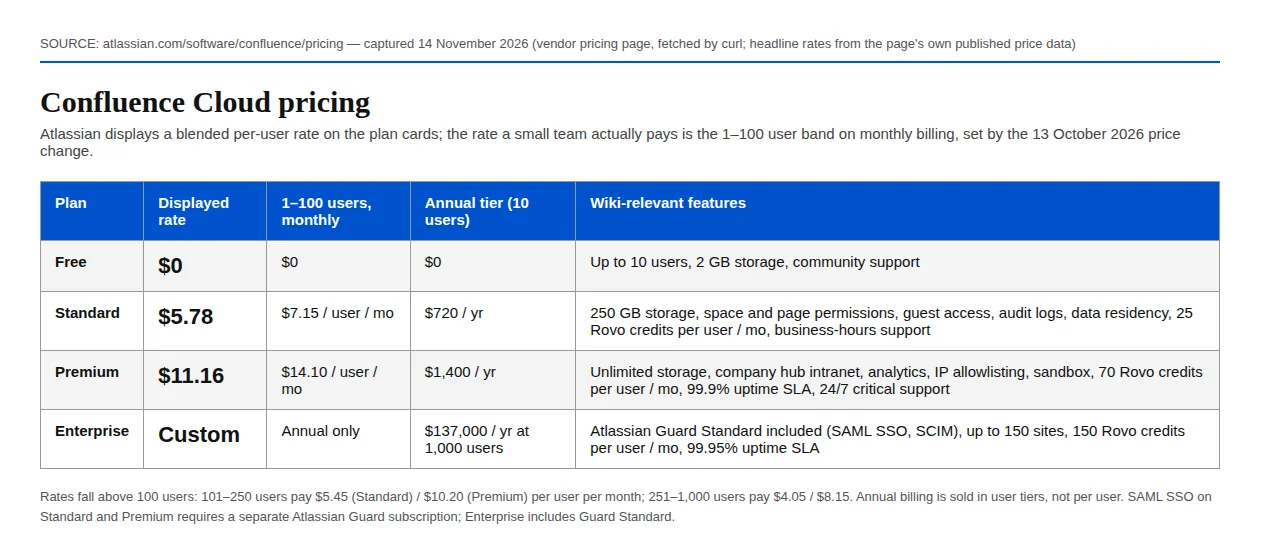
Confluence suits teams already on Jira, regulated teams needing data residency and audit logs at the Standard price, and companies wanting a dedicated wiki. It is the wrong buy for a team that needs SAML SSO on a small budget, and for a team that wants databases and automations inside the wiki — automations are capped at 100 steps per user per month on Standard and 250 on Premium. The engineering-tooling angle is covered in the Linear vs Jira vs ClickUp comparison.
Coda: pay for the builders, not the readers
Coda was renamed Superhuman Docs on 8 July 2026; coda.io/pricing now redirects to superhuman.com/plans/docs. The vendor states pricing did not change at the rename: Free at $0, Pro at $12 per Doc Maker per month billed annually ($15 monthly), Business at $33 billed annually ($40 monthly), and Enterprise by quote. A Doc Maker is a person who creates docs and changes their structure. Editors, viewers and guests are free on every plan, including Enterprise — a 20-person team with 4 Doc Makers pays for 4 makers only.
That model rewards a wiki with a small authoring group and a large reading audience. Business adds Databases in beta, unlimited automations and version history, private folders and subfolders, doc and page locking, and cross-doc sync with actions. Pro adds unlimited doc size, Docs AI in beta, a 30-day version history, hidden pages, and custom branding and domains. Enterprise adds SAML SSO, SCIM, AI admin controls, governance, audit events, a SOC 2 Type 2 report, and HIPAA compliance.
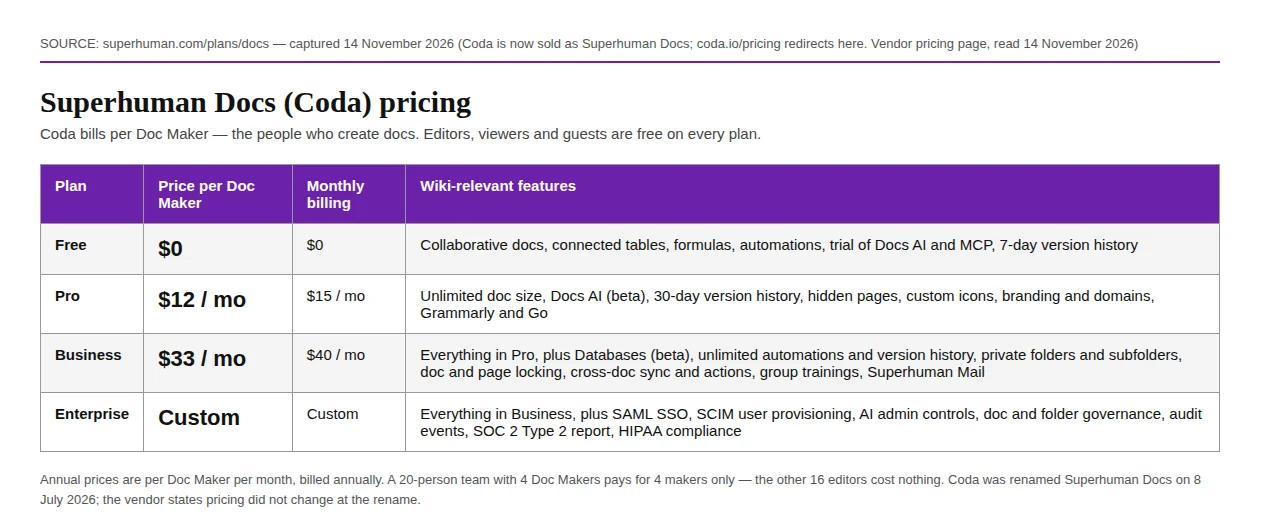
Coda suits a team with a small author group and a much larger readership, and one that wants formulas, automations and connected tables in the wiki. It is the wrong buy for a team where most people build docs, because the maker count then approaches the seat count and $33 is the highest unit price here. It is also the wrong buy for a team that needs SAML SSO or SCIM without an Enterprise quote.
Worked math 1: annual cost at 5, 25 and 100 seats
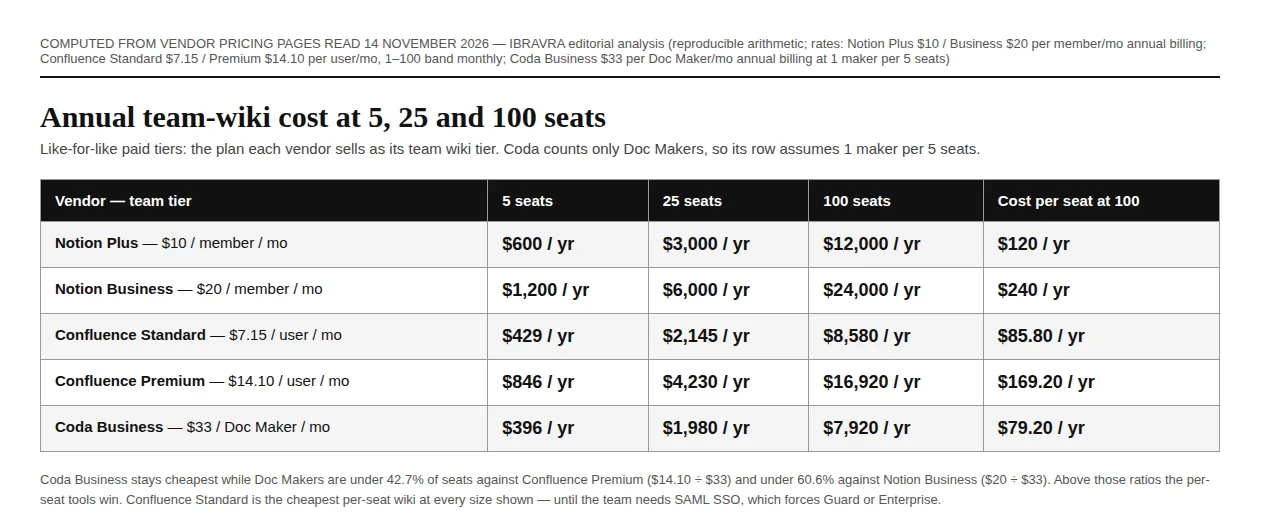
For Coda, seats become makers at the stated 1-in-5 assumption:
Applying the verified rates:
| Vendor, team tier | 5 seats | 25 seats | 100 seats |
|---|---|---|---|
| Notion Plus, $10 / member / mo | $600 / yr | $3,000 / yr | $12,000 / yr |
| Notion Business, $20 / member / mo | $1,200 / yr | $6,000 / yr | $24,000 / yr |
| Confluence Standard, $7.15 / user / mo | $429 / yr | $2,145 / yr | $8,580 / yr |
| Confluence Premium, $14.10 / user / mo | $846 / yr | $4,230 / yr | $16,920 / yr |
| Coda Business, $33 / maker / mo | $396 / yr | $1,980 / yr | $7,920 / yr |
Confluence Standard is the cheapest per-seat wiki at every size shown: $8,580 against $24,000 for Notion Business at 100 seats. Coda Business is cheapest in absolute dollars, but only at the 1-in-5 maker ratio.
Worked math 2: the maker-ratio break-evens
The break-even maker share is the per-seat rate divided by the per-maker rate:
Below 21.7 percent builders, Coda Business beats even Confluence Standard. Between 21.7 and 42.7 percent, Confluence Standard is cheapest and Coda still beats Premium. Above 60.6 percent — more than three builders in every five people — Coda Business is the most expensive option here. For a wiki where builders are a small minority, that is why Coda usually wins on price.
Worked math 3: the three-year bill and the switching cost
A wiki is a three-year commitment. The three-year bill is the annual cost times three:
At 25 seats: Notion Business $18,000, Confluence Standard $6,435, Coda Business $5,940 over three years. The Notion-to-Confluence gap is $11,565 — enough to fund the migration twice over.
The switching cost is a one-off — price it before the decision:
At a stated 2 hours per seat and a $50 loaded hourly rate, a 25-seat migration costs $2,500 once. That figure is small next to a $11,565 three-year gap: when the annual gap is large, the switching cost is not a reason to stay. When the annual gap is small — Confluence Standard against Coda Business at 25 seats is $165 a year — the switching cost dominates, and the incumbent wins. Run the annual figure through the tax estimator as well: the subscription is an operating expense, and the after-tax cost is what the budget feels.
Permissions, governance and AI search
Price decides the shortlist; permissions decide whether it survives a security review.
| Capability | Notion | Confluence | Coda (Superhuman Docs) |
|---|---|---|---|
| SAML SSO | Business ($20) | Enterprise, or Guard add-on | Enterprise only |
| SCIM provisioning | Enterprise | Enterprise (Guard included) | Enterprise only |
| Audit log | Enterprise | Standard and up | Enterprise only |
| AI search | Enterprise Search (beta), Business | Rovo; 25 / 70 / 150 credits per user / mo | Docs AI (beta), Pro and up |
| Data controls | Zero LLM data retention, Enterprise | Data residency, Standard; IP allowlisting, Premium | SOC 2 Type 2, HIPAA, Enterprise |
Notion puts SSO on its mid tier and reserves SCIM and the audit log for Enterprise. Confluence puts the audit log and data residency on Standard but holds SSO behind Enterprise or a Guard subscription. Coda holds every governance feature for Enterprise.
Operator boundaries: who each tool is for
Choose Notion Business for one workspace covering wiki, projects and databases, with SAML SSO and no Enterprise quote. Avoid it if most of the team only reads: every reader is a billed member.
Choose Confluence Standard for the cheapest per-seat wiki, audit logs and data residency at the entry tier, or an existing Jira stack. Avoid it if SAML SSO is a hard requirement and Guard is not budgeted, or if the wiki needs databases and automation inside the tool.
Choose Coda Business if a small group authors and a large group reads, the team wants formulas and automations in the wiki, and the maker share sits below 40 percent. Avoid it if most of the team builds docs, if SSO or SCIM is required without an Enterprise budget, or if the team needs space-level rather than doc-level permissions.
Founder & CEO Insight — Enow A. Jovial
Execution checklist
- [x] Count the builders: run the two-week maker census.
- [x] Price the band, not the card: for Confluence, confirm the 1-100 band rate and tier.
- [x] Check the SSO gate: confirm in writing whether SSO is included or needs Guard or Enterprise.
- [x] Test the free tier first: put 10 people on a free workspace and run the real wiki for two weeks.
- [x] Map the guests: list every external collaborator and check whether they are guests or billed members.
- [x] Price three years, not one: multiply the annual figure by three, add the switching cost, and compare.
- [x] Re-check at renewal: prices here moved twice in 2026; diary the renewal date and re-read the pricing page 30 days before it.
The cheapest team wiki is the tool whose billing unit matches how the team works. Count the builders, check the SSO tier, multiply by three years, and the answer is arithmetic.