The three-way workspace pricing guide we published on November 5 is already out of date, and the changes are not small print. Coda has become Superhuman Docs and repriced both paid tiers. Notion has folded its AI into the Business tier instead of selling it as a separate add-on. Airtable now renders its monthly-billing prices on the pricing page alongside the annual figures. This playbook is the November 2026 refresh: the new ladders, the new seat math at 5, 25, and 100 seats, and the ceilings that decide which tool a team outgrows first. Our Notion vs Airtable vs Coda team workspace pricing automation is the prior guide; every price below supersedes it where the two disagree.
What changed since November 5
Three changes, each big enough to change a buying decision. First, the Coda rebrand. The pricing page at coda.io now serves Superhuman Docs: Pro is $12 per Doc Maker per month billed annually ($15 monthly), Business is $33 per Doc Maker per month billed annually ($40 monthly), Enterprise is custom. The November 5 guide printed Pro $10 and Team $30. Both figures are gone. Second, Notion AI. Business now includes Notion Agent, AI Meeting Notes, and Enterprise Search as part of the $20 tier, and Plus carries only a trial of AI. AI was an add-on decision in the old guide; it is now a tier decision. Third, Airtable held. Team stays at $20 per user per month billed annually and Business at $45, unchanged from the November 5 guide — the annual prices did not move.
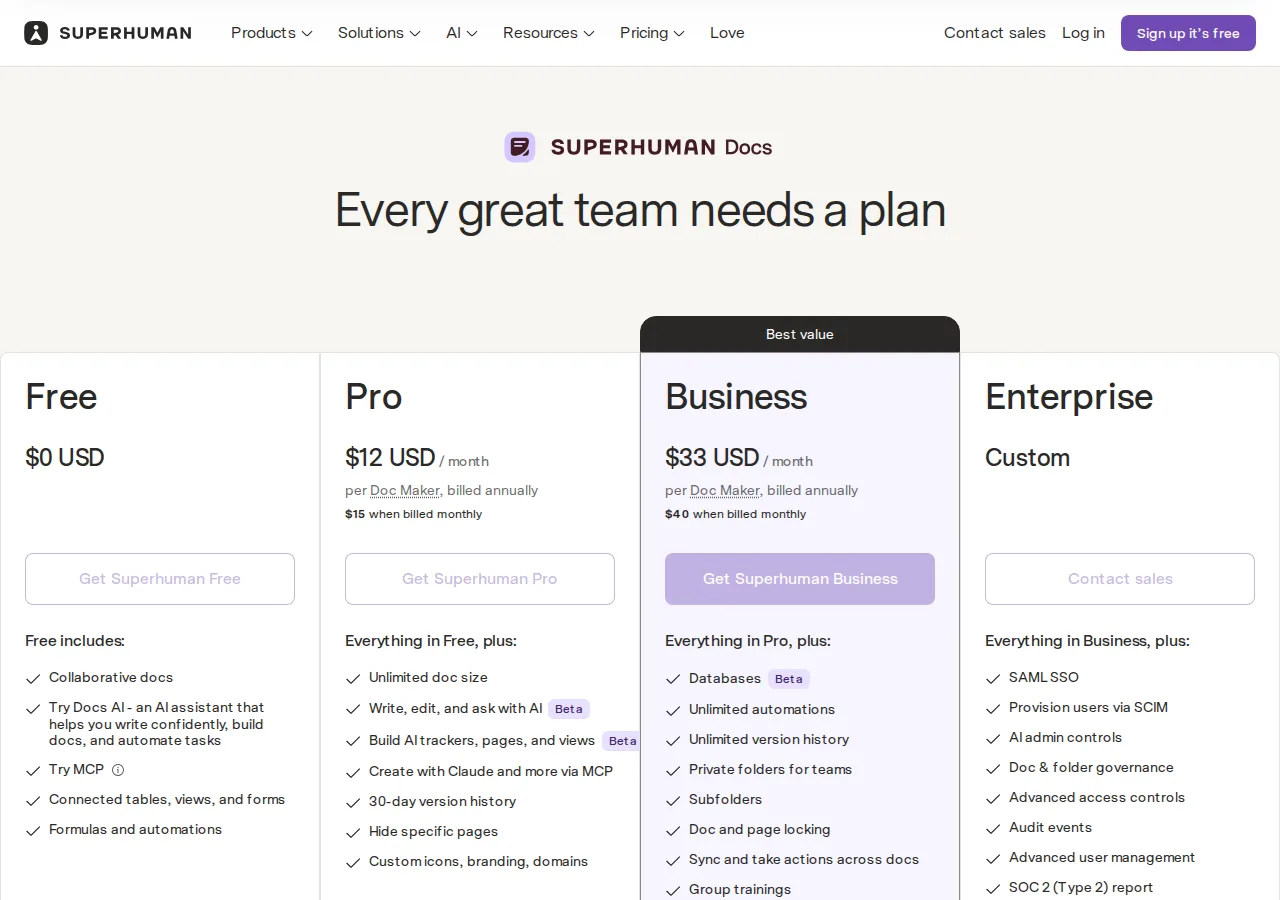
One thing did not change: the billing model. Notion charges per member, Airtable per user with edit permissions, Coda per Doc Maker only. Editors and viewers are free on Coda, read-only collaborators are free on Airtable, guests are free on Notion. A 25-person team is not a 25-seat bill on any of these tools unless all 25 edit — and on Coda, not unless all 25 make docs.
The new price ladders
| Vendor | Free | First paid tier | Second paid tier | Enterprise |
|---|---|---|---|---|
| Notion | $0 | Plus $10/member/mo | Business $20/member/mo | Custom |
| Superhuman Docs (Coda) | $0 | Pro $12/Doc Maker/mo | Business $33/Doc Maker/mo | Custom |
| Airtable | $0 | Team $20/user/mo | Business $45/user/mo | Enterprise Scale, custom |
All figures are annual billing. Monthly billing costs more wherever both figures are published: Coda Pro $15 and Business $40 a month against $12 and $33 annual — a 25% penalty on Pro and 21% on Business. Notion's pricing page states annual billing saves up to 20%. Get the finance approval for annual billing first.
Seat math at 5, 25, and 100
The distinction that matters is the multiplier. Notion multiplies by members, Airtable by edit users, Coda by makers. A team of 25 people with 5 makers and 20 viewers pays 25 seats on Notion, 25 edit users on Airtable if all 25 edit, and 5 makers on Coda. The table runs the Coda column at 5 makers, the common shape for a team that writes in docs and reads everywhere else:
| Team size | Notion Plus | Notion Business | Coda Pro (5 makers) | Coda Business (5 makers) | Airtable Team | Airtable Business |
|---|---|---|---|---|---|---|
| 5 people | $50 | $100 | $60 | $165 | $100 | $225 |
| 25 people | $250 | $500 | $60 | $165 | $500 | $1,125 |
| 100 people | $1,000 | $2,000 | $60 | $165 | $2,000 | $4,500 |
Read the 25-person row slowly. Notion Plus costs $250 a month. Coda Pro costs $60 a month for the same 25 people, because only 5 of them are makers. Airtable Team costs $500 a month, twice Notion, because every edit user is billed. The Coda column does not move between 5 and 100 people, because the maker count does not move.
At 5 people with 5 makers, Coda Pro at $60 costs more than Notion Plus at $50: the maker model only wins when the maker ratio is low.
The maker-ratio break-even
The break-even is the point where the Coda bill equals the Notion bill. Set the two monthly costs equal and solve for makers:
For Coda Business at $33 against Notion Plus at $10, the break-even maker count is the seat count divided by 3.3. A 25-person team breaks even at 7.58 makers; fewer than 8 and Coda Business is cheaper, more than 8 and Notion wins. A 100-person team breaks even at 30.3 makers. The same arithmetic for Coda Pro at $12 against Notion Plus at $10 gives a break-even at 0.83 times the seat count: Pro beats Plus whenever fewer than 83% of the team are makers.
Against Airtable the break-even is even more forgiving. Coda Business at $33 against Airtable Team at $20 breaks even at 0.61 times the seat count: a 25-person team breaks even at 15.2 makers. Coda Pro at $12 against Airtable Team at $20 breaks even at 1.67 times the seat count, which means Coda Pro is cheaper than Airtable Team even if every single person on the team is a maker.
Count your makers before you buy: open the existing workspace, count the people who created a doc, a base, or an automation in the last 90 days, and divide by headcount. Under 1 in 3, Coda Business beats Notion Plus. Under 1 in 2, Coda Business beats Airtable Team. Over 4 in 5, buy Notion Plus.
Record, attachment, and history ceilings
Price is the entry fee. Ceilings are the exit fee: a team that outgrows a ceiling migrates, and migration is the expensive part. The ceilings that matter, as published on each vendor's pricing page on November 15, 2026:
| Ceiling | Notion | Superhuman Docs | Airtable |
|---|---|---|---|
| Records per base | No per-base ceiling published | No per-base ceiling published | Free 1,000; Team 50,000; Business 100,000; Enterprise Scale 500,000 |
| Attachments | Free 5 MB; paid 5 GB | Pro 5 GB per doc | Free 1 GB; Team 20 GB; Business 100 GB; Enterprise Scale 1 TB |
| Page or version history | Free 7 days; Plus 30; Business 90 | Pro 30 days; Business unlimited | Free 14 days; Team 365; Business 730; Enterprise Scale 1,095 |
Two honest notes on this table. First, Notion and Coda publish no per-base record ceiling on their pricing pages, because their unit is the page and the doc, not the base. Airtable's unit is the base, and the ceiling is the number that ends Airtable evaluations: a 50,000-record Team base is a real ceiling for an operations team that logs every order, ticket, or applicant. Second, Airtable's Business tier carries a discrepancy. The plan description states 100,000 records per base, while the page payload's maxRows field for the same tier states 125,000. This playbook prints the 100,000 figure and flags the 125,000 as unverified. Ask Airtable support for the number in writing before you commit a 100,000-record base to Business.
Automation-run budgets
Automation is where the three tools stop being comparable. Airtable publishes hard monthly run numbers on its pricing page. Coda publishes only qualitative tiers — Low, Medium, Unlimited — with no numbers. Notion publishes no automation-run ceiling on its pricing page at all. The verified figures:
| Vendor | Tier | Automation runs per month |
|---|---|---|
| Airtable | Business | 100,000 |
| Airtable | Enterprise Scale | 1,000,000 |
| Superhuman Docs | Pro | Low (no number published) |
| Superhuman Docs | Business | Unlimited |
| Notion | Plus / Business | No ceiling published |
Airtable's Free and Team automation-run numbers are not stated in the pricing page payload this cycle, and this playbook does not print them. An earlier guide printed 100 and 25,000 for those tiers from another source; those figures are not verified from the page opened November 15, 2026.
The Airtable numbers are generous on paper and tight in practice. A base that runs one automation per record update, on a base that updates 4,000 records a day, burns 120,000 runs a month and exceeds the Business ceiling. A base that runs one automation per new record, on 1,000 new records a day, burns 30,000 runs a month and fits comfortably. Count runs per record event, not per automation.
AI credit budgets
AI is priced three different ways, and the comparison is a unit-conversion problem. Notion sells Custom Agents at $10 per 1,000 Notion credits on annual billing, which is $0.01 per credit, and bundles Notion Agent, AI Meeting Notes, and Enterprise Search into Business. Airtable grants a monthly credit allowance per user: Free 500, Team 15,000, Business 20,000, Enterprise Scale 25,000 at list price. Coda's AI credit allowances are not published on the pricing page opened this cycle.
The arithmetic that matters is cost per thousand AI actions. A Notion team that burns 10,000 Custom Agent credits a month pays $100 a month for agents on top of the seat bill. An Airtable Team user gets 15,000 credits a month inside the $20 seat, but the allowance is per user and does not pool across the team in the published terms: the one person who automates everything burns their 15,000 in a week, and the twenty who never touch AI hold credits nobody uses.
The practical rule: if AI is the reason you are buying, buy the tier that includes it, not the tier that sells it. Notion Business includes the agent. Airtable Team includes 15,000 credits per user. Do not buy a base tier and then add AI on top.
Who should not use each
Notion is the wrong buy for a team that needs a hard record ceiling in writing, because the pricing page publishes none, and for a team that needs more than 90 days of page history below Enterprise. It is the right buy for a team where everyone writes, because the per-member price is flat.
Superhuman Docs is the wrong buy for a team where everyone is a maker, because the per-maker price is the highest in this comparison at the Business tier, and for a team that needs a published automation-run number in a contract, because the pricing page publishes Low, Medium, and Unlimited and nothing else. It is the right buy for a team with a small building core and a large reading audience, because the bill follows the builders.
Airtable is the wrong buy for a team that edits heavily and counts seats, because $20 per edit user is twice Notion Plus, and for a team that will pass 50,000 records on the Team tier, because the next ceiling is a tier jump to Business at $45. It is the right buy for a team that needs a real database with a published ceiling, a published automation-run budget, and a published AI credit allowance: it is the only tool of the three that publishes all three numbers.
The founder's rule for buying workspace software
Founder & CEO Insight — Enow A. Jovial
The buying checklist
- [x] Step 1: Count makers. Count the people who created a doc, a base, or an automation in the last 90 days, and divide by headcount. Under 1 in 3 favors Coda Business over Notion Plus.
- [x] Step 2: Count records. Count the rows in your largest base today and project twelve months forward. Over 50,000 rules out Airtable Team.
- [x] Step 3: Count automation events. Multiply records updated per day by automations per update by 30. Over 100,000 rules out Airtable Business.
- [x] Step 4: Count AI usage. If the team needs an agent, buy the tier that includes it: Notion Business includes Notion Agent; Airtable Team includes 15,000 credits per user per month.
- [x] Step 5: Price the monthly penalty. Annual billing saves up to 20% on Notion, as its pricing page states, and 21–25% on Coda. Confirm Airtable's monthly penalty at checkout. Get the finance approval before the first invoice.
- [x] Step 6: Confirm the ceiling in writing. Airtable's Business record ceiling reads 100,000 in the description and 125,000 in the page payload. Ask for the number in writing before committing a large base.
The refresh in one paragraph: Coda is Superhuman Docs at $12 and $33 per maker, Notion holds at $10 and $20 per member with AI now inside Business, and Airtable holds at $20 and $45 per edit user with the monthly prices now printed on the page. A 25-person team with 5 makers pays $250 on Notion Plus, $60 on Coda Pro, and $500 on Airtable Team. Count your makers, count your records, count your automation events, and the cheapest tool picks itself. Our Evernote vs Notion vs Obsidian note-taking pricing playbook covers the note-taking side of the same Notion decision, and the pricing calculator runs the seat math for your exact headcount before you sign.