Three note apps, three philosophies, three different bills. Notion is a cloud database that happens to take notes. Obsidian is a local Markdown editor that happens to sync. Evernote is a capture archive that happens to have AI now. The monthly prices look close until the seat count, the sync fee, the AI tier, and the exit fee are counted together. This playbook prices all three the same way, on annual billing, for one person and for teams of 5 and 25, from the vendors' own pricing pages as of 15 November 2026.
The three prices, verified
All figures are annual billing, USD, from each vendor's own pricing page, read on 15 November 2026. Monthly billing costs more on every vendor.
| Vendor | Free tier | Paid entry (annual) | Paid top (annual) | Authority |
|---|---|---|---|---|
| Notion | $0, unlimited pages, 10 guests, 5 MB upload cap | Plus $10 per member / month | Business $20 per member / month, full AI included | notion.com/pricing |
| Obsidian | $0, full app, unlimited notes and vaults | Sync $4 per user / month | Publish $8 per site / month; Catalyst $25 one-time | obsidian.md/pricing |
| Evernote | $0, 50 notes, 1 notebook, 1 device, 1 GB | Starter $99 / year | Advanced $249.99 / year, full AI suite | evernote.com/pricing |
Notion's ladder reads simply: Free at $0, Plus at $10 per member a month, Business at $20, Enterprise on contact. The $20 Business plan is the only tier with full AI — Plus gets a trial only. Notion also sells AI credits at $10 per 1,000 monthly credits for agents on Business and above, so heavy AI use is metered on top of the $20 seat. A custom domain costs $8 a month per domain on annual billing.
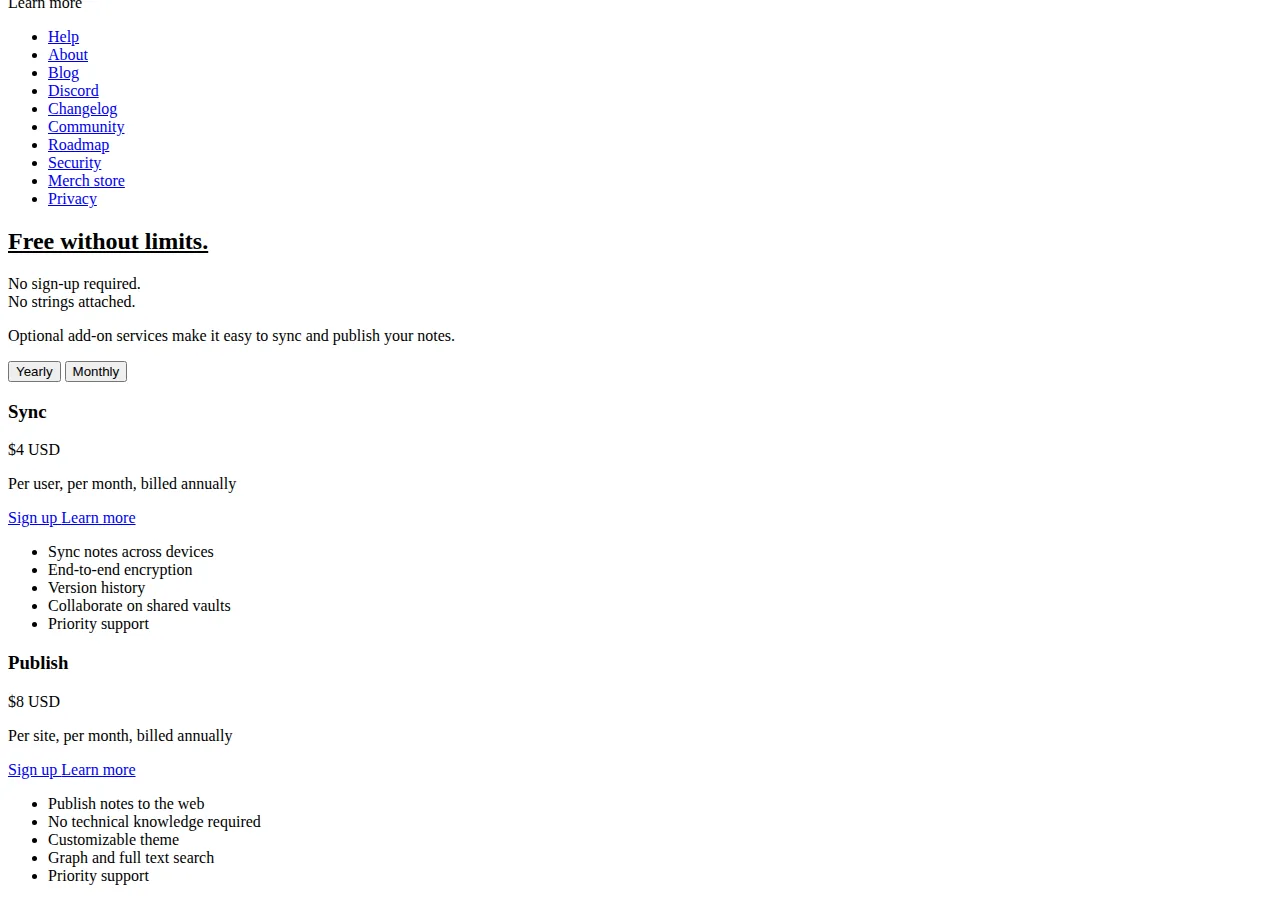
Obsidian's pricing is the inverse of Notion's: the app is free. Sync is $4 per user a month on annual billing, $5 on monthly billing, with end-to-end encryption, version history, and shared vaults. Publish is $8 per site a month on annual billing, $10 on monthly billing. Catalyst is a $25 one-time payment for beta access. Commercial is listed at $50 per user a year as a support tier, not a licence gate — the core app is free for commercial use.
Evernote's page needs careful reading: the legacy Personal ($14.99) and Professional ($17.99) plans are gone, replaced by Starter and Advanced, plus two team tiers, Flexible and Unlimited, whose per-seat prices render at checkout. The caps are printed on the page: Free allows 50 notes and 1 notebook; Starter 1,000 notes and 20 notebooks; Advanced is unlimited throughout, with a safeguard-limits footnote.
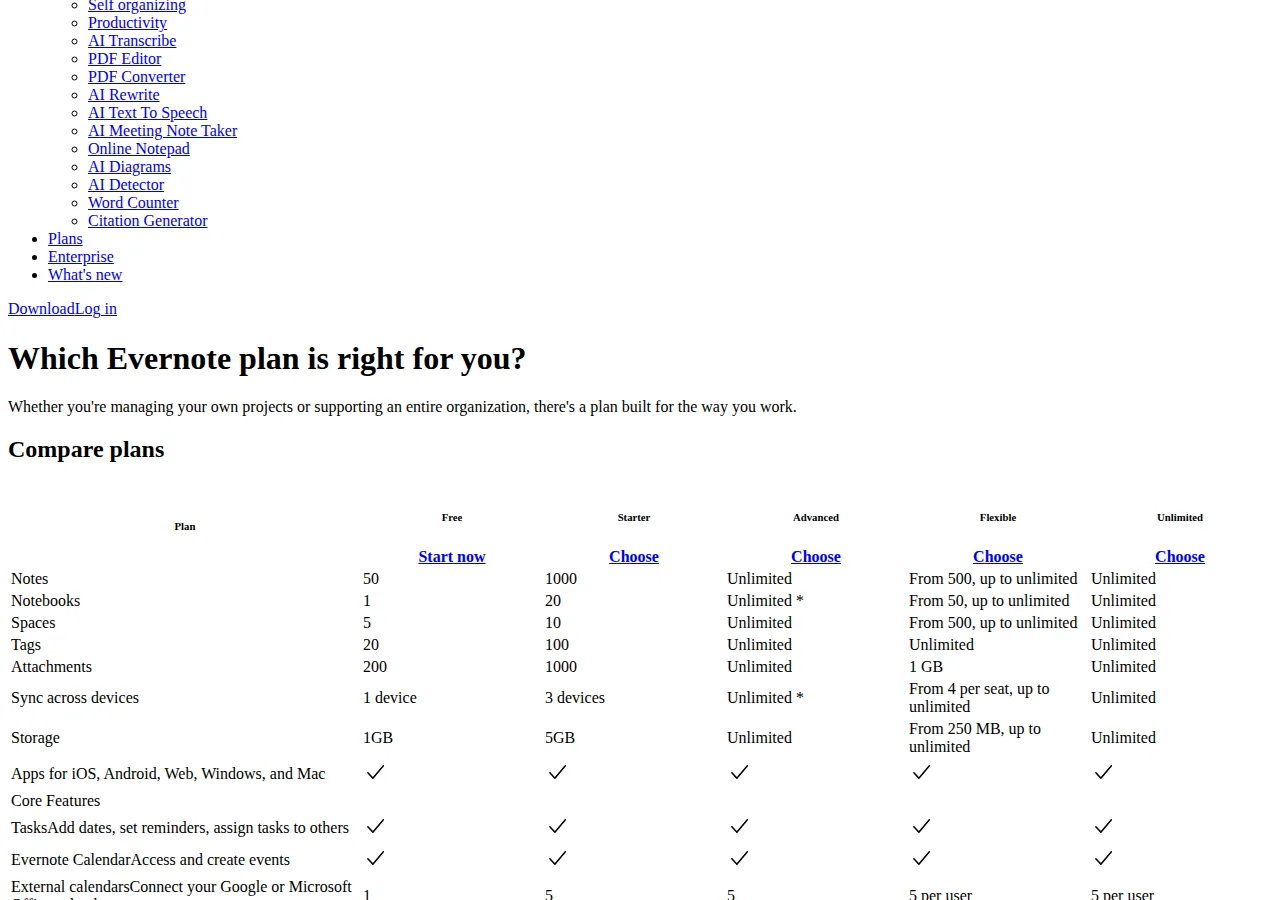
Evernote's prices are the least stable. Independent 2026 checks of the vendor page put Starter at $99 a year on annual billing ($14.99 a month month-to-month) and Advanced at $249.99 a year ($24 a month month-to-month). Secondary sources disagree on the monthly equivalents — one lists Starter at $8.25 a month (simply $99 divided by 12) and Advanced at $14.17 a month, which matches no current annual figure. Budget against the annual totals below, dated 15 November 2026, and confirm at checkout — Evernote has repriced twice since 2024.
Solo math: one person, one year, three years
Example A — solo, one year. Notion Plus: $10 times 12 is $120. Obsidian with Sync: $4 times 12 is $48. Evernote Starter: $99 a year. Evernote Advanced: $249.99 a year.
Example B — solo, three years. Notion Plus costs $360 over three years. Obsidian with Sync costs $144. Evernote Starter costs $297. Evernote Advanced costs $749.97. Obsidian without Sync costs $0 over three years — the only zero in the comparison. Note apps are sticky — switching costs weeks of reorganisation — so the honest comparison is three years, not one month.
Example C — the cap that forces the upgrade. Evernote Starter allows 1,000 notes. A user who captures five notes a day hits the cap in 200 days — under seven months. The capacity cost of Starter is $99 divided by 1,000 notes, or $0.099 per note-year of capacity, but the real cost is the forced upgrade: at note 1,001 the choice is Advanced at $249.99 a year or a migration. Neither Notion Plus nor Obsidian caps notes, so the cap risk is unique to Evernote's paid entry tier. Buy Starter only if the count is honestly under 1,000 and staying there.
Team math: 5 seats and 25 seats
Team pricing is where the philosophies diverge hardest: Notion and Evernote charge per seat, while Obsidian charges per syncing user — and a team that self-hosts sync pays Obsidian nothing at all.
| Team | Notion Plus | Notion Business | Obsidian + Sync | Evernote Starter × seats | Evernote Advanced × seats |
|---|---|---|---|---|---|
| 1 seat | $120 / yr | $240 / yr | $48 / yr | $99 / yr | $249.99 / yr |
| 5 seats | $600 / yr | $1,200 / yr | $240 / yr | $495 / yr | $1,249.95 / yr |
| 25 seats | $3,000 / yr | $6,000 / yr | $1,200 / yr | $2,475 / yr | $6,249.75 / yr |
Notion Plus costs $6 a month more per seat than Obsidian Sync ($72 a year, $1,800 for 25 seats). Notion Business costs $16 more ($192 a year, $4,800 for 25). That $4,800 buys full AI, SSO, private teamspaces, and granular permissions — real features — but the AI is the reason for the delta, not the notes.
Evernote's team tiers are excluded from the table: Flexible and Unlimited are priced per seat at checkout, and this playbook does not estimate a price the vendor does not publish. The Starter and Advanced columns are individual seats bought per person. A team that needs SSO and centralised administration should get a written quote and compare it against Notion Business at $20 a seat.
Run the three-vendor total for your own team shape through the ROI calculator before you commit: the seat math here gives you the monthly bill, and the calculator turns it into the payback period. If the team needs a personal knowledge base rather than a shared database, the Notion vs Obsidian vs Logseq knowledge management pricing guide prices the same seat math for notes, sync, and the file-format exit fee.
The free tier trap
Free tiers are not equal, and the difference decides whether free is a plan or a trial. Notion Free gives unlimited pages and blocks for individuals, 10 guests, and a 5 MB file-upload cap. Obsidian Free gives the full app — unlimited notes, unlimited vaults, the graph view, and the entire plugin ecosystem — with no account and no cap.
Evernote Free is the trap. Fifty notes, one notebook, one device, and 1 GB of storage is a trial with a start button, not a workspace. Anyone who takes notes daily exhausts it within weeks, and the migration pressure starts immediately: the user is choosing between paying $99 a year and exporting 50 notes. Evernote's free tier costs $0 and lasts about a month for a real user. Budget for Starter from day one, or do not start with Evernote at all.
AI: bundled, gated, or bring your own
Notion rolled its standalone $10 a month AI add-on into the Business plan in May 2025, so full AI now requires the $20 seat — Plus users get a trial only, and agents and automations on Business consume credits at $10 per 1,000 monthly credits. A team that adopts Notion AI heavily should budget the seat plus a credits line — the $20 figure is the floor, not the ceiling.
Evernote's AI is bundled differently: the whole suite — AI Assistant, Semantic Search, AI Transcribe, AI Edit, AI Cleanup, AI Meeting Note Taker, AI Diagrams, AI Detector, and MCP connections to Claude and ChatGPT — ships in Advanced. Starter gets none of it. The AI is the reason Advanced costs $150.99 a year more than Starter, and the buyer should test the transcription and semantic search during a trial before paying for them, because AI quality is the one feature a pricing page cannot prove.
Obsidian has no built-in AI. AI arrives through community plugins with the user's own API key and bill — typically a few dollars a month of tokens, plus setup time. That is a feature for privacy-minded users and a tax for everyone else: the plugin route is flexible and cheap, but unmaintained, unvetted, and entirely the user's problem when it breaks.
Sync, offline, and the file format
Obsidian Sync is end-to-end encrypted and syncs across devices for $4 a month — and because the vault is local Markdown files, the notes are readable on disk even with no subscription at all. Notion is cloud-first, with limited offline access and the export as the escape hatch. Evernote syncs 1 device on Free, 3 on Starter, unlimited on Advanced, and offline notes require a paid tier.
Obsidian's notes are plain Markdown files in folders the user owns; leaving costs nothing and the notes open in any editor. Notion exports workspaces to Markdown, CSV, and PDF, and the export is good but lossy around databases and relations — the cost of leaving is cleanup time. Evernote exports to ENEX, its own XML format; the notes survive, but the formatting and attachments need conversion to land cleanly in another app. GDPR Article 20 gives EU users a right to receive their data in a structured, machine-readable format — but the right guarantees a format, not a clean migration. The file format is the exit fee, and Obsidian's is zero.
The decision table
| Need | Buy | Why | Authority |
|---|---|---|---|
| Solo notes, lowest cost | Obsidian + Sync, $48 / yr | Full app free; only sync is paid | obsidian.md/pricing |
| Team workspace + databases | Notion Plus, $10 / seat / mo | Per-seat workspace; unlimited pages | notion.com/pricing |
| Team workspace + full AI | Notion Business, $20 / seat / mo | AI included; credits metered above | notion.com/pricing |
| Capture + web clipper + AI | Evernote Advanced, $249.99 / yr | Best clipper; AI suite bundled | evernote.com/pricing |
| Tight budget, under 1,000 notes | Evernote Starter, $99 / yr | Cheapest Evernote that works | evernote.com/pricing |
| Zero vendor lock-in | Obsidian free, $0 | Local Markdown files; no account | obsidian.md/pricing |
Who should not buy what
Do not buy Notion Business for notes alone: without AI agents, SSO, or private teamspaces, Plus at $10 is the same notebook for half the price. Buy Evernote Advanced for the AI suite, not the note count — and only after testing transcription on real meetings. Do not buy Obsidian Sync for a single-device user — the vault is already local, and Sync pays for devices, not for notes. And do not choose on price alone: the cheapest plan that cannot do the job is the most expensive plan in the comparison, because the migration is the bill.
Founder & CEO Insight — Enow A. Jovial
Migration checklist
- [x] Step 1 — Count the notes: Export a note count from the current app. Over 1,000 notes rules out Evernote Starter; over 5 MB of uploads rules out Notion Free.
- [x] Step 2 — Price the team: Multiply the per-seat annual price by real headcount, not by the seats you hope to fill. Use the team table above, and run the total through the ROI calculator.
- [x] Step 3 — Test the AI: Run one real week of meetings through the AI tier before paying — Notion Business trial, Evernote Advanced trial, or an Obsidian plugin.
- [x] Step 4 — Test the export: Export ten notes to the destination format and open them in the target app before migrating anything. The export test is the exit-fee test.
- [x] Step 5 — Buy annual: Annual billing cuts every vendor's price by roughly 17 to 45 percent. Never start on monthly billing unless the app is a 30-day trial.
- [x] Step 6 — Set the calendar: Note the renewal date and the price on the day of purchase. Evernote in particular has repriced mid-cycle before, and an annual renewal is the moment to re-check the comparison.
For teams comparing workspaces more broadly, the Notion vs Airtable vs Coda team workspace pricing guide extends the same seat math to databases and automations. The three apps are three different answers to what a note is — the right one matches the buyer's file format, sync model, and AI tier, at a price that survives the three-year test.