A dirty email list is the most expensive line item in marketing that nobody budgets for. It does not show up as a fee. It shows up as the whole campaign landing in spam, the domain's reputation dropping below the line the mailbox providers publish, and the next six months of email performing worse for reasons nobody can see in the dashboard. List hygiene is the fix, and it is mostly arithmetic: bounces counted, complaints counted, dead addresses removed on a schedule, and the cost of cleaning weighed against the cost of a burned domain.
Who this is for, and who should stop here
This playbook is for a business that sends marketing email to a list it owns: a SaaS company emailing trial users, an ecommerce store emailing customers, a B2B team running outbound to opted-in contacts, a newsletter operator with a list built over years. If your list is bought, rented, or scraped, stop here — no hygiene process fixes a list that was never permissioned, and the mailbox providers treat purchased lists as a reputation signal in themselves. The playbook assumes you have consent; it protects the consent you have.
It pairs with the authentication layer, not instead of it. If your domain does not yet pass SPF, DKIM, and DMARC, fix that first — our cold-email deliverability playbook works the authentication setup. If your outbound runs on secondary sending domains, our B2B cold-email outbound infrastructure guide covers the domain and warmup side. Hygiene is what keeps a properly authenticated domain out of the spam folder; authentication is what gets you through the door at all.
Hard bounces, soft bounces, and the suppression list
A bounce is a receiving mail server rejecting a message. Twilio SendGrid's bounce documentation draws the operational line operators need: a bounce is synchronous when the remote provider rejects the message during the initial delivery attempt, and asynchronous when SendGrid accepts the message for delivery and the inbox provider later reports it as a bounce. The distinction matters for timing, not for the remedy — both kinds land in the suppression list, and a repeat bounce is logged there permanently: an address that has bounced, bounced a second time, and been logged to the bounce suppression list is suppressed on every later send, because SendGrid has recorded that address as invalid.
The SMTP reply codes behind the two kinds are the part of the standard every operator should be able to read. A 5xx reply is permanent — the address does not exist, the domain does not exist, the mailbox is gone. A 4xx reply is temporary — the mailbox is full, the receiving server is throttling, the message is too large. Yahoo's sender requirements cite compliance with RFC 5321 and RFC 5322 as a baseline for all senders, and those reply classes are the RFC's own classification. The rule that follows from them is simple and absolute: a hard bounce is removed from the sending list on first occurrence, and a soft bounce is retried a fixed number of times and then removed. Mailing a hard bounce twice is not persistence. It is a reputation event.
| Bounce kind | SMTP signal | Meaning | Action |
|---|---|---|---|
| Hard bounce | 5xx permanent | Address or domain does not exist | Remove immediately; never re-mail |
| Soft bounce | 4xx temporary | Mailbox full, throttled, too large | Retry on a fixed schedule, then remove |
| Repeat bounce | Logged twice | Recorded invalid by the provider | Suppression list blocks all future sends |
| Block / spam complaint | Provider filter | Message rejected or marked as spam | Investigate content and consent; counts toward the 0.3% line |
SendGrid's console makes the operation concrete: bounces live under Suppressions, then Bounces, where you can filter by date, export the list as a CSV, and delete entries — deleting an entry re-allows sending to that address, which is exactly why deletion is a deliberate act and never a bulk cleanup. The export is the audit trail: every address you removed, with the date and the reason, is the evidence that your list was maintained.
The 0.3 percent line, worked
Yahoo's Sender Hub publishes the requirements for all senders and the stricter set for bulk senders, and the numbers are not suggestions. Every sender must authenticate mail with SPF or DKIM at a minimum, keep the spam complaint rate below 0.3 percent, hold a valid forward and reverse DNS record for its sending IPs, and comply with RFCs 5321 and 5322. Bulk senders must implement both SPF and DKIM, publish a valid DMARC policy with at least p=none — DMARC must pass, with a rua reporting tag strongly recommended — keep the From domain aligned with either the SPF or the DKIM domain, support one-click unsubscribe through the List-Unsubscribe header (the RFC 8058 POST method is highly recommended, the mail-to method is acceptable), show a clearly visible unsubscribe link in the email body, and honor unsubscribes within 2 days.
The spam rate is calculated on mail delivered to the inbox, not on mail sent, which makes the arithmetic unforgiving at scale:
At 100,000 messages delivered, the 0.3 percent ceiling allows 300 complaints:
At 0.45 percent observed, that same campaign produces 450 complaints — 150 over the line, on a single send. The complaint count is not the only number that matters, but it is the only one with a published ceiling, and it is the one the mailbox provider enforces without telling you first. Your email platform shows the complaint rate from its own feedback loop; Yahoo's page notes its rate is calculated on inbox-delivered mail, so the platform's number and the provider's number will differ, and the provider's number is the one that decides placement.
The sunset rule: what to remove, and when
A sunset policy is a written rule for removing addresses that no longer engage, and it is the part of hygiene most teams skip because it feels like throwing away assets. It is the opposite. Unengaged addresses are the addresses most likely to complain, most likely to be spam traps, and least likely to buy. The standard windows are 90 days of no opens or clicks for a high-frequency sender, and 180 days for a low-frequency one. The sequence is fixed: stop regular sends, run one re-engagement campaign, remove everyone who does not respond, and keep the removal list so the addresses are never re-imported.
The math is what justifies the removal to anyone who objects to shrinking the list. Take a list delivering 80,000 messages with 400 complaints — a 0.50 percent complaint rate, above the line. Split it: the 48,000 unengaged addresses produce 320 complaints (0.67 percent); the 32,000 engaged addresses produce 80 (0.25 percent).
Removing 60 percent of the list cuts the complaint rate in half and brings the sender under the published ceiling. The list is smaller, the deliverable audience is the same size it always was — the 48,000 were never going to buy — and the domain's reputation recovers because the complaints stop. A list's value is not its row count. It is the number of inboxes that still want the mail.
Verification economics: ZeroBounce on its published prices
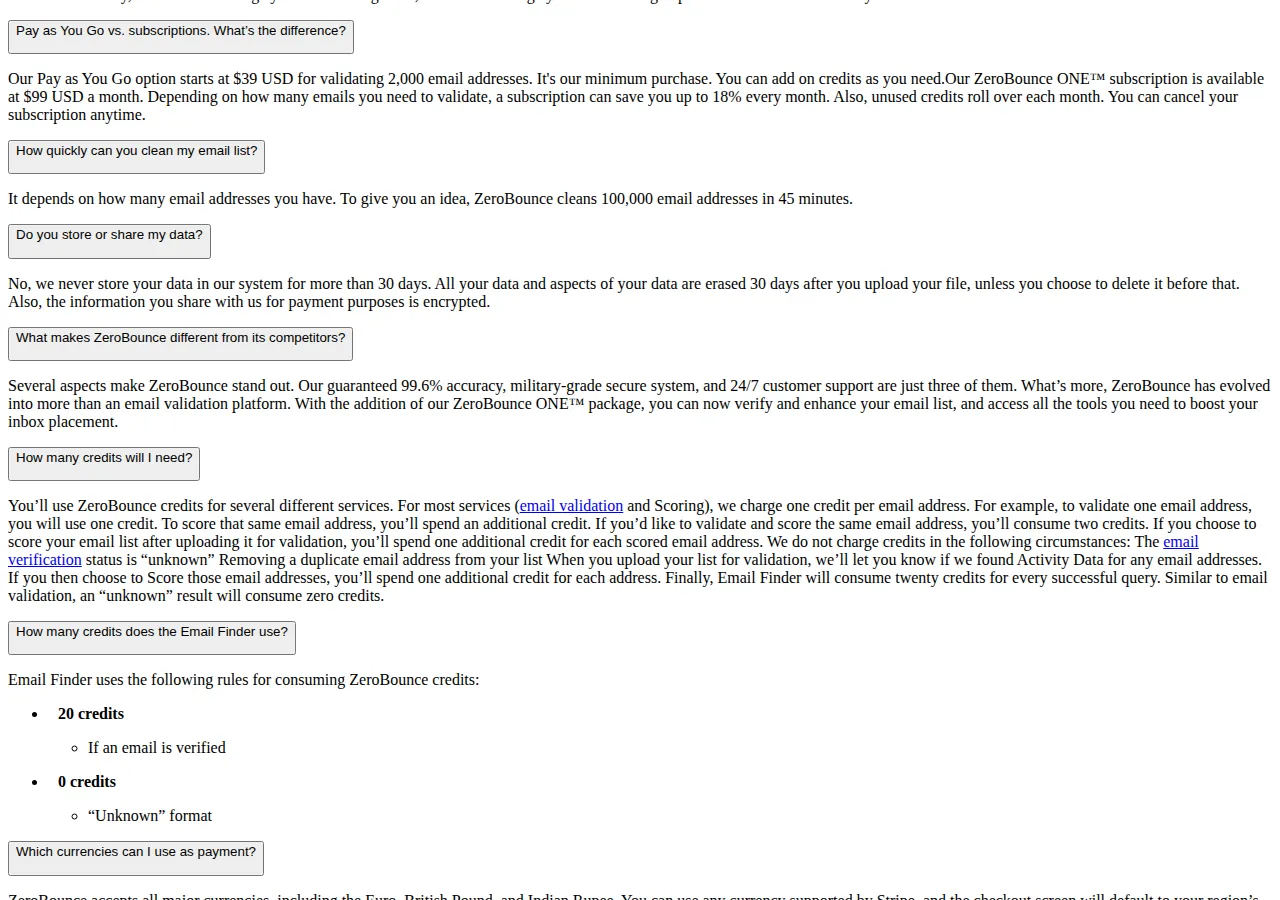
Verification is the step that catches the addresses bounces have not caught yet: typos at signup, disposable domains, role accounts, addresses that will hard-bounce on the next send. ZeroBounce's pricing page publishes the two ways to buy it. Pay as You Go starts at $39 for validating 2,000 email addresses — the minimum purchase — with credits added on as needed. ZeroBounce ONE is a subscription at $99 a month, with a minimum of 10,000 credits a month, unused credits rolling over, and a saving of up to 18 percent against pay-as-you-go. One credit validates or scores one email address, and a result of "unknown" consumes zero credits. The page also states its throughput: 100,000 email addresses cleaned in 45 minutes, and a published accuracy figure of 99.6 percent — its claim, stated as its claim.
The unit price on pay-as-you-go is exact:
| List size | Pay-as-you-go cost | What it buys |
|---|---|---|
| 10,000 addresses | $195.00 | Full validation before the next campaign |
| 50,000 addresses | $975.00 | Full validation, roughly 23 minutes at published throughput |
| 100,000 addresses | $1,950.00 | Full validation in about 45 minutes |
The subscription changes the comparison only when the volume is recurring: at the $99-a-month entry with a 10,000-credit minimum, a team validating 10,000 addresses every month pays about $0.0099 per email at full use, against $0.0195 pay-as-you-go. The decision is a frequency question, not a price question: a one-off list clean is pay-as-you-go; a monthly import pipeline is the subscription. Either way, the verification cost is a rounding error against the campaign it protects — a single campaign to 50,000 addresses costs $975 to verify and costs the domain if it is sent unverified.
Founder & CEO Insight — Enow A. Jovial
The cleaning operation, step by step
Work the first three steps in order; the rest are standing rules that stay true every send.
- Export the suppression list: bounces, unsubscribes, and complaints from your email platform, as a CSV, and keep the file as the audit trail.
- Remove hard bounces on first occurrence: 5xx replies leave the sending list the day they arrive, with no retry and no exception.
- Retry soft bounces on a fixed schedule: three attempts over seven days for a 4xx reply, then removal — the schedule is written down, not decided per address.
- [x] Run the sunset rule: 90 days without an open or click for frequent senders, 180 for infrequent ones; one re-engagement campaign, then removal, and the removal list is kept so the addresses are never re-imported.
- [x] Verify before the next big send: run the list through verification — pay-as-you-go at $0.0195 an address, or the $99-a-month subscription when the volume recurs — and price the choice against the campaign it protects with the pricing calculator.
- [x] Check the complaint rate after every send: against Yahoo's published 0.3 percent ceiling, calculated on delivered mail, and pause the next campaign if the rate is over the line.
- [x] Confirm authentication still passes: SPF and DKIM on every send, DMARC at p=none or stricter, and the List-Unsubscribe header carrying one-click unsubscribe.
The work is unglamorous, and that is the point. Nobody opens an email program to admire a clean list. They notice it when the campaigns land, the complaint rate stays under the line the mailbox providers publish, and the domain they spent years building still reaches the inbox. Hygiene is not a campaign. It is the maintenance that makes every campaign after it possible — and the cheapest deliverability fix there is, because the alternative is buying a new domain and starting the reputation clock from zero.