A new sending domain has no reputation, and mailbox providers treat no reputation as a risk. Domain warmup is the controlled ramp that builds that reputation before real outreach begins: start at 10 to 20 messages a day to real, engaged inboxes, increase the volume on a fixed schedule over two to three weeks, and let opens, replies, and removals from spam teach Gmail, Yahoo, and Outlook that the domain belongs in the inbox. Send 500 cold emails on day one instead, and providers read the spike as spam behaviour. This playbook gives the exact 21-day ladder, the sender rules, the monitoring, and the arithmetic behind skipping it.
What domain warmup actually is
Warmup is reputation building by demonstration. A mailbox provider cannot see your intentions; it sees behaviour — volume growth, complaint rate, bounce rate, engagement, and authentication. A domain with no history has no score. Warmup gives providers one: small volumes, steady growth, high engagement, before the domain carries a real campaign.
That history must be real engagement, not volume alone. A warmup exchange works because the receiving inbox opens the message, replies to it, marks it important, and pulls it out of spam when it lands there. That is why warmup tools exchange mail with a network of real inboxes.
Warmup is not authentication: SPF, DKIM, and DMARC prove who you are; warmup proves how you behave. A domain with perfect authentication and no warmup still lands in spam on its first large send. Set records up first with the cold email deliverability guide on SPF, DKIM and DMARC; choosing the sending domain is covered in the B2B cold email outbound infrastructure guide on secondary domains. This playbook starts where that guide ends.
Why warmup decides whether your pipeline gets read
An email that lands in spam is worth the same as an email never sent, except it cost you the send and a piece of your domain's standing. Example: take 10,000 prospects, a 2% reply rate among messages that reach the inbox, and a $150 value per qualified reply.
At a 95% inbox rate, the warmed domain produces $10{,}000 \times 0.95 \times 0.02 \times \$150 = \$28{,}500$. At a 60% inbox rate, the unwarm domain produces $10{,}000 \times 0.60 \times 0.02 \times \$150 = \$18{,}000$. The gap is $\$28{,}500 - \$18{,}000 = \$10{,}500$ on one campaign — and the unwarm domain keeps paying it until its reputation recovers. Price your own gap with the Marketing and Capital ROI Calculator.
Reputation compounds: inbox placement earns the opens and replies that reinforce it; spam placement earns the complaints that reinforce that. The first two weeks set the direction. Domain age alone does not save you: an old domain that has never sent mail has no sending reputation.
The bar warmup has to clear: Google and Yahoo's sender rules
Google and Yahoo publish the same core standard: Google enforced its requirements from February 1, 2024; Yahoo from February 2024, rolling out gradually through the first half of 2024. Both set stricter requirements for bulk senders.
| Requirement | Google (Gmail) | Yahoo | Authority |
|---|---|---|---|
| Bulk sender threshold | Over 5,000 messages/day to Gmail | Bulk senders (no numeric threshold published) | Google; Yahoo |
| Spam complaint rate | Below 0.3% in Postmaster Tools | Below 0.3% | Google; Yahoo |
| Authentication, all senders | SPF or DKIM minimum | SPF or DKIM minimum | Google; Yahoo |
| Authentication, bulk senders | SPF and DKIM, plus DMARC (p=none allowed) | SPF and DKIM, plus DMARC ≥ p=none, must pass | Google; Yahoo |
| One-click unsubscribe | Required for marketing/subscribed mail above 5,000/day | List-Unsubscribe, one-click; RFC 8058 POST recommended | Google; Yahoo |
| DNS | Valid forward and reverse DNS (PTR) | Valid forward and reverse DNS | Google; Yahoo |
The 0.3% rate is complaints divided by delivered mail, measured in Google Postmaster Tools:
Fifteen complaints a day is the ceiling at 5,000 daily sends, and the ceiling applies to the rate, not the count: at 500 sends a day the allowance is effectively one or two complaints. Yahoo also strongly recommends bulk senders include a "rua" tag for DMARC reports, with the From domain aligned to the SPF or DKIM domain. Google requires a DKIM key of at least 1,024 bits (2,048 recommended) and a TLS connection.
The 21-day ramp: the exact volume ladder
The ladder below runs 21 days, matching the two-to-three-week window Instantly gives for taking a brand-new domain to full-scale outreach. Each step roughly doubles the previous one and never more, because sudden volume spikes are a spam signal lemwarm names explicitly.
| Days | Daily volume | Running total | What the domain is doing |
|---|---|---|---|
| 1–3 | 10 | 30 | Warmup only |
| 4–6 | 25 | 105 | Warmup; first test sends |
| 7–9 | 50 | 255 | Warmup; first small batch, warmest segment |
| 10–12 | 100 | 555 | Engaged contacts only |
| 13–15 | 200 | 1,155 | Full engaged segment |
| 16–18 | 350 | 2,205 | Check Postmaster Tools reputation |
| 19–21 | 500 | 3,705 | Full volume; hold one week |
Total ramp mail:
3,705 messages is the price of a reputation — three weeks and a warmup subscription against the $10,500 gap above. If your target is above 500 sends a day from one domain, add a second warmed domain instead, following the B2B cold email outbound infrastructure guide on secondary domains, and ramp it on the same schedule.
Run the ramp in three phases: Phase 1, days 1–9, warmup and first test sends; Phase 2, days 10–15, engaged contacts only; Phase 3, days 16–21, full volume with dashboard checks.
Two rules govern the ladder: never increase volume on a day when the previous day's spam rate or bounce rate rose — hold flat, fix the cause, resume the next day — and never let a single day's jump exceed a doubling.
Warmup tools: what each one actually does
Three tools cover most of the market; prices are list prices from each vendor's own pages on November 19, 2026.
| Tool | What it actually does | Price (list, Nov 19, 2026) | Authority |
|---|---|---|---|
| Instantly warmup | Automated warmup; AI exchanges mimicking human conversation, with opens, replies, spam rescue; keeps running after campaigns start | Included free with Instantly; no separate price published | Instantly warmup guide |
| lemwarm (by lemlist) | Automatic warmup across 20,000+ healthy domains; deliverability score tracking with alerts | Essential $29/email/month ($24 yearly); Smart $49 ($40 yearly); free with every lemlist plan | lemwarm pricing page |
| Warmbox | AI-based warmup; auto-remove from spam, auto-reply, spam-score monitoring; Growth, Flat, or Random ramps | Solo $15/mo yearly ($19 monthly), 1 inbox, 50/day; Start-up $69 ($79), 3 inboxes, 250/day; Growth $139 ($159), 6 inboxes, 500/day | Warmbox pricing page |
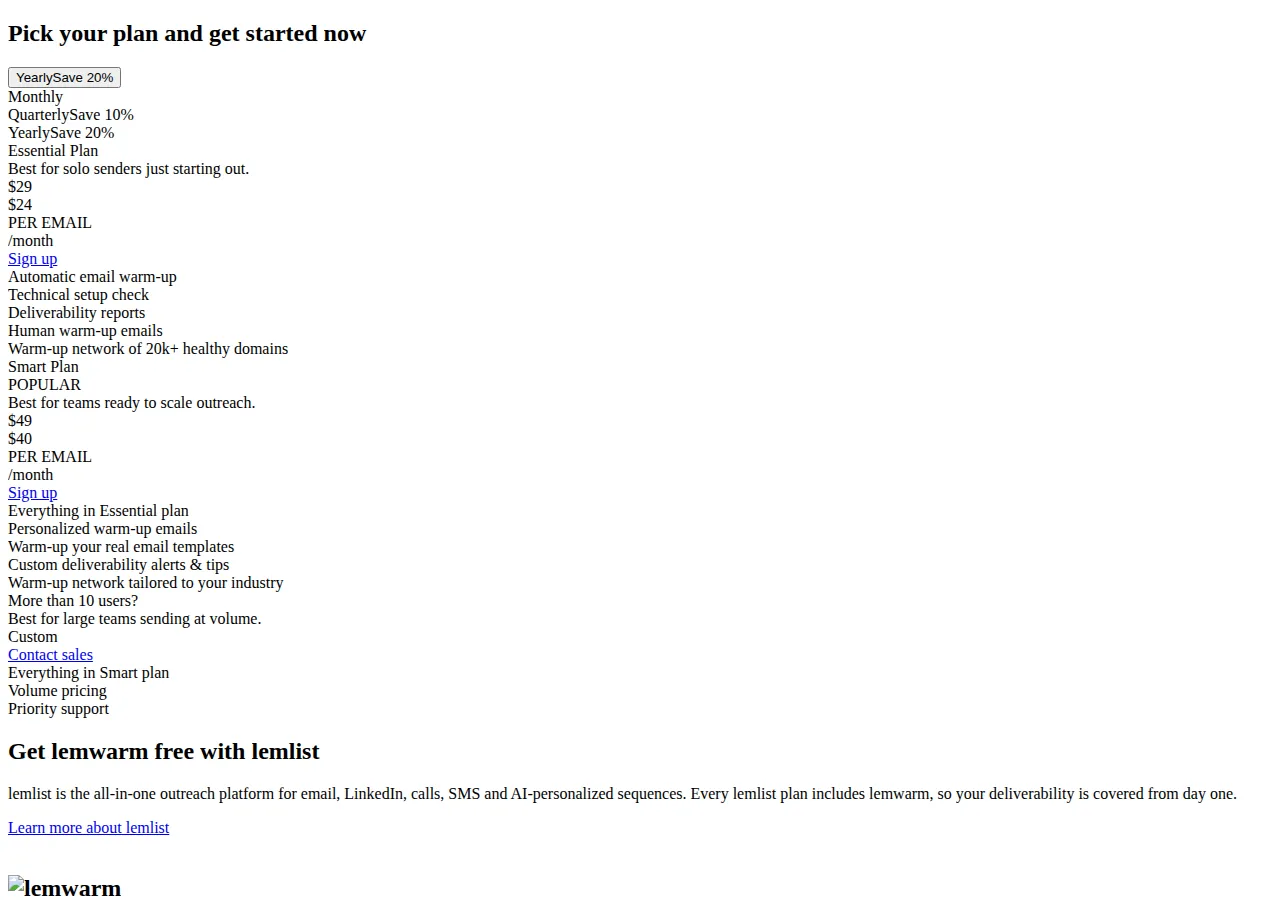
The screenshot above shows lemwarm's pricing page. Note the unit — per email, per month: three inboxes on lemwarm Smart cost $147 a month, against $69 for three on Warmbox Start-up.
Instantly is the default when it is already the sending platform, because warmup, campaigns, and inbox live in one system. Lemwarm is the default when monitoring matters as much as the warmup: its score tracking and alerts catch a reputation slide before campaign results do. Warmbox is the default for a multi-inbox setup on a budget. What none of them does is warm a domain with bad authentication, a purchased list, or deceptive content.
The manual ramp, and the no-warmup option
A manual ramp is possible, and Instantly's own guide describes it: gather a group of real people, send them instructions, start in small volumes, and increase slowly over two to three weeks, with each participant opening the mail, marking it important, replying with a real message, and pulling it out of spam when it lands there. It is also, in the same guide's words, a strenuous process — and its failure mode is silent: nobody tells you the participants stopped opening on day nine. Do it only when the budget is zero and the volume is small, a founder mailing fifty warm contacts a week. Above that, a tool costs less than one hour of the founder's time per month. Skipping warmup entirely is the third option, and the worst: spam-folder placement and domain burn from day one. One rule applies to every route: warmup never ends — once the domain reaches full volume, keep it running.
Monitoring: Postmaster Tools and SNDS
Google Postmaster Tools is the Gmail view: spam rate, domain and IP reputation, authentication, and delivery errors. Check from day seven, and read spam rate and domain reputation together: a rising spam rate with a falling reputation is the earliest warning the ramp has outrun the domain.
Microsoft SNDS is the Outlook view: data about individual sending IPs, plus the Junk Email Reporting Program, which reports when a recipient marks a message as junk. Microsoft's wording is blunt: deliverability to Outlook.com is based on reputation, and reputation is always the responsibility of the sender. Access requires a Microsoft account and a request for your IPs; the portal was relaunched in a version announced September 22, 2026. SNDS is IP-level where Postmaster Tools is domain-level: Postmaster Tools tells you how Gmail judges the domain, SNDS how Outlook judges the IP. Record three numbers weekly — spam rate, domain reputation, IP status.
Pause and rollback triggers
The ramp is a schedule, not a promise. Five conditions stop it: hold flat or step back, never push through.
- Spam rate at or above 0.3% on any day. Hold volume, remove the offending segment, resume after two clean days below 0.1%.
- Bounce rate above 2% on any day. Stop campaign mail, verify the list, resume warmup-only traffic until bounces fall.
- Postmaster Tools domain reputation drops a band. Hold volume flat for a week; clean sending is the cheapest repair.
- Messages landing in spam in seed tests. If test messages to Gmail and Outlook seed accounts land in spam, step back one rung for three days.
- A sudden volume spike from any cause. A misfire, a duplicated send, a list import that doubled the day's volume: return to the previous rung and rebuild.
The rollback is the playbook working: stepping back from 200 to 100 for three days costs a week of growth; pushing through a spam-rate breach costs the domain.
Founder & CEO Insight — Enow A. Jovial
When warmup fails: domain burn and what recovery costs
Domain burn is the end state of a skipped or broken warmup: providers route most of the domain's mail to spam or reject it outright, and ordinary sending no longer recovers it. The signs are consistent — open rates collapse across providers at once, Postmaster Tools shows the lowest reputation band, and seed tests land in spam everywhere on the same day.
At $150 per qualified reply and a 2% reply rate, a warmed domain at a 95% inbox rate produces $28,500 of expected reply value on 10,000 sends, from the earlier arithmetic. At a 20% inbox rate after a burn, the same sends produce $10{,}000 \times 0.20 \times 0.02 \times \$150 = \$6{,}000$. The loss is $\$28{,}500 - \$6{,}000 = \$22{,}500$ per 10,000 sends while the domain stays burned, before counting the replacement domain, the new 21-day ramp, and the new warmup subscription. Resting the domain recovers it slowly, if at all, so operators retire it and warm a replacement. That is why the secondary-domain pattern exists.
Prevention has four parts: authenticate before the first send, ramp on the ladder, monitor both dashboards weekly, and never let one day's volume more than double the last.
The execution checklist
- [x] Authenticate first: SPF, DKIM, and DMARC published and passing; DMARC at least p=none; DKIM key 1,024 bits or longer. See the cold email deliverability guide on SPF, DKIM and DMARC.
- [x] Register for monitoring: Monitor in Google Postmaster Tools; request SNDS access for the sending IPs.
- [x] Choose the warmup route: Tool or manual, decided before day one, set to the 21-day ladder.
- [x] Start at 10 a day: Warmup exchanges only for three days; no campaign mail until day four.
- [x] Grow by the ladder, never more than doubling: 10, 25, 50, 100, 200, 350, 500 across the seven steps.
- [x] Seed-test every step: Test to Gmail, Outlook, and Yahoo seed accounts at each new volume; confirm inbox placement first.
- [x] Read the dashboards from day seven: Record spam rate, domain reputation, and IP status weekly; hold on any breach above.
- [x] Warm the list as well as the domain: First campaign batches go to the most engaged contacts only — see the email list segmentation RFM and cohort retention playbook.
- [x] Keep warmup running after day 21: Warmup never ends; maintenance exchanges hold the reputation the ramp built.
- [x] Document the ramp: Keep daily volume, spam rate, and reputation band in one log.
Warmup is three weeks of small, correctly-sized sends that buy the right to send at scale for the life of the domain.