Docusign vs Dropbox Sign vs PandaDoc: The E-Signature Price War, Priced Per Seat
Three vendors sell the same legal outcome — a signature a court will accept — and charge for it in three different ways. Docusign sells envelopes. Dropbox Sign (formerly HelloSign) sells senders and gives away the signatures. PandaDoc sells the document itself. A buyer who compares only the monthly headline picks the wrong vendor twice: on the plan, and on the billing cycle, where month-to-month pricing runs 50 percent above the annual rate on Docusign Standard.
Every figure below comes from a page opened on 7 November 2026, or is labelled corroborated secondary. Docusign's page loaded; the Dropbox Sign page returned a 404 and the PandaDoc page a rate-limit error, so their figures rest on four independent 2026 reads. All three are priced at 1, 5, and 25 seats, then month to month, per envelope, and per API call.
> [!KEY TAKEAWAY]
> The billing unit is the decision. Docusign caps envelopes per user per year, so volume is the tax. Dropbox Sign charges per sender and never counts a signature, so headcount is the tax. PandaDoc charges per seat for a sales document machine that happens to sign, so the CRM is the tax. Count envelopes, senders, and CRM users first.
The law first: what makes the signature count
An electronic signature is legally valid in the United States under the ESIGN Act, 15 U.S.C. section 7001, which bars denying a signature, contract, or record legal effect solely because it is electronic or because an electronic signature was used. Section 7006 defines it as a sound, symbol, or process attached to a record and executed with intent to sign. Intent is the hinge: a typed name and a click-to-sign button both qualify when the signer meant to sign.
The federal act governs transactions in interstate or foreign commerce. Inside a single state, the Uniform Electronic Transactions Act, UETA, does the same work. UETA, a 1999 model law, has been enacted by 49 states plus the District of Columbia, Puerto Rico, and the U.S. Virgin Islands. New York is the only holdout, running its own Electronic Signatures and Records Act, ESRA, to the same effect. ESIGN defers to a state UETA enactment under 15 U.S.C. section 7002.
!15 U.S.C. section 7001: the general rule of validity
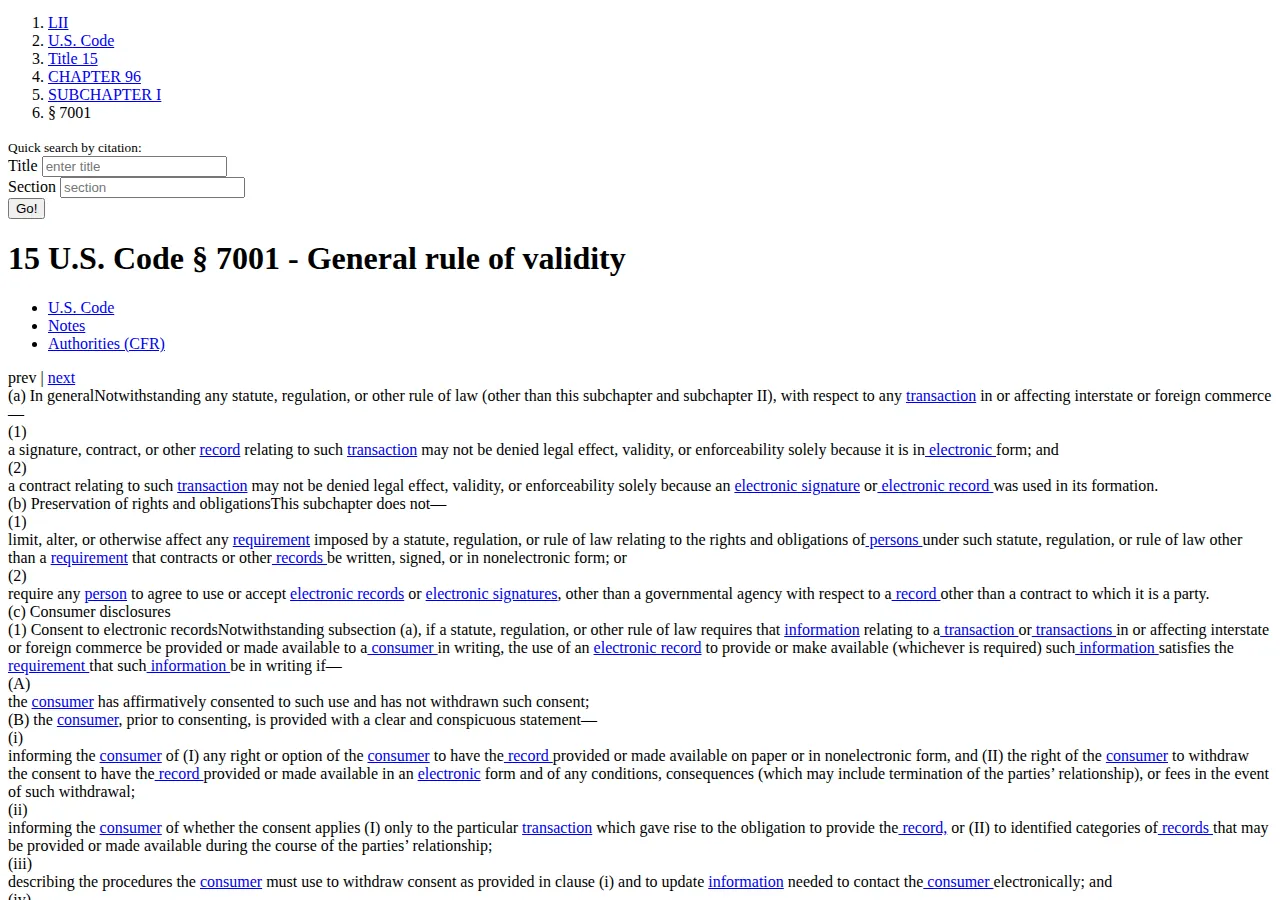
Two limits matter. First, ESIGN section 7001(c) imposes consent and disclosure duties when a law requires information to be given to a consumer in writing: the consumer must consent to electronic delivery, must be offered a paper copy, and must be able to withdraw consent without a fee. Second, neither law covers everything: UETA does not apply to wills, testamentary trusts, or documents relating to births, marriages, or divorces.
What each vendor actually sells
Docusign sells e-signature. Personal, at 11 dollars a month on an annual commitment, is a single-user plan with 5 envelopes a month. Standard, at 30 dollars per user per month, is the team plan: shared templates, 100 envelopes per user per year, 5 identity verifications as a one-time bonus. Business Pro, at 45 dollars per user per month, adds web forms, bulk send, payments, and custom fields on the same allowance. Advanced Solutions is quote-only. Standard and Business Pro cap self-serve seats at 50 users.
!Docusign pricing tiers: Personal, Standard, and Business Pro
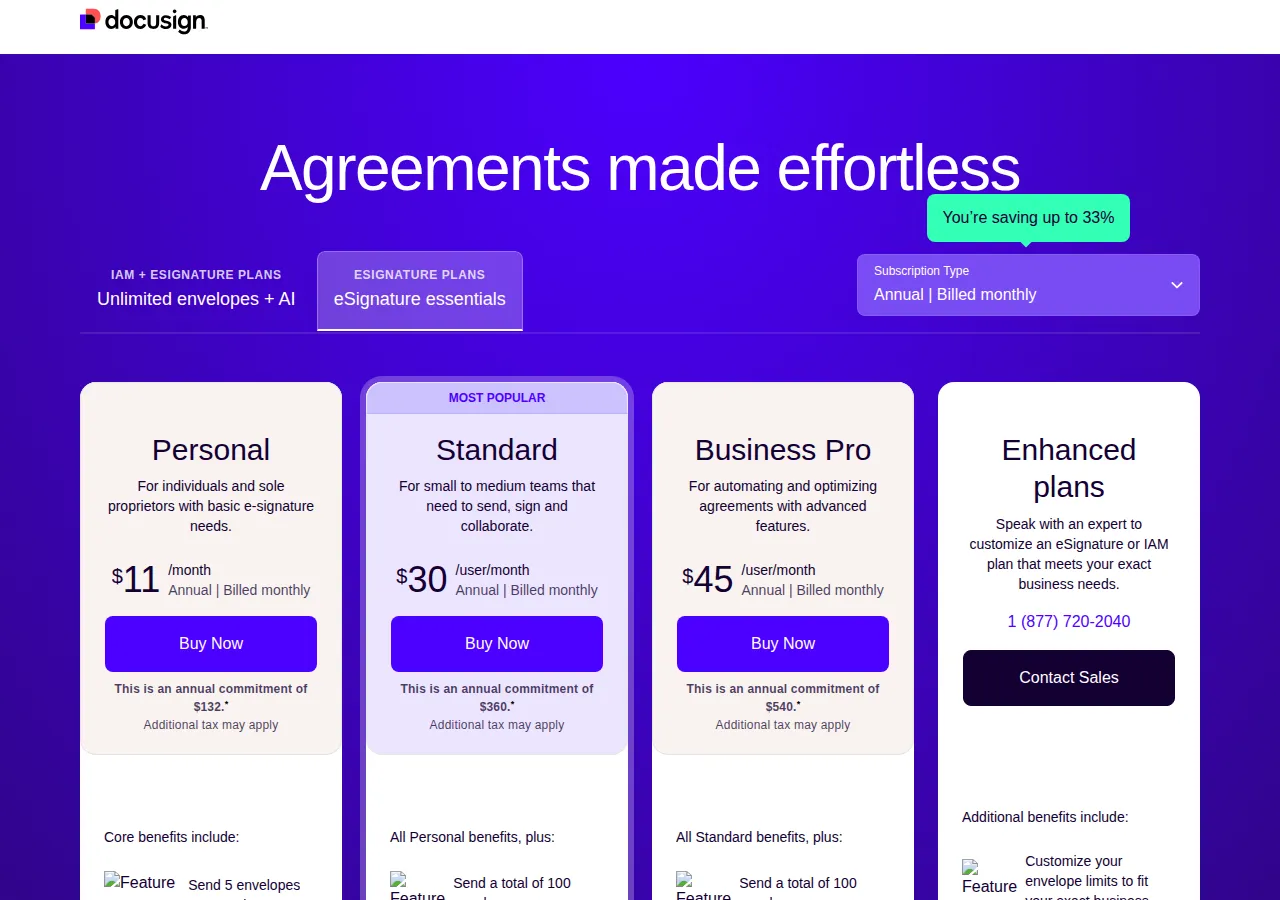
The envelope is Docusign's metering unit. One envelope is one record sent for signature, however many documents, fields, or signers it holds. Send a 40-page agreement to six signers and it counts once; send it twice and it counts twice, signed or not. Beyond the allowance, overage is billed pay-as-you-go at an unpublished rate: get it in writing first.
Dropbox Sign sells a sender licence with no meter on signatures. HelloSign became Dropbox Sign. Essentials, at 15 dollars a month annually, covers one sender with unlimited signature requests and 5 templates. Standard, at 25 dollars per user per month, needs at least two senders, starts at 600 dollars a year, raising templates to 15 and adding signer attachments, in-person signing, branding, bulk send, and reporting. Premium is quote-only for five or more senders, adding single sign-on. A free plan gives 3 signature requests per 30 days and unlimited self-signing.
PandaDoc sells the document, and the signature rides along. Essentials, at 19 dollars per user per month on annual billing, covers at most 2 seats with templates, a drag-and-drop editor, pricing tables, analytics, and payments. Business, at 49 dollars per user per month, adds CRM integrations (Salesforce, HubSpot, Pipedrive), a content library, custom branding, approval workflows, forms, and bulk send. Enterprise is quote-only, with single sign-on and API access. All paid plans include unlimited documents and signatures; a free eSign plan covers unlimited uploads and signatures.
The decision table
| Decision | Docusign | Dropbox Sign | PandaDoc | Authority |
| :--- | :--- | :--- | :--- | :--- |
| Billing unit | Per envelope, 100 per user per year | Per sender, unlimited requests on paid plans | Per seat, unlimited documents and signatures | Vendor page; corroborated |
| Templates | Shared templates from Standard | 5 on Essentials, 15 on Standard, unlimited on Premium | Templates on Essentials, content library on Business | Vendor page; corroborated |
| API | Separate API plans from 50 dollars a month | Separate API plans from 75 dollars a month | Production API key needs Enterprise | API pricing corroborated secondary |
Worked math: 1, 5, and 25 seats on annual billing
Annual billing means an annual commitment billed monthly, the default on all three pricing pages. Month-to-month rates run 15, 45, and 65 dollars on Docusign Personal, Standard, and Business Pro; 20 and 30 dollars on Dropbox Sign Essentials and Standard; and 29 dollars on PandaDoc Essentials. No PandaDoc Business month-to-month figure could be verified. The formula for every team total below is the same:
$
\text{Annual Cost} = \text{Seats} \times \text{Price Per User Per Month} \times 12
$
| Seats | Docusign Personal | Docusign Standard | Docusign Business Pro | Dropbox Sign Essentials | Dropbox Sign Standard | PandaDoc Essentials | PandaDoc Business |
| ---: | ---: | ---: | ---: | ---: | ---: | ---: | ---: |
| 1 | 11/mo, 132/yr | 30/mo, 360/yr | 45/mo, 540/yr | 15/mo, 180/yr | — (min 2) | 19/mo, 228/yr | 49/mo, 588/yr |
| 5 | — | 150/mo, 1,800/yr | 225/mo, 2,700/yr | — (1 sender) | 125/mo, 1,500/yr | — (max 2 seats) | 245/mo, 2,940/yr |
| 25 | — | 750/mo, 9,000/yr | 1,125/mo, 13,500/yr | — | 625/mo, 7,500/yr | — | 1,225/mo, 14,700/yr |
Cheapest paid seat: Docusign Personal, 132 dollars a year for 60 envelopes, capped at 5 a month. Cheapest unlimited: Dropbox Sign Essentials, 180 dollars a year. At five seats Dropbox Sign Standard is cheapest on subscription alone: 300 dollars a year below Docusign Standard, 1,440 dollars below PandaDoc Business. Three-year totals at 25 seats: 27,000 dollars (Docusign Standard), 22,500 dollars (Dropbox Sign Standard), 40,500 dollars (Business Pro), 44,100 dollars (PandaDoc Business). At five seats: 5,400, 4,500, 8,100, and 8,820 dollars in the same order. The 25-seat Dropbox Sign total is a list-rate estimate (teams of five or more are asked to contact sales).
The month-to-month premium is the cost of refusing the annual commitment:
$
\text{Month-to-Month Premium} = 12 \times \text{Seats} \times (\text{Monthly Rate} - \text{Annual Rate})
$
Month to month at five seats: Docusign Standard 2,700 dollars a year against 1,800 dollars, a 900-dollar premium. Business Pro 3,900 dollars against 2,700 dollars, a 1,200-dollar premium. Dropbox Sign Standard 1,800 dollars against 1,500 dollars, a 300-dollar premium. PandaDoc Essentials for one seat 348 dollars against 228 dollars, a 120-dollar premium.
Per-envelope math: where the winner changes
Subscription totals hide the real cost driver: how many documents each seat actually sends. Docusign Standard at its full 100-envelope allowance costs 360 dollars divided by 100, or 3.60 dollars per envelope. At 50 envelopes it is 7.20 dollars each; at 10, 36.00 dollars each. Business Pro at full use costs 5.40 dollars per envelope. Personal at its full 60-envelope allowance costs 2.20 dollars per envelope, 5.50 dollars each at 24 a year.
On unlimited plans the effective rate is the subscription divided by the documents actually sent. Dropbox Sign Essentials costs 1.80 dollars each at 100 documents a year, 0.60 dollars at 300, and 0.18 dollars at 1,000. PandaDoc Essentials costs 2.28 dollars each at 100 documents and 0.76 dollars at 300. The crossover is exact: Dropbox Sign Essentials falls below Docusign Standard's 3.60-dollar rate at 51 documents a year (180 divided by 51 is 3.53 dollars); the two tie at 50. A solo sender signing more than 50 documents a year pays less per document on Dropbox Sign Essentials than on Docusign Standard at full use.
PandaDoc Essentials is 132 dollars a year cheaper per user than Docusign Standard, yet it caps at two seats and carries no CRM integration, no approval workflow, and no bulk send. A sales team sending proposals from a CRM should price PandaDoc Business at 49 dollars per user per month against Docusign Business Pro at 45 dollars, not against Essentials. The HubSpot versus Salesforce versus Pipedrive CRM pricing guide prices the CRM side, and PandaDoc Business plugs into all three.
Worked example: a five-seat sales team sending 40 proposals a month, 480 a year. On Docusign Standard the five seats carry 500 envelopes of allowance, so the year fits — 1,800 dollars, or 3.75 dollars per proposal. On PandaDoc Business the same team pays 2,940 dollars, or 6.13 dollars per proposal, and gets the CRM workflow Docusign Standard lacks. The 1,140-dollar gap is the price of the proposal workflow, not of the signatures. Count the envelopes for the last twelve months, by sender, because the cap is per user, not per account.
The API: a second bill entirely
None of the three vendors includes production API access in its web plans. Docusign sells separate eSignature API plans: Starter at 50 dollars a month on annual billing for 40 envelopes a month, Intermediate at 300 dollars a month for 100 a month, and Advanced at 480 dollars a month for 100 a month with bulk send. Starter is 600 dollars a year for 480 envelopes, or 1.25 dollars per envelope; Intermediate runs 3.00 dollars and Advanced 4.80 dollars.
Dropbox Sign sells separate API plans too: Essentials API at 75 dollars a month for 50 signature requests a month, and Standard API at 250 dollars a month for 100 requests a month, with Premium API by quote. That is 900 dollars a year for 600 requests (1.50 dollars each) and 3,000 dollars a year for 1,200 requests (2.50 dollars each). PandaDoc gates its production API key behind the quote-only Enterprise plan, although a developer API plan at 40 dollars a month for 40 documents a month is listed in 2026 reads, and eligible free accounts created after 5 June 2026 get 60 production documents a year. Price the API plan, not the web plan, for embedded signing: the seats and the envelopes are different meters. A B2B SaaS product signing its own customer contracts through an API needs the audit trail in CSV form for its CPA, the LLC or C-Corp entity name on the agreement, and KYC checks where the signer is unknown. For the agreement itself, the LLC operating agreement breakdown covers the document most small businesses sign first, and the ASC 606 revenue recognition guide for SaaS contracts covers how the signed contract turns into recognised revenue.
> [!FOUNDER]
> "I have watched founders pick an e-signature tool by the monthly price and then pay for it in envelope overage or a second seat bought only for its allowance. Price the signatures you will actually send and count the seats that will send them. The cheapest plan is the one whose limits you never hit."
> — Enow A. Jovial, Founder & Chief Executive Officer
> [!WARNING]
> Do not sign a will, a trust, a divorce settlement, or a court filing through any of these tools on the assumption that ESIGN covers it. UETA excludes wills, testamentary trusts, and documents relating to births, marriages, and divorces. A signature valid for a sales contract can be void for a will in the same state.
The execution checklist
#### Phase 1: Count before you buy
#### Phase 2: Price on your own numbers
#### Phase 3: Prove it before the annual commitment
> [!TIP]
> Start on monthly billing for one month, send the real volume, then switch to annual billing. Docusign Standard at five seats costs 225 dollars for one month-to-month month against 150 dollars on annual billing, so the test costs 75 dollars and saves a 900-dollar annual mistake.
Docusign wins when the envelope cap is never hit and the brand on the request matters. Dropbox Sign wins when signatures are many, senders are few, and templates stay under 15. PandaDoc wins when the document is the sale and the signature is the last line of a proposal built in a CRM. Price your own envelopes, senders, and templates, and the winner is arithmetic, not preference.