Three vendors sell the same promise: run code without a server, pay only for what runs. The price lists look interchangeable until you read the billing unit, and the billing unit is where the money goes. AWS Lambda and Azure Functions charge by the gigabyte-second, a unit that bundles CPU and memory into one number. Google Cloud Functions 2nd gen charges CPU and memory separately, which means a function that holds a full vCPU for 200 milliseconds costs roughly three times as much on Google as on AWS at the same settings. This guide prices the same workload on all three, at 1 million, 10 million, and 100 million invocations a month, with the free tiers applied honestly.
> [!FOUNDER]
> The question I hear most is which serverless vendor is cheapest. It is the wrong question, because the answer changes with the shape of the function. A 200-millisecond function at 512 MB costs almost the same on Lambda and Azure, and about four times as much on Cloud Functions, because Google bills a full vCPU while the other two bill memory. Price the function you actually run, not the vendor you like.
The workload, stated before the math
Every figure below uses one workload profile, so the three vendors are compared on identical terms: 512 MB of memory, 200 milliseconds of average duration, and 1 vCPU allocated for Google Cloud Functions 2nd gen. The profile is a typical API handler: a JSON request in, a database read, a JSON response out. If your function is different, the per-invocation formulas still work, because each vendor's price is a linear function of invocations, duration, and memory.
The per-invocation compute for each vendor, at this profile:
$
\text{Lambda per invocation} = 0.2\,\text{s} \times 0.5\,\text{GB} \times \$0.0000166667 = \$0.00000166667
$
$
\text{Azure per invocation} = 0.2\,\text{s} \times 0.5\,\text{GB} \times \$0.000016 = \$0.0000016
$
$
\text{Cloud Functions per invocation} = 0.2\,\text{s} \times 1\,\text{vCPU} \times \$0.000024 + 0.2\,\text{s} \times 0.5\,\text{GiB} \times \$0.0000025 = \$0.00000505
$
The Google figure is the story of this guide in one line. The CPU term, $0.0000048, is 95 percent of the per-invocation cost, and the memory term, $0.00000025, is the rest. Lambda and Azure fold the CPU into the gigabyte-second and never show it separately.
The rates, from the vendors' own pages
| Item | AWS Lambda | Google Cloud Functions 2nd gen | Azure Functions Consumption |
| :--- | :--- | :--- | :--- |
| Requests | $0.20 per 1M, first 1M free per month | $0.40 per 1M, first 2M free per month | $0.20 per 1M, first 1M free per month |
| Compute unit | $0.0000166667 per GB-s, first 400,000 GB-s free per month | CPU $0.000024 per vCPU-s, first 180,000 free; memory $0.0000025 per GiB-s, first 360,000 free | $0.000016 per GB-s, first 400,000 GB-s free per month |
| Billing increment | 1 ms | 100 ms | 100 ms |
| Idle CPU | Not billed separately | $0.0000025 per vCPU-s when idle with minimum instances | Not billed separately |
| Ephemeral storage | $0.0000000309 per GB-s beyond 512 MB free | Included in the instance | Included in the instance |
| Authority | AWS Lambda Pricing | Google Cloud Functions Pricing | Azure Functions Pricing |
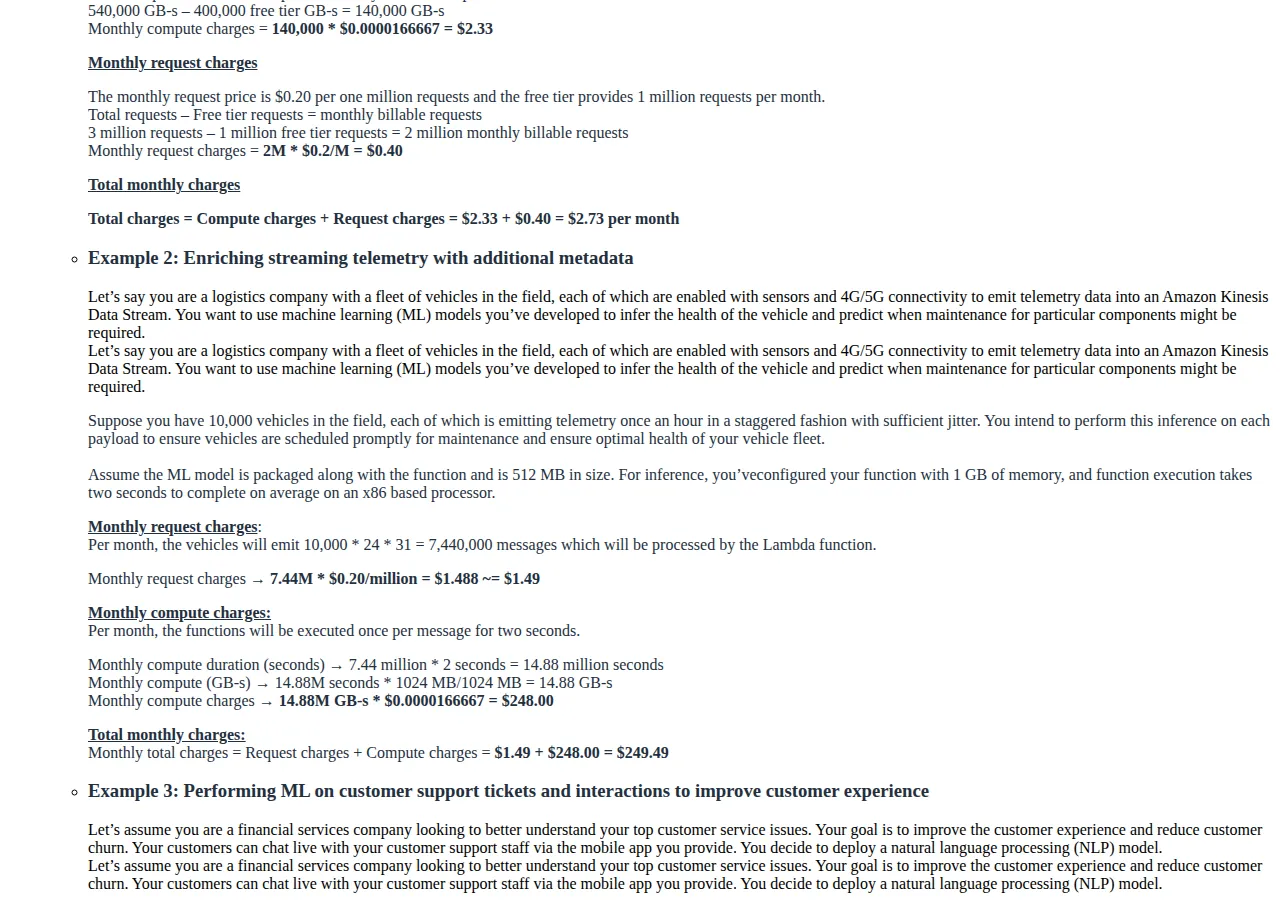
AWS publishes a worked example on its own pricing page. A workload with 540,000 GB-seconds in a month, minus the 400,000 GB-second free tier, leaves 140,000 billable GB-seconds, which cost $2.33 at $0.0000166667 per GB-second. Three million requests minus the 1 million free requests leaves 2 million billable requests at $0.20 per million, or $0.40. The total is $2.73 a month.
The monthly bill at 1, 10, and 100 million invocations
The tables below apply the free tiers before multiplying. Gross means before the free tier. Net means after it. All figures use the 512 MB, 200 ms profile.
At 1 million invocations a month
| Vendor | Gross requests | Gross compute | Gross total | Net total |
| :--- | :--- | :--- | :--- | :--- |
| AWS Lambda | $0.20 | $1.67 | $1.87 | $0.00 |
| Azure Functions | $0.20 | $1.60 | $1.80 | $0.00 |
| Cloud Functions 2nd gen | $0.40 | $5.05 | $5.45 | $0.48 |
At 1 million invocations, Lambda and Azure cost nothing, because 1 million requests and 100,000 GB-seconds both sit inside the free tier. Cloud Functions costs $0.48, because the free tier gives 2 million requests and 360,000 GiB-seconds of memory, but only 180,000 vCPU-seconds of CPU, and the workload uses 200,000. The 20,000 vCPU-seconds above the free tier, at $0.000024 each, are $0.48.
At 10 million invocations a month
| Vendor | Requests after free tier | Compute after free tier | Monthly total |
| :--- | :--- | :--- | :--- |
| AWS Lambda | $1.80 | $10.00 | $11.80 |
| Azure Functions | $1.80 | $9.60 | $11.40 |
| Cloud Functions 2nd gen | $3.20 | $45.28 | $48.48 |
At 10 million: Lambda totals $11.80, Azure $11.40, and Cloud Functions $48.48. The Google CPU line alone is $43.68, or 90.1 percent of its bill.
$
\frac{\$48.48}{\$11.80} = 4.1\times \quad \text{and} \quad \frac{\$11.40}{\$11.80} = 0.966
$
At 10 million invocations, Cloud Functions costs 4.1 times Lambda, and Azure costs 3.4 percent less than Lambda. The per-invocation cost, net of the free tier, is $0.00000118 on Lambda, $0.00000114 on Azure, and $0.000004848 on Cloud Functions.
At 100 million invocations a month
| Vendor | Requests after free tier | Compute after free tier | Monthly total |
| :--- | :--- | :--- | :--- |
| AWS Lambda | $19.80 | $160.00 | $179.80 |
| Azure Functions | $19.80 | $153.60 | $173.40 |
| Cloud Functions 2nd gen | $39.20 | $499.78 | $538.98 |
At 100 million, the free tier is a rounding error and the unit prices decide everything. Lambda totals $179.80, Azure $173.40, and Cloud Functions $538.98. The Google bill is 3.0 times the Lambda bill at this volume, down from 4.1 times at 10 million, because the request charge, which is only twice Lambda's, dilutes the CPU gap as volume grows.
The Azure Flex trap
Azure offers a second plan, Flex Consumption, and it is the most common way to overpay on Azure. Flex charges $0.40 per million executions with a free grant of 250,000 executions a month, and $0.000026 per GB-second on demand with a free grant of 100,000 GB-seconds a month. Flex also offers Always Ready instances at $0.000016 per GB-second. Run the same 10-million-invocation profile on Flex:
$
\text{Flex executions} = \frac{10{,}000{,}000 - 250{,}000}{1{,}000{,}000} \times \$0.40 = \$3.90
$
$
\text{Flex compute} = (1{,}000{,}000 - 100{,}000) \times \$0.000026 = \$23.40
$
$
\text{Flex total} = \$3.90 + \$23.40 = \$27.30
$
Flex costs $27.30 against $11.40 for the classic Consumption plan at this profile, or 2.4 times as much. Flex exists for workloads that need virtual network integration, larger instances, and always-ready capacity. If your function does not need those three things, Flex is a premium plan bought by accident, usually because a tutorial defaulted to it.
> [!WARNING]
> The Flex plan is not a discount tier, and the name does not say that anywhere on the bill. A function app created from a template can land on Flex, and the first sign is a bill roughly double the Consumption price for the same invocations. If your Azure bill is higher than the tables in this guide predict, check the plan before the code.
How Azure meters, and why it matters
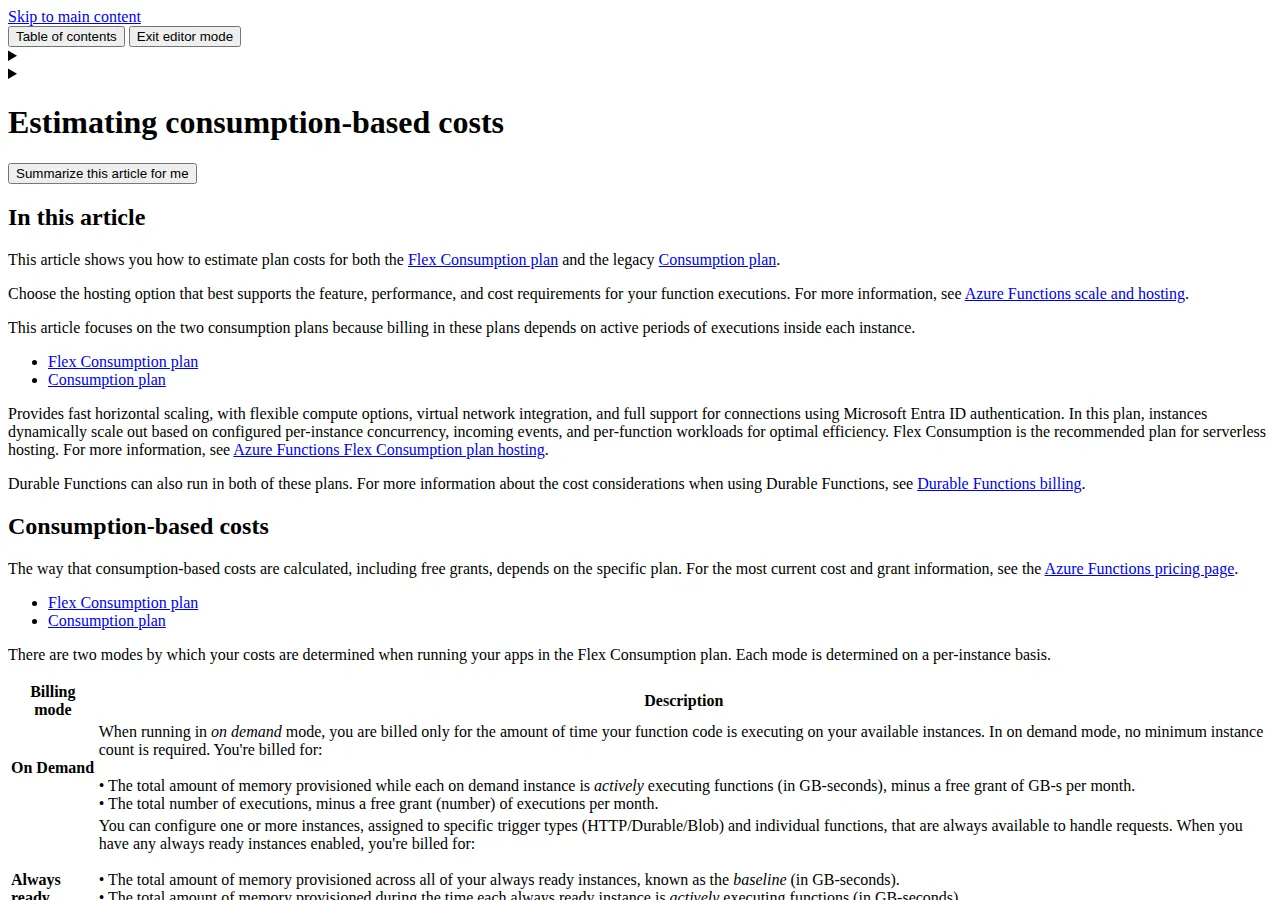
Microsoft documents its metering in plain language. Azure rounds memory usage up to the nearest 128 MB bucket: a process that uses 160 MB is billed for 256 MB. The rounding is small per invocation and large at 100 million invocations, which is exactly the scale where nobody checks it.
The same documentation gives a worked metering example: an app that consumed 3,540,992,000 MB-milliseconds over nine minutes, which is 3,458.00 GB-seconds, and 2,102 executions. At $0.000016, those 3,458 GB-seconds cost $0.06. The meter is honest and the rounding is the only surprise.
Lambda has its own small charge that surprises people at scale: ephemeral storage. Lambda provides 512 MB of ephemeral storage at no additional cost, and charges $0.0000000309 per GB-second beyond that. AWS gives an example with 2,048 MB configured: 2,048 minus 512 leaves 1,536 MB billable. A function that writes large temporary files, or that unpacks a large model into the temp directory, pays for storage on every invocation, on top of the compute charge.
Operator boundaries
Each vendor's pricing page carries boundaries that are not prices but still decide the bill. Lambda's free tier does not apply to functions that enable Provisioned Concurrency: pay for warm capacity and you pay for requests and duration with no free tier. Google's 1st gen Cloud Functions are priced separately from the 2nd gen pricing in this guide, so a 1st gen function does not get the rates above. Cloud Functions 2nd gen bills in 100-millisecond increments: a 120-millisecond function bills for 200 milliseconds, and a 250-millisecond function bills for 300 milliseconds. Rounding a duration up to the next 100 milliseconds is a 4 percent tax on a 2.4-second function and a 67 percent tax on a 150-millisecond function. Azure's 128 MB memory rounding works the same way: configure memory in 128 MB steps.
> [!KEY TAKEAWAY]
> The cheapest vendor for your workload is the one whose billing unit matches your function's shape. Memory-heavy, short functions favor Lambda and Azure, because the GB-second bundles CPU and memory. Functions that idle between requests favor Lambda and Azure, because Google charges for idle CPU when minimum instances are set. There is no cheapest vendor. There is a cheapest vendor for a given duration, memory, and concurrency.
The decision boundary
Choose AWS Lambda when your team already lives in AWS, because the IAM, VPC, and observability integration is worth more than the $0.40 a month that separates Lambda from Azure at 10 million invocations. Choose Azure Functions when your team already lives in Microsoft, for the same reason in reverse. Choose Google Cloud Functions 2nd gen when the workload is already on Cloud Run, because 2nd gen functions are Cloud Run services under the hood. Choose none of the three when the workload is steady-state and always on: a container that runs 24 hours a day at fixed capacity is cheaper than a function invoked 100 million times a month.
Compare the compute layer with the layers around it before you commit. The Cloudflare Workers versus Vercel Edge Functions guide prices edge compute for workloads that need to run close to the user. The Supabase versus Firebase versus PlanetScale guide prices the backend platforms that usually sit next to these functions, because the database bill often exceeds the function bill. Run the pricing calculator against the monthly totals here to see what the serverless line costs as a share of the whole product.
Who should NOT go serverless
A workload with a constant request rate and no bursts should not be serverless, because you are paying per invocation for capacity you could buy by the hour. A workload with invocations longer than a few minutes should not be serverless on a consumption plan, because the billing increments and the per-invocation overhead stop being trivial at that duration. A workload that needs a persistent local cache, a long-lived connection pool, or a large in-memory dataset should not be serverless, because every cold start rebuilds what a container would have kept. A team with no observability budget should not go serverless: a function that costs $0.00000118 per invocation still costs $179.80 a month at 100 million invocations. A workload that runs on a schedule, once an hour, with a 5-second duration, should be serverless, because the free tier absorbs it entirely and the bill is zero.
Why it matters
Serverless pricing deserves a guide with arithmetic instead of a comparison table, because the three vendors price different things, and the table hides the difference. A table that lists $0.20, $0.40, and $0.20 for requests suggests a 2-to-1 gap. A table that lists the compute rates suggests a 1.5-to-1 gap. The actual gap at 10 million invocations is 4.1-to-1, because Google bills a full vCPU that the other two bundle into the gigabyte-second, and the request charge is the smallest line on the bill. A founder who picks a vendor from the request price alone will pick wrong, and will discover the error in the second month, when the first real traffic arrives and the free tier stops absorbing it. Run the arithmetic with your numbers before you deploy.
Execution checklist
1. Measure the function before you price it. Log the average duration and the configured memory for a week of real traffic. Do not guess either number.
2. Compute the per-invocation cost for all three vendors. Use the formulas at the top of this guide with your duration, memory, and vCPU allocation.
3. Apply the free tier, then multiply. Subtract the free tier from requests and from compute separately, then multiply by the monthly invocation count. The free tier is worth $1.87 a month on Lambda at 1 million invocations.
4. Check the plan. On Azure, confirm the function app is on the Consumption plan and not Flex, unless you need virtual network integration or always-ready instances. On Google, confirm the function is 2nd gen.
5. Round the duration up. On Google, round the average duration up to the next 100 milliseconds. On Azure, round the configured memory up to the next 128 MB.
6. Add the storage line. If the function writes temp files, add the Lambda ephemeral storage charge to the monthly total.
7. Re-price every quarter. All three vendors change rates and free tiers. The numbers in this guide are from the vendors' pricing pages in November 2026.
> [!TIP]
> The fastest saving in serverless is not a vendor switch. It is a memory reduction. A function configured for 1 GB that uses 300 MB bills for 1 GB on every invocation, on every vendor. Measure the actual peak memory, set the configuration to the next step above it, and the bill falls by the same percentage on all three vendors at once.