client:* directive, and the rest of the site is static HTML. Next.js answers with Partial Prerendering: a static shell served from the CDN with dynamic holes streamed in behind Suspense boundaries. Nuxt answers with hybrid rendering: every page pre-rendered to HTML by default, then hydrated as a Vue app. On a 200-page docs site with 12 interactive widgets, Astro ships JavaScript on 12 pages and Next.js and Nuxt ship it on all 200 — and that ratio, not the framework logo, is the performance decision.Three rendering models, one decision
A static site is not one thing. The frameworks in this comparison generate static HTML at build time, but they differ in what happens after the HTML arrives in the browser — and that difference is the whole cost of the choice.
| Framework | Build output | What ships per page | Dynamic content | Authority |
|---|---|---|---|---|
| Astro | Static HTML; islands hydrate selectively | Zero JavaScript by default; JS only for components marked client:load, client:idle, client:visible, or client:media | On-demand rendering per route; server islands for dynamic sections | Astro docs, Islands |
| Next.js | Static shell + streamed dynamic holes | React runtime and router on every page; client components hydrate | Partial Prerendering, the default with Cache Components; Suspense fallback ships with the shell | Next.js docs, Partial Prerendering |
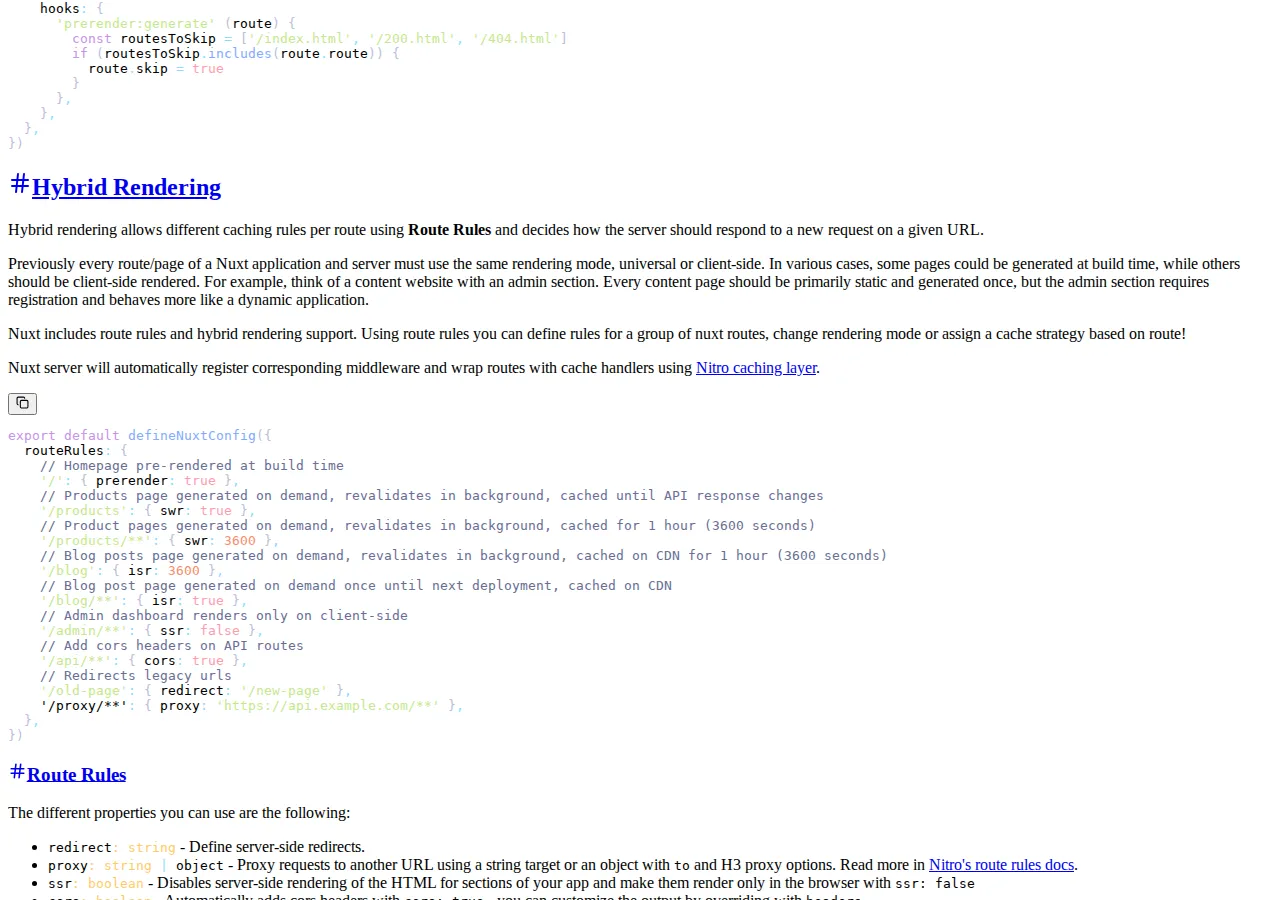
| Nuxt | Pre-rendered HTML via nuxt generate or nuxt build --prerender | Vue runtime hydrates the app on every page, including pre-rendered ones | routeRules: prerender: true, swr: true, swr: 3600 per route | Nuxt docs, Rendering |
The Next.js vs Remix framework benchmark compares the two React routers on rendering and routing; this guide is the SSG decision, not the router decision. The headless WordPress vs Next.js decoupling guide covers the CMS half of the same build — where the content lives — while this guide covers the framework half: what the browser receives.
The JavaScript-per-page math
The most honest way to compare the three is to count the pages that ship JavaScript at all. Take a documentation site with 200 pages, of which 12 contain one interactive widget each — a search box, a code playground, a feedback form. The widget count is the only input that matters, and the model is arithmetic, not opinion.
Astro's own docs state the mechanism plainly: with islands, client-side JavaScript is only loaded for the explicit interactive components you mark using client:* directives, and interaction is configured at the component level, so client:idle loads a component when the browser becomes idle and client:visible loads it only once it enters the viewport. The other 188 pages are static HTML with no JavaScript payload at all. Next.js and Nuxt take the opposite default: the framework runtime ships on every page because the page is a hydrated application, not a document with islands. A page with no interactive components still carries the runtime, the router, and the hydration code. That is a defensible trade when the site is an application — routing, transitions, and shared state need the runtime — and it is pure overhead when the site is documentation.
The second-order effect is on the metrics that decide search ranking and conversion. JavaScript is one of the slowest assets a browser parses, and Astro's docs name that directly as the benefit of islands: the majority of the site is converted to fast, static HTML. Every island you add back costs parse time on the pages that carry it, so the discipline is to count islands the way you count dependencies. A docs site that drifts from 12 islands to 120 has quietly become an application, and at that point the framework choice should be revisited rather than defended.

Build time: the linear-scaling problem
Static generation scales linearly with page count, and the build is where a wrong framework choice first hurts. The model is simple enough to run on a napkin, with one assumption you must substitute with your own measured per-page cost:
At an assumed 0.25 seconds of render cost per page — substitute your measured figure — a 200-page site renders in about 50 seconds plus data fetching, and a 10,000-page site renders in about 42 minutes if the work runs serially. The frameworks attack different terms of that equation. Astro parallelises page rendering through Vite and lets content collections fetch once for many pages. Next.js prerenders routes and caches the results, so a rebuild after a content edit re-renders only what changed when caching is configured — its docs recommend pairing every cache directive with a cacheLife profile. Nuxt's routeRules let each route pick its own strategy: { prerender: true } for the homepage, { swr: true } for a products page that revalidates in the background, { swr: 3600 } for product pages cached for one hour.
The practical test is not the framework's marketing page but a build of your own content at your own page count, timed twice: once cold, once after a single-page edit. If the second build re-renders everything, the framework's cache configuration is wrong, not the framework.
Hosting cost: the static site is nearly free
Static HTML is the cheapest thing on the internet to serve, and the pricing pages confirm it. Cloudflare Pages states on its plans page that all plans come with unlimited sites, seats, requests, and bandwidth. Vercel's Hobby tier is $0, and its Pro tier is $20 per month with $20 of included usage credit. The frontend hosting pricing guide prices the three hosts per gigabyte; the CDN pricing guide prices delivery per gigabyte for the heavy case.
| Monthly volume | Cloudflare Pages | Vercel Hobby | Vercel Pro |
|---|---|---|---|
| Platform cost | $0 | $0 | $20, with $20 usage credit |
| Bandwidth | Unlimited on all plans | Included allowance, then usage billing | Included credit, then usage billing |
| What the paid tier buys | Builds, team seats, advanced controls | Build concurrency, team seats, spend controls | Same, plus the usage credit |
The bandwidth arithmetic shows why the free tier holds. Assume 50 KB of HTML per page and 100,000 page visits a month:
Five gigabytes a month is a rounding error on any of these plans, and the build minutes are the real constraint: a 10,000-page site rebuilt on every commit will burn through a free build allowance long before bandwidth matters. Price the build with the website cost calculator at your own page count and commit frequency — the framework decision is a build decision as much as a runtime one.
client:load component on Astro, every client component in Next.js, and every hydrated widget in Nuxt reintroduces the JavaScript the framework was chosen to remove. Audit the island count quarterly: if more than a quarter of your pages carry interactive components, you are running an application on a static-site framework, and the honest move is to admit it and pick the framework whose runtime you actually want.Who should not use each
- Do not use Astro for an application with shared client state across most pages — a dashboard, a checkout flow, a real-time editor. Islands are per-component by design, and wiring cross-island state through events or a store is fighting the architecture.
- Do not use Next.js for a pure documentation site with no dynamic content. The React runtime, the router, and the hydration code ship on every page, and the build system is heavier than the site needs. The static shell is fast, but the shell is not the whole page.
- Do not use Nuxt if the team does not write Vue. The framework's value is the Vue ecosystem — single-file components, the Nuxt module system, Nitro — and a React team adopting Nuxt for its SSG output pays the learning cost on every page.
The decision matrix is the selection test. Score your site honestly; the framework with the highest total is the answer, and a tie means the decision does not matter enough to argue about.
| Requirement | Astro | Next.js | Nuxt | Authority |
|---|---|---|---|---|
| Mostly static content | Best — zero JS by default | Good — static shell via PPR | Good — pre-rendered HTML | Framework docs |
| Interactive app feel | Weak — islands are isolated | Best — full React app | Best — full Vue app | Framework docs |
| Per-route caching control | On-demand rendering per route | Cache Components + cacheLife | routeRules per route | Framework docs |
| Team already knows | Any UI framework per island | React | Vue | Team skill |
| Hosting cost at 100k visits | $0 | $0 | $0 | Vendor pricing pages |
Founder & CEO Insight — Enow A. Jovial
Execution checklist
- [x] Step 1: Count the interactive components. List every widget, form, search box, and playground on the site. If the count is under 20 and they sit on few pages, Astro is the default. If most pages are interactive, skip to Step 4.
- [x] Step 2: Time a build at your page count. Build the real content twice — once cold, once after a one-page edit — and record both times. A framework that re-renders everything on a one-page edit has a cache configuration problem.
- [x] Step 3: Measure the JavaScript per page. Count the pages that ship JavaScript and the pages that do not. The ratio is the performance story; a framework that ships JS on 100% of pages must justify it with application behaviour.
- [x] Step 4: Match the framework to the team's language. React team: Next.js or Remix. Vue team: Nuxt. Mixed or framework-agnostic content team: Astro, which lets each island use its own UI framework.
- [x] Step 5: Price the hosting at your volume. Run the page count, page weight, and monthly visits through the website cost calculator. If the monthly transfer is under 10 GB, the free tier holds and the decision is not about money.
- [x] Step 6: Set the island budget in writing. Write down the maximum number of interactive components per page and the maximum share of pages that may carry JavaScript. Review it quarterly; the budget is the only thing that stops a static site from drifting into an application.
client:visible directive as the default for every island, not client:load. A widget below the fold does not need its JavaScript until the reader scrolls to it, and client:visible is free performance — the same component, the same behaviour, loaded only when it enters the viewport. Reserve client:load for the one component above the fold that the reader interacts with first.