Tailwind vs Bootstrap vs Bulma: The CSS Framework Playbook for 2026
Founder & CEO Insight — Enow A. Jovial
Three CSS frameworks dominate front-end work in 2026, and all three are free. Tailwind CSS is utility-first: small classes in the HTML, and a build that generates only the styles the page uses. Bootstrap is component-first: a class like card or btn buys a whole component, plus a JavaScript bundle for interactive parts. Bulma is class-first and CSS-only: a single file built on Flexbox, with no JavaScript at all. The choice is not about price. It is about bytes, build steps, and who owns the design system.
This playbook does not repeat the vendors' marketing. It builds the same demo page three ways with the current releases — Tailwind CSS 4.3.5, Bootstrap 5.3.8, Bulma 1.0.4, installed from npm on November 10, 2026 — and measures what each one actually ships.
The decision in one table
| Your position | The move | What you pay | Authority |
|---|---|---|---|
| Performance is the priority | Tailwind, built per docs | 2,869 gzip bytes of CSS for the demo page | Tailwind CSS docs; editorial build, Nov 10, 2026 |
| No build step, ship today | Bootstrap or Bulma from a CDN link | 30,786 gzip bytes CSS (+23,707 JS) or 65,219 gzip bytes CSS | Bootstrap docs v5.3; Bulma install docs |
| Interactive components out of the box | Bootstrap | A JS bundle plus Popper for dropdowns, modals, tooltips | Bootstrap docs v5.3, JS components list |
| A design system you fully own | Tailwind | A build step and a utility vocabulary the team must learn | Tailwind CSS docs |
| CSS variables and dark mode with no build | Bulma | 65,219 gzip bytes of CSS, the largest drop-in file | Bulma docs; editorial build, Nov 10, 2026 |
| An existing Bootstrap codebase | Stay on Bootstrap | Migration cost dominates any byte saving | See the migration model below |
The three architectures
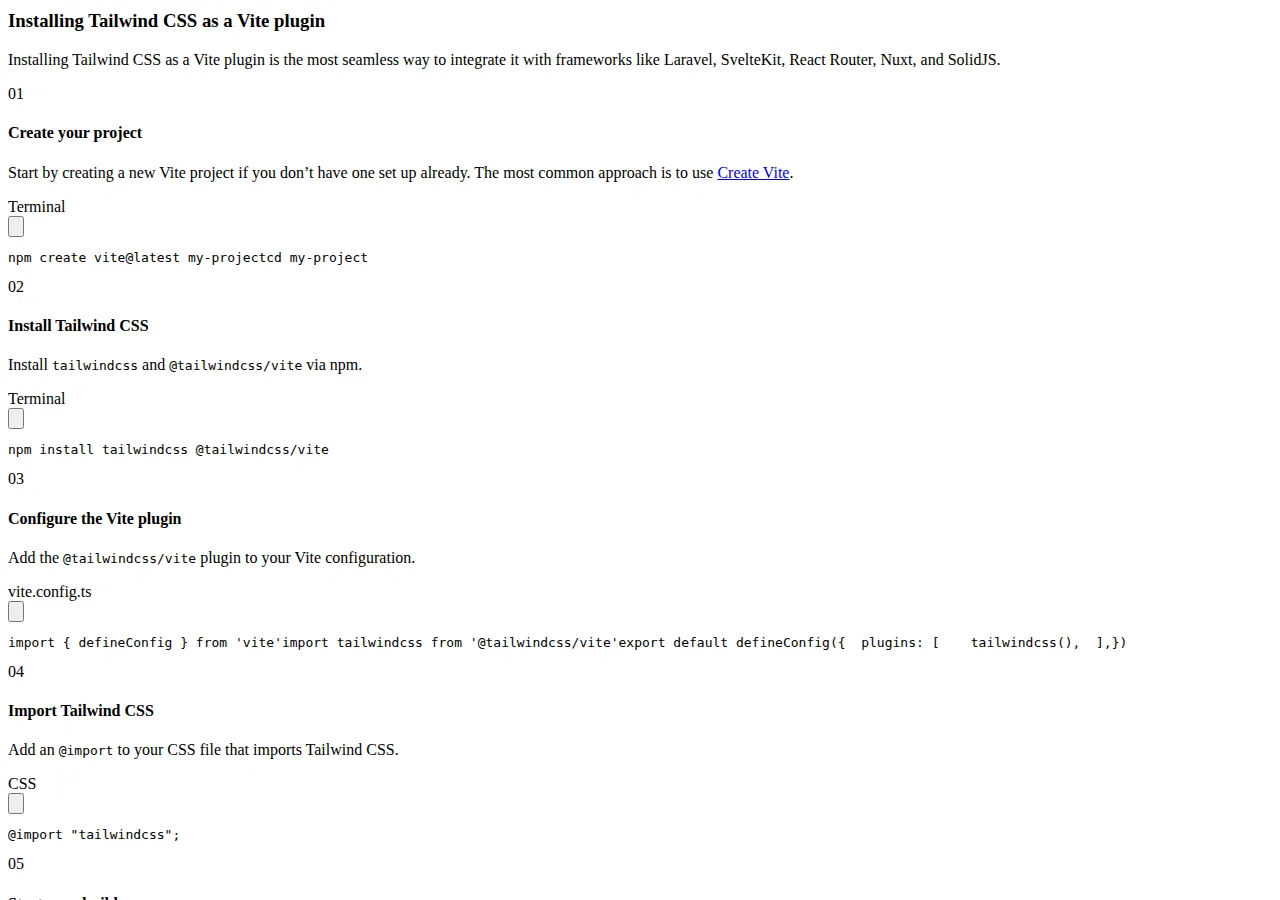
Tailwind CSS works by scanning all of the HTML files, JavaScript components and other templates for class names, generating the corresponding styles, and writing them to a static CSS file. Its own docs describe the result as fast, flexible and reliable, with zero runtime. The install route the docs lead with is a Vite plugin: npm install tailwindcss @tailwindcss/vite, a plugin entry in the Vite configuration, and @import "tailwindcss" in the CSS file. PostCSS, a standalone CLI and framework guides are the other routes. There is no Tailwind runtime in the browser — the work happens at build time.
Bootstrap is the opposite shape. Its docs open with a quick start that needs no build steps at all: two tags, one for the CSS and one for the JavaScript bundle, and the page works. The current release is 5.3.8, served from a CDN with an integrity hash on each file. Bootstrap is developed mobile-first, and its global styles normalize cross-browser rendering through Reboot. Customization comes from Sass: the docs point to building with the source files via a package manager for teams that want only part of the framework.
Bulma is the simplest shape of the three. Its docs open with the line that it is free, open source, and a modern CSS framework based on Flexbox, and that a developer needs only one CSS file to use it. The install page offers a CDN link to bulma.min.css, a downloadable release, or the Sass library for a custom build. Bulma v1 adds CSS variables, themes, an automatic dark mode, and color palettes generated from a single input color. It ships no JavaScript bundle: interactive behavior is the developer's code.
The honest price: $0, and then the real bill
All three frameworks are free and open-source software under the MIT license. There is no license fee, no per-seat charge, and no paid tier that unlocks the framework itself. Any article that prices this decision in license fees is pricing the wrong thing.
The real bill has three lines. First, shipped bytes: the CSS — and, for Bootstrap, the JavaScript — that every first-time visitor downloads. Second, the build step: Tailwind requires one, Bootstrap and Bulma do not. Third, the hours: the time a team spends learning the system's vocabulary, maintaining its configuration, and fighting it when a design falls outside its components. This playbook measures the first line exactly and models the third honestly.
Example 1: the measured bundle
Example 1 is the measurement this playbook stands on. The same demo page — a navigation bar, a hero, three pricing cards, a signup form and a footer — was built three ways on November 10, 2026. For Tailwind, the page was written with utility classes and built with the Tailwind v4.3.5 CLI in minified mode. For Bootstrap and Bulma, the measurement is the full minified file as served from the CDN, which is what a drop-in install ships.
| Framework and file | Raw bytes | Gzip bytes | How it was measured |
|---|---|---|---|
| Tailwind v4.3.5, scanned build of the demo page | 10,548 | 2,869 | Tailwind CLI, minified, Nov 10, 2026 |
| Bootstrap v5.3.8, bootstrap.min.css (full) | 232,111 | 30,786 | npm package file, Nov 10, 2026 |
| Bootstrap v5.3.8, bootstrap.bundle.min.js (full) | 80,496 | 23,707 | npm package file, Nov 10, 2026 |
| Bulma v1.0.4, bulma.min.css (full) | 677,931 | 65,219 | npm package file, Nov 10, 2026 |
The comparison is deliberately asymmetric, and the asymmetry is the point. Tailwind ships only what the page uses; Bootstrap and Bulma ship the whole framework unless the team cuts it down with a Sass build. The ratios, on gzip bytes:
On raw bytes the gap is wider: Bulma's minified file is 64.27 times the Tailwind build, and Bootstrap's minified CSS is 22.01 times it. A first-time visitor on a slow connection feels the gzip number, not the raw number — but both point the same way.
Example 2: the bandwidth bill
Example 2 turns the byte gap into a monthly bill. Take a site with 100,000 page views a month, counting only first-visit downloads at gzip size, before any browser caching. The monthly CSS transfer for each framework:
Two honest caveats belong on this table. First, browser caching means repeat visitors download nothing — the bill above is the first-visit cost, which is the cost that matters for new traffic from search and social. Second, a Sass build of Bootstrap or Bulma ships less than the full file, so a team willing to maintain an import list can close much of the gap. The numbers above are the drop-in defaults, which is what most teams actually ship.
What the bundle number does not decide
The byte gap is real, and it is not the whole decision. Four things the bundle number cannot tell a team:
Speed of writing. Bootstrap and Bulma give a developer a card, a navbar and a modal in one class. Tailwind gives the developer the pieces and asks for the assembly. A team shipping a dashboard in a week will move faster with components; a team building a brand with a custom look will move faster with utilities once the vocabulary is learned.
JavaScript. Bootstrap's components need its JavaScript, and dropdowns, popovers and tooltips also need Popper. That is 23,707 gzip bytes on top of the CSS, plus a second dependency to keep updated. Tailwind and Bulma ship no JavaScript, so a modal or dropdown is the developer's own code — smaller to ship, larger to write and test.
Theming. Bulma's v1 theming is the strongest out of the box: CSS variables, a single input color that generates a palette, and an automatic dark mode. Bootstrap's theming runs through Sass variables and CSS custom properties. Tailwind's theming runs through its @theme configuration. A team that needs dark mode on day one has the least work with Bulma.
Design ownership. Tailwind's utility vocabulary makes a custom design cheap to express and hard to drift from, because there is no component to fight. Bootstrap and Bulma make a standard design cheap to express and a custom one expensive, because every deviation is an override. The framework that wins is the one whose default output is closest to the design the team actually wants.
Our Vercel vs Netlify vs Cloudflare Pages playbook covers where the built CSS is served from, and our Docker vs Kubernetes vs Amazon ECS playbook covers the other half of the shipping decision. Our Cloudflare Workers vs Vercel Edge Functions guide covers the runtime that serves the page.
Example 3: the migration model
Example 3 is a labelled model, not a measurement: the cost of moving an existing site between frameworks. Take a 40-page marketing site, and assume the migration takes 120 developer hours — rewriting class names, rebuilding components, and re-testing every page. The arithmetic is simple:
The assumptions are the whole argument: 120 hours is a planning figure for a 40-page site, not a measured fact, and a site with a design system or heavy custom components will take longer. The point of the model is the comparison. At $9,000 to $18,000, a migration pays for itself only if the byte saving is worth more than the hours — and for most small sites, it is not. A team already on Bootstrap should stay on Bootstrap and cut the bundle with a Sass build, rather than pay a migration to chase Tailwind's 2,869 bytes. A team starting fresh has no migration cost, and should choose on the merits.
Decision matrix by team
| Team profile | The pick | Why |
|---|---|---|
| Solo developer, new site, performance matters | Tailwind | Smallest shipped CSS, no runtime, full design control |
| Agency shipping client sites weekly | Bootstrap | Components out of the box, every developer already knows it |
| No build step, static site, ship today | Bulma or Bootstrap | One CDN link, no build, no toolchain to maintain |
| Design system with dark mode on day one | Bulma | CSS variables, palettes from one color, automatic dark mode |
| Existing Bootstrap codebase | Bootstrap | Migration cost beats any byte saving; cut with Sass instead |
| Custom brand, long-lived product | Tailwind | Utility vocabulary keeps the design owned, not overridden |
Execution checklist
- [x] Step 1: Measure before choosing: build the same page with each candidate and record the shipped bytes, as this playbook did on November 10, 2026.
- [x] Step 2: Count the JavaScript: Bootstrap's bundle adds 23,707 gzip bytes and a Popper dependency — include it in the total.
- [x] Step 3: Check the build step: Tailwind needs one; Bootstrap and Bulma do not. A team without a toolchain should not pick Tailwind.
- [x] Step 4: Price the migration: a labelled model at 120 hours and the team's real hourly rate, against the byte saving.
- [x] Step 5: Test the theming: build one dark-mode page and one custom component in each candidate before committing.
- [x] Step 6: Plan the reduction path: if the pick is Bootstrap or Bulma, set up the Sass build that ships only the components in use.
- [x] Step 7: Check the hosting cost: run the bandwidth math for the site's real traffic with our website cost calculator before treating bytes as free.